Scraper API
Rakuten
rakuten.travel_searchAvailable
Rakuten Travel search
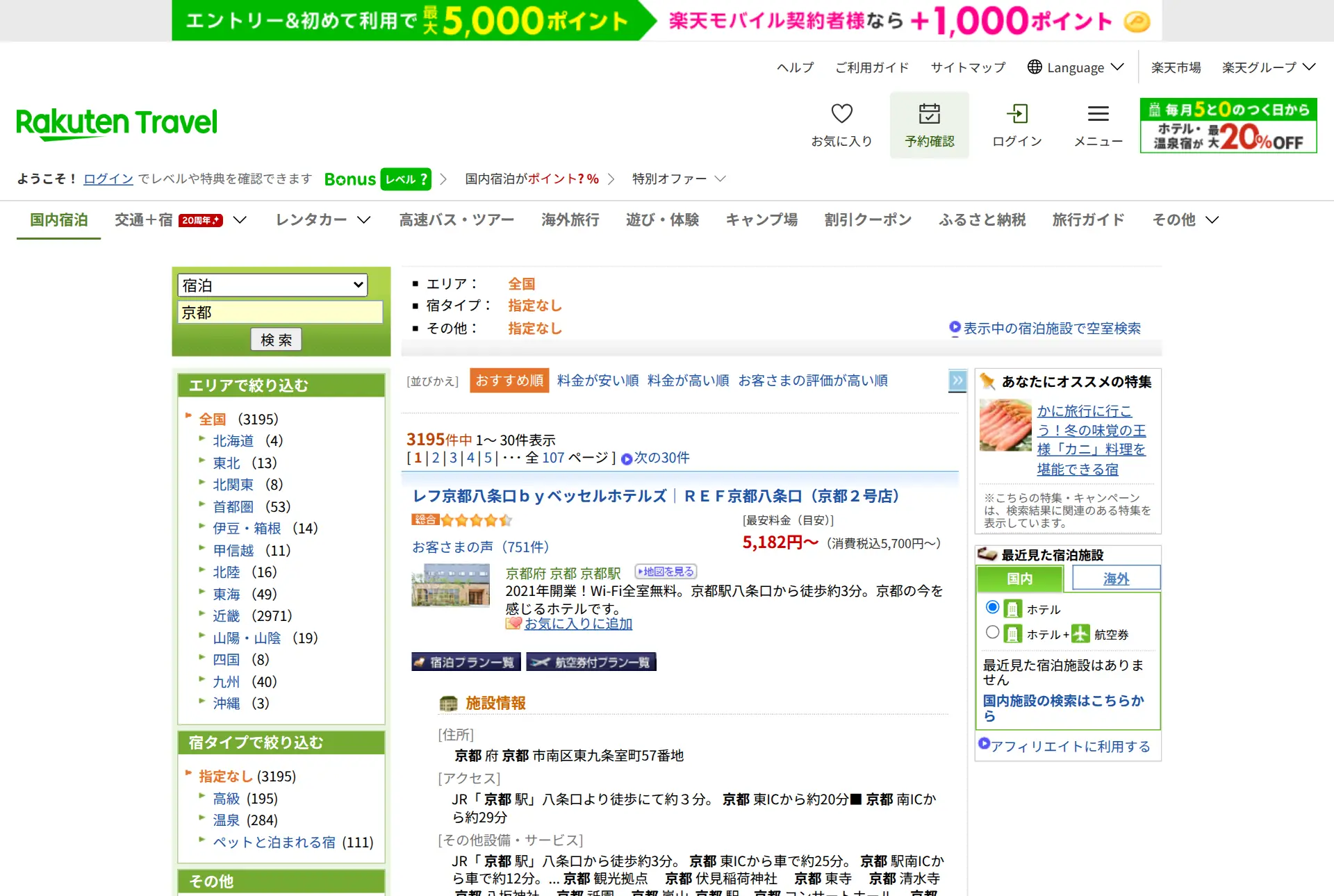
A page of places to stay in Japan on Rakuten Travel: name, stars, review count, the lowest price a night in yen with and without tax, area, the place's own line and the details the words were found in.
Give it keywords, and optionally an order and a page.
1 unit a run, for runs that return data. Runs that fail cost nothing. How units work
- Counted
- 1 unit a run
- Inputs
- 3, 1 required
- Record
- 16 fields
- A run takes
- up to 5 minutes
- Records kept
- 7 days
- Measured
- its success, on the status page
POST/v1/scrapers/rakuten.travel_search/runs
sent, and answered
a record of the run16 fields
ok1 unit a run
A record this scraper returned for this input. The first 9 of its 16 fields are set down here; the whole record is below.
What it is used for
- Watch hotel prices in Japan
- Search a town or a station on a schedule and follow the lowest price a night of the places you compete with.
- Build a list of places to stay
- Collect the hotels, ryokan and guest houses of an area with their review counts and stars.
- Find the cheapest or the best rated
- Ask for a town's places cheapest first or best rated first and keep the top of the list.
What you send
Keywords, and optionally an order and a page. These are its 3 inputs, as its schema has them.
keywordsstring Required- What to search for, in Japanese or in Latin letters: a town, an area, a station, a hotel's name or chain.
sortstring Optional- The order: recommended (the site's own), price_low, price_high or best_rated.Default
recommended pageinteger Optional- The results page, from 1 to 100; 30 places a page.Default
1
A request, ready to send
It starts a run with the input shown at the top of this page, waits up to 60 seconds for it, and reads its records. Put your key in the variable it reads.
# Start a run and wait up to 60 seconds for it to finish
curl -X POST "https://api.enrichednow.com/v1/scrapers/rakuten.travel_search/runs?wait=60" \
  -H "Authorization: Bearer $ENRICHEDNOW_API_KEY" \
  -H "Content-Type: application/json" \
  -d '{"input":{"keywords":"京都"}}'

# Read its records, with the id the first call answered
curl "https://api.enrichednow.com/v1/runs/$RUN_ID/records?limit=100" \
  -H "Authorization: Bearer $ENRICHEDNOW_API_KEY"
from enrichednow import EnrichedNow
client = EnrichedNow() # reads ENRICHEDNOW_API_KEY
# Start a run, wait for it to end, and get its records
result = client.scrape("rakuten.travel_search", {"keywords": "京都"})
print(result.run.id, result.run.status, result.run.record_count)
# Read its records: pages are fetched as you go
for record in result.records:
print(record)Install it with pip install enrichednow, then save as run.py and run python3 run.py
import EnrichedNow from "enrichednow";

const client = new EnrichedNow(); // reads ENRICHEDNOW_API_KEY

// Start a run, wait for it to end, and get its records
const { run, records } = await client.scrape("rakuten.travel_search", { keywords: "京都" });
console.log(run.id, run.status, run.record_count);

// Read its records: pages are fetched as you go
for await (const record of records) console.log(record);
Install it with npm install enrichednow, then save as run.mjs and run node run.mjs
package main

import (
	"context"
	"fmt"
	"log"
	"time"

	enrichednow "github.com/enrichednow/enrichednow-go"
)

func main() {
	client, err := enrichednow.NewClient() // reads ENRICHEDNOW_API_KEY
	if err != nil {
		log.Fatal(err)
	}
	ctx, cancel := context.WithTimeout(context.Background(), 10*time.Minute)
	defer cancel()

	// Start a run, wait for it to end, and get its records
	run, records, err := client.Scrape(ctx, "rakuten.travel_search", map[string]any{"keywords": "京都"})
	if err != nil {
		log.Fatal(err)
	}
	fmt.Println(run.ID, run.Status, run.RecordCount)

	// Read its records: pages are fetched as you go
	for records.Next() {
		fmt.Println(string(records.Current()))
	}
	if err := records.Err(); err != nil {
		log.Fatal(err)
	}
}
Install it with go get github.com/enrichednow/enrichednow-go@latest, then save as run.go and run go run run.go
import com.enrichednow.EnrichedNowClient;
import com.enrichednow.ScrapeResult;
import java.util.Map;

public class Run {
    public static void main(String[] args) {
        EnrichedNowClient client = EnrichedNowClient.fromEnv(); // reads ENRICHEDNOW_API_KEY

        // Start a run, wait for it to end, and get its records
        ScrapeResult result = client.scrape("rakuten.travel_search", Map.of("keywords", "\u4eac\u90fd"));
        System.out.println(result.run().id() + " " + result.run().status() + " " + result.run().recordCount());

        // Read its records: pages are fetched as you go
        for (Map<String, Object> record : result.records()) {
            System.out.println(record);
        }
    }
}
Add com.enrichednow:enrichednow-java:0.4.0 to your Maven or Gradle build, then save as Run.java
enrichednow run rakuten.travel_search --input 'keywords=京都'Install it with curl -fsSL https://raw.githubusercontent.com/enrichednow/enrichednow-cli/main/install.sh | sh
What comes back
A page of places to stay in Japan on Rakuten Travel: name, stars, review count, the lowest price a night in yen with and without tax, area, the place's own line and the details the words were found in. A record has 16 fields. One we could not read is null, never an empty string or a zero.
{
  "position": 1,
  "hotel_id": "179147",
  "url": "https://travel.rakuten.co.jp/HOTEL/179147/179147.html",
  "name": "レフ京都八条口byベッセルホテルズ|REF京都八条口(京都2号店)",
  "stars": 4.5,
  "review_count": 751,
  "lowest_price": 5700,
  "lowest_price_before_tax": 5182,
  "currency": "JPY",
  "area": "京都府 京都 京都駅",
  "summary": "2021年開業!Wi-Fi全室無料。京都駅八条口から徒歩約3分。京都の今を感じるホテルです。",
  "matches": {
    "住所": "京都府京都市南区東九条室町57番地",
    "アクセス": "JR「京都駅」八条口より徒歩にて約3分。京都東ICから約20分■京都南ICから約29分"
  },
  "plans_matched": 14,
  "image": "https://img.travel.rakuten.co.jp/image/imgr_90?no=179147",
  "total_results": 3195,
  "fetched_at": "2026-11-19T22:28:10.851364Z"
}
The scraper returned this record for the input above, reading a saved copy of the page, not the live site.
The fields of a record
positioninteger- The place's place in the results, from 1 across pages (30 a page).
hotel_idstring- Rakuten Travel's number of the place.
rakuten.travel_hoteltakes it. urlstring- The place's page on travel.rakuten.co.jp.
namestring- The place's name as the site writes it (often in full-width letters).
starsnumber or null- The average of its guests' ratings as the page draws it, in whole and half stars out of 5; null for a place without reviews.
rakuten.travel_hotelgives the exact average. review_countinteger or null- How many reviews (お客さまの声) the place has.
lowest_priceinteger or null- The lowest price the site estimates for a room a night, in yen, tax included (最安料金(目安)).
lowest_price_before_taxinteger or null- The same price before consumption tax, as the page writes it first.
currencystring- Always
JPY. areastring or null- The prefecture and areas the site files the place under, e.g.
京都府 京都 京都駅. summarystring or null- The place's own line about itself (特徴).
matchesobject- The details the words were found in, as label and text in Japanese: 住所 (address), アクセス (access), 館内設備 (facilities), その他設備・サービス, 風呂情報 (baths).
plans_matchedinteger or null- How many of the place's plans (rooms and offers) the words were found in.
imagestring or null- The place's picture.
total_resultsinteger or null- How many places the site says match the search, the same on every record.
fetched_atdatetime- When the site answered, in UTC.
Units and limits
- Counted per request
- Billed per request: a run that returns data costs 1 unit, however many records it returns.
- A miss costs nothing
- A run that fails, that meets something not supported yet, or that you cancel costs nothing. You pay for runs that return data.
- What bounds a run
- A run may take up to 5 minutes. Its records are read in pages of up to 1,000 and are kept for 7 days.
What it does not do
- One run reads one page: 30 places.
- The lowest price is the site's own estimate for a room a night, without dates; it is not the price of a given stay.
- Names, areas and the details found are in Japanese, as the site writes them.
The bounds its schema sets
sort- recommended, price_low, price_high, best_rated; recommended unless you say otherwise
page- 1 to 100; 1 unless you say otherwise
Questions
What does Rakuten Travel search return?
A page of places to stay in Japan on Rakuten Travel: name, stars, review count, the lowest price a night in yen with and without tax, area, the place's own line and the details the words were found in. A record has 16 fields, among them position, hotel_id, url, name, stars and review_count. A value that could not be read is null, never an empty string or a zero.
What do I send?
Keywords, and optionally an order and a page. The input keywords is required. Optional: sort and page.
How is it counted?
Billed per request: a run that returns data costs 1 unit, however many records it returns. A run that fails, that meets something not supported yet, or that you cancel costs nothing. The first 1,000 units each month are free.
How much does one run return?
Its schema sets these bounds: sort recommended, price_low, price_high, best_rated (recommended unless you say otherwise); page 1 to 100 (1 unless you say otherwise). A run may take up to 5 minutes.
What does it not do?
One run reads one page: 30 places. The lowest price is the site's own estimate for a room a night, without dates; it is not the price of a given stay. Names, areas and the details found are in Japanese, as the site writes them.
How long are the records kept, and in what format do they come?
Records are kept for 7 days after the run ended, and read in pages of up to 1,000. They come as JSON, as NDJSON with one record a line, or as CSV with a column for each field.
Can an AI assistant call it?
Yes. Through the EnrichedNow MCP server an assistant calls the tool run_scraper with the scraper_id rakuten.travel_search and the same input. It costs what the same API call costs.
Rakuten
Rakuten Ichiba, Japan's largest online marketplace, Rakuten Books and Rakuten Travel: search results, an item's page and a hotel's details, with prices in yen, shops, points and reviews.
Rakuten search
rakuten.searchWhat to search for, in Japanese or Latin letters, and optionally a page and an order. A page of Rakuten Ichiba's results: each item's id, name, price in yen, shipping, points, rating, review count, shop and picture.
Rakuten item
rakuten.itemAn item's id as shop:item, or its address on item.rakuten.co.jp. The item: name, price and the range of its variants' prices, availability, rating, review count, shop, categories, description and pictures.
Rakuten Books search
rakuten.books_searchKeywords, and optionally an order and a page. A page of Rakuten Books' results: books, CDs, DVDs, games, downloads and Kobo e-books, with title, creators, codes, release, publisher, price in yen, stock and rating.
Rakuten Books item
rakuten.bookAn item's address on books.rakuten.co.jp, or its id. The item: title, creators, price in yen, rating and review count, release, publisher, ISBN or JAN, stock, description and every fact its page lists.
Rakuten Travel hotel
rakuten.travel_hotelA place's number on Rakuten Travel, or the address of its page. The place: name, rating and review count, postal code and address, areas, check-in and check-out, telephone, access, parking, rooms, facilities, room amenities, cards taken, cancellation policy and every line of its basic information.
- Industry
- Shopping and retail
- Where
- Japan
- For
- E-commerce
Run it on an input of your own.
Create an account, make a key, and send the request above with your own input. The first 1,000 units each month are free.