Scraper API
Rakuten
rakuten.bookAvailable
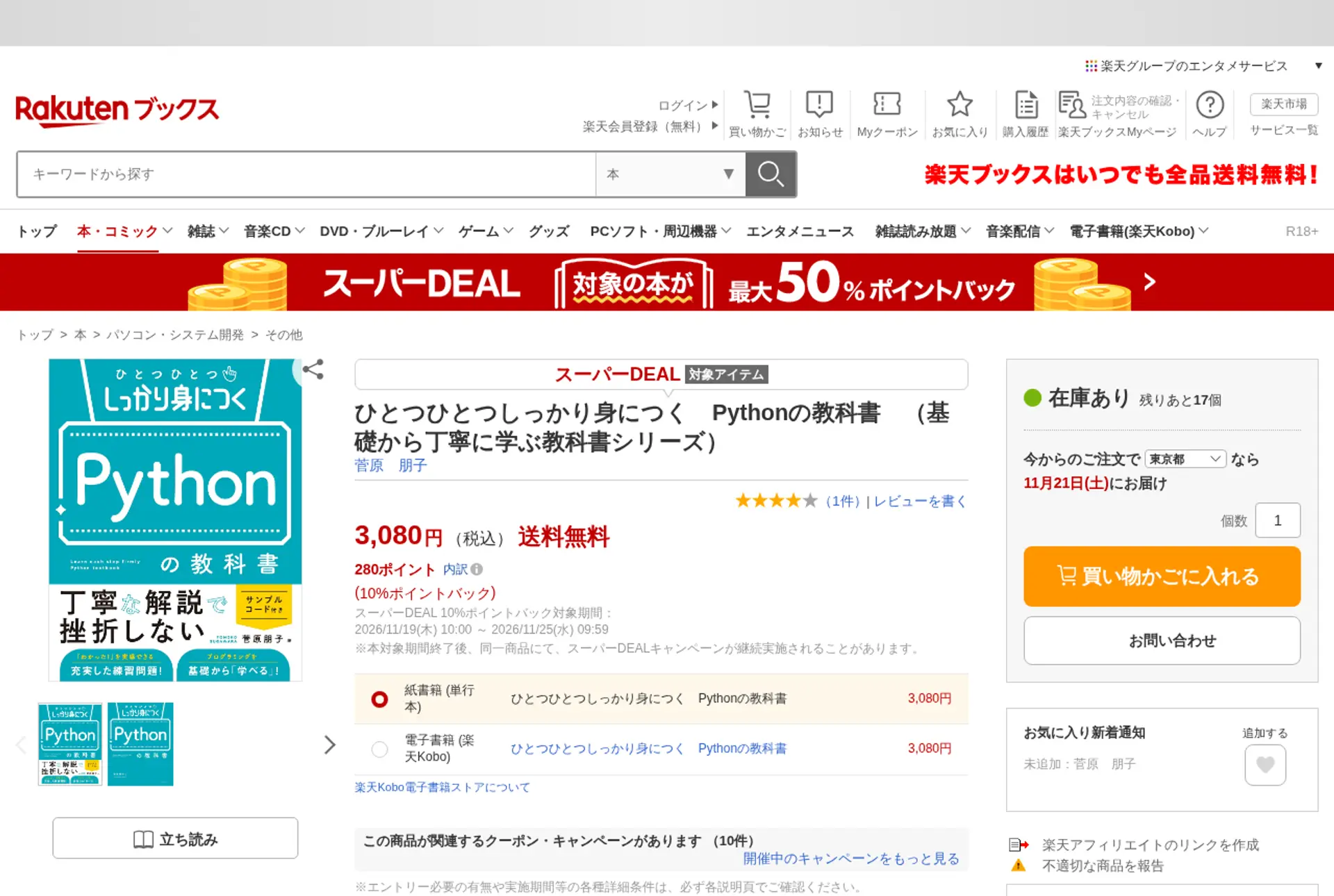
Rakuten Books item
The item: title, creators, price in yen, rating and review count, release, publisher, ISBN or JAN, stock, description and every fact its page lists.
Give it an item's address on books.rakuten.co.jp, or its id.
1 unit a run, for runs that return data. Runs that fail cost nothing. How units work
- Counted
- 1 unit a run
- Inputs
- 1, 1 required
- Record
- 18 fields
- A run takes
- up to 5 minutes
- Records kept
- 7 days
- Measured
- its success, on the status page
POST/v1/scrapers/rakuten.book/runs
sent, and answered
a record of the run18 fields
ok1 unit a run
A record this scraper returned for this input. The first 9 of its 18 fields are set down here; the whole record is below.
What it is used for
- Complete a catalogue
- Read the ISBN or JAN, publisher, release day, format and page count of the items you list.
- Follow a title's reception
- Read the average rating and the number of reviews of a book, a disc or a game over time.
- Give descriptions to a model
- Hand the
descriptionof each item to a language model to sort titles by subject or to write summaries.
What you send
An item's address on books.rakuten.co.jp, or its id. It is the one input.
itemstring Required- The item's address (…/rb/18513563/, …/rd/… for a download, …/rk/… for a Kobo e-book), or its id as the search returns it.
A request, ready to send
It starts a run with the input shown at the top of this page, waits up to 60 seconds for it, and reads its records. Put your key in the variable it reads.
# Start a run and wait up to 60 seconds for it to finish
curl -X POST "https://api.enrichednow.com/v1/scrapers/rakuten.book/runs?wait=60" \
  -H "Authorization: Bearer $ENRICHEDNOW_API_KEY" \
  -H "Content-Type: application/json" \
  -d '{"input":{"item":"rb:18513563"}}'

# Read its records, with the id the first call answered
curl "https://api.enrichednow.com/v1/runs/$RUN_ID/records?limit=100" \
  -H "Authorization: Bearer $ENRICHEDNOW_API_KEY"
from enrichednow import EnrichedNow
client = EnrichedNow() # reads ENRICHEDNOW_API_KEY
# Start a run, wait for it to end, and get its records
result = client.scrape("rakuten.book", {"item": "rb:18513563"})
print(result.run.id, result.run.status, result.run.record_count)
# Read its records: pages are fetched as you go
for record in result.records:
print(record)Install it with pip install enrichednow, then save as run.py and run python3 run.py
import EnrichedNow from "enrichednow";

const client = new EnrichedNow(); // reads ENRICHEDNOW_API_KEY

// Start a run, wait for it to end, and get its records
const { run, records } = await client.scrape("rakuten.book", { item: "rb:18513563" });
console.log(run.id, run.status, run.record_count);

// Read its records: pages are fetched as you go
for await (const record of records) console.log(record);
Install it with npm install enrichednow, then save as run.mjs and run node run.mjs
package main

import (
	"context"
	"fmt"
	"log"
	"time"

	enrichednow "github.com/enrichednow/enrichednow-go"
)

func main() {
	client, err := enrichednow.NewClient() // reads ENRICHEDNOW_API_KEY
	if err != nil {
		log.Fatal(err)
	}
	ctx, cancel := context.WithTimeout(context.Background(), 10*time.Minute)
	defer cancel()

	// Start a run, wait for it to end, and get its records
	run, records, err := client.Scrape(ctx, "rakuten.book", map[string]any{"item": "rb:18513563"})
	if err != nil {
		log.Fatal(err)
	}
	fmt.Println(run.ID, run.Status, run.RecordCount)

	// Read its records: pages are fetched as you go
	for records.Next() {
		fmt.Println(string(records.Current()))
	}
	if err := records.Err(); err != nil {
		log.Fatal(err)
	}
}
Install it with go get github.com/enrichednow/enrichednow-go@latest, then save as run.go and run go run run.go
import com.enrichednow.EnrichedNowClient;
import com.enrichednow.ScrapeResult;
import java.util.Map;

public class Run {
    public static void main(String[] args) {
        EnrichedNowClient client = EnrichedNowClient.fromEnv(); // reads ENRICHEDNOW_API_KEY

        // Start a run, wait for it to end, and get its records
        ScrapeResult result = client.scrape("rakuten.book", Map.of("item", "rb:18513563"));
        System.out.println(result.run().id() + " " + result.run().status() + " " + result.run().recordCount());

        // Read its records: pages are fetched as you go
        for (Map<String, Object> record : result.records()) {
            System.out.println(record);
        }
    }
}
Add com.enrichednow:enrichednow-java:0.4.0 to your Maven or Gradle build, then save as Run.java
enrichednow run rakuten.book --input item=rb:18513563Install it with curl -fsSL https://raw.githubusercontent.com/enrichednow/enrichednow-cli/main/install.sh | sh
What comes back
The item: title, creators, price in yen, rating and review count, release, publisher, ISBN or JAN, stock, description and every fact its page lists. A record has 18 fields. One we could not read is null, never an empty string or a zero.
{
  "item_id": "rb:18513563",
  "url": "https://books.rakuten.co.jp/rb/18513563/",
  "title": "ひとつひとつしっかり身につく Pythonの教科書 (基礎から丁寧に学ぶ教科書シリーズ)",
  "creators": [
    "菅原 朋子 (著)"
  ],
  "price": 3080,
  "currency": "JPY",
  "rating": 4,
  "review_count": 1,
  "release": "2026年04月01日頃",
  "release_date": "2026-04-01",
  "publisher": "SBクリエイティブ",
  "isbn": "9784815630614",
  "jan": null,
  "availability": "在庫あり",
  "description": "内容紹介(出版社より)\n\nPythonの基礎から“とことん丁寧に”解説\n初心者の方には、パソコンの基本操作や開発環境の整え方から、変数や関数、リスト、クラスといったPythonの基礎構文を一つひとつ、わかりやすい言葉でご説明します。また、プログラムの流れやエラーの原因と対処法(例外処理)、データの可視化など、実践的な知識も豊富にご用意。コード例や図解を交え、難しい理論もイメージしやすく解説いたします。\n\nPythonの重要なポイントが分かる! … [truncated]",
  "image": "https://tshop.r10s.jp/book/cabinet/0614/9784815630614_1_7.jpg?downsize=600:*",
  "details": {
    "発売日": "2026年04月01日頃",
    "著者/編集": "菅原 朋子 (著)",
    "レーベル": "基礎から丁寧に学ぶ教科書シリーズ",
    "出版社": "SBクリエイティブ",
    "発行形態": "単行本",
    "ページ数": "536p",
    "ISBN": "9784815630614"
  },
  "fetched_at": "2026-11-19T21:13:52.976916Z"
}
The scraper returned this record for the input above, reading a saved copy of the page, not the live site.
Values shortened for this page: description: 3,623 characters, the first 223 shown.
The fields of a record
item_idstring- The item's id:
rb:<number>,rd:<number>for a download, orrk:<code>for a Kobo e-book. urlstring- The item's page on books.rakuten.co.jp.
titlestring- The title as the page writes it; a Kobo e-book's ends in
[電子書籍版]. creatorslist of strings- The authors, artists or makers the page names, in its order, with their role where it gives one (
菅原 朋子(著)). priceinteger or null- The price in yen, tax included. 0 for a free e-book.
currencystring- Always
JPY. ratingnumber or null- The average of its reviews, out of 5; null for an item without reviews.
review_countinteger or null- How many reviews it has.
releasestring or null- The release day as the page writes it (発売日, or for a download 配信開始日), e.g.
2026年04月01日頃. release_datedate or null- The day of
release, when it names one. publisherstring or null- The publisher (出版社), the label that issues a disc (発売元), the seller of a game (販売元), or the maker of a download (提供元).
isbnstring or null- The ISBN, for a book.
janstring or null- The JAN (the barcode number), for a disc or a game.
availabilitystring or null- What the page says of stock, in Japanese, e.g.
在庫あり(in stock); null for an e-book. descriptionstring or null- The item's description (商品説明), as text.
imagestring or null- The cover's picture.
detailsobject- Every fact the page lists under 商品情報, as label and value in Japanese: 発売日, 出版社, 発行形態 (format), ページ数 (pages), 収録時間 (running time), 言語 (language), ...
fetched_atdatetime- When the store answered, in UTC.
Units and limits
- Counted per request
- Billed per request: a run that returns data costs 1 unit, however many records it returns.
- A miss costs nothing
- A run that fails, that meets something not supported yet, or that you cancel costs nothing. You pay for runs that return data.
- What bounds a run
- A run may take up to 5 minutes. Its records are read in pages of up to 1,000 and are kept for 7 days.
What it does not do
- The facts are returned with the page's own labels, in Japanese (発売日, 出版社, ページ数, ...).
- Reviews themselves are not returned, only their average and number.
- An item the store does not have ends as failed with the reason not_found, and costs nothing.
Questions
What does Rakuten Books item return?
The item: title, creators, price in yen, rating and review count, release, publisher, ISBN or JAN, stock, description and every fact its page lists. A record has 18 fields, among them item_id, url, title, creators, price and currency. A value that could not be read is null, never an empty string or a zero.
What do I send?
An item's address on books.rakuten.co.jp, or its id. The input item is required.
How is it counted?
Billed per request: a run that returns data costs 1 unit, however many records it returns. A run that fails, that meets something not supported yet, or that you cancel costs nothing. The first 1,000 units each month are free.
What does it not do?
The facts are returned with the page's own labels, in Japanese (発売日, 出版社, ページ数, ...). Reviews themselves are not returned, only their average and number. An item the store does not have ends as failed with the reason not_found, and costs nothing.
How long are the records kept, and in what format do they come?
Records are kept for 7 days after the run ended, and read in pages of up to 1,000. They come as JSON, as NDJSON with one record a line, or as CSV with a column for each field.
Can an AI assistant call it?
Yes. Through the EnrichedNow MCP server an assistant calls the tool run_scraper with the scraper_id rakuten.book and the same input. It costs what the same API call costs.
Rakuten
Rakuten Ichiba, Japan's largest online marketplace, Rakuten Books and Rakuten Travel: search results, an item's page and a hotel's details, with prices in yen, shops, points and reviews.
Rakuten search
rakuten.searchWhat to search for, in Japanese or Latin letters, and optionally a page and an order. A page of Rakuten Ichiba's results: each item's id, name, price in yen, shipping, points, rating, review count, shop and picture.
Rakuten item
rakuten.itemAn item's id as shop:item, or its address on item.rakuten.co.jp. The item: name, price and the range of its variants' prices, availability, rating, review count, shop, categories, description and pictures.
Rakuten Books search
rakuten.books_searchKeywords, and optionally an order and a page. A page of Rakuten Books' results: books, CDs, DVDs, games, downloads and Kobo e-books, with title, creators, codes, release, publisher, price in yen, stock and rating.
Rakuten Travel search
rakuten.travel_searchKeywords, and optionally an order and a page. A page of places to stay in Japan on Rakuten Travel: name, stars, review count, the lowest price a night in yen with and without tax, area, the place's own line and the details the words were found in.
Rakuten Travel hotel
rakuten.travel_hotelA place's number on Rakuten Travel, or the address of its page. The place: name, rating and review count, postal code and address, areas, check-in and check-out, telephone, access, parking, rooms, facilities, room amenities, cards taken, cancellation policy and every line of its basic information.
- Industry
- Shopping and retail
- Where
- Japan
Run it on an input of your own.
Create an account, make a key, and send the request above with your own input. The first 1,000 units each month are free.