Scraper API
Rakuten
rakuten.itemAvailable
Rakuten item
The item: name, price and the range of its variants' prices, availability, rating, review count, shop, categories, description and pictures.
Give it an item's id as shop:item, or its address on item.rakuten.co.jp.
1 unit a run, for runs that return data. Runs that fail cost nothing. How units work
- Counted
- 1 unit a run
- Inputs
- 1, 1 required
- Record
- 15 fields
- A run takes
- up to 5 minutes
- Records kept
- 7 days
- Measured
- its success, on the status page
POST/v1/scrapers/rakuten.item/runs
sent, and answered
a record of the run15 fields
ok1 unit a run
A record this scraper returned for this input. The first 9 of its 15 fields are set down here; the whole record is below.
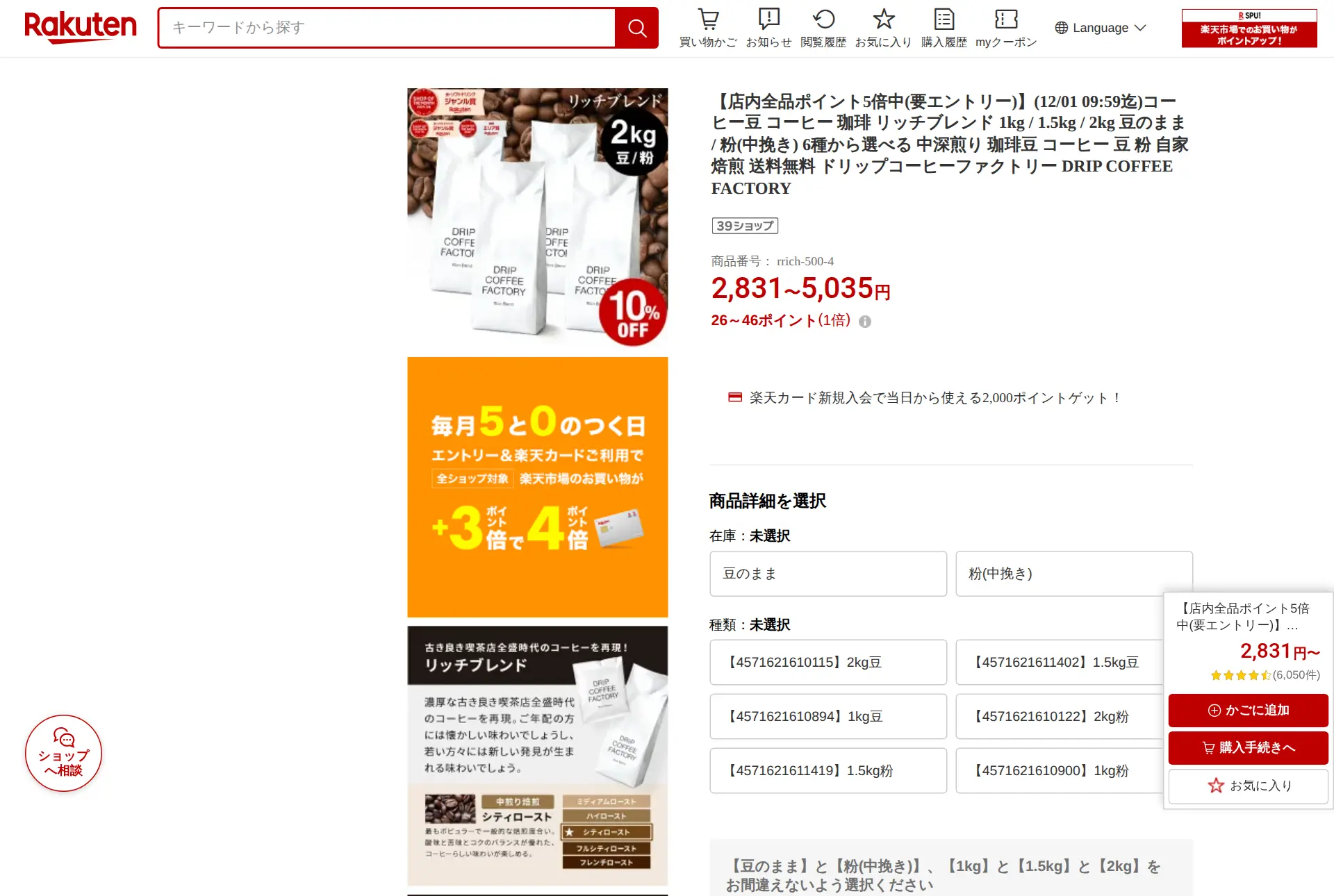
What it is used for
- Complete a product record
- Name, price range, categories, description and pictures of a Rakuten item, keyed by its
item_id. - Watch one item's price
- Read an item on a schedule and keep
price,price_highandavailable, to see sales and sold-out days. - Follow an item's standing
ratingandreview_countshow how an item's buyers rate it, and how fast its reviews grow.
What you send
An item's id as shop:item, or its address on item.rakuten.co.jp. It is the one input.
itemstring Required- The item's id as
shop:item(dripcoffee:rich-500-4), or its address on item.rakuten.co.jp.
A request, ready to send
It starts a run with the input shown at the top of this page, waits up to 60 seconds for it, and reads its records. Put your key in the variable it reads.
# Start a run and wait up to 60 seconds for it to finish
curl -X POST "https://api.enrichednow.com/v1/scrapers/rakuten.item/runs?wait=60" \
  -H "Authorization: Bearer $ENRICHEDNOW_API_KEY" \
  -H "Content-Type: application/json" \
  -d '{"input":{"item":"dripcoffee:rich-500-4"}}'

# Read its records, with the id the first call answered
curl "https://api.enrichednow.com/v1/runs/$RUN_ID/records?limit=100" \
  -H "Authorization: Bearer $ENRICHEDNOW_API_KEY"
from enrichednow import EnrichedNow
client = EnrichedNow() # reads ENRICHEDNOW_API_KEY
# Start a run, wait for it to end, and get its records
result = client.scrape("rakuten.item", {"item": "dripcoffee:rich-500-4"})
print(result.run.id, result.run.status, result.run.record_count)
# Read its records: pages are fetched as you go
for record in result.records:
print(record)Install it with pip install enrichednow, then save as run.py and run python3 run.py
import EnrichedNow from "enrichednow";

const client = new EnrichedNow(); // reads ENRICHEDNOW_API_KEY

// Start a run, wait for it to end, and get its records
const { run, records } = await client.scrape("rakuten.item", { item: "dripcoffee:rich-500-4" });
console.log(run.id, run.status, run.record_count);

// Read its records: pages are fetched as you go
for await (const record of records) console.log(record);
Install it with npm install enrichednow, then save as run.mjs and run node run.mjs
package main

import (
	"context"
	"fmt"
	"log"
	"time"

	enrichednow "github.com/enrichednow/enrichednow-go"
)

func main() {
	client, err := enrichednow.NewClient() // reads ENRICHEDNOW_API_KEY
	if err != nil {
		log.Fatal(err)
	}
	ctx, cancel := context.WithTimeout(context.Background(), 10*time.Minute)
	defer cancel()

	// Start a run, wait for it to end, and get its records
	run, records, err := client.Scrape(ctx, "rakuten.item", map[string]any{"item": "dripcoffee:rich-500-4"})
	if err != nil {
		log.Fatal(err)
	}
	fmt.Println(run.ID, run.Status, run.RecordCount)

	// Read its records: pages are fetched as you go
	for records.Next() {
		fmt.Println(string(records.Current()))
	}
	if err := records.Err(); err != nil {
		log.Fatal(err)
	}
}
Install it with go get github.com/enrichednow/enrichednow-go@latest, then save as run.go and run go run run.go
import com.enrichednow.EnrichedNowClient;
import com.enrichednow.ScrapeResult;
import java.util.Map;

public class Run {
    public static void main(String[] args) {
        EnrichedNowClient client = EnrichedNowClient.fromEnv(); // reads ENRICHEDNOW_API_KEY

        // Start a run, wait for it to end, and get its records
        ScrapeResult result = client.scrape("rakuten.item", Map.of("item", "dripcoffee:rich-500-4"));
        System.out.println(result.run().id() + " " + result.run().status() + " " + result.run().recordCount());

        // Read its records: pages are fetched as you go
        for (Map<String, Object> record : result.records()) {
            System.out.println(record);
        }
    }
}
Add com.enrichednow:enrichednow-java:0.4.0 to your Maven or Gradle build, then save as Run.java
enrichednow run rakuten.item --input item=dripcoffee:rich-500-4Install it with curl -fsSL https://raw.githubusercontent.com/enrichednow/enrichednow-cli/main/install.sh | sh
What comes back
The item: name, price and the range of its variants' prices, availability, rating, review count, shop, categories, description and pictures. A record has 15 fields. One we could not read is null, never an empty string or a zero.
{
  "item_id": "dripcoffee:rich-500-4",
  "url": "https://item.rakuten.co.jp/dripcoffee/rich-500-4/",
  "name": "【店内全品ポイント5倍中(要エントリー)】(12/01 09:59迄)コーヒー豆 コーヒー 珈琲 リッチブレンド 1kg / 1.5kg / 2kg 豆のまま / 粉(中挽き) 6種から選べる 中深煎り 珈琲豆 コーヒー 豆 粉 自家焙煎 送料無料 ドリップコーヒーファクトリー DRIP COFFEE FACTORY",
  "price": 2831,
  "price_high": 5035,
  "currency": "JPY",
  "available": true,
  "rating": 4.53,
  "review_count": 6050,
  "shop_name": "DRIP COFFEE FACTORY",
  "shop_url": "https://www.rakuten.co.jp/dripcoffee/",
  "categories": [
    "水・ソフトドリンク",
    "コーヒー",
    "コーヒー豆"
  ],
  "description": "ボタン風バナー\n楽天ショップ・オブ・ザ・イヤー2024\n水・ソフトドリンク ジャンル賞受賞\n楽天ショップ・オブ・ザ・イヤー2023\n水・ソフトドリンク ジャンル賞受賞\nコーヒーにも「温故知新」があります。濃厚な古き良き喫茶店全盛時代のコーヒーをDrip Coffee Factoryが再現してみました。\nご年配の方には懐かしい味わいでしょうし、若い方々には新しい発見が生まれる味わいでしょう。お正月や、お盆など、世代をまたいで一家が揃う時、話題提供をしてくれる優れものです。 … [truncated]",
  "images": [
    "https://tshop.r10s.jp/dripcoffee/cabinet/cap01/factory_1.jpg",
    "https://tshop.r10s.jp/dripcoffee/cabinet/it01/limited/rc_rich/0400003233953_ne_10p.jpg",
    "https://tshop.r10s.jp/dripcoffee/cabinet/cap01/dcf-caution03.gif"
  ],
  "fetched_at": "2026-11-19T19:10:51.706137Z"
}
The scraper returned this record for the input above, reading a saved copy of the page, not the live site.
Values shortened for this page: description: 698 characters, the first 237 shown; images: 18 items, the first 3 shown.
The fields of a record
item_idstring- The item's id on Rakuten, as
shop:item. urlstring- The item's page.
namestring- The item's name as the shop writes it.
priceinteger or null- The price in yen, tax included, as the page's offer states it; for an item with variants, the lowest.
price_highinteger or null- The highest price of the item's variants; equal to
pricewhen there is one price. currencystring or null- The currency of the prices:
JPY. availableboolean or null- Whether the item can be bought now, as the page's offer states it.
ratingnumber or null- The average review score, out of 5.
review_countinteger or null- How many reviews the item has.
shop_namestring or null- The shop's name.
shop_urlstring- The shop's page on Rakuten.
categorieslist of strings- The marketplace's categories the item is filed in, from the widest (in Japanese).
descriptionstring or null- The shop's description of the item, as plain text.
imageslist of strings- The item's pictures.
fetched_atdatetime- When the page was read, in UTC.
Units and limits
- Counted per request
- Billed per request: a run that returns data costs 1 unit, however many records it returns.
- A miss costs nothing
- A run that fails, that meets something not supported yet, or that you cancel costs nothing. You pay for runs that return data.
- What bounds a run
- A run may take up to 5 minutes. Its records are read in pages of up to 1,000 and are kept for 7 days.
What it does not do
- One run reads one item. An item the shop no longer sells ends as failed, with the reason not_found.
- Reviews are not returned, only their number and the average score.
- Items of shops with a storefront of their own, such as Rakuten Bic, come with less: no availability and no shop name.
Questions
What does Rakuten item return?
The item: name, price and the range of its variants' prices, availability, rating, review count, shop, categories, description and pictures. A record has 15 fields, among them item_id, url, name, price, price_high and currency. A value that could not be read is null, never an empty string or a zero.
What do I send?
An item's id as shop:item, or its address on item.rakuten.co.jp. The input item is required.
How is it counted?
Billed per request: a run that returns data costs 1 unit, however many records it returns. A run that fails, that meets something not supported yet, or that you cancel costs nothing. The first 1,000 units each month are free.
What does it not do?
One run reads one item. An item the shop no longer sells ends as failed, with the reason not_found. Reviews are not returned, only their number and the average score. Items of shops with a storefront of their own, such as Rakuten Bic, come with less: no availability and no shop name.
How long are the records kept, and in what format do they come?
Records are kept for 7 days after the run ended, and read in pages of up to 1,000. They come as JSON, as NDJSON with one record a line, or as CSV with a column for each field.
Can an AI assistant call it?
Yes. Through the EnrichedNow MCP server an assistant calls the tool run_scraper with the scraper_id rakuten.item and the same input. It costs what the same API call costs.
Rakuten
Rakuten Ichiba, Japan's largest online marketplace, Rakuten Books and Rakuten Travel: search results, an item's page and a hotel's details, with prices in yen, shops, points and reviews.
Rakuten search
rakuten.searchWhat to search for, in Japanese or Latin letters, and optionally a page and an order. A page of Rakuten Ichiba's results: each item's id, name, price in yen, shipping, points, rating, review count, shop and picture.
Rakuten Books search
rakuten.books_searchKeywords, and optionally an order and a page. A page of Rakuten Books' results: books, CDs, DVDs, games, downloads and Kobo e-books, with title, creators, codes, release, publisher, price in yen, stock and rating.
Rakuten Books item
rakuten.bookAn item's address on books.rakuten.co.jp, or its id. The item: title, creators, price in yen, rating and review count, release, publisher, ISBN or JAN, stock, description and every fact its page lists.
Rakuten Travel search
rakuten.travel_searchKeywords, and optionally an order and a page. A page of places to stay in Japan on Rakuten Travel: name, stars, review count, the lowest price a night in yen with and without tax, area, the place's own line and the details the words were found in.
Rakuten Travel hotel
rakuten.travel_hotelA place's number on Rakuten Travel, or the address of its page. The place: name, rating and review count, postal code and address, areas, check-in and check-out, telephone, access, parking, rooms, facilities, room amenities, cards taken, cancellation policy and every line of its basic information.
- Industry
- Shopping and retail
- Where
- Japan
- For
- E-commerce
Run it on an input of your own.
Create an account, make a key, and send the request above with your own input. The first 1,000 units each month are free.