Scraper API
REALTOR.ca
realtorca.searchAvailable
REALTOR.ca search
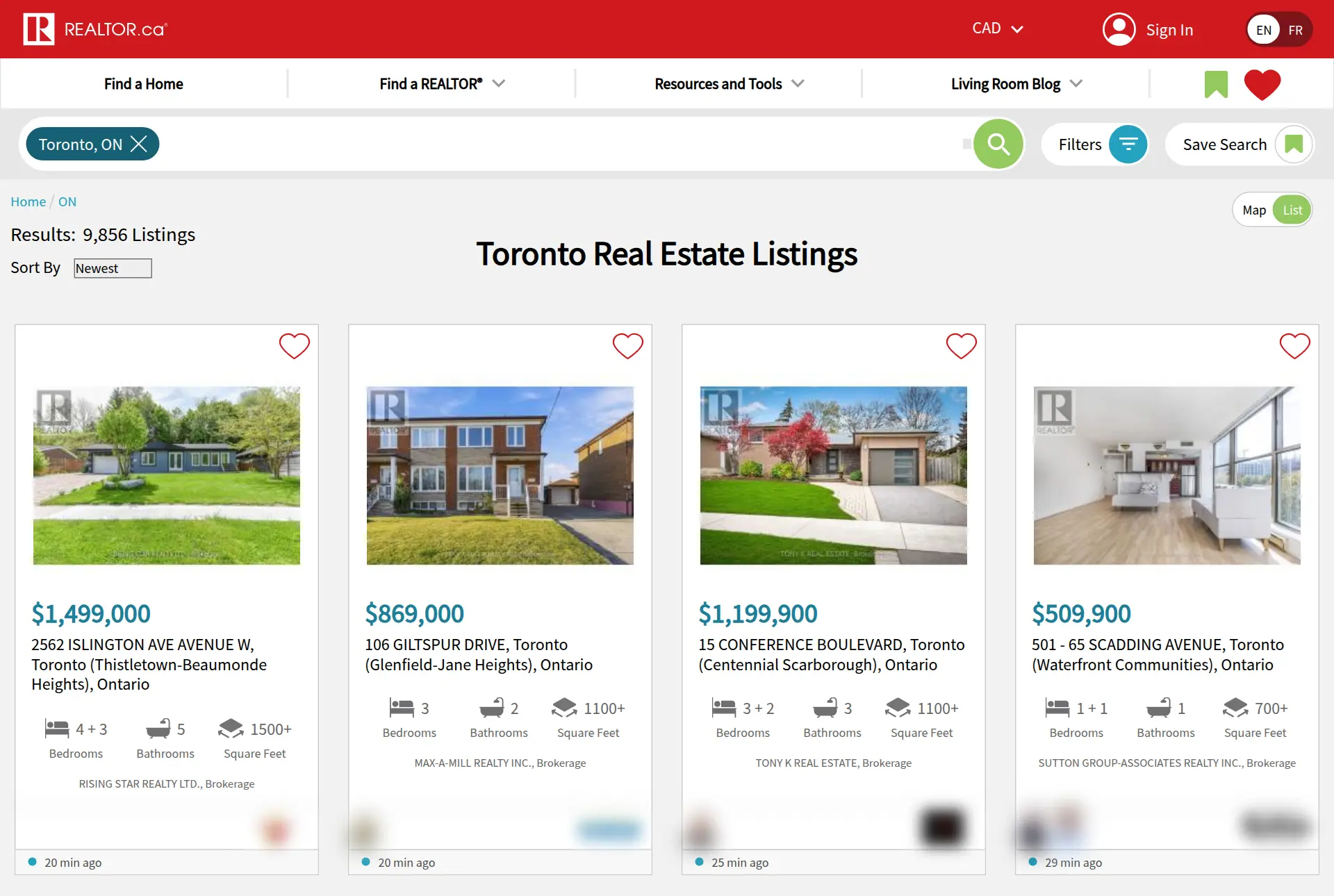
The area's newest listings: MLS® number, price or rent, address, postal code and pin, property and building type, ownership, rooms, sizes, parking, how long it has been listed and the brokerage, with the number the area has.
Give it the address of an area's page on realtor.ca.
1 unit a run, for runs that return data. Runs that fail cost nothing. How units work
- Counted
- 1 unit a run
- Inputs
- 1, 1 required
- Record
- 26 fields
- A run takes
- up to 5 minutes
- Records kept
- 7 days
- Measured
- its success, on the status page
POST/v1/scrapers/realtorca.search/runs
sent, and answered
a record of the run26 fields
ok1 unit a run
A record this scraper returned for this input. The first 9 of its 26 fields are set down here; the whole record is below.
What it is used for
- Watch new listings
- Read a town's newest listings on a schedule and catch homes the moment they come on the market.
- Follow rents
- Read the newest rentals of a city and follow the asking rents by building type.
- Map fresh supply
- Place an area's newest listings on a map with their pins, types and prices.
What you send
The address of an area's page on realtor.ca. It is the one input.
area_urlstring Required- The address of an area's page on realtor.ca: a town or a part of it and a kind (real-estate, rentals, condos-for-sale, townhomes-for-sale, land-for-sale, new-listings, open-houses, condos-for-rent, apartments-for-rent).
A request, ready to send
It starts a run with the input shown at the top of this page, waits up to 60 seconds for it, and reads its records. Put your key in the variable it reads.
# Start a run and wait up to 60 seconds for it to finish
curl -X POST "https://api.enrichednow.com/v1/scrapers/realtorca.search/runs?wait=60" \
  -H "Authorization: Bearer $ENRICHEDNOW_API_KEY" \
  -H "Content-Type: application/json" \
  -d '{"input":{"area_url":"https://www.realtor.ca/on/toronto/real-estate"}}'

# Read its records, with the id the first call answered
curl "https://api.enrichednow.com/v1/runs/$RUN_ID/records?limit=100" \
  -H "Authorization: Bearer $ENRICHEDNOW_API_KEY"
from enrichednow import EnrichedNow
client = EnrichedNow() # reads ENRICHEDNOW_API_KEY
# Start a run, wait for it to end, and get its records
result = client.scrape("realtorca.search", {
"area_url": "https://www.realtor.ca/on/toronto/real-estate",
})
print(result.run.id, result.run.status, result.run.record_count)
# Read its records: pages are fetched as you go
for record in result.records:
print(record)Install it with pip install enrichednow, then save as run.py and run python3 run.py
import EnrichedNow from "enrichednow";

const client = new EnrichedNow(); // reads ENRICHEDNOW_API_KEY

// Start a run, wait for it to end, and get its records
const { run, records } = await client.scrape("realtorca.search", {
  area_url: "https://www.realtor.ca/on/toronto/real-estate",
});
console.log(run.id, run.status, run.record_count);

// Read its records: pages are fetched as you go
for await (const record of records) console.log(record);
Install it with npm install enrichednow, then save as run.mjs and run node run.mjs
package main

import (
	"context"
	"fmt"
	"log"
	"time"

	enrichednow "github.com/enrichednow/enrichednow-go"
)

func main() {
	client, err := enrichednow.NewClient() // reads ENRICHEDNOW_API_KEY
	if err != nil {
		log.Fatal(err)
	}
	ctx, cancel := context.WithTimeout(context.Background(), 10*time.Minute)
	defer cancel()

	// Start a run, wait for it to end, and get its records
	run, records, err := client.Scrape(ctx, "realtorca.search", map[string]any{"area_url": "https://www.realtor.ca/on/toronto/real-estate"})
	if err != nil {
		log.Fatal(err)
	}
	fmt.Println(run.ID, run.Status, run.RecordCount)

	// Read its records: pages are fetched as you go
	for records.Next() {
		fmt.Println(string(records.Current()))
	}
	if err := records.Err(); err != nil {
		log.Fatal(err)
	}
}
Install it with go get github.com/enrichednow/enrichednow-go@latest, then save as run.go and run go run run.go
import com.enrichednow.EnrichedNowClient;
import com.enrichednow.ScrapeResult;
import java.util.Map;

public class Run {
    public static void main(String[] args) {
        EnrichedNowClient client = EnrichedNowClient.fromEnv(); // reads ENRICHEDNOW_API_KEY

        // Start a run, wait for it to end, and get its records
        ScrapeResult result = client.scrape("realtorca.search", Map.of("area_url", "https://www.realtor.ca/on/toronto/real-estate"));
        System.out.println(result.run().id() + " " + result.run().status() + " " + result.run().recordCount());

        // Read its records: pages are fetched as you go
        for (Map<String, Object> record : result.records()) {
            System.out.println(record);
        }
    }
}
Add com.enrichednow:enrichednow-java:0.4.0 to your Maven or Gradle build, then save as Run.java
enrichednow run realtorca.search --input area_url=https://www.realtor.ca/on/toronto/real-estateInstall it with curl -fsSL https://raw.githubusercontent.com/enrichednow/enrichednow-cli/main/install.sh | sh
What comes back
The area's newest listings: MLS® number, price or rent, address, postal code and pin, property and building type, ownership, rooms, sizes, parking, how long it has been listed and the brokerage, with the number the area has. A record has 26 fields. One we could not read is null, never an empty string or a zero.
{
  "position": 1,
  "listing_id": "30530780",
  "mls_number": "W14196984",
  "url": "https://www.realtor.ca/real-estate/30530780/2562-islington-ave-avenue-w-toronto-thistletown-beaumonde-heights",
  "price": 1499000,
  "price_text": "$1,499,000",
  "currency": "CAD",
  "address": "2562 ISLINGTON AVE AVENUE W",
  "place": "Toronto (Thistletown-Beaumonde Heights), Ontario M9V2X2",
  "postal_code": "M9V2X2",
  "latitude": 43.7325235,
  "longitude": -79.5636776,
  "property_type": "Single Family",
  "building_type": "House",
  "ownership": "Freehold",
  "bedrooms": "4 + 3",
  "bathrooms": 5,
  "interior_size": "139.3534 m2",
  "land_size": "76.4 x 150 FT",
  "parking_spaces": 6,
  "parking": "Attached Garage, Garage",
  "listed": "7 min ago",
  "brokerage": "RISING STAR REALTY LTD.",
  "image": "https://cdn.realtor.ca/listings/TS639307065127630000/reb82/highres/4/w14196984_1.jpg",
  "total_results": 9856,
  "fetched_at": "2026-11-19T23:01:45.286615Z"
}
The scraper returned this record for the input above, reading a saved copy of the page, not the live site.
The fields of a record
positioninteger- The listing's place on the page, from 1, newest first.
listing_idstring- REALTOR.ca's id of the listing, in its address.
mls_numberstring or null- The listing's MLS® number, e.g.
C14196772. urlstring- The listing's page on realtor.ca.
realtorca.listingtakes it. priceinteger or null- The asking price, or the rent a month, in Canadian dollars.
price_textstring or null- The price as the site writes it, e.g.
$1,499,000,$2,200/Monthly. currencystring- Always
CAD. addressstring or null- The street address, as the site writes it.
placestring or null- The town, its neighbourhood and province, with the postal code, e.g.
Toronto (Westminster-Branson), Ontario M2R3C6. postal_codestring or null- The postal code.
latitudenumber or null- The listing's latitude.
longitudenumber or null- The listing's longitude.
property_typestring or null- The kind of property, e.g.
Single Family,Vacant Land. building_typestring or null- The kind of building, e.g.
House,Apartment,Row / Townhouse. ownershipstring or null- The ownership, e.g.
Freehold,Condominium/Strata. bedroomsstring or null- The bedrooms as the site writes them;
4 + 3is four above ground and three below. bathroomsinteger or null- The number of bathrooms.
interior_sizestring or null- The interior size as the site gives it, e.g.
139.3534 m2. land_sizestring or null- The land's size as the site writes it, e.g.
76.4 x 150 FT. parking_spacesinteger or null- The number of parking spaces.
parkingstring or null- The kinds of parking, e.g.
Attached Garage, Garage. listedstring or null- How long the listing has been on REALTOR.ca, as the site writes it, e.g.
7 min ago. brokeragestring or null- The brokerage that lists it.
imagestring or null- The listing's first photo.
total_resultsinteger or null- How many listings the site says the area has, the same on every record.
fetched_atdatetime- When REALTOR.ca answered, in UTC.
Units and limits
- Counted per request
- Billed per request: a run that returns data costs 1 unit, however many records it returns.
- A miss costs nothing
- A run that fails, that meets something not supported yet, or that you cancel costs nothing. You pay for runs that return data.
- What bounds a run
- A run may take up to 5 minutes. Its records are read in pages of up to 1,000 and are kept for 7 days.
What it does not do
- One run returns the 11 newest listings the area's page carries; further pages are not offered.
- Agents' names and numbers are not returned; the brokerage is.
- A place the site has no page for ends as failed with the reason not_found, and costs nothing.
Questions
What does REALTOR.ca search return?
The area's newest listings: MLS® number, price or rent, address, postal code and pin, property and building type, ownership, rooms, sizes, parking, how long it has been listed and the brokerage, with the number the area has. A record has 26 fields, among them position, listing_id, mls_number, url, price and price_text. A value that could not be read is null, never an empty string or a zero.
What do I send?
The address of an area's page on realtor.ca. The input area_url is required.
How is it counted?
Billed per request: a run that returns data costs 1 unit, however many records it returns. A run that fails, that meets something not supported yet, or that you cancel costs nothing. The first 1,000 units each month are free.
What does it not do?
One run returns the 11 newest listings the area's page carries; further pages are not offered. Agents' names and numbers are not returned; the brokerage is. A place the site has no page for ends as failed with the reason not_found, and costs nothing.
How long are the records kept, and in what format do they come?
Records are kept for 7 days after the run ended, and read in pages of up to 1,000. They come as JSON, as NDJSON with one record a line, or as CSV with a column for each field.
Can an AI assistant call it?
Yes. Through the EnrichedNow MCP server an assistant calls the tool run_scraper with the scraper_id realtorca.search and the same input. It costs what the same API call costs.
REALTOR.ca
Homes for sale and to rent across Canada on REALTOR.ca: the newest listings of a town or a part of it, and one listing with its MLS® number, price, pin, rooms, taxes and every detail of its page.
REALTOR.ca listing
realtorca.listingA listing's address on realtor.ca. The listing: MLS® number, sale or rent, price, address and pin, bedrooms, bathrooms, size, property and building type, community, annual taxes, description, every line of its summary, building and land, photos and brokerage.
- Industry
- Real estate
- Where
- Canada
Run it on an input of your own.
Create an account, make a key, and send the request above with your own input. The first 1,000 units each month are free.