Scraper API
REALTOR.ca
realtorca.listingAvailable
REALTOR.ca listing
The listing: MLS® number, sale or rent, price, address and pin, bedrooms, bathrooms, size, property and building type, community, annual taxes, description, every line of its summary, building and land, photos and brokerage.
Give it a listing's address on realtor.ca.
1 unit a run, for runs that return data. Runs that fail cost nothing. How units work
- Counted
- 1 unit a run
- Inputs
- 1, 1 required
- Record
- 27 fields
- A run takes
- up to 5 minutes
- Records kept
- 7 days
- Measured
- its success, on the status page
POST/v1/scrapers/realtorca.listing/runs
sent, and answered
a record of the run27 fields
ok1 unit a run
A record this scraper returned for this input. The first 9 of its 27 fields are set down here; the whole record is below.
What it is used for
- Read a home in full
- The price, rooms, size, taxes, description and every detail of a listing in one record.
- Compare homes
- Set the summaries, building features and land of the homes you follow side by side.
- Value a property
- Collect the taxes, sizes and asking prices of nearby listings to judge a fair price.
What you send
A listing's address on realtor.ca. It is the one input.
urlstring Required- The listing's address on realtor.ca, as a search result gives it.
A request, ready to send
It starts a run with the input shown at the top of this page, waits up to 60 seconds for it, and reads its records. Put your key in the variable it reads.
# Start a run and wait up to 60 seconds for it to finish
curl -X POST "https://api.enrichednow.com/v1/scrapers/realtorca.listing/runs?wait=60" \
  -H "Authorization: Bearer $ENRICHEDNOW_API_KEY" \
  -H "Content-Type: application/json" \
  -d '{"input":{"url":"https://www.realtor.ca/real-estate/30530495/51-11-james-stock-path-toronto-mimico"}}'

# Read its records, with the id the first call answered
curl "https://api.enrichednow.com/v1/runs/$RUN_ID/records?limit=100" \
  -H "Authorization: Bearer $ENRICHEDNOW_API_KEY"
from enrichednow import EnrichedNow
client = EnrichedNow() # reads ENRICHEDNOW_API_KEY
# Start a run, wait for it to end, and get its records
result = client.scrape("realtorca.listing", {
"url": "https://www.realtor.ca/real-estate/30530495/51-11-james-stock-path-toronto-mimico",
})
print(result.run.id, result.run.status, result.run.record_count)
# Read its records: pages are fetched as you go
for record in result.records:
print(record)Install it with pip install enrichednow, then save as run.py and run python3 run.py
import EnrichedNow from "enrichednow";

const client = new EnrichedNow(); // reads ENRICHEDNOW_API_KEY

// Start a run, wait for it to end, and get its records
const { run, records } = await client.scrape("realtorca.listing", {
  url: "https://www.realtor.ca/real-estate/30530495/51-11-james-stock-path-toronto-mimico",
});
console.log(run.id, run.status, run.record_count);

// Read its records: pages are fetched as you go
for await (const record of records) console.log(record);
Install it with npm install enrichednow, then save as run.mjs and run node run.mjs
package main

import (
	"context"
	"fmt"
	"log"
	"time"

	enrichednow "github.com/enrichednow/enrichednow-go"
)

func main() {
	client, err := enrichednow.NewClient() // reads ENRICHEDNOW_API_KEY
	if err != nil {
		log.Fatal(err)
	}
	ctx, cancel := context.WithTimeout(context.Background(), 10*time.Minute)
	defer cancel()

	// Start a run, wait for it to end, and get its records
	run, records, err := client.Scrape(ctx, "realtorca.listing", map[string]any{"url": "https://www.realtor.ca/real-estate/30530495/51-11-james-stock-path-toronto-mimico"})
	if err != nil {
		log.Fatal(err)
	}
	fmt.Println(run.ID, run.Status, run.RecordCount)

	// Read its records: pages are fetched as you go
	for records.Next() {
		fmt.Println(string(records.Current()))
	}
	if err := records.Err(); err != nil {
		log.Fatal(err)
	}
}
Install it with go get github.com/enrichednow/enrichednow-go@latest, then save as run.go and run go run run.go
import com.enrichednow.EnrichedNowClient;
import com.enrichednow.ScrapeResult;
import java.util.Map;

public class Run {
    public static void main(String[] args) {
        EnrichedNowClient client = EnrichedNowClient.fromEnv(); // reads ENRICHEDNOW_API_KEY

        // Start a run, wait for it to end, and get its records
        ScrapeResult result = client.scrape("realtorca.listing", Map.of("url", "https://www.realtor.ca/real-estate/30530495/51-11-james-stock-path-toronto-mimico"));
        System.out.println(result.run().id() + " " + result.run().status() + " " + result.run().recordCount());

        // Read its records: pages are fetched as you go
        for (Map<String, Object> record : result.records()) {
            System.out.println(record);
        }
    }
}
Add com.enrichednow:enrichednow-java:0.4.0 to your Maven or Gradle build, then save as Run.java
enrichednow run realtorca.listing --input url=https://www.realtor.ca/real-estate/30530495/51-11-james-stock-path-toronto-mimicoInstall it with curl -fsSL https://raw.githubusercontent.com/enrichednow/enrichednow-cli/main/install.sh | sh
What comes back
The listing: MLS® number, sale or rent, price, address and pin, bedrooms, bathrooms, size, property and building type, community, annual taxes, description, every line of its summary, building and land, photos and brokerage. A record has 27 fields. One we could not read is null, never an empty string or a zero.
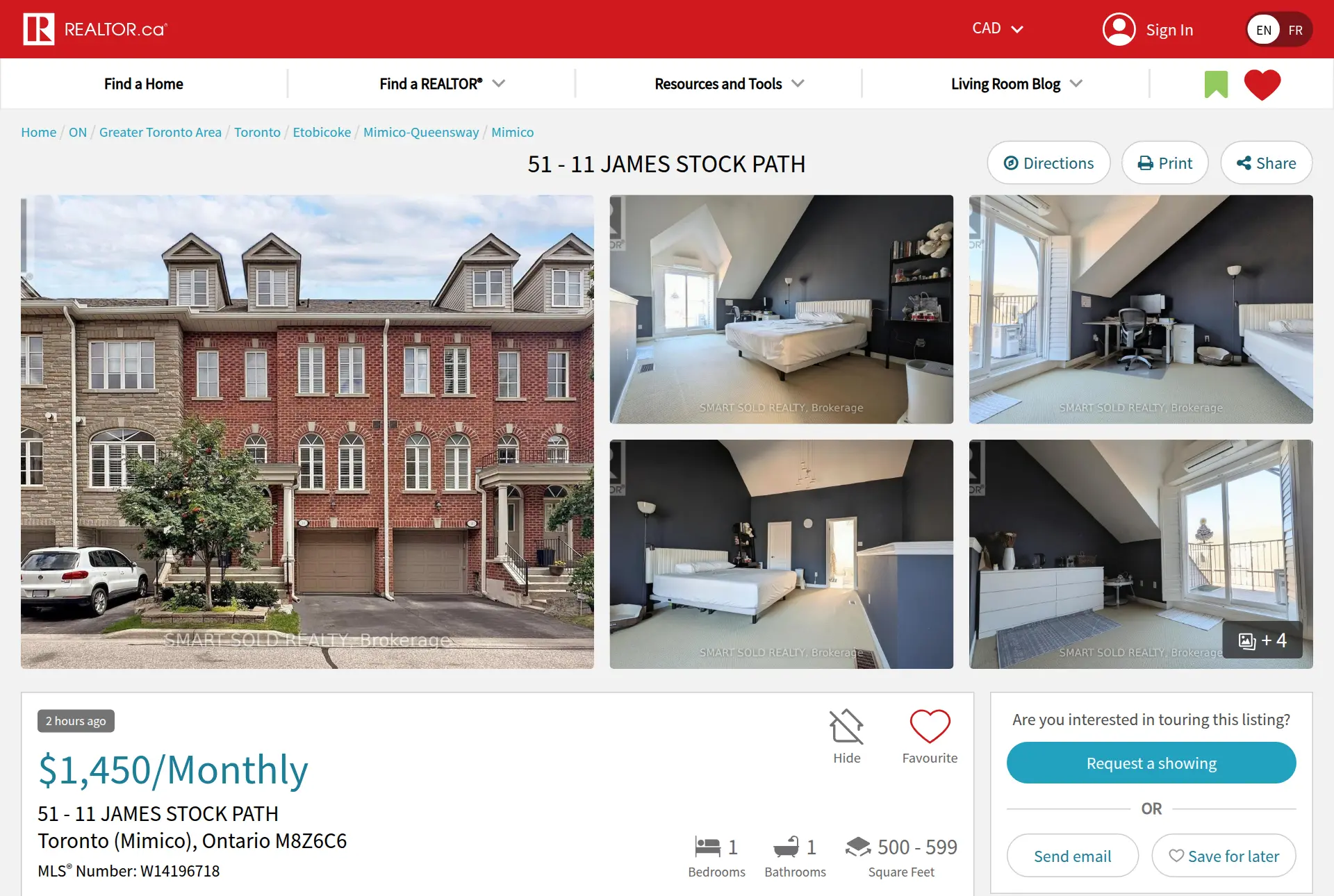
{
  "listing_id": "30530495",
  "mls_number": "W14196718",
  "url": "https://www.realtor.ca/real-estate/30530495/51-11-james-stock-path-toronto-mimico",
  "offer": "rent",
  "price": 1450,
  "price_text": "$1,450/Monthly",
  "currency": "CAD",
  "address": "51 - 11 JAMES STOCK PATH",
  "place": "Toronto (Mimico), Ontario M8Z6C6",
  "latitude": 43.6205808,
  "longitude": -79.5067283,
  "bedrooms": "1",
  "bathrooms": "1",
  "square_feet": "500 - 599",
  "property_type": "Single Family",
  "building_type": "Row / Townhouse",
  "community": "Mimico",
  "annual_taxes": null,
  "time_on_site": "1 hour",
  "description": "Female Tenant Only - Spacious Third-Floor Master Bedroom in a Gorgeous Townhouse!Featuring a huge walk-in closet for ample storage. Located in a beautifully maintained townhouse, the room comes furnished, with all utilities and high-speed … [truncated]",
  "location_description": "Cross Streets: Royal York And Evans. ** Directions: On Evans.",
  "summary": {
    "Property Type": "Single Family",
    "Building Type": "Row / Townhouse",
    "Storeys": "3",
    "Square Footage": "500 - 599 sqft",
    "Community Name": "Mimico",
    "Title": "Condominium/Strata",
    "Parking Type": "Garage",
    "Time on REALTOR.ca": "1 hour"
  },
  "details": {
    "Bedrooms: Above Grade": "1",
    "Bathrooms: Total": "1",
    "Interior Features: Appliances Included": "Furniture",
    "Interior Features: Flooring": "Wood, Tile",
    "Interior Features: Basement Type": "Finished",
    "Building Features: Features": "Carpet Free",
    "Building Features: Building Amenities": "Visitor Parking",
    "Heating & Cooling: Cooling": "Central air conditioning",
    "Heating & Cooling: Heating Type": "Forced air (Natural gas)",
    "Exterior Features: Exterior Finish": "Brick",
    "Neighbourhood Features: Community Features": "Pets Allowed With Restrictions",
    "Maintenance or Condo Information: Maintenance Management Company": "Maple Ridge Community Management",
    "Parking: Parking Type": "Garage",
    "Parking: Total Parking Spaces": "0"
  },
  "photo_count": 9,
  "images": [
    "https://cdn.realtor.ca/listings/TS639307030421830000/reb82/highres/8/w14196718_1.jpg",
    "https://cdn.realtor.ca/listings/TS639307030421830000/reb82/highres/8/w14196718_2.jpg",
    "https://cdn.realtor.ca/listings/TS639307030421830000/reb82/highres/8/w14196718_3.jpg"
  ],
  "brokerage": "SMART SOLD REALTY",
  "fetched_at": "2026-11-19T23:05:12.933623Z"
}
The scraper returned this record for the input above, reading a saved copy of the page, not the live site.
Values shortened for this page: description: 561 characters, the first 238 shown; images: 5 items, the first 3 shown.
The fields of a record
listing_idstring- REALTOR.ca's id of the listing.
mls_numberstring or null- The listing's MLS® number.
urlstring- The listing's page on realtor.ca.
offerstring or nullsaleorrent, as the page's title says (or a rent a month as its price); null where it says neither.priceinteger or null- The asking price, or the rent a month, in Canadian dollars.
price_textstring or null- The price as the page writes it.
currencystring- Always
CAD. addressstring or null- The street address.
placestring or null- The town, its neighbourhood and province, with the postal code.
latitudenumber or null- The listing's latitude.
longitudenumber or null- The listing's longitude.
bedroomsstring or null- The bedrooms as the page writes them;
4 + 4is four above ground and four below. bathroomsstring or null- The bathrooms as the page writes them.
square_feetstring or null- The interior size in square feet as the page gives it, often a range (
1500 - 2000). property_typestring or null- The kind of property, from the page's summary.
building_typestring or null- The kind of building, from the summary.
communitystring or null- The community (neighbourhood) the summary names.
annual_taxesinteger or null- The annual property taxes in dollars, when the summary states them.
time_on_sitestring or null- How long the listing has been on REALTOR.ca, as the page writes it.
descriptionstring or null- The listing's description.
location_descriptionstring or null- The page's short description of where it is, e.g. the nearest crossing.
summaryobject- Every line of the page's property summary, as label and value: Property Type, Building Type, Square Footage, Title, Land Size, Annual Property Taxes, Parking Type, Time on REALTOR.ca, ...
detailsobject- Every line of the page's building and land sections, as
Section: labeland value, e.g.Bedrooms: Above Grade:4,Heating & Cooling: Cooling:Central air conditioning. photo_countinteger or null- How many photos the listing has.
imageslist of strings- The photos the page shows at its top.
brokeragestring or null- The brokerage that lists it.
fetched_atdatetime- When REALTOR.ca answered, in UTC.
Units and limits
- Counted per request
- Billed per request: a run that returns data costs 1 unit, however many records it returns.
- A miss costs nothing
- A run that fails, that meets something not supported yet, or that you cancel costs nothing. You pay for runs that return data.
- What bounds a run
- A run may take up to 5 minutes. Its records are read in pages of up to 1,000 and are kept for 7 days.
What it does not do
- Details keep the page's own labels, in English.
- Agents' names and numbers are not returned; the brokerage is.
- A listing that was sold or withdrawn ends as failed with the reason not_found, and costs nothing.
Questions
What does REALTOR.ca listing return?
The listing: MLS® number, sale or rent, price, address and pin, bedrooms, bathrooms, size, property and building type, community, annual taxes, description, every line of its summary, building and land, photos and brokerage. A record has 27 fields, among them listing_id, mls_number, url, offer, price and price_text. A value that could not be read is null, never an empty string or a zero.
What do I send?
A listing's address on realtor.ca. The input url is required.
How is it counted?
Billed per request: a run that returns data costs 1 unit, however many records it returns. A run that fails, that meets something not supported yet, or that you cancel costs nothing. The first 1,000 units each month are free.
What does it not do?
Details keep the page's own labels, in English. Agents' names and numbers are not returned; the brokerage is. A listing that was sold or withdrawn ends as failed with the reason not_found, and costs nothing.
How long are the records kept, and in what format do they come?
Records are kept for 7 days after the run ended, and read in pages of up to 1,000. They come as JSON, as NDJSON with one record a line, or as CSV with a column for each field.
Can an AI assistant call it?
Yes. Through the EnrichedNow MCP server an assistant calls the tool run_scraper with the scraper_id realtorca.listing and the same input. It costs what the same API call costs.
REALTOR.ca
Homes for sale and to rent across Canada on REALTOR.ca: the newest listings of a town or a part of it, and one listing with its MLS® number, price, pin, rooms, taxes and every detail of its page.
REALTOR.ca search
realtorca.searchThe address of an area's page on realtor.ca. The area's newest listings: MLS® number, price or rent, address, postal code and pin, property and building type, ownership, rooms, sizes, parking, how long it has been listed and the brokerage, with the number the area has.
- Industry
- Real estate
- Where
- Canada
Run it on an input of your own.
Create an account, make a key, and send the request above with your own input. The first 1,000 units each month are free.