Scraper API
Google Search
google.searchAvailable
Google Search results
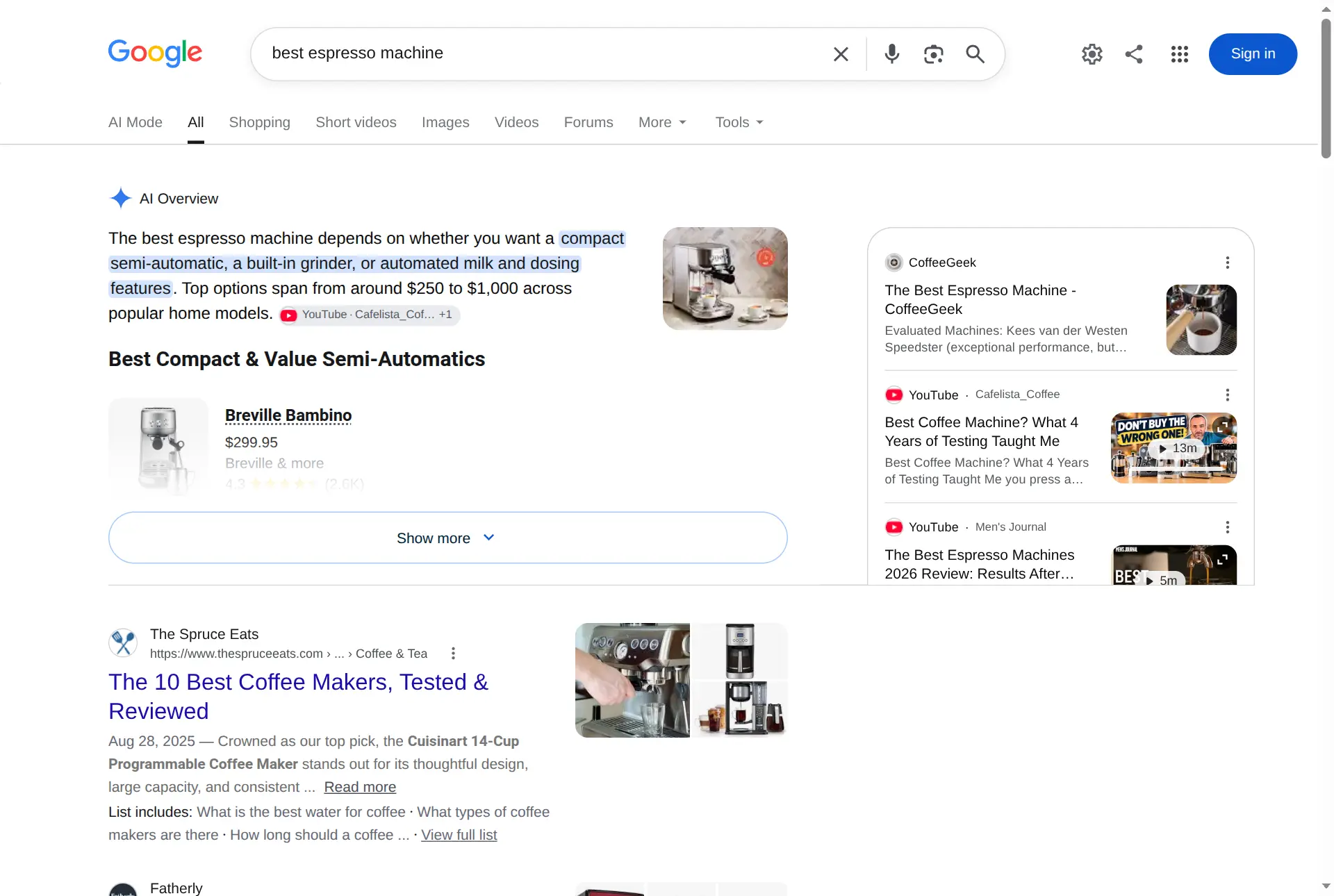
One page of Google Search: the organic results in order with title, address and snippet, and the other blocks the page shows, each as records of its own type: related questions, related searches, top stories, local places, the knowledge panel, the AI Overview, recipes, sports games and the corrected query.
Give it a search query, and the country and language to rank the results for.
1 unit a run, for runs that return data. Runs that fail cost nothing. How units work
- Counted
- 1 unit a run
- Inputs
- 5, 1 required
- Record
- 17 fields
- A run takes
- up to 5 minutes
- Records kept
- 7 days
- Measured
- its success, on the status page
POST/v1/scrapers/google.search/runs
sent, and answered
a record of the run17 fields
ok1 unit a run
A record this scraper returned for this input. The first 9 of its 17 fields are set down here; the whole record is below.
What it is used for
- Track where you rank
- The results Google Search shows for a query, in order, with title, address and snippet, for the country and language you choose.
- Research what answers a question
- Read the results for the questions your customers ask and see which pages answer them, and how each describes itself.
- Ground a language model
- Give a model the current results for a query, with their sources and dates, so its answer rests on pages it can cite.
What you send
A search query, and the country and language to rank the results for. These are its 5 inputs, as its schema has them.
querystring Required- What to search for, as you would type it. Operators such as site: and quoted phrases work.
countrystring Optional- The country the results are ranked for, as a two-letter code such as us, gb or de. us unless you say otherwise.Default
us languagestring Optional- The language of the results page, as a code such as en, de or pt-BR. en unless you say otherwise.Default
en pageinteger Optional- The results page, from 1. A page holds about ten organic results.Default
1 numinteger Optional- Return at most this many organic results of the page. The other blocks are returned whole.Default
10
A request, ready to send
It starts a run with the input shown at the top of this page, waits up to 60 seconds for it, and reads its records. Put your key in the variable it reads.
# Start a run and wait up to 60 seconds for it to finish
curl -X POST "https://api.enrichednow.com/v1/scrapers/google.search/runs?wait=60" \
  -H "Authorization: Bearer $ENRICHEDNOW_API_KEY" \
  -H "Content-Type: application/json" \
  -d '{"input":{"query":"best espresso machine"}}'

# Read its records, with the id the first call answered
curl "https://api.enrichednow.com/v1/runs/$RUN_ID/records?limit=100" \
  -H "Authorization: Bearer $ENRICHEDNOW_API_KEY"
from enrichednow import EnrichedNow
client = EnrichedNow() # reads ENRICHEDNOW_API_KEY
# Start a run, wait for it to end, and get its records
result = client.scrape("google.search", {"query": "best espresso machine"})
print(result.run.id, result.run.status, result.run.record_count)
# Read its records: pages are fetched as you go
for record in result.records:
print(record)Install it with pip install enrichednow, then save as run.py and run python3 run.py
import EnrichedNow from "enrichednow";

const client = new EnrichedNow(); // reads ENRICHEDNOW_API_KEY

// Start a run, wait for it to end, and get its records
const { run, records } = await client.scrape("google.search", { query: "best espresso machine" });
console.log(run.id, run.status, run.record_count);

// Read its records: pages are fetched as you go
for await (const record of records) console.log(record);
Install it with npm install enrichednow, then save as run.mjs and run node run.mjs
package main

import (
	"context"
	"fmt"
	"log"
	"time"

	enrichednow "github.com/enrichednow/enrichednow-go"
)

func main() {
	client, err := enrichednow.NewClient() // reads ENRICHEDNOW_API_KEY
	if err != nil {
		log.Fatal(err)
	}
	ctx, cancel := context.WithTimeout(context.Background(), 10*time.Minute)
	defer cancel()

	// Start a run, wait for it to end, and get its records
	run, records, err := client.Scrape(ctx, "google.search", map[string]any{"query": "best espresso machine"})
	if err != nil {
		log.Fatal(err)
	}
	fmt.Println(run.ID, run.Status, run.RecordCount)

	// Read its records: pages are fetched as you go
	for records.Next() {
		fmt.Println(string(records.Current()))
	}
	if err := records.Err(); err != nil {
		log.Fatal(err)
	}
}
Install it with go get github.com/enrichednow/enrichednow-go@latest, then save as run.go and run go run run.go
import com.enrichednow.EnrichedNowClient;
import com.enrichednow.ScrapeResult;
import java.util.Map;

public class Run {
    public static void main(String[] args) {
        EnrichedNowClient client = EnrichedNowClient.fromEnv(); // reads ENRICHEDNOW_API_KEY

        // Start a run, wait for it to end, and get its records
        ScrapeResult result = client.scrape("google.search", Map.of("query", "best espresso machine"));
        System.out.println(result.run().id() + " " + result.run().status() + " " + result.run().recordCount());

        // Read its records: pages are fetched as you go
        for (Map<String, Object> record : result.records()) {
            System.out.println(record);
        }
    }
}
Add com.enrichednow:enrichednow-java:0.4.0 to your Maven or Gradle build, then save as Run.java
enrichednow run google.search --input 'query=best espresso machine'Install it with curl -fsSL https://raw.githubusercontent.com/enrichednow/enrichednow-cli/main/install.sh | sh
What comes back
One page of Google Search: the organic results in order with title, address and snippet, and the other blocks the page shows, each as records of its own type: related questions, related searches, top stories, local places, the knowledge panel, the AI Overview, recipes, sports games and the corrected query. A record has 17 fields. One we could not read is null, never an empty string or a zero.
{
  "type": "organic",
  "query": "best espresso machine",
  "position": 1,
  "page": 1,
  "title": "The Best Espresso Machines for Every Budget, Tested and ...",
  "url": "https://www.aol.com/articles/best-espresso-machines-every-budget-191700000.html",
  "displayed_url": "https://www.aol.com › articles › best-espresso-machines...",
  "snippet": "Best Overall: Breville Barista Express Impress Espresso Machine ; Best Entry-Level: Breville Barista Express Espresso Machine ; Most Versatile: De ... Read more",
  "date": "Oct 26, 2026",
  "source": null,
  "rating": null,
  "review_count": null,
  "category": null,
  "address": null,
  "attributes": null,
  "sources": null,
  "fetched_at": "2026-11-19T16:33:36.140541Z"
}
The scraper returned this record for the input above, reading a saved copy of the page, not the live site.
The fields of a record
typestring- The kind of item:
organic(a web result),related_question("People also ask"),related_search,top_story,local_place(the map pack),knowledge_panel,ai_overview,recipe(the "Recipes" block),sports_game(a game of the sports block: a team's or a match's results and fixtures) orspelling(the query Google searched in place of the one asked, or suggests). Advertisements are not returned. querystring- The query that was asked.
positioninteger- The rank among the items of the same type, from 1. For organic results it is counted across pages.
pageinteger- The results page the item was on.
titlestring- The item's title as the page shows it: a result's or a story's headline, the question, the suggested search, the place's or the panel's name;
AI Overviewfor the AI answer; the recipe's name; the two teams of a game,<first> vs <second>in the page's order; forspelling, the query Google searched instead, or the one it suggests. urlstring or null- The page the item leads to: an organic result, a top story, a recipe, the knowledge panel's description source. For an organic result it is null only when the address could not be read, and the run is then
partial; for the other types it is null when the page gives none or it was not read in the run's time. displayed_urlstring or null- Organic results: the address as Google shows it above the title, e.g.
https://example.com › docs. snippetstring or null- The text of the item: under an organic result's title (without the date), the knowledge panel's description, or the whole text of the AI answer; for
spelling, the line's own words:These are results for(Google searched the corrected query) orDid you mean:(it searched the query as asked and suggests the corrected one). datestring or null- The date or age Google shows with a result or a story, or the day of a game, as it is written there, e.g.
Mar 17, 2026,2 hours ago,Sun, Nov 15. sourcestring or null- Top stories: the publisher. Recipes: the site, e.g.
Allrecipes. Knowledge panel: where the description comes from, e.g.Wikipedia. ratingnumber or null- Local places and recipes: the average rating, 1 to 5.
review_countinteger or null- Local places: the number of reviews.
categorystring or null- Local places: the kind of place, e.g.
Dentist. Knowledge panel: the line under the name, e.g.American singer-songwriter. addressstring or null- Local places: the address line as the page shows it: a street address, or a district or town.
attributesobject or null- Knowledge panel: its facts, label to value as shown, e.g.
{"Born": "December 13, 1989"}. Recipe:reviews(the count as shown, e.g.15K),total_time,ingredients. Sports game:team_1,team_1_score,team_2,team_2_score,status(e.g.Final,FT,Starts at 11:00 PM), andcompetitionorstagewhere shown. Spelling:searched_instead_of, the query as asked. sourceslist of objects or null- AI answer: the pages it cites.Each holds
title,url. fetched_atdatetime- When the page was read, in UTC.
Units and limits
- Counted per request
- Billed per request: a run that returns data costs 1 unit, however many records it returns.
- A miss costs nothing
- A run that fails, that meets something not supported yet, or that you cancel costs nothing. You pay for runs that return data.
- What bounds a run
- A run may take up to 5 minutes. Its records are read in pages of up to 1,000 and are kept for 7 days.
What it does not do
- One run is one results page. A page holds five to ten organic results; ask for the next with page.
- A run takes about half a minute. The first run after a quiet spell takes longer, sometimes over a minute: wait up to 300 seconds for it, or poll the run.
- The AI Overview is returned when the page carries it. On many pages it is loaded afterwards, and is then not returned.
- Advertisements are not returned.
- A top story's address is read while the run has time for it; a few come back without one.
- The request is made from the United States. country and language steer the ranking; they do not move the searcher.
The bounds its schema sets
page- 1 to 30; 1 unless you say otherwise
num- 1 to 10; 10 unless you say otherwise
Questions
What does Google Search results return?
One page of Google Search: the organic results in order with title, address and snippet, and the other blocks the page shows, each as records of its own type: related questions, related searches, top stories, local places, the knowledge panel, the AI Overview, recipes, sports games and the corrected query. A record has 17 fields, among them type, query, position, page, title and url. A value that could not be read is null, never an empty string or a zero.
What do I send?
A search query, and the country and language to rank the results for. The input query is required. Optional: country, language, page and num.
How is it counted?
Billed per request: a run that returns data costs 1 unit, however many records it returns. A run that fails, that meets something not supported yet, or that you cancel costs nothing. The first 1,000 units each month are free.
How much does one run return?
Its schema sets these bounds: page 1 to 30 (1 unless you say otherwise); num 1 to 10 (10 unless you say otherwise). A run may take up to 5 minutes.
What does it not do?
One run is one results page. A page holds five to ten organic results; ask for the next with page. A run takes about half a minute. The first run after a quiet spell takes longer, sometimes over a minute: wait up to 300 seconds for it, or poll the run. The AI Overview is returned when the page carries it. On many pages it is loaded afterwards, and is then not returned. Advertisements are not returned. A top story's address is read while the run has time for it; a few come back without one. The request is made from the United States. country and language steer the ranking; they do not move the searcher.
How long are the records kept, and in what format do they come?
Records are kept for 7 days after the run ended, and read in pages of up to 1,000. They come as JSON, as NDJSON with one record a line, or as CSV with a column for each field.
Can an AI assistant call it?
Yes. Through the EnrichedNow MCP server an assistant calls the tool run_scraper with the scraper_id google.search and the same input. It costs what the same API call costs.
Used in these playbooks
A playbook runs Google Search results as one of its steps and hands back the finished list. Its runs of this scraper cost what they cost here, and the playbook adds nothing.
Marketing
Broken Link Prospects
Resource pages on your topic that link to pages or sites that are gone, each with the dead link and the site's email.
Marketing
Footprint Prospects
Sites on your topic that take guest posts or keep resource pages, found by search footprints, each with its email.
Marketing
Link Intersect
Sites that link to two or more of your competitors but not to you, each with the page and the email the site publishes.
Marketing
Rank Tracker
Your domain's and your competitors' Google Search positions for each keyword, with the top results and what moved since last run.
Marketing
Unlinked Mentions
Pages that name your brand but do not link to your site, each read to be sure, with the email the site publishes.
Google Search
Results pages of Google Search and of its news tab, as a visitor who is not signed in sees them.
Google News results
google.newsA search query, and the country and language to rank the stories for. The stories Google News lists for the query, in order: headline, publisher, address, and how long ago each was published.
Google Search short videos
google.short_videosA search query, and the country to rank the videos for. The short videos Google Search lists for the query, in order: title, the site it is on, the account that posted it, its length and its address.
- Industry
- Search and the open web
- Where
- Worldwide
Run it on an input of your own.
Create an account, make a key, and send the request above with your own input. The first 1,000 units each month are free.