Scraper API
Google Patents
google.patentAvailable
Google Patents patent
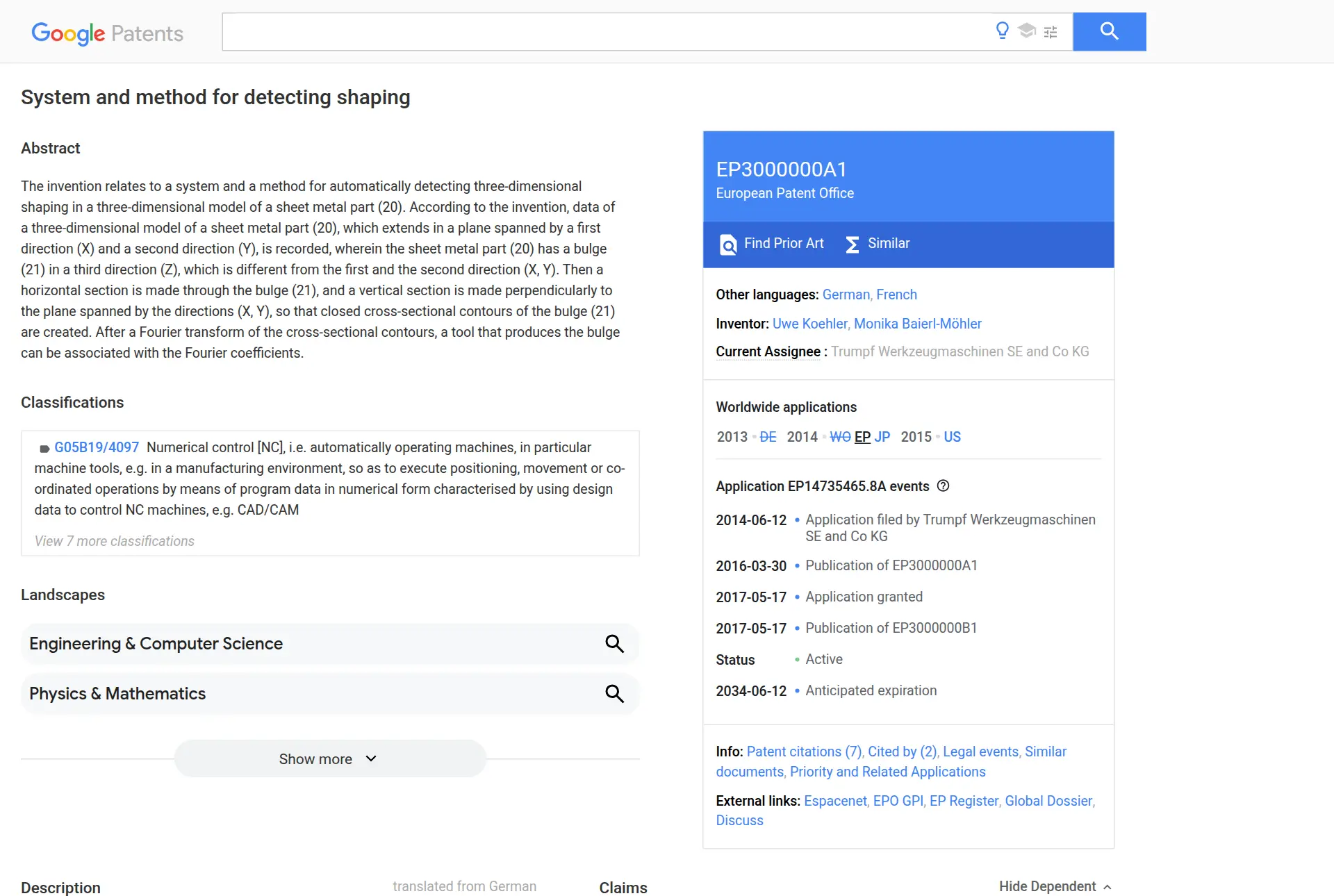
The patent as Google Patents shows it: numbers and dates, inventors, current and original assignees, legal status, classifications, the abstract, the claims, the description, the drawings, the PDF, and how many patents it cites and is cited by.
Give it a patent's publication number with its country code, such as US7654321B2, or the address of its page on Google Patents.
1 unit a run, for runs that return data. Runs that fail cost nothing. How units work
- Counted
- 1 unit a run
- Inputs
- 2, 1 required
- Record
- 27 fields
- A run takes
- up to 5 minutes
- Records kept
- 7 days
- Measured
- its success, on the status page
POST/v1/scrapers/google.patent/runs
sent, and answered
a record of the run27 fields
ok1 unit a run
A record this scraper returned for this input. The first 9 of its 27 fields are set down here; the whole record is below.
What it is used for
- Read a patent in full
- The abstract, the claims, the description, the classifications and the drawings of a patent, keyed by its
publication_number. - Follow a patent's status
- Read
legal_statusandexpiration_dateagain later to know whether a patent is still in force. - Weigh a patent
cited_by_countandcitation_countsay how often a patent is cited and how much it cites.
What you send
A patent's publication number with its country code, such as US7654321B2, or the address of its page on Google Patents. These are its 2 inputs, as its schema has them.
patentstring Required- The publication number with its country code (US7654321B2, EP3000000A1, CN110606668B), written with or without spaces and commas, or the page's address.
languagestring Optional- The language the page is read in, as a two-letter code such as en. Google Patents shows a machine translation where the patent is in another language. en unless you say otherwise.Default
en
A request, ready to send
It starts a run with the input shown at the top of this page, waits up to 60 seconds for it, and reads its records. Put your key in the variable it reads.
# Start a run and wait up to 60 seconds for it to finish
curl -X POST "https://api.enrichednow.com/v1/scrapers/google.patent/runs?wait=60" \
  -H "Authorization: Bearer $ENRICHEDNOW_API_KEY" \
  -H "Content-Type: application/json" \
  -d '{"input":{"patent":"EP3000000A1"}}'

# Read its records, with the id the first call answered
curl "https://api.enrichednow.com/v1/runs/$RUN_ID/records?limit=100" \
  -H "Authorization: Bearer $ENRICHEDNOW_API_KEY"
from enrichednow import EnrichedNow
client = EnrichedNow() # reads ENRICHEDNOW_API_KEY
# Start a run, wait for it to end, and get its records
result = client.scrape("google.patent", {"patent": "EP3000000A1"})
print(result.run.id, result.run.status, result.run.record_count)
# Read its records: pages are fetched as you go
for record in result.records:
print(record)Install it with pip install enrichednow, then save as run.py and run python3 run.py
import EnrichedNow from "enrichednow";

const client = new EnrichedNow(); // reads ENRICHEDNOW_API_KEY

// Start a run, wait for it to end, and get its records
const { run, records } = await client.scrape("google.patent", { patent: "EP3000000A1" });
console.log(run.id, run.status, run.record_count);

// Read its records: pages are fetched as you go
for await (const record of records) console.log(record);
Install it with npm install enrichednow, then save as run.mjs and run node run.mjs
package main

import (
	"context"
	"fmt"
	"log"
	"time"

	enrichednow "github.com/enrichednow/enrichednow-go"
)

func main() {
	client, err := enrichednow.NewClient() // reads ENRICHEDNOW_API_KEY
	if err != nil {
		log.Fatal(err)
	}
	ctx, cancel := context.WithTimeout(context.Background(), 10*time.Minute)
	defer cancel()

	// Start a run, wait for it to end, and get its records
	run, records, err := client.Scrape(ctx, "google.patent", map[string]any{"patent": "EP3000000A1"})
	if err != nil {
		log.Fatal(err)
	}
	fmt.Println(run.ID, run.Status, run.RecordCount)

	// Read its records: pages are fetched as you go
	for records.Next() {
		fmt.Println(string(records.Current()))
	}
	if err := records.Err(); err != nil {
		log.Fatal(err)
	}
}
Install it with go get github.com/enrichednow/enrichednow-go@latest, then save as run.go and run go run run.go
import com.enrichednow.EnrichedNowClient;
import com.enrichednow.ScrapeResult;
import java.util.Map;

public class Run {
    public static void main(String[] args) {
        EnrichedNowClient client = EnrichedNowClient.fromEnv(); // reads ENRICHEDNOW_API_KEY

        // Start a run, wait for it to end, and get its records
        ScrapeResult result = client.scrape("google.patent", Map.of("patent", "EP3000000A1"));
        System.out.println(result.run().id() + " " + result.run().status() + " " + result.run().recordCount());

        // Read its records: pages are fetched as you go
        for (Map<String, Object> record : result.records()) {
            System.out.println(record);
        }
    }
}
Add com.enrichednow:enrichednow-java:0.4.0 to your Maven or Gradle build, then save as Run.java
enrichednow run google.patent --input patent=EP3000000A1Install it with curl -fsSL https://raw.githubusercontent.com/enrichednow/enrichednow-cli/main/install.sh | sh
What comes back
The patent as Google Patents shows it: numbers and dates, inventors, current and original assignees, legal status, classifications, the abstract, the claims, the description, the drawings, the PDF, and how many patents it cites and is cited by. A record has 27 fields. One we could not read is null, never an empty string or a zero.
{
  "publication_number": "EP3000000A1",
  "url": "https://patents.google.com/patent/EP3000000A1/en",
  "title": "System and method for detecting shaping",
  "language": "en",
  "country_code": "EP",
  "kind_code": "A1",
  "application_number": "EP14735465.8A",
  "inventors": [
    "Uwe Koehler",
    "Monika Baierl-Möhler"
  ],
  "current_assignees": [
    "Trumpf Werkzeugmaschinen SE and Co KG"
  ],
  "original_assignees": [
    "Trumpf Werkzeugmaschinen SE and Co KG"
  ],
  "priority_date": "2013-06-24",
  "filing_date": "2014-06-12",
  "publication_date": "2016-03-30",
  "grant_date": "2017-05-17",
  "expiration_date": "2034-06-12",
  "legal_status": "Granted",
  "abstract": "The invention relates to a system and a method for automatically detecting three-dimensional shaping in a three-dimensional model of a sheet metal part (20). According to the invention, data of a three-dimensional model of a sheet metal … [truncated]",
  "claims": "PATENTA SPEECHES\nA system for automatically detecting three-dimensional transformations in a three-dimensional model of a sheet metal part (20), comprising:\nan input unit (100) for inputting data of a three-dimensional model of a sheet … [truncated]",
  "claim_count": null,
  "description": "System and method for detecting deformations\nThe invention relates to a system and a method for automatically detecting three-dimensional transformations in a three-dimensional model of a sheet metal part.\nThe said transformations, such as … [truncated]",
  "description_truncated": false,
  "classifications": [
    {
      "code": "G05B19/4097",
      "description": "Numerical control [NC], i.e. automatically operating machines, in particular machine tools, e.g. in a manufacturing environment, so as to execute positioning, movement or co-ordinated operations by means of program data in numerical form … [truncated]"
    },
    {
      "code": "G05B19/40938",
      "description": "Tool management"
    },
    {
      "code": "G06F17/141",
      "description": "Discrete Fourier transforms"
    }
  ],
  "pdf_url": null,
  "images": [],
  "cited_by_count": 2,
  "citation_count": 7,
  "fetched_at": "2026-11-19T18:07:40.634237Z"
}
The scraper returned this record for the input above, reading a saved copy of the page, not the live site.
Values shortened for this page: abstract: 852 characters, the first 236 shown; claims: 9,750 characters, the first 235 shown; description: 23,902 characters, the first 239 shown; classifications: 8 items, the first 3 shown; classifications[0].description: 309 characters, the first 237 shown.
The fields of a record
publication_numberstring- The publication number with country and kind codes, e.g.
US7654321B2. urlstring- The patent's page on Google Patents.
titlestring- The patent's title.
languagestring- The language the page was asked for in.
country_codestring or null- The patent office, as two letters, e.g.
US,EP,WO. kind_codestring or null- The kind of publication, e.g.
B2for a granted United States patent,A1for an application. application_numberstring or null- The application number, as the page writes it.
inventorslist of strings- The inventors named on the patent, in order.
current_assigneeslist of strings- The current assignees, as Google Patents lists them.
original_assigneeslist of strings- The assignees at filing.
priority_datestring or null- The priority date,
YYYY-MM-DD. filing_datestring or null- The filing date,
YYYY-MM-DD. publication_datestring or null- The date of this publication,
YYYY-MM-DD. grant_datestring or null- The grant date,
YYYY-MM-DD; null when the page's timeline has no grant. expiration_datestring or null- The expiry date the page's timeline gives,
YYYY-MM-DD: the expected one for a patent in force. Null when the timeline has none. legal_statusstring or null- The legal status Google Patents shows, e.g.
Active,Expired - Fee Related,Pending. It is Google's assumption, not a legal conclusion. abstractstring or null- The abstract.
claimsstring or null- The claims, as text, one line per paragraph.
claim_countinteger or null- The number of claims the page states.
descriptionstring or null- The description (the specification), as text, one line per paragraph.
description_truncatedboolean- True when the description was longer than 400,000 characters and was cut there.
classificationslist of objects- The classifications the patent is filed under: the most specific code of each.
pdf_urlstring or null- The address of the patent's PDF, when the page links one.
imageslist of strings- The addresses of the drawings, in order.
cited_by_countinteger- How many later patents the page lists as citing this one, family-to-family citations included.
citation_countinteger- How many earlier patents the page lists as cited by this one, family-to-family citations included.
fetched_atdatetime- When the page was read, in UTC.
Units and limits
- Counted per request
- Billed per request: a run that returns data costs 1 unit, however many records it returns.
- A miss costs nothing
- A run that fails, that meets something not supported yet, or that you cancel costs nothing. You pay for runs that return data.
- What bounds a run
- A run may take up to 5 minutes. Its records are read in pages of up to 1,000 and are kept for 7 days.
What it does not do
- One run reads one patent. The cited patents are counted, not listed.
- A very long description is cut, and description_truncated says so.
- A number Google Patents does not have ends as failed, with the reason not_found, and costs nothing.
Questions
What does Google Patents patent return?
The patent as Google Patents shows it: numbers and dates, inventors, current and original assignees, legal status, classifications, the abstract, the claims, the description, the drawings, the PDF, and how many patents it cites and is cited by. A record has 27 fields, among them publication_number, url, title, language, country_code and kind_code. A value that could not be read is null, never an empty string or a zero.
What do I send?
A patent's publication number with its country code, such as US7654321B2, or the address of its page on Google Patents. The input patent is required. Optional: language.
How is it counted?
Billed per request: a run that returns data costs 1 unit, however many records it returns. A run that fails, that meets something not supported yet, or that you cancel costs nothing. The first 1,000 units each month are free.
What does it not do?
One run reads one patent. The cited patents are counted, not listed. A very long description is cut, and description_truncated says so. A number Google Patents does not have ends as failed, with the reason not_found, and costs nothing.
How long are the records kept, and in what format do they come?
Records are kept for 7 days after the run ended, and read in pages of up to 1,000. They come as JSON, as NDJSON with one record a line, or as CSV with a column for each field.
Can an AI assistant call it?
Yes. Through the EnrichedNow MCP server an assistant calls the tool run_scraper with the scraper_id google.patent and the same input. It costs what the same API call costs.
Google Patents
Searches and patents on Google Patents, from its own public pages.
Google Patents search
google.patents_searchWords to search for, or an inventor or an assignee, with Google Patents' own filters: patent office, granted or not, a range of priority dates, the order and the page. One page of results, in order: publication number, title, the passage that matched, priority, filing, publication and grant dates, the first inventor, the assignee, the language, the PDF and the legal state.
- Industry
- Code and research
- Where
- Worldwide
Run it on an input of your own.
Create an account, make a key, and send the request above with your own input. The first 1,000 units each month are free.