Scraper API
Finviz
finviz.screenerAvailable
Finviz screener
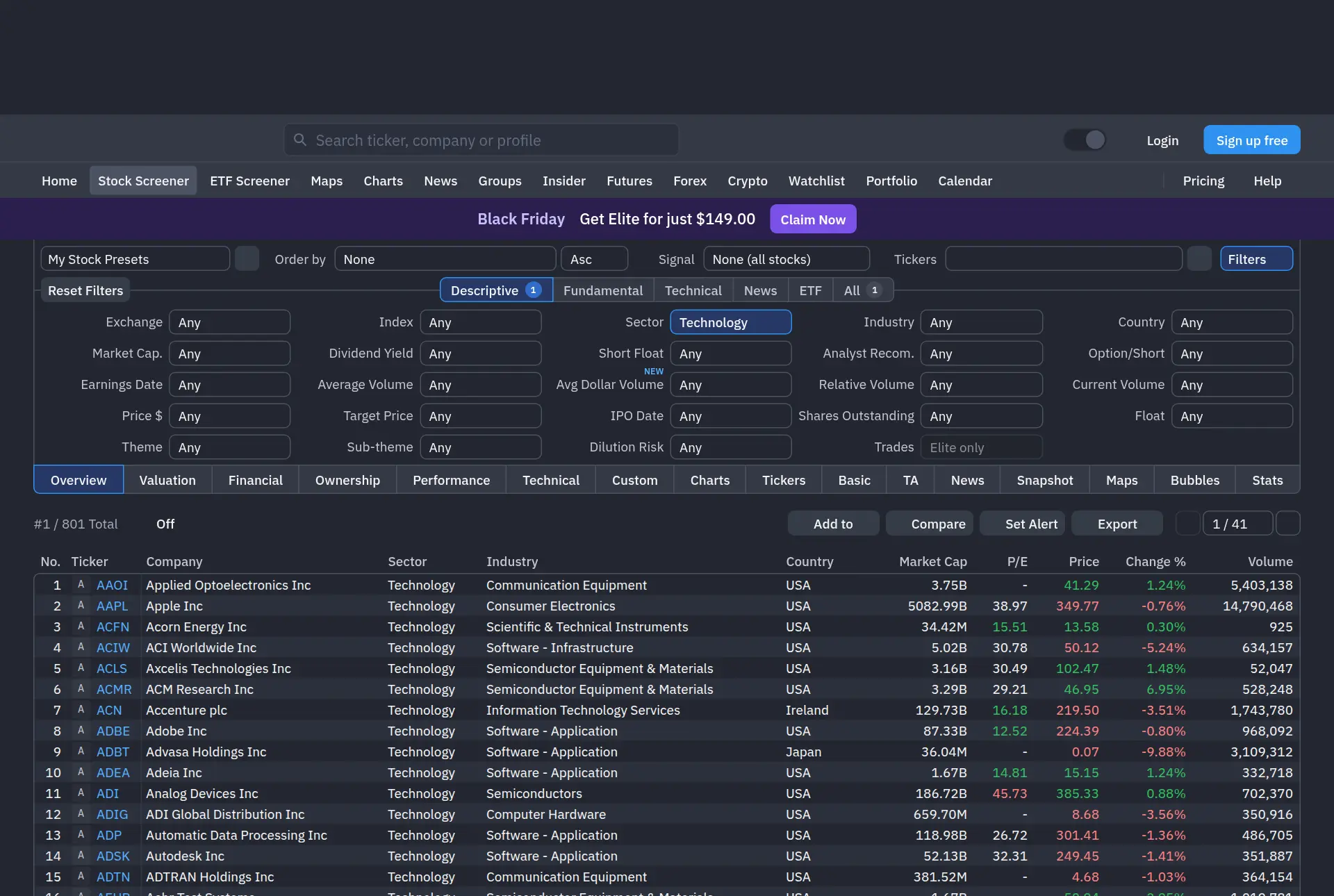
One page of 20 rows: ticker, company, sector, industry, country, market cap, P/E, price, change and volume.
Give it Finviz's own filter, signal and order codes, or a screener address copied from finviz.com.
1 unit a run, for runs that return data. Runs that fail cost nothing. How units work
- Counted
- 1 unit a run
- Inputs
- 5
- Record
- 15 fields
- A run takes
- up to 5 minutes
- Records kept
- 7 days
- Measured
- its success, on the status page
POST/v1/scrapers/finviz.screener/runs
sent, and answered
a record of the run15 fields
ok1 unit a run
A record this scraper returned for this input. The first 9 of its 15 fields are set down here; the whole record is below.
What it is used for
- Screen stocks by Finviz's filters
- Send Finviz's own filter codes, such as sector and size, and get one page of matching stocks with price and P/E.
- Track a sector's leaders
- Run the same screen each day ordered by market cap and keep the top rows'
priceandchange_percent. - Build a list of tickers to study
- Page through a screen's results and collect
ticker,companyandindustryfor the stocks to read in full.
What you send
Finviz's own filter, signal and order codes, or a screener address copied from finviz.com. These are its 5 inputs, as its schema has them.
filterslist of strings Optional- Finviz's own filter codes, as a screener address carries them after
f=:cap_mega(market cap over $200bn),sec_technology,geo_usa,fa_div_o3(a dividend yield above three percent),ta_rsi_os30. Every stock when empty. signalstring Optional- One of Finviz's signals, as an address carries it after
s=:ta_topgainers,ta_toplosers,ta_newhigh,ta_mostactive,ta_unusualvolume, … orderstring Optional- The column to sort by, as an address carries it after
o=, with a dash in front for descending:-marketcap,-change,pe,ticker. urlstring Optional- A screener address copied from finviz.com instead; its filters, signal and order are read from it.
pageinteger Optional- The page of the result, from 1; each holds 20 rows.Default
1
A request, ready to send
It starts a run with the input shown at the top of this page, waits up to 60 seconds for it, and reads its records. Put your key in the variable it reads.
# Start a run and wait up to 60 seconds for it to finish
curl -X POST "https://api.enrichednow.com/v1/scrapers/finviz.screener/runs?wait=60" \
  -H "Authorization: Bearer $ENRICHEDNOW_API_KEY" \
  -H "Content-Type: application/json" \
  -d '{"input":{"filters":["sec_technology"]}}'

# Read its records, with the id the first call answered
curl "https://api.enrichednow.com/v1/runs/$RUN_ID/records?limit=100" \
  -H "Authorization: Bearer $ENRICHEDNOW_API_KEY"
from enrichednow import EnrichedNow
client = EnrichedNow() # reads ENRICHEDNOW_API_KEY
# Start a run, wait for it to end, and get its records
result = client.scrape("finviz.screener", {"filters": ["sec_technology"]})
print(result.run.id, result.run.status, result.run.record_count)
# Read its records: pages are fetched as you go
for record in result.records:
print(record)Install it with pip install enrichednow, then save as run.py and run python3 run.py
import EnrichedNow from "enrichednow";

const client = new EnrichedNow(); // reads ENRICHEDNOW_API_KEY

// Start a run, wait for it to end, and get its records
const { run, records } = await client.scrape("finviz.screener", { filters: ["sec_technology"] });
console.log(run.id, run.status, run.record_count);

// Read its records: pages are fetched as you go
for await (const record of records) console.log(record);
Install it with npm install enrichednow, then save as run.mjs and run node run.mjs
package main

import (
	"context"
	"fmt"
	"log"
	"time"

	enrichednow "github.com/enrichednow/enrichednow-go"
)

func main() {
	client, err := enrichednow.NewClient() // reads ENRICHEDNOW_API_KEY
	if err != nil {
		log.Fatal(err)
	}
	ctx, cancel := context.WithTimeout(context.Background(), 10*time.Minute)
	defer cancel()

	// Start a run, wait for it to end, and get its records
	run, records, err := client.Scrape(ctx, "finviz.screener", map[string]any{"filters": []any{"sec_technology"}})
	if err != nil {
		log.Fatal(err)
	}
	fmt.Println(run.ID, run.Status, run.RecordCount)

	// Read its records: pages are fetched as you go
	for records.Next() {
		fmt.Println(string(records.Current()))
	}
	if err := records.Err(); err != nil {
		log.Fatal(err)
	}
}
Install it with go get github.com/enrichednow/enrichednow-go@latest, then save as run.go and run go run run.go
import com.enrichednow.EnrichedNowClient;
import com.enrichednow.ScrapeResult;
import java.util.List;
import java.util.Map;

public class Run {
    public static void main(String[] args) {
        EnrichedNowClient client = EnrichedNowClient.fromEnv(); // reads ENRICHEDNOW_API_KEY

        // Start a run, wait for it to end, and get its records
        ScrapeResult result = client.scrape("finviz.screener", Map.of("filters", List.of("sec_technology")));
        System.out.println(result.run().id() + " " + result.run().status() + " " + result.run().recordCount());

        // Read its records: pages are fetched as you go
        for (Map<String, Object> record : result.records()) {
            System.out.println(record);
        }
    }
}
Add com.enrichednow:enrichednow-java:0.4.0 to your Maven or Gradle build, then save as Run.java
enrichednow run finviz.screener --input-json '{"filters":["sec_technology"]}'Install it with curl -fsSL https://raw.githubusercontent.com/enrichednow/enrichednow-cli/main/install.sh | sh
What comes back
One page of 20 rows: ticker, company, sector, industry, country, market cap, P/E, price, change and volume. A record has 15 fields. One we could not read is null, never an empty string or a zero.
{
  "position": 1,
  "ticker": "AAOI",
  "url": "https://finviz.com/quote.ashx?t=AAOI",
  "company": "Applied Optoelectronics Inc",
  "sector": "Technology",
  "industry": "Communication Equipment",
  "country": "USA",
  "website": "http://www.ao-inc.com",
  "market_cap": 3702535885.41,
  "pe_ratio": null,
  "price": 40.79,
  "previous_close": 45.22,
  "change_percent": -9.8,
  "volume": 20351834,
  "fetched_at": "2026-11-19T18:07:40.135826Z"
}
The scraper returned this record for the input above, reading a saved copy of the page, not the live site.
The fields of a record
positioninteger- The row's number in the whole result, from 1 across pages, in the order asked for.
tickerstring- The ticker symbol.
urlstring- The ticker's page on finviz.com.
companystring or null- The company's or the fund's name.
sectorstring or null- The sector.
industrystring or null- The industry.
countrystring or null- The country, as Finviz names it.
websitestring or null- The company's own website.
market_capnumber or null- The market capitalisation in US dollars.
pe_rationumber or null- The price to earnings ratio. Null for a company without earnings.
pricenumber or null- The last price in US dollars.
previous_closenumber or null- The previous close.
change_percentnumber or null- The day's change in percent, negative for a fall.
volumeinteger or null- The shares traded in the session.
fetched_atdatetime- When the page was read, in UTC.
Units and limits
- Counted per request
- Billed per request: a run that returns data costs 1 unit, however many records it returns.
- A miss costs nothing
- A run that fails, that meets something not supported yet, or that you cancel costs nothing. You pay for runs that return data.
- What bounds a run
- A run may take up to 5 minutes. Its records are read in pages of up to 1,000 and are kept for 7 days.
What it does not do
- One run reads one page of 20 rows; page goes to 50, the first 1,000 rows of a result.
- Finviz ignores a code it does not know: the rows then come without that filter.
- The columns are the overview's; other views of the screener are not read.
The bounds its schema sets
filters- at most 30 items
page- 1 to 50; 1 unless you say otherwise
Questions
What does Finviz screener return?
One page of 20 rows: ticker, company, sector, industry, country, market cap, P/E, price, change and volume. A record has 15 fields, among them position, ticker, url, company, sector and industry. A value that could not be read is null, never an empty string or a zero.
What do I send?
Finviz's own filter, signal and order codes, or a screener address copied from finviz.com. Optional: filters, signal, order, url and page.
How is it counted?
Billed per request: a run that returns data costs 1 unit, however many records it returns. A run that fails, that meets something not supported yet, or that you cancel costs nothing. The first 1,000 units each month are free.
How much does one run return?
Its schema sets these bounds: filters at most 30 items; page 1 to 50 (1 unless you say otherwise). A run may take up to 5 minutes.
What does it not do?
One run reads one page of 20 rows; page goes to 50, the first 1,000 rows of a result. Finviz ignores a code it does not know: the rows then come without that filter. The columns are the overview's; other views of the screener are not read.
How long are the records kept, and in what format do they come?
Records are kept for 7 days after the run ended, and read in pages of up to 1,000. They come as JSON, as NDJSON with one record a line, or as CSV with a column for each field.
Can an AI assistant call it?
Yes. Through the EnrichedNow MCP server an assistant calls the tool run_scraper with the scraper_id finviz.screener and the same input. It costs what the same API call costs.
Finviz
Stock quotes and the stock screener of finviz.com, as a visitor who is not signed in sees them: delayed prices and the site's own figures.
Finviz quote
finviz.quoteA ticker symbol of a stock or fund listed in the United States. What its page on finviz.com states: price and change, sector, industry, every figure of the page's table, the company profile and the latest analyst ratings.
- Industry
- Markets and funding
- Where
- United States
- For
- Investors
- Data
- Market data
Run it on an input of your own.
Create an account, make a key, and send the request above with your own input. The first 1,000 units each month are free.