Scraper API
Finviz
finviz.quoteAvailable
Finviz quote
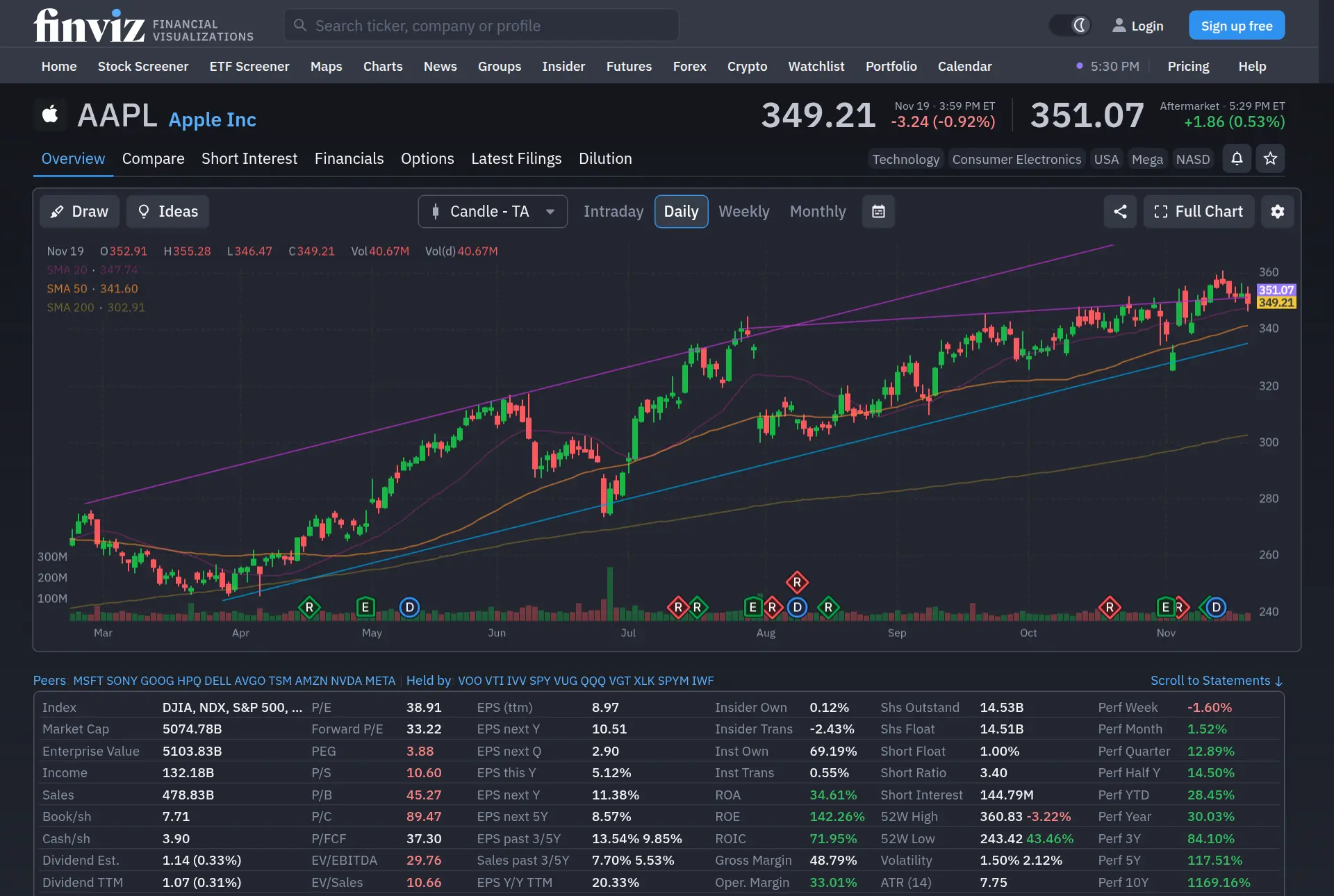
What its page on finviz.com states: price and change, sector, industry, every figure of the page's table, the company profile and the latest analyst ratings.
Give it a ticker symbol of a stock or fund listed in the United States.
1 unit a run, for runs that return data. Runs that fail cost nothing. How units work
- Counted
- 1 unit a run
- Inputs
- 1, 1 required
- Record
- 29 fields
- A run takes
- up to 5 minutes
- Records kept
- 7 days
- Measured
- its success, on the status page
POST/v1/scrapers/finviz.quote/runs
sent, and answered
a record of the run29 fields
ok1 unit a run
A record this scraper returned for this input. The first 9 of its 29 fields are set down here; the whole record is below.
What it is used for
- Read a stock's figures at once
- Give a ticker and get its price, sector, industry, market cap, P/E and every figure of its Finviz table.
- Follow analysts' calls
- Read the latest
analyst_ratingsof the stocks you hold, with the firm, the action and the price target. - Fill a watchlist
- Read the tickers of a watchlist each evening and keep
price,change_percent,volumeandtarget_price.
What you send
A ticker symbol of a stock or fund listed in the United States. It is the one input.
tickerstring Required- The ticker symbol of a stock or fund listed in the United States, e.g.
AAPL,BRK-B,SPY.
A request, ready to send
It starts a run with the input shown at the top of this page, waits up to 60 seconds for it, and reads its records. Put your key in the variable it reads.
# Start a run and wait up to 60 seconds for it to finish
curl -X POST "https://api.enrichednow.com/v1/scrapers/finviz.quote/runs?wait=60" \
  -H "Authorization: Bearer $ENRICHEDNOW_API_KEY" \
  -H "Content-Type: application/json" \
  -d '{"input":{"ticker":"AAPL"}}'

# Read its records, with the id the first call answered
curl "https://api.enrichednow.com/v1/runs/$RUN_ID/records?limit=100" \
  -H "Authorization: Bearer $ENRICHEDNOW_API_KEY"
from enrichednow import EnrichedNow
client = EnrichedNow() # reads ENRICHEDNOW_API_KEY
# Start a run, wait for it to end, and get its records
result = client.scrape("finviz.quote", {"ticker": "AAPL"})
print(result.run.id, result.run.status, result.run.record_count)
# Read its records: pages are fetched as you go
for record in result.records:
print(record)Install it with pip install enrichednow, then save as run.py and run python3 run.py
import EnrichedNow from "enrichednow";

const client = new EnrichedNow(); // reads ENRICHEDNOW_API_KEY

// Start a run, wait for it to end, and get its records
const { run, records } = await client.scrape("finviz.quote", { ticker: "AAPL" });
console.log(run.id, run.status, run.record_count);

// Read its records: pages are fetched as you go
for await (const record of records) console.log(record);
Install it with npm install enrichednow, then save as run.mjs and run node run.mjs
package main

import (
	"context"
	"fmt"
	"log"
	"time"

	enrichednow "github.com/enrichednow/enrichednow-go"
)

func main() {
	client, err := enrichednow.NewClient() // reads ENRICHEDNOW_API_KEY
	if err != nil {
		log.Fatal(err)
	}
	ctx, cancel := context.WithTimeout(context.Background(), 10*time.Minute)
	defer cancel()

	// Start a run, wait for it to end, and get its records
	run, records, err := client.Scrape(ctx, "finviz.quote", map[string]any{"ticker": "AAPL"})
	if err != nil {
		log.Fatal(err)
	}
	fmt.Println(run.ID, run.Status, run.RecordCount)

	// Read its records: pages are fetched as you go
	for records.Next() {
		fmt.Println(string(records.Current()))
	}
	if err := records.Err(); err != nil {
		log.Fatal(err)
	}
}
Install it with go get github.com/enrichednow/enrichednow-go@latest, then save as run.go and run go run run.go
import com.enrichednow.EnrichedNowClient;
import com.enrichednow.ScrapeResult;
import java.util.Map;

public class Run {
    public static void main(String[] args) {
        EnrichedNowClient client = EnrichedNowClient.fromEnv(); // reads ENRICHEDNOW_API_KEY

        // Start a run, wait for it to end, and get its records
        ScrapeResult result = client.scrape("finviz.quote", Map.of("ticker", "AAPL"));
        System.out.println(result.run().id() + " " + result.run().status() + " " + result.run().recordCount());

        // Read its records: pages are fetched as you go
        for (Map<String, Object> record : result.records()) {
            System.out.println(record);
        }
    }
}
Add com.enrichednow:enrichednow-java:0.4.0 to your Maven or Gradle build, then save as Run.java
enrichednow run finviz.quote --input ticker=AAPLInstall it with curl -fsSL https://raw.githubusercontent.com/enrichednow/enrichednow-cli/main/install.sh | sh
What comes back
What its page on finviz.com states: price and change, sector, industry, every figure of the page's table, the company profile and the latest analyst ratings. A record has 29 fields. One we could not read is null, never an empty string or a zero.
{
  "ticker": "AAPL",
  "url": "https://finviz.com/quote.ashx?t=AAPL",
  "company": "Apple Inc",
  "website": "http://www.apple.com",
  "sector": "Technology",
  "industry": "Consumer Electronics",
  "country": "USA",
  "exchange": "NASD",
  "categories": [
    "Technology",
    "Consumer Electronics",
    "USA"
  ],
  "price": 352.45,
  "price_label": "Last Close",
  "price_time": "Nov 18 • 3:59 PM ET",
  "change": 0.54,
  "change_percent": 0.15,
  "extended_price": 351.79,
  "extended_label": "Aftermarket Close",
  "extended_time": "Aftermarket • 5:35 PM ET",
  "extended_change": -0.66,
  "extended_change_percent": -0.19,
  "market_cap": 5121870000000,
  "pe_ratio": 39.27,
  "eps_ttm": 8.97,
  "volume": 34053163,
  "previous_close": 351.91,
  "target_price": 348.52,
  "metrics": [
    {
      "label": "Index",
      "value": "DJIA, NDX, S&P 500, RUI"
    },
    {
      "label": "Market Cap",
      "value": "5121.87B"
    },
    {
      "label": "Enterprise Value",
      "value": "5150.91B"
    }
  ],
  "description": "Apple, Inc. engages in the design, manufacture, and sale of smartphones, personal computers, tablets, wearables and accessories, and other varieties of related services. It operates through the following geographical segments: Americas, … [truncated]",
  "analyst_ratings": [
    {
      "date": "2026-11-11",
      "action": "Upgrade",
      "firm": "China Renaissance",
      "rating": "Hold → Buy",
      "price_target": "$425"
    },
    {
      "date": "2026-11-04",
      "action": "Downgrade",
      "firm": "DZ Bank",
      "rating": "Hold → Sell",
      "price_target": "$300"
    }
  ],
  "fetched_at": "2026-11-19T18:07:40.123195Z"
}
The scraper returned this record for the input above, reading a saved copy of the page, not the live site.
Values shortened for this page: categories: 5 items, the first 3 shown; metrics: 83 items, the first 3 shown; description: 905 characters, the first 236 shown; analyst_ratings: 20 items, the first 2 shown.
The fields of a record
tickerstring- The ticker symbol, e.g.
AAPL. urlstring- The page on finviz.com.
companystring or null- The company's or the fund's name.
websitestring or null- The company's own website, where the page links one.
sectorstring or null- The sector, e.g.
Technology; Finviz files a fund underFinancial. industrystring or null- The industry, e.g.
Consumer Electronics. Null for a fund. countrystring or null- The country the company is based in, as Finviz names it, e.g.
USA. exchangestring or null- The exchange, as Finviz abbreviates it:
NASD,NYSE,AMEX. categorieslist of strings- Every category the page's header lists, in order: for a stock the sector, industry, country, size and exchange; for a fund its own categories.
pricenumber or null- The price the page shows first, in US dollars: the last trade of the regular session, or the last close.
price_labelstring or null- What the page calls that price, e.g.
Last Close. price_timestring or null- When that price is from, as printed, e.g.
Nov 18 • 3:59 PM ET. changenumber or null- The change in dollars beside that price, negative for a fall.
change_percentnumber or null- That change in percent, e.g.
0.15. extended_pricenumber or null- The second price, when the page shows one: the premarket or aftermarket price.
extended_labelstring or null- What the page calls the second price, e.g.
Aftermarket Close. extended_timestring or null- When the second price is from, as printed.
extended_changenumber or null- The change in dollars beside the second price.
extended_change_percentnumber or null- That change in percent.
market_capnumber or null- The market capitalisation in US dollars, from the table's
Market Capcell (5121.87Bis 5,121,870,000,000). pe_rationumber or null- The price to earnings ratio, from the
P/Ecell. eps_ttmnumber or null- Earnings a share over the last twelve months, from the
EPS (ttm)cell. volumeinteger or null- The shares traded in the session, from the
Volumecell. previous_closenumber or null- The previous close, from the
Prev Closecell. target_pricenumber or null- The analysts' mean target price, from the
Target Pricecell. metricslist of objects- Every cell of the page's table of figures, in the page's order and as printed (about 80 for a stock). A label can occur twice (
EPS next Yis once a figure and once a growth rate). descriptionstring or null- The company profile the page prints.
analyst_ratingslist of objects- The latest analyst ratings the page lists, newest first.Each holds
date,action,firm,rating,price_target. fetched_atdatetime- When the page was read, in UTC.
Units and limits
- Counted per request
- Billed per request: a run that returns data costs 1 unit, however many records it returns.
- A miss costs nothing
- A run that fails, that meets something not supported yet, or that you cancel costs nothing. You pay for runs that return data.
- What bounds a run
- A run may take up to 5 minutes. Its records are read in pages of up to 1,000 and are kept for 7 days.
What it does not do
- One run reads one ticker.
- Prices are delayed, as Finviz shows them to a visitor who is not signed in.
- News, insider trades and financial statements on the page are not returned.
Questions
What does Finviz quote return?
What its page on finviz.com states: price and change, sector, industry, every figure of the page's table, the company profile and the latest analyst ratings. A record has 29 fields, among them ticker, url, company, website, sector and industry. A value that could not be read is null, never an empty string or a zero.
What do I send?
A ticker symbol of a stock or fund listed in the United States. The input ticker is required.
How is it counted?
Billed per request: a run that returns data costs 1 unit, however many records it returns. A run that fails, that meets something not supported yet, or that you cancel costs nothing. The first 1,000 units each month are free.
What does it not do?
One run reads one ticker. Prices are delayed, as Finviz shows them to a visitor who is not signed in. News, insider trades and financial statements on the page are not returned.
How long are the records kept, and in what format do they come?
Records are kept for 7 days after the run ended, and read in pages of up to 1,000. They come as JSON, as NDJSON with one record a line, or as CSV with a column for each field.
Can an AI assistant call it?
Yes. Through the EnrichedNow MCP server an assistant calls the tool run_scraper with the scraper_id finviz.quote and the same input. It costs what the same API call costs.
Finviz
Stock quotes and the stock screener of finviz.com, as a visitor who is not signed in sees them: delayed prices and the site's own figures.
Finviz screener
finviz.screenerFinviz's own filter, signal and order codes, or a screener address copied from finviz.com. One page of 20 rows: ticker, company, sector, industry, country, market cap, P/E, price, change and volume.
- Industry
- Markets and funding
- Where
- United States
- For
- Investors
- Data
- Market data
Run it on an input of your own.
Create an account, make a key, and send the request above with your own input. The first 1,000 units each month are free.