Scraper API
Booking.com
booking.searchAvailable
Booking.com search
The properties on a page of Booking.com's results: name, address, coordinates, class, review score and count, the price of the stay and what it includes, and the main photo.
Give it a destination, and optionally the dates of a stay, the guests and the rooms.
1 unit a run, for runs that return data. Runs that fail cost nothing. How units work
- Counted
- 1 unit a run
- Inputs
- 10, 1 required
- Record
- 33 fields
- A run takes
- up to 5 minutes
- Records kept
- 7 days
- Measured
- its success, on the status page
POST/v1/scrapers/booking.search/runs
sent, and answered
a record of the run33 fields
ok1 unit a run
A record this scraper returned for this input. The first 9 of its 33 fields are set down here; the whole record is below.
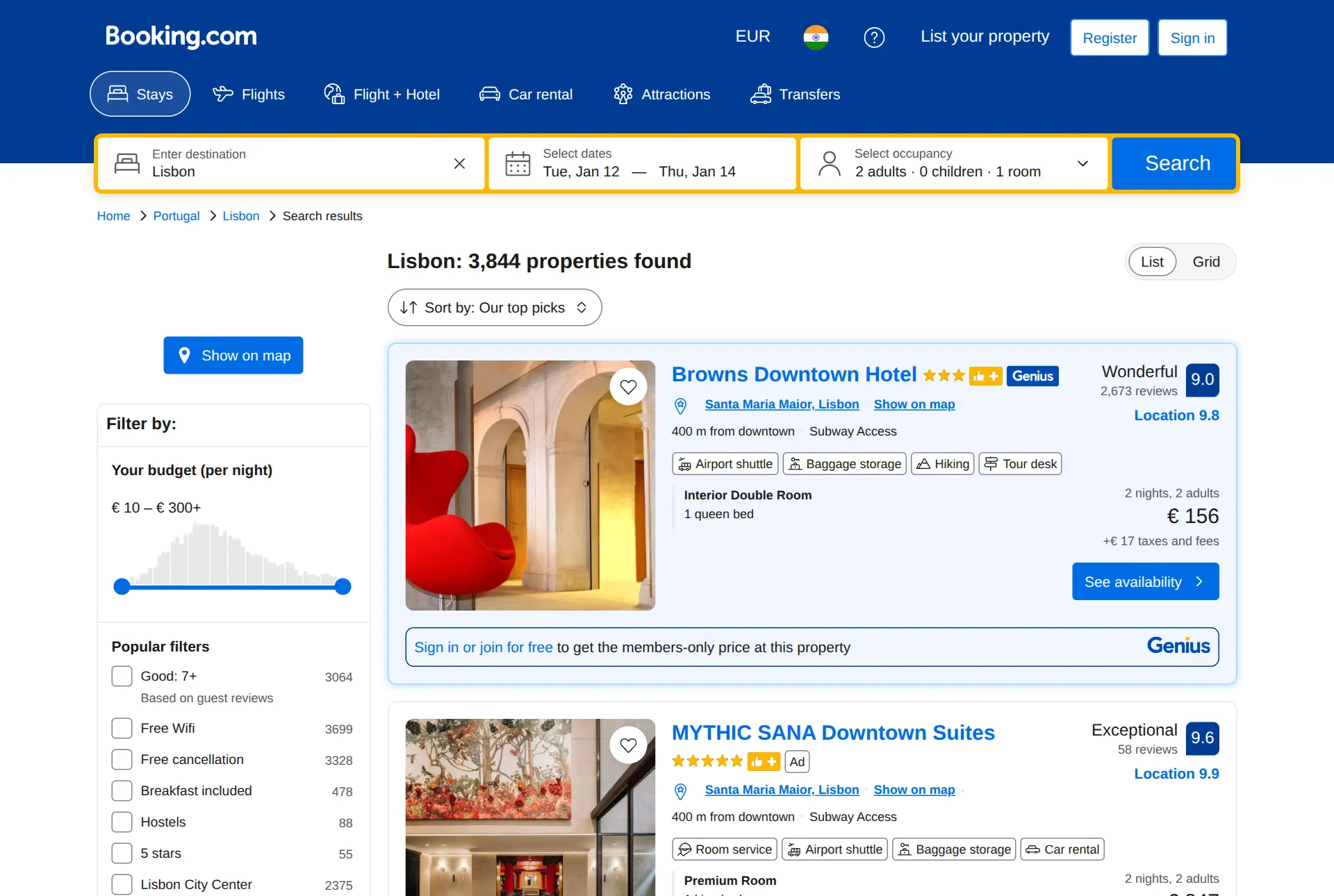
What it is used for
- Monitor hotel rates
- The properties Booking.com returns for a destination and dates, with the price for the stay, the price per night and the price before discount.
- Compare a market
- Read a city's results for the same dates each week: star class, review score, price and what is sold out.
- Check where you appear
- See the order of the results for your destination, which listings are sponsored and where your property stands.
What you send
A destination, and optionally the dates of a stay, the guests and the rooms. These are its 10 inputs, as its schema has them.
destinationstring Required- Where to stay, as typed into Booking.com's search box: a city, a region, a district or a landmark. Add the country when the name is ambiguous.
checkinstring Optional- The first night, as YYYY-MM-DD. Without dates the records carry no prices.
checkoutstring Optional- The day of departure, as YYYY-MM-DD: after checkin, and at most 90 nights later.
adultsinteger Optional- The number of adults.Default
2 children_ageslist of integers Optional- One age, 0 to 17, for each child travelling.
roomsinteger Optional- The number of rooms.Default
1 currencystring Optional- The currency prices are shown in, as an ISO code such as USD, EUR or GBP. USD unless you say otherwise.Default
USD languagestring Optional- The language of names and wording, as Booking.com codes it in lower case: en-us, en-gb, de, fr, pt-br.Default
en-us sortstring Optional- The order of the results. top_picks is Booking.com's own order.Default
top_picks pageinteger Optional- The results page, from 1 to 40; 25 properties a page.Default
1
A request, ready to send
It starts a run with the input shown at the top of this page, waits up to 60 seconds for it, and reads its records. Put your key in the variable it reads.
# Start a run and wait up to 60 seconds for it to finish
curl -X POST "https://api.enrichednow.com/v1/scrapers/booking.search/runs?wait=60" \
  -H "Authorization: Bearer $ENRICHEDNOW_API_KEY" \
  -H "Content-Type: application/json" \
  -d '{"input":{"destination":"Lisbon","checkin":"2027-01-12","checkout":"2027-01-14","adults":2}}'

# Read its records, with the id the first call answered
curl "https://api.enrichednow.com/v1/runs/$RUN_ID/records?limit=100" \
  -H "Authorization: Bearer $ENRICHEDNOW_API_KEY"
from enrichednow import EnrichedNow
client = EnrichedNow() # reads ENRICHEDNOW_API_KEY
# Start a run, wait for it to end, and get its records
result = client.scrape("booking.search", {
"destination": "Lisbon",
"checkin": "2027-01-12",
"checkout": "2027-01-14",
"adults": 2,
})
print(result.run.id, result.run.status, result.run.record_count)
# Read its records: pages are fetched as you go
for record in result.records:
print(record)Install it with pip install enrichednow, then save as run.py and run python3 run.py
import EnrichedNow from "enrichednow";

const client = new EnrichedNow(); // reads ENRICHEDNOW_API_KEY

// Start a run, wait for it to end, and get its records
const { run, records } = await client.scrape("booking.search", {
  destination: "Lisbon",
  checkin: "2027-01-12",
  checkout: "2027-01-14",
  adults: 2,
});
console.log(run.id, run.status, run.record_count);

// Read its records: pages are fetched as you go
for await (const record of records) console.log(record);
Install it with npm install enrichednow, then save as run.mjs and run node run.mjs
package main

import (
	"context"
	"fmt"
	"log"
	"time"

	enrichednow "github.com/enrichednow/enrichednow-go"
)

func main() {
	client, err := enrichednow.NewClient() // reads ENRICHEDNOW_API_KEY
	if err != nil {
		log.Fatal(err)
	}
	ctx, cancel := context.WithTimeout(context.Background(), 10*time.Minute)
	defer cancel()

	// Start a run, wait for it to end, and get its records
	run, records, err := client.Scrape(ctx, "booking.search", map[string]any{"destination": "Lisbon", "checkin": "2027-01-12", "checkout": "2027-01-14", "adults": 2})
	if err != nil {
		log.Fatal(err)
	}
	fmt.Println(run.ID, run.Status, run.RecordCount)

	// Read its records: pages are fetched as you go
	for records.Next() {
		fmt.Println(string(records.Current()))
	}
	if err := records.Err(); err != nil {
		log.Fatal(err)
	}
}
Install it with go get github.com/enrichednow/enrichednow-go@latest, then save as run.go and run go run run.go
import com.enrichednow.EnrichedNowClient;
import com.enrichednow.ScrapeResult;
import java.util.Map;

public class Run {
    public static void main(String[] args) {
        EnrichedNowClient client = EnrichedNowClient.fromEnv(); // reads ENRICHEDNOW_API_KEY

        // Start a run, wait for it to end, and get its records
        ScrapeResult result = client.scrape("booking.search", Map.of("destination", "Lisbon", "checkin", "2027-01-12", "checkout", "2027-01-14", "adults", 2));
        System.out.println(result.run().id() + " " + result.run().status() + " " + result.run().recordCount());

        // Read its records: pages are fetched as you go
        for (Map<String, Object> record : result.records()) {
            System.out.println(record);
        }
    }
}
Add com.enrichednow:enrichednow-java:0.4.0 to your Maven or Gradle build, then save as Run.java
enrichednow run booking.search --input destination=Lisbon --input checkin=2027-01-12 --input checkout=2027-01-14 --input adults=2Install it with curl -fsSL https://raw.githubusercontent.com/enrichednow/enrichednow-cli/main/install.sh | sh
What comes back
The properties on a page of Booking.com's results: name, address, coordinates, class, review score and count, the price of the stay and what it includes, and the main photo. A record has 33 fields. One we could not read is null, never an empty string or a zero.
{
  "position": 2,
  "page": 1,
  "property_id": 10131840,
  "name": "MASA Hotel & Spa Campo Grande Collection",
  "url": "https://www.booking.com/hotel/pt/masa-campo-grande.html",
  "address": "Campo Grande 56",
  "city": "Lisboa",
  "country_code": "pt",
  "area": "Alvalade, Lisbon",
  "distance": "2.6 miles from downtown",
  "latitude": 38.750851,
  "longitude": -9.148746,
  "star_class": 4,
  "review_score": 8.5,
  "review_count": 11673,
  "review_word": "Very Good",
  "checkin": "2027-01-12",
  "checkout": "2027-01-14",
  "nights": 2,
  "price": {
    "amount": 167.76,
    "currency": "USD"
  },
  "price_per_night": {
    "amount": 83.88,
    "currency": "USD"
  },
  "price_before_discount": {
    "amount": 209.7,
    "currency": "USD"
  },
  "taxes_and_fees": {
    "amount": 27.67,
    "currency": "USD"
  },
  "discounts": [
    {
      "name": "Bonus savings",
      "amount": {
        "amount": 41.94,
        "currency": "USD"
      },
      "description": "You’re getting a reduced rate because this property is offering a discount."
    }
  ],
  "room": "Standard Double or Twin Room",
  "meal_plan": "Breakfast included",
  "free_cancellation": true,
  "no_prepayment": false,
  "availability_note": null,
  "sold_out": false,
  "sponsored": false,
  "image": "https://cf.bstatic.com/xdata/images/hotel/square600/535564893.jpg?k=e7a60ec8e804b0be59a40ec440854ad50d0cfa8dc2316bed0e97f443d03c8412&o=",
  "fetched_at": "2026-11-19T18:07:39.213234Z"
}
The scraper returned this record for the input above, reading a saved copy of the page, not the live site.
The fields of a record
positioninteger- The property's place on this results page, from 1.
pageinteger- The results page the property was on.
property_idinteger- Booking's numeric id of the property.
booking.reviewstakes it. namestring- The property's name, as the results show it.
urlstring- The property's page on booking.com, without tracking parameters.
booking.hoteltakes it. addressstring or null- The street address.
citystring or null- The city, as Booking writes it (often in the local language).
country_codestring or null- The two-letter country code, in lower case as Booking gives it.
areastring or null- The district and city the card shows, e.g.
Santa Maria Maior, Lisbon. distancestring or null- The distance line of the card, in Booking's words, e.g.
0.2 miles from downtown. latitudenumber or null- The latitude of the property, in decimal degrees.
longitudenumber or null- The longitude of the property, in decimal degrees.
star_classnumber or null- The property's class, 1 to 5: official hotel stars, or Booking's own rating for a home or apartment. Null when it has none.
review_scorenumber or null- The guest review score, 1 to 10. Null when the property has no score yet.
review_countinteger or null- The number of guest reviews behind the score.
review_wordstring or null- Booking's word for the score, e.g.
Wonderful. checkindate or null- The first night of the stay the prices are for; null for a search without dates.
checkoutdate or null- The day of departure.
nightsinteger or null- The length of the stay in nights.
priceobject or null- The price the card shows for the whole stay, for the guests and rooms asked for, as Booking shows it to a visitor in the United States: before taxes and fees. It includes the discounts listed in
discounts. Null for a search without dates, or when the property has nothing left for the stay.Holdsamount,currency. price_per_nightobject or null- The same price per night, as Booking averages it.Holds
amount,currency. price_before_discountobject or null- The struck-through price of the stay, when the card shows one.Holds
amount,currency. taxes_and_feesobject or null- The taxes and fees Booking states for the stay that are not in
price.Holdsamount,currency. discountslist of objects- The discounts already taken off
price, as Booking lists them. AGeniusdiscount is the rate Booking gives its signed-in members and shows to every visitor on some properties.Each holdsname,amount,description. roomstring or null- The room or unit the price is for, e.g.
Interior Double Room. meal_planstring or null- The meals in the price, in Booking's words, e.g.
Breakfast included; null when it states none. free_cancellationboolean or null- True when the card says the offer can be cancelled free of charge.
no_prepaymentboolean or null- True when the card says nothing is paid in advance.
availability_notestring or null- The card's scarcity line, e.g.
We have 3 left at this price. sold_outboolean- True when Booking lists the property as having nothing left for the stay.
sponsoredboolean- True when the card is marked as an advertisement.
imagestring or null- The card's main photo.
fetched_atdatetime- When the results were read, in UTC.
Units and limits
- Counted per request
- Billed per request: a run that returns data costs 1 unit, however many records it returns.
- A miss costs nothing
- A run that fails, that meets something not supported yet, or that you cancel costs nothing. You pay for runs that return data.
- What bounds a run
- A run may take up to 5 minutes. Its records are read in pages of up to 1,000 and are kept for 7 days.
What it does not do
- One run reads one page of results: 25 properties. Booking.com serves 40 pages of a search at most.
- Prices are the ones Booking.com shows a visitor in the United States: the total for the stay before taxes and fees, with those given beside it.
- A destination Booking.com knows no place for returns no records, and so does a page past the end of the results.
The bounds its schema sets
adults- 1 to 30; 2 unless you say otherwise
children_ages- at most 10 items
rooms- 1 to 30; 1 unless you say otherwise
sort- top_picks, price_low_to_high, price_high_to_low, class_high_to_low, class_low_to_high, review_score, distance, homes_first; top_picks unless you say otherwise
page- 1 to 40; 1 unless you say otherwise
Questions
What does Booking.com search return?
The properties on a page of Booking.com's results: name, address, coordinates, class, review score and count, the price of the stay and what it includes, and the main photo. A record has 33 fields, among them position, page, property_id, name, url and address. A value that could not be read is null, never an empty string or a zero.
What do I send?
A destination, and optionally the dates of a stay, the guests and the rooms. The input destination is required. Optional: checkin, checkout, adults, children_ages, rooms, currency, language, sort and page.
How is it counted?
Billed per request: a run that returns data costs 1 unit, however many records it returns. A run that fails, that meets something not supported yet, or that you cancel costs nothing. The first 1,000 units each month are free.
How much does one run return?
Its schema sets these bounds: adults 1 to 30 (2 unless you say otherwise); children_ages at most 10 items; rooms 1 to 30 (1 unless you say otherwise); sort top_picks, price_low_to_high, price_high_to_low, class_high_to_low, class_low_to_high, review_score, distance, homes_first (top_picks unless you say otherwise); page 1 to 40 (1 unless you say otherwise). A run may take up to 5 minutes.
What does it not do?
One run reads one page of results: 25 properties. Booking.com serves 40 pages of a search at most. Prices are the ones Booking.com shows a visitor in the United States: the total for the stay before taxes and fees, with those given beside it. A destination Booking.com knows no place for returns no records, and so does a page past the end of the results.
How long are the records kept, and in what format do they come?
Records are kept for 7 days after the run ended, and read in pages of up to 1,000. They come as JSON, as NDJSON with one record a line, or as CSV with a column for each field.
Can an AI assistant call it?
Yes. Through the EnrichedNow MCP server an assistant calls the tool run_scraper with the scraper_id booking.search and the same input. It costs what the same API call costs.
Booking.com
Booking.com's public search results, property pages and guest reviews, as a visitor who is not signed in sees them.
Booking.com property
booking.hotelA property's address on Booking.com, and optionally the dates of a stay, the guests and the rooms. What its page says: description, address, coordinates, class, review score by category, most popular facilities, house rules, photos, and its rooms with their prices for the stay.
Booking.com reviews
booking.reviewsA property's id on Booking.com, an order and a page. A page of its guest reviews: score, headline, what the guest liked and disliked, the stay, the property's answer, and the name and country shown with the review.
- Industry
- Travel, food and places
- Where
- Worldwide
Run it on an input of your own.
Create an account, make a key, and send the request above with your own input. The first 1,000 units each month are free.