Scraper API
Booking.com
booking.hotelAvailable
Booking.com property
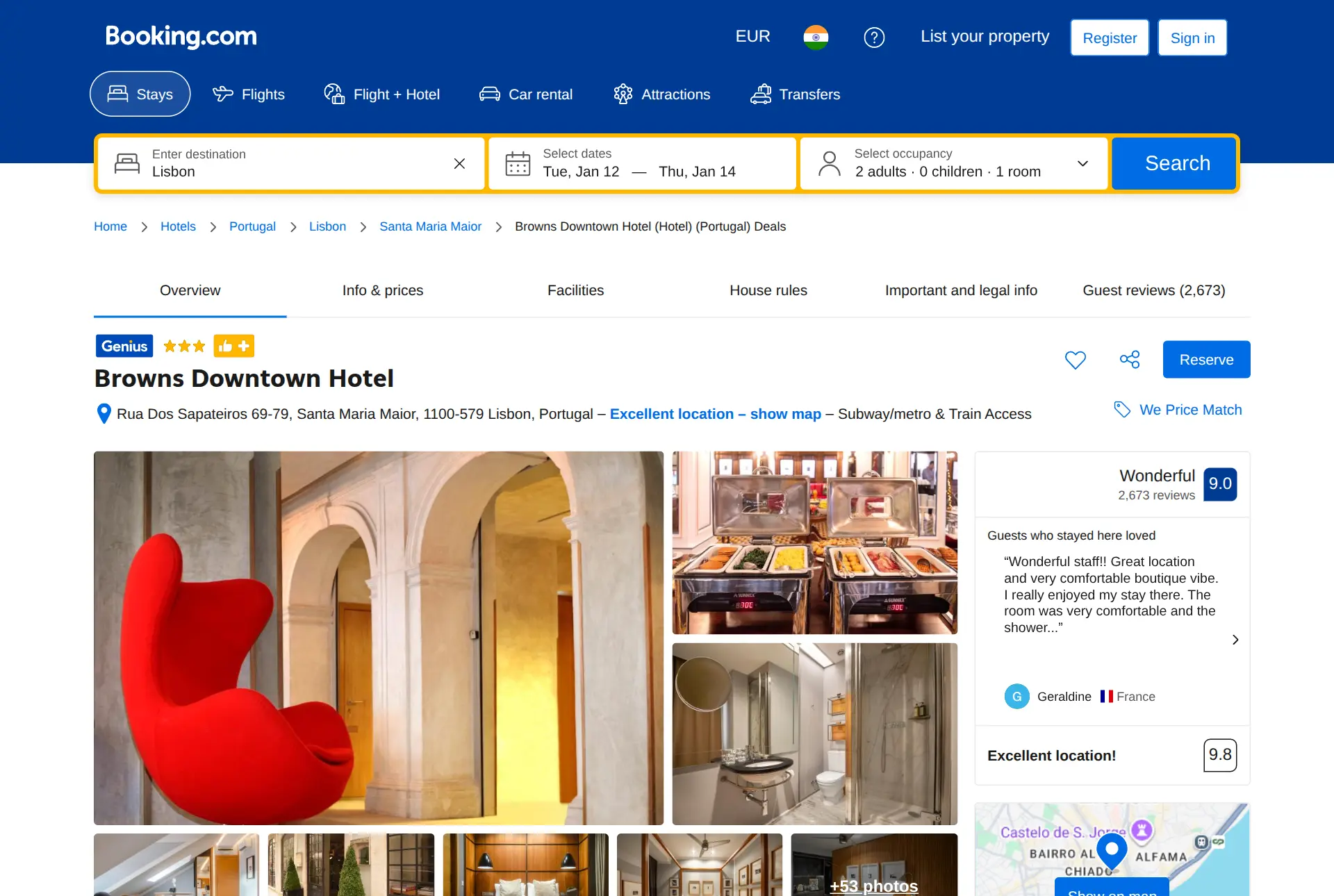
What its page says: description, address, coordinates, class, review score by category, most popular facilities, house rules, photos, and its rooms with their prices for the stay.
Give it a property's address on Booking.com, and optionally the dates of a stay, the guests and the rooms.
1 unit a run, for runs that return data. Runs that fail cost nothing. How units work
- Counted
- 1 unit a run
- Inputs
- 8, 1 required
- Record
- 26 fields
- A run takes
- up to 5 minutes
- Records kept
- 7 days
- Measured
- its success, on the status page
POST/v1/scrapers/booking.hotel/runs
sent, and answered
a record of the run26 fields
ok1 unit a run
A record this scraper returned for this input. The first 9 of its 26 fields are set down here; the whole record is below.
What it is used for
- Read a property in full
- A property's name, address, coordinates, star class, review score with its categories, facilities, rooms, house rules and photos.
- Complete a hotel record
- Add the description, the facilities and the check-in and check-out times to the properties you already list.
- Benchmark quality
- Compare
review_scoreandreview_scoresacross the properties of a district: cleanliness, location, staff, value.
What you send
A property's address on Booking.com, and optionally the dates of a stay, the guests and the rooms. These are its 8 inputs, as its schema has them.
propertystring Required- The property's page on Booking.com, or just its country and name, such as pt/browns-downtown.
checkinstring Optional- The first night, as YYYY-MM-DD. Without dates the rooms carry no prices.
checkoutstring Optional- The day of departure, as YYYY-MM-DD: after checkin, and at most 90 nights later.
adultsinteger Optional- The number of adults.Default
2 children_ageslist of integers Optional- One age, 0 to 17, for each child travelling.
roomsinteger Optional- The number of rooms.Default
1 currencystring Optional- The currency prices are shown in, as an ISO code such as USD, EUR or GBP. USD unless you say otherwise.Default
USD languagestring Optional- The language of the page, as Booking.com codes it in lower case: en-us, en-gb, de, fr, pt-br.Default
en-us
A request, ready to send
It starts a run with the input shown at the top of this page, waits up to 60 seconds for it, and reads its records. Put your key in the variable it reads.
# Start a run and wait up to 60 seconds for it to finish
curl -X POST "https://api.enrichednow.com/v1/scrapers/booking.hotel/runs?wait=60" \
  -H "Authorization: Bearer $ENRICHEDNOW_API_KEY" \
  -H "Content-Type: application/json" \
  -d '{"input":{"property":"https://www.booking.com/hotel/pt/browns-downtown.html"}}'

# Read its records, with the id the first call answered
curl "https://api.enrichednow.com/v1/runs/$RUN_ID/records?limit=100" \
  -H "Authorization: Bearer $ENRICHEDNOW_API_KEY"
from enrichednow import EnrichedNow
client = EnrichedNow() # reads ENRICHEDNOW_API_KEY
# Start a run, wait for it to end, and get its records
result = client.scrape("booking.hotel", {
"property": "https://www.booking.com/hotel/pt/browns-downtown.html",
})
print(result.run.id, result.run.status, result.run.record_count)
# Read its records: pages are fetched as you go
for record in result.records:
print(record)Install it with pip install enrichednow, then save as run.py and run python3 run.py
import EnrichedNow from "enrichednow";

const client = new EnrichedNow(); // reads ENRICHEDNOW_API_KEY

// Start a run, wait for it to end, and get its records
const { run, records } = await client.scrape("booking.hotel", {
  property: "https://www.booking.com/hotel/pt/browns-downtown.html",
});
console.log(run.id, run.status, run.record_count);

// Read its records: pages are fetched as you go
for await (const record of records) console.log(record);
Install it with npm install enrichednow, then save as run.mjs and run node run.mjs
package main

import (
	"context"
	"fmt"
	"log"
	"time"

	enrichednow "github.com/enrichednow/enrichednow-go"
)

func main() {
	client, err := enrichednow.NewClient() // reads ENRICHEDNOW_API_KEY
	if err != nil {
		log.Fatal(err)
	}
	ctx, cancel := context.WithTimeout(context.Background(), 10*time.Minute)
	defer cancel()

	// Start a run, wait for it to end, and get its records
	run, records, err := client.Scrape(ctx, "booking.hotel", map[string]any{"property": "https://www.booking.com/hotel/pt/browns-downtown.html"})
	if err != nil {
		log.Fatal(err)
	}
	fmt.Println(run.ID, run.Status, run.RecordCount)

	// Read its records: pages are fetched as you go
	for records.Next() {
		fmt.Println(string(records.Current()))
	}
	if err := records.Err(); err != nil {
		log.Fatal(err)
	}
}
Install it with go get github.com/enrichednow/enrichednow-go@latest, then save as run.go and run go run run.go
import com.enrichednow.EnrichedNowClient;
import com.enrichednow.ScrapeResult;
import java.util.Map;

public class Run {
    public static void main(String[] args) {
        EnrichedNowClient client = EnrichedNowClient.fromEnv(); // reads ENRICHEDNOW_API_KEY

        // Start a run, wait for it to end, and get its records
        ScrapeResult result = client.scrape("booking.hotel", Map.of("property", "https://www.booking.com/hotel/pt/browns-downtown.html"));
        System.out.println(result.run().id() + " " + result.run().status() + " " + result.run().recordCount());

        // Read its records: pages are fetched as you go
        for (Map<String, Object> record : result.records()) {
            System.out.println(record);
        }
    }
}
Add com.enrichednow:enrichednow-java:0.4.0 to your Maven or Gradle build, then save as Run.java
enrichednow run booking.hotel --input property=https://www.booking.com/hotel/pt/browns-downtown.htmlInstall it with curl -fsSL https://raw.githubusercontent.com/enrichednow/enrichednow-cli/main/install.sh | sh
What comes back
What its page says: description, address, coordinates, class, review score by category, most popular facilities, house rules, photos, and its rooms with their prices for the stay. A record has 26 fields. One we could not read is null, never an empty string or a zero.
{
  "property_id": 315442,
  "name": "Browns Downtown Hotel",
  "url": "https://www.booking.com/hotel/pt/browns-downtown.html",
  "property_type": "hotel",
  "description": "These trendy rooms in the center of Lisbon include hi-tech work stations with iMac computers. All are individually decorated, including coffee station and flat-screen TVs. Wi-Fi is free of charge.\nWith a tasteful mixture of textures and … [truncated]",
  "address": "Rua Dos Sapateiros 69-79, Santa Maria Maior, 1100-579 Lisbon, Portugal",
  "postal_code": "1100-579",
  "district": "Santa Maria Maior",
  "city": "Lisbon",
  "country": "Portugal",
  "country_code": "pt",
  "latitude": 38.71053976958895,
  "longitude": -9.138137251138687,
  "star_class": 3,
  "review_score": 9,
  "review_count": 2672,
  "review_scores": [
    {
      "category": "Staff",
      "score": 9.5
    },
    {
      "category": "Facilities",
      "score": 9
    },
    {
      "category": "Cleanliness",
      "score": 9.3
    }
  ],
  "popular_facilities": [
    "Free Wifi",
    "Airport shuttle",
    "Non-smoking rooms"
  ],
  "checkin": null,
  "checkout": null,
  "available": null,
  "rooms": [
    {
      "room_id": 31544201,
      "name": "Small Double Room",
      "offers": []
    },
    {
      "room_id": 31544202,
      "name": "Superior Double Room",
      "offers": []
    }
  ],
  "house_rules": [
    {
      "name": "Check-in",
      "text": "From 3:00 PM\nGuests are required to show a photo ID and credit card at check-in."
    },
    {
      "name": "Check-out",
      "text": "Until 12:00 PM"
    },
    {
      "name": "Cancellation/ prepayment",
      "text": "Cancellation and prepayment policies vary according to accommodation type. Enter your stay dates and check the conditions of your selected option."
    }
  ],
  "fine_print": "Please note that the buffet breakfast is served every morning at the Brown's Brasserie between 7:30 and 11:00.\nPlease note that reservations for more than 3 rooms, different policies and additional supplements may apply.\nGuests are required … [truncated]",
  "photos": [
    "https://cf.bstatic.com/xdata/images/hotel/max1280x900/594514309.jpg?k=77a82eaeb0e54004da40f660aafa6420c5c03221ea461d0e7e0da285c98f1d99&o=&hp=1",
    "https://cf.bstatic.com/xdata/images/hotel/max1280x900/594240624.jpg?k=74f011db86d50c719d0e8f67b77f55dac09fb8344ea9425a83e32744e2335a5c&o=&hp=1",
    "https://cf.bstatic.com/xdata/images/hotel/max1280x900/594244824.jpg?k=c3bb170caef34fbbaed96d340fdd7dc1bacd30d91c1f20807964e0e8d9b95bb7&o=&hp=1"
  ],
  "fetched_at": "2026-11-19T18:07:39.201815Z"
}
The scraper returned this record for the input above, reading a saved copy of the page, not the live site.
Values shortened for this page: description: 1,082 characters, the first 236 shown; review_scores: 7 items, the first 3 shown; popular_facilities: 10 items, the first 3 shown; rooms: 4 items, the first 2 shown; house_rules: 8 items, the first 3 shown; fine_print: 416 characters, the first 240 shown; photos: 45 items, the first 3 shown.
The fields of a record
property_idinteger- Booking's numeric id of the property.
booking.reviewstakes it. namestring- The property's name.
urlstring- The property's page on booking.com, without tracking parameters.
property_typestring or null- The kind of property as Booking classes it, in English and lower case, e.g.
hotel,apartment,villa,hostel. descriptionstring or null- The property's description, in the language asked for, one line per paragraph.
addressstring or null- The full postal address, as the page writes it.
postal_codestring or null- The postal code.
districtstring or null- The district or neighbourhood, when Booking names one.
citystring or null- The city or town.
countrystring or null- The country's name.
country_codestring or null- The two-letter country code, in lower case.
latitudenumber or null- The latitude of the property's map pin, in decimal degrees.
longitudenumber or null- The longitude of the property's map pin, in decimal degrees.
star_classnumber or null- The property's class, 1 to 5; null when it has none.
review_scorenumber or null- The guest review score, 1 to 10; null when the property has no score yet.
review_countinteger or null- The number of guest reviews behind the score.
review_scoreslist of objects- The score per review category, as the page lists them.
popular_facilitieslist of strings- The facilities the page lists as most popular, in the language asked for.
checkindate or null- The first night of the stay the rooms are priced for; null when no dates were asked.
checkoutdate or null- The day of departure.
availableboolean or null- For a stay: true when the page offers at least one room for it, false when it says it has nothing. Null when no dates were asked.
roomslist of objects- The room types: with a stay, the ones the page offers for it and their prices; without, the property's room types with no offers.Each holds
room_id,name,offers. house_ruleslist of objects- The page's "House rules": check-in and check-out times, cancellation, children and beds, pets and the rest, in the page's order.Each holds
name,text. fine_printstring or null- The page's "fine print": what the property wants guests to know before booking.
photoslist of strings- The photos of the page's gallery, largest size, in the gallery's order.
fetched_atdatetime- When the page was read, in UTC.
Units and limits
- Counted per request
- Billed per request: a run that returns data costs 1 unit, however many records it returns.
- A miss costs nothing
- A run that fails, that meets something not supported yet, or that you cancel costs nothing. You pay for runs that return data.
- What bounds a run
- A run may take up to 5 minutes. Its records are read in pages of up to 1,000 and are kept for 7 days.
What it does not do
- Room prices are the ones Booking.com shows a visitor in the United States: for the stay, for one unit of the room, before taxes and fees.
- The facilities returned are the ones the page lists as most popular, not the full list.
- Guest reviews are not read from this page: booking.reviews returns them.
- A run Booking.com does not serve the page to ends as failed, and costs nothing.
The bounds its schema sets
adults- 1 to 30; 2 unless you say otherwise
children_ages- at most 10 items
rooms- 1 to 30; 1 unless you say otherwise
Questions
What does Booking.com property return?
What its page says: description, address, coordinates, class, review score by category, most popular facilities, house rules, photos, and its rooms with their prices for the stay. A record has 26 fields, among them property_id, name, url, property_type, description and address. A value that could not be read is null, never an empty string or a zero.
What do I send?
A property's address on Booking.com, and optionally the dates of a stay, the guests and the rooms. The input property is required. Optional: checkin, checkout, adults, children_ages, rooms, currency and language.
How is it counted?
Billed per request: a run that returns data costs 1 unit, however many records it returns. A run that fails, that meets something not supported yet, or that you cancel costs nothing. The first 1,000 units each month are free.
How much does one run return?
Its schema sets these bounds: adults 1 to 30 (2 unless you say otherwise); children_ages at most 10 items; rooms 1 to 30 (1 unless you say otherwise). A run may take up to 5 minutes.
What does it not do?
Room prices are the ones Booking.com shows a visitor in the United States: for the stay, for one unit of the room, before taxes and fees. The facilities returned are the ones the page lists as most popular, not the full list. Guest reviews are not read from this page: booking.reviews returns them. A run Booking.com does not serve the page to ends as failed, and costs nothing.
How long are the records kept, and in what format do they come?
Records are kept for 7 days after the run ended, and read in pages of up to 1,000. They come as JSON, as NDJSON with one record a line, or as CSV with a column for each field.
Can an AI assistant call it?
Yes. Through the EnrichedNow MCP server an assistant calls the tool run_scraper with the scraper_id booking.hotel and the same input. It costs what the same API call costs.
Used in this playbook
A playbook runs Booking.com property as one of its steps and hands back the finished list. Its runs of this scraper cost what they cost here, and the playbook adds nothing.
Other
Hotel Rate Shop
What your competing hotels charge a night for the same stays, from Google Hotels, Booking.com and MakeMyTrip, with each change.
Booking.com
Booking.com's public search results, property pages and guest reviews, as a visitor who is not signed in sees them.
Booking.com search
booking.searchA destination, and optionally the dates of a stay, the guests and the rooms. The properties on a page of Booking.com's results: name, address, coordinates, class, review score and count, the price of the stay and what it includes, and the main photo.
Booking.com reviews
booking.reviewsA property's id on Booking.com, an order and a page. A page of its guest reviews: score, headline, what the guest liked and disliked, the stay, the property's answer, and the name and country shown with the review.
- Industry
- Travel, food and places
- Where
- Worldwide
Run it on an input of your own.
Create an account, make a key, and send the request above with your own input. The first 1,000 units each month are free.