Scraper API
App storesapp_store.top_chartsAvailable
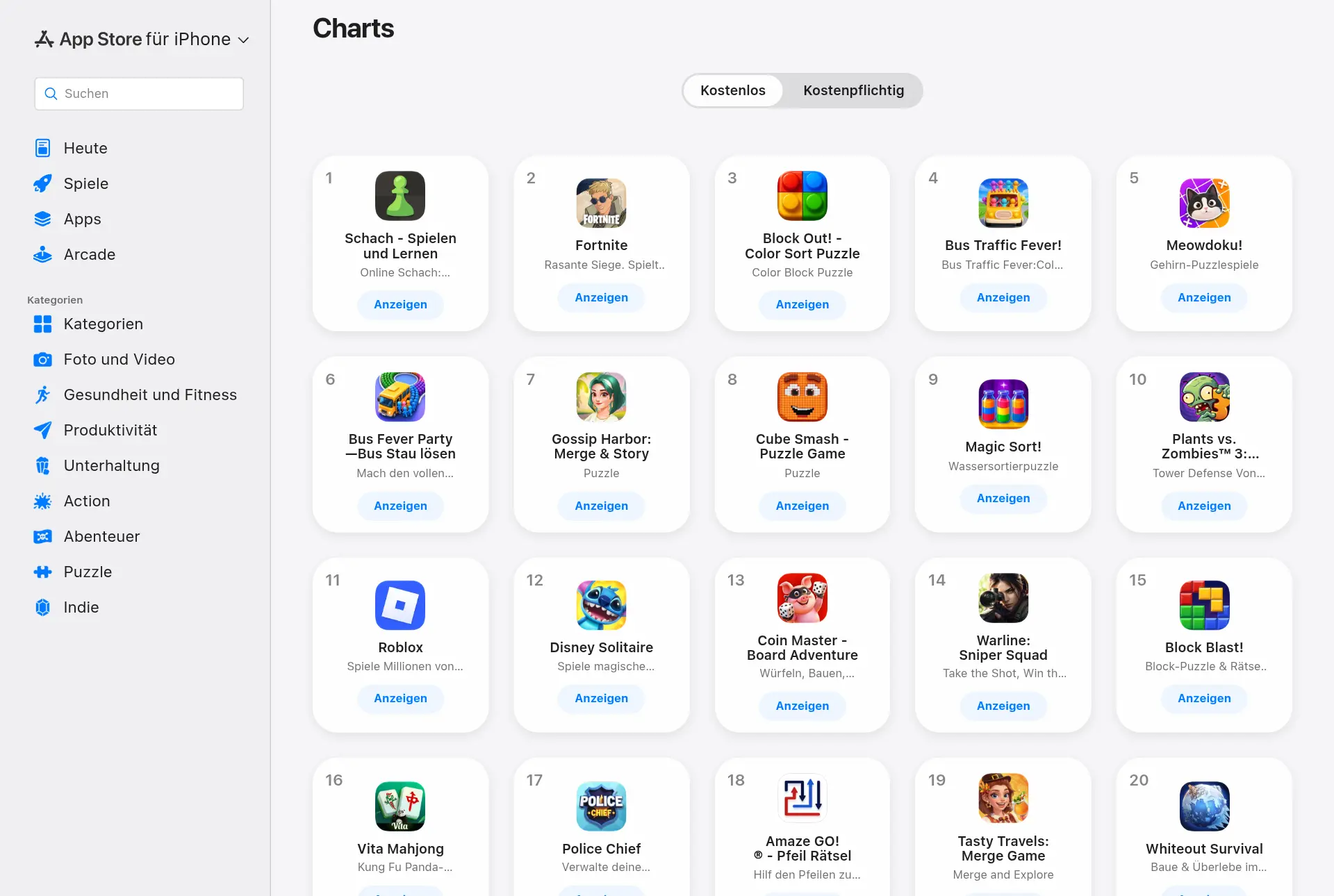
App Store top charts
The chart in order: rank, app, developer, category, price and release date.
Give it a country, a chart (free, paid or grossing) and, if you like, a category and a device.
1 unit a run, for runs that return data. Runs that fail cost nothing. How units work
- Counted
- 1 unit a run
- Inputs
- 5
- Record
- 17 fields
- A run takes
- up to 5 minutes
- Records kept
- 7 days
- Measured
- its success, on the status page
POST/v1/scrapers/app_store.top_charts/runs
sent, and answered
a record of the run17 fields
ok1 unit a run
A record this scraper returned for this input. The first 9 of its 17 fields are set down here; the whole record is below.
What it is used for
- Follow the charts
- The apps on an App Store chart, in order, by country, category and device: free or paid.
- Spot a climber
- Read a chart daily and see which apps enter and how fast they rise.
- Size a category
- Read the charts of the categories you publish in and see which developers hold the top places, country by country.
What you send
A country, a chart (free, paid or grossing) and, if you like, a category and a device. These are its 5 inputs, as its schema has them.
countrystring Optional- The storefront, as a two-letter country code (default us). Prices, ratings and availability are per storefront.Default
us chartstring Optional- Which chart: top free, top paid or top grossing apps.Default
free categorystring Optional- One App Store category, e.g. games or finance; every category when not given.
devicestring Optional- The iPhone chart or the iPad chart.Default
iphone max_resultsinteger Optional- Return at most this many apps (Apple publishes 100).Default
100
A request, ready to send
It starts a run with the input shown at the top of this page, waits up to 60 seconds for it, and reads its records. Put your key in the variable it reads.
# Start a run and wait up to 60 seconds for it to finish
curl -X POST "https://api.enrichednow.com/v1/scrapers/app_store.top_charts/runs?wait=60" \
  -H "Authorization: Bearer $ENRICHEDNOW_API_KEY" \
  -H "Content-Type: application/json" \
  -d '{"input":{"country":"de","chart":"paid","category":"games","max_results":3}}'

# Read its records, with the id the first call answered
curl "https://api.enrichednow.com/v1/runs/$RUN_ID/records?limit=100" \
  -H "Authorization: Bearer $ENRICHEDNOW_API_KEY"
from enrichednow import EnrichedNow
client = EnrichedNow() # reads ENRICHEDNOW_API_KEY
# Start a run, wait for it to end, and get its records
result = client.scrape("app_store.top_charts", {
"country": "de",
"chart": "paid",
"category": "games",
"max_results": 3,
})
print(result.run.id, result.run.status, result.run.record_count)
# Read its records: pages are fetched as you go
for record in result.records:
print(record)Install it with pip install enrichednow, then save as run.py and run python3 run.py
import EnrichedNow from "enrichednow";

const client = new EnrichedNow(); // reads ENRICHEDNOW_API_KEY

// Start a run, wait for it to end, and get its records
const { run, records } = await client.scrape("app_store.top_charts", {
  country: "de",
  chart: "paid",
  category: "games",
  max_results: 3,
});
console.log(run.id, run.status, run.record_count);

// Read its records: pages are fetched as you go
for await (const record of records) console.log(record);
Install it with npm install enrichednow, then save as run.mjs and run node run.mjs
package main

import (
	"context"
	"fmt"
	"log"
	"time"

	enrichednow "github.com/enrichednow/enrichednow-go"
)

func main() {
	client, err := enrichednow.NewClient() // reads ENRICHEDNOW_API_KEY
	if err != nil {
		log.Fatal(err)
	}
	ctx, cancel := context.WithTimeout(context.Background(), 10*time.Minute)
	defer cancel()

	// Start a run, wait for it to end, and get its records
	run, records, err := client.Scrape(ctx, "app_store.top_charts", map[string]any{"country": "de", "chart": "paid", "category": "games", "max_results": 3})
	if err != nil {
		log.Fatal(err)
	}
	fmt.Println(run.ID, run.Status, run.RecordCount)

	// Read its records: pages are fetched as you go
	for records.Next() {
		fmt.Println(string(records.Current()))
	}
	if err := records.Err(); err != nil {
		log.Fatal(err)
	}
}
Install it with go get github.com/enrichednow/enrichednow-go@latest, then save as run.go and run go run run.go
import com.enrichednow.EnrichedNowClient;
import com.enrichednow.ScrapeResult;
import java.util.Map;

public class Run {
    public static void main(String[] args) {
        EnrichedNowClient client = EnrichedNowClient.fromEnv(); // reads ENRICHEDNOW_API_KEY

        // Start a run, wait for it to end, and get its records
        ScrapeResult result = client.scrape("app_store.top_charts", Map.of("country", "de", "chart", "paid", "category", "games", "max_results", 3));
        System.out.println(result.run().id() + " " + result.run().status() + " " + result.run().recordCount());

        // Read its records: pages are fetched as you go
        for (Map<String, Object> record : result.records()) {
            System.out.println(record);
        }
    }
}
Add com.enrichednow:enrichednow-java:0.4.0 to your Maven or Gradle build, then save as Run.java
enrichednow run app_store.top_charts --input country=de --input chart=paid --input category=games --input max_results=3Install it with curl -fsSL https://raw.githubusercontent.com/enrichednow/enrichednow-cli/main/install.sh | sh
What comes back
The chart in order: rank, app, developer, category, price and release date. A record has 17 fields. One we could not read is null, never an empty string or a zero.
{
  "rank": 2,
  "app_id": "479516143",
  "bundle_id": "com.mojang.minecraftpe",
  "url": "https://apps.apple.com/de/app/minecraft/id479516143",
  "title": "Minecraft",
  "developer": {
    "name": "Mojang",
    "id": "479516146",
    "url": "https://apps.apple.com/de/developer/mojang/id479516146"
  },
  "category": "Spiele",
  "category_id": "6014",
  "price": {
    "amount": 3.99,
    "currency": "EUR"
  },
  "free": false,
  "summary": "Entdecke unendliche Welten und baue Alles, von einem einfachen Zuhause bis hin zu riesigen Schlössern. Spiele im Kreativmodus mit unbegrenzten Ressourcen oder grabe dich im Überlebensmodus tief in die Welt, während du Waffen und Rüstung … [truncated]",
  "icon": "https://is1-ssl.mzstatic.com/image/thumb/Purple211/v4/fb/a7/be/fba7bef5-248f-e255-da11-dd06a30e3828/AppIcon-0-0-1x_U007emarketing-0-10-0-85-220.png/100x100bb.png",
  "released_at": "2011-11-17T07:00:00Z",
  "chart": "paid",
  "device": "iphone",
  "country": "de",
  "fetched_at": "2026-11-19T18:07:38.404327Z"
}
The scraper returned this record for the input above, reading a saved copy of the page, not the live site.
Values shortened for this page: summary: 2,521 characters, the first 236 shown.
The fields of a record
rankinteger- The app's place on the chart, from 1.
app_idstring- Apple's numeric app id.
bundle_idstring or null- The app's bundle identifier.
urlstring- The app's address on the App Store, in this storefront.
titlestring- The app's name, as the storefront shows it.
developerobject- Who published the app.Holds
name,id,url. categorystring or null- The app's primary category, as named for the storefront.
category_idstring or null- Apple's id of that category, e.g. 6014 for Games.
priceobject or null- The app's price in this storefront; amount 0 for a free app.
freeboolean or null- True when
priceis 0, false when it is more; null when no price was read. summarystring or null- The app's description, as the chart carries it.
iconstring or null- The address of the app's icon image (the largest the chart gives).
released_atdatetime or null- The release date the chart gives for the app.
chartstring- The chart asked for: free, paid or grossing.
devicestring- The device the chart is for: iphone or ipad.
countrystring- The storefront, as a two-letter country code.
fetched_atdatetime- When the chart was read, in UTC.
Units and limits
- Counted per request
- Billed per request: a run that returns data costs 1 unit, however many records it returns.
- A miss costs nothing
- A run that fails, that meets something not supported yet, or that you cancel costs nothing. You pay for runs that return data.
- What bounds a run
- A run may take up to 5 minutes. Its records are read in pages of up to 1,000 and are kept for 7 days.
What it does not do
- A chart has at most 100 apps.
- A category that has no chart of that kind returns no records.
The bounds its schema sets
chart- free, paid, grossing; free unless you say otherwise
category- books, business, developer_tools, education, entertainment, finance, food_and_drink, games, graphics_and_design, health_and_fitness, lifestyle, magazines_and_newspapers, medical, music, navigation, news, photo_and_video, productivity, reference, shopping, social_networking, sports, travel, utilities, weather
device- iphone, ipad; iphone unless you say otherwise
max_results- 1 to 100; 100 unless you say otherwise
Questions
What does App Store top charts return?
The chart in order: rank, app, developer, category, price and release date. A record has 17 fields, among them rank, app_id, bundle_id, url, title and developer. A value that could not be read is null, never an empty string or a zero.
What do I send?
A country, a chart (free, paid or grossing) and, if you like, a category and a device. Optional: country, chart, category, device and max_results.
How is it counted?
Billed per request: a run that returns data costs 1 unit, however many records it returns. A run that fails, that meets something not supported yet, or that you cancel costs nothing. The first 1,000 units each month are free.
How much does one run return?
Its schema sets these bounds: chart free, paid, grossing (free unless you say otherwise); category books, business, developer_tools, education, entertainment, finance, food_and_drink, games, graphics_and_design, health_and_fitness, lifestyle, magazines_and_newspapers, medical, music, navigation, news, photo_and_video, productivity, reference, shopping, social_networking, sports, travel, utilities, weather; device iphone, ipad (iphone unless you say otherwise); max_results 1 to 100 (100 unless you say otherwise). A run may take up to 5 minutes.
What does it not do?
A chart has at most 100 apps. A category that has no chart of that kind returns no records.
How long are the records kept, and in what format do they come?
Records are kept for 7 days after the run ended, and read in pages of up to 1,000. They come as JSON, as NDJSON with one record a line, or as CSV with a column for each field.
Can an AI assistant call it?
Yes. Through the EnrichedNow MCP server an assistant calls the tool run_scraper with the scraper_id app_store.top_charts and the same input. It costs what the same API call costs.
Used in this playbook
A playbook runs App Store top charts as one of its steps and hands back the finished list. Its runs of this scraper cost what they cost here, and the playbook adds nothing.
Other
App Intelligence
Ratings, versions, release notes and chart ranks of apps on the App Store and Google Play, with what changed since last run.
App stores
Apple's App Store and Google Play as a visitor who is not signed in sees them: an app's listing, its reviews, search results, top charts and a developer's apps.
App Store app
app_store.appAn app's id or address on Apple's App Store, and a country. Its listing there: developer, category, rating, price, description, version and images.
Google Play app
google_play.appAn app's package name on Google Play. Its listing there: developer, category, rating, installs, price, description, last update and images.
App Store search
app_store.searchA search term and a country. The apps Apple's App Store search returns, in its order: developer, category, rating, price, version, description and images.
App Store reviews
app_store.reviewsAn app's id or address on Apple's App Store, and a country. The customer reviews published for it there, newest or most helpful first: stars, headline, text, app version and date.
App Store developer apps
app_store.developer_appsA developer's id or address on Apple's App Store, and a country. The apps that developer publishes there: category, rating, price, version, description and images of each.
Google Play search
google_play.searchA search term, a country and a language. The apps on Google Play's search results page: developer, category, rating, price, installs and description.
Google Play reviews
google_play.reviewsAn app's package name on Google Play, a country and a language. The reviews under its listing, newest, most relevant or highest rated first: stars, text, date, helpful count, app version and the developer's reply.
Google Play top charts
google_play.top_chartsA chart (free, paid or grossing), a category and a country. The chart in order: app, developer, category, rating, price and installs.
Google Play developer apps
google_play.developer_appsA developer's id or name, as the address of their Google Play page gives it. The apps that page shows: category, rating, price, installs and description of each.
- Industry
- Reviews and apps
- Where
- Worldwide
- Data
- Prices
Run it on an input of your own.
Create an account, make a key, and send the request above with your own input. The first 1,000 units each month are free.