Scraper API
Zomato
zomato.restaurantAvailable
Zomato restaurant
The restaurant: cuisines, address, coordinates, phone numbers, dining and delivery ratings with how many reviews each rests on, opening hours, cost for two, what it is known for, popular dishes and the features it offers.
Give it the address of a restaurant's page on zomato.com.
1 unit a run, for runs that return data. Runs that fail cost nothing. How units work
- Counted
- 1 unit a run
- Inputs
- 1, 1 required
- Record
- 26 fields
- A run takes
- up to 5 minutes
- Records kept
- 7 days
- Measured
- its success, on the status page
POST/v1/scrapers/zomato.restaurant/runs
sent, and answered
a record of the run26 fields
ok1 unit a run
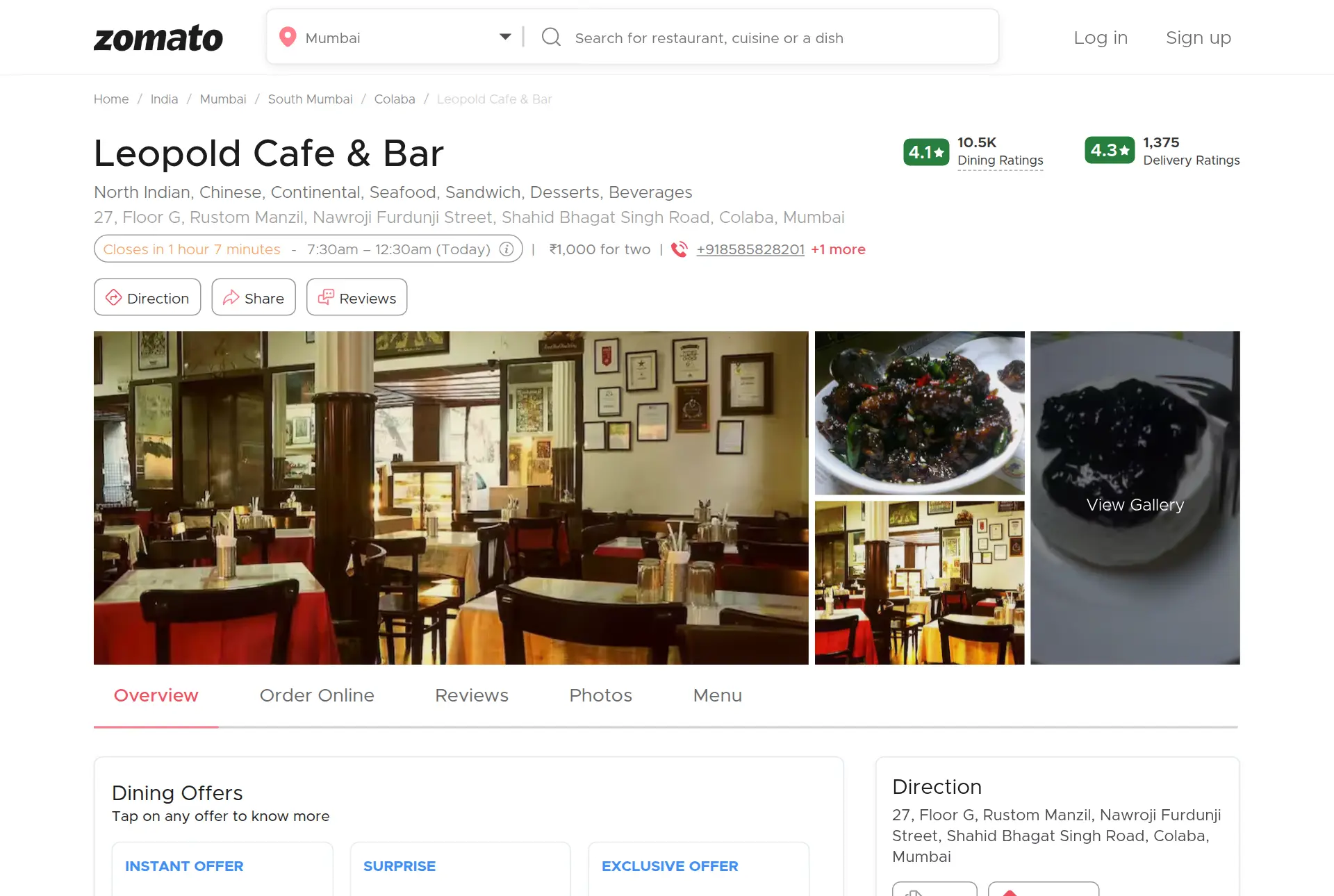
A record this scraper returned for this input. The first 9 of its 26 fields are set down here; the whole record is below.
What it is used for
- Build a restaurant directory
- Name, cuisines, address, coordinates, phone numbers and opening hours of restaurants in India's cities, in one record each.
- Compare ratings
- Set
dining_ratinganddelivery_rating, with the reviews behind each, side by side for the restaurants of a neighbourhood. - Price a market
cost_for_two,featuresandpopular_dishesshow what a place charges and offers, for a menu or a site of your own.
What you send
The address of a restaurant's page on zomato.com. It is the one input.
urlstring Required- The restaurant's page on zomato.com, e.g. https://www.zomato.com/mumbai/leopold-cafe-bar-colaba.
A request, ready to send
It starts a run with the input shown at the top of this page, waits up to 60 seconds for it, and reads its records. Put your key in the variable it reads.
# Start a run and wait up to 60 seconds for it to finish
curl -X POST "https://api.enrichednow.com/v1/scrapers/zomato.restaurant/runs?wait=60" \
  -H "Authorization: Bearer $ENRICHEDNOW_API_KEY" \
  -H "Content-Type: application/json" \
  -d '{"input":{"url":"https://www.zomato.com/mumbai/leopold-cafe-bar-colaba"}}'

# Read its records, with the id the first call answered
curl "https://api.enrichednow.com/v1/runs/$RUN_ID/records?limit=100" \
  -H "Authorization: Bearer $ENRICHEDNOW_API_KEY"
from enrichednow import EnrichedNow
client = EnrichedNow() # reads ENRICHEDNOW_API_KEY
# Start a run, wait for it to end, and get its records
result = client.scrape("zomato.restaurant", {
"url": "https://www.zomato.com/mumbai/leopold-cafe-bar-colaba",
})
print(result.run.id, result.run.status, result.run.record_count)
# Read its records: pages are fetched as you go
for record in result.records:
print(record)Install it with pip install enrichednow, then save as run.py and run python3 run.py
import EnrichedNow from "enrichednow";

const client = new EnrichedNow(); // reads ENRICHEDNOW_API_KEY

// Start a run, wait for it to end, and get its records
const { run, records } = await client.scrape("zomato.restaurant", {
  url: "https://www.zomato.com/mumbai/leopold-cafe-bar-colaba",
});
console.log(run.id, run.status, run.record_count);

// Read its records: pages are fetched as you go
for await (const record of records) console.log(record);
Install it with npm install enrichednow, then save as run.mjs and run node run.mjs
package main

import (
	"context"
	"fmt"
	"log"
	"time"

	enrichednow "github.com/enrichednow/enrichednow-go"
)

func main() {
	client, err := enrichednow.NewClient() // reads ENRICHEDNOW_API_KEY
	if err != nil {
		log.Fatal(err)
	}
	ctx, cancel := context.WithTimeout(context.Background(), 10*time.Minute)
	defer cancel()

	// Start a run, wait for it to end, and get its records
	run, records, err := client.Scrape(ctx, "zomato.restaurant", map[string]any{"url": "https://www.zomato.com/mumbai/leopold-cafe-bar-colaba"})
	if err != nil {
		log.Fatal(err)
	}
	fmt.Println(run.ID, run.Status, run.RecordCount)

	// Read its records: pages are fetched as you go
	for records.Next() {
		fmt.Println(string(records.Current()))
	}
	if err := records.Err(); err != nil {
		log.Fatal(err)
	}
}
Install it with go get github.com/enrichednow/enrichednow-go@latest, then save as run.go and run go run run.go
import com.enrichednow.EnrichedNowClient;
import com.enrichednow.ScrapeResult;
import java.util.Map;

public class Run {
    public static void main(String[] args) {
        EnrichedNowClient client = EnrichedNowClient.fromEnv(); // reads ENRICHEDNOW_API_KEY

        // Start a run, wait for it to end, and get its records
        ScrapeResult result = client.scrape("zomato.restaurant", Map.of("url", "https://www.zomato.com/mumbai/leopold-cafe-bar-colaba"));
        System.out.println(result.run().id() + " " + result.run().status() + " " + result.run().recordCount());

        // Read its records: pages are fetched as you go
        for (Map<String, Object> record : result.records()) {
            System.out.println(record);
        }
    }
}
Add com.enrichednow:enrichednow-java:0.4.0 to your Maven or Gradle build, then save as Run.java
enrichednow run zomato.restaurant --input url=https://www.zomato.com/mumbai/leopold-cafe-bar-colabaInstall it with curl -fsSL https://raw.githubusercontent.com/enrichednow/enrichednow-cli/main/install.sh | sh
What comes back
The restaurant: cuisines, address, coordinates, phone numbers, dining and delivery ratings with how many reviews each rests on, opening hours, cost for two, what it is known for, popular dishes and the features it offers. A record has 26 fields. One we could not read is null, never an empty string or a zero.
{
  "restaurant_id": "34383",
  "name": "Leopold Cafe & Bar",
  "url": "https://www.zomato.com/mumbai/leopold-cafe-bar-colaba",
  "cuisines": [
    "North Indian",
    "Chinese",
    "Continental"
  ],
  "address": "27, Floor G, Rustom Manzil, Nawroji Furdunji Street, Shahid Bhagat Singh Road, Colaba, Mumbai",
  "locality": "Colaba, Mumbai",
  "city": "Mumbai",
  "country": "India",
  "latitude": 18.9227648651,
  "longitude": 72.8316005319,
  "phones": [
    "+918585828201",
    "+918282808002"
  ],
  "dining_rating": 4.1,
  "dining_reviews": "10.5K",
  "delivery_rating": 4.3,
  "delivery_reviews": "1,375",
  "status": "Closed",
  "permanently_closed": false,
  "hours": [
    {
      "days": "Mon-Sun",
      "hours": "7:30am – 12:30am"
    }
  ],
  "cost_for_two": "₹1,000 for two",
  "payments": "Cash and Cards accepted",
  "known_for": "Legendary restaurant in the midst of the shopping hub",
  "popular_dishes": [
    "Shephards Pie",
    "Draught Beer Tower",
    "Walnut Pie"
  ],
  "people_say": [
    "Awesome Cafe",
    "Great Hangout Place",
    "Big Menu"
  ],
  "features": [
    "Dinner",
    "Breakfast",
    "Lunch"
  ],
  "image": "https://b.zmtcdn.com/data/pictures/3/34383/e59e8eb9b09da3984f4dfd0b6edff698_featured_v2.jpg",
  "fetched_at": "2026-11-19T18:18:55.368234Z"
}
The scraper returned this record for the input above, reading a saved copy of the page, not the live site.
Values shortened for this page: cuisines: 7 items, the first 3 shown; popular_dishes: 6 items, the first 3 shown; people_say: 6 items, the first 3 shown; features: 10 items, the first 3 shown.
The fields of a record
restaurant_idstring- Zomato's id of the restaurant.
namestring- The restaurant's name.
urlstring- The restaurant's page on zomato.com.
cuisineslist of strings- The cuisines the page lists, e.g.
North Indian,Chinese. addressstring or null- The address, as the page writes it.
localitystring or null- The neighbourhood and city, e.g.
Colaba, Mumbai. citystring or null- The city.
countrystring or null- The country.
latitudenumber or null- The latitude of the restaurant, in decimal degrees.
longitudenumber or null- The longitude of the restaurant.
phoneslist of strings- The restaurant's telephone numbers, as the page lists them.
dining_ratingnumber or null- The rating for eating in, 1 to 5; null when the page shows none.
dining_reviewsstring or null- How many reviews the dining rating rests on, as the page writes it, e.g.
10.5K. delivery_ratingnumber or null- The rating for delivery, 1 to 5; null when the page shows none.
delivery_reviewsstring or null- How many reviews the delivery rating rests on, as the page writes it, e.g.
1,375. statusstring or null- Whether the restaurant is open at the moment of the read, as the page says it, e.g.
Open now,Closed. permanently_closedboolean or null- True when Zomato marks the restaurant as closed for good.
hourslist of objects- The opening hours, as the page groups them by days.
cost_for_twostring or null- The average cost for two the page gives, as written, e.g.
₹1,000 for two. paymentsstring or null- The ways to pay the page states, e.g.
Cash and Cards accepted. known_forstring or null- What the page says the restaurant is known for.
popular_disheslist of strings- The dishes the page lists as popular.
people_saylist of strings- What the page says people say the place is known for, e.g.
Great Atmosphere. featureslist of strings- The services and features the page lists as available, e.g.
Takeaway available,Indoor seating. imagestring or null- The restaurant's main picture.
fetched_atdatetime- When the page was read, in UTC.
Units and limits
- Counted per request
- Billed per request: a run that returns data costs 1 unit, however many records it returns.
- A miss costs nothing
- A run that fails, that meets something not supported yet, or that you cancel costs nothing. You pay for runs that return data.
- What bounds a run
- A run may take up to 5 minutes. Its records are read in pages of up to 1,000 and are kept for 7 days.
What it does not do
- One run reads one restaurant.
- The reviews and the menu are not returned.
- A restaurant's status, such as Closes in 30 minutes, is the one at the moment of the read.
Questions
What does Zomato restaurant return?
The restaurant: cuisines, address, coordinates, phone numbers, dining and delivery ratings with how many reviews each rests on, opening hours, cost for two, what it is known for, popular dishes and the features it offers. A record has 26 fields, among them restaurant_id, name, url, cuisines, address and locality. A value that could not be read is null, never an empty string or a zero.
What do I send?
The address of a restaurant's page on zomato.com. The input url is required.
How is it counted?
Billed per request: a run that returns data costs 1 unit, however many records it returns. A run that fails, that meets something not supported yet, or that you cancel costs nothing. The first 1,000 units each month are free.
What does it not do?
One run reads one restaurant. The reviews and the menu are not returned. A restaurant's status, such as Closes in 30 minutes, is the one at the moment of the read.
How long are the records kept, and in what format do they come?
Records are kept for 7 days after the run ended, and read in pages of up to 1,000. They come as JSON, as NDJSON with one record a line, or as CSV with a column for each field.
Can an AI assistant call it?
Yes. Through the EnrichedNow MCP server an assistant calls the tool run_scraper with the scraper_id zomato.restaurant and the same input. It costs what the same API call costs.
Used in this playbook
A playbook runs Zomato restaurant as one of its steps and hands back the finished list. Its runs of this scraper cost what they cost here, and the playbook adds nothing.
E-commerce
Menu Price Tracker
Every dish and price on the menus of the restaurants you watch, on Uber Eats, TheFork and Zomato, with each price change.
Zomato
Restaurants' pages on Zomato in India: cuisines, address, phone numbers, dining and delivery ratings, opening hours and cost for two.
- Industry
- Travel, food and places
- Where
- India
Run it on an input of your own.
Create an account, make a key, and send the request above with your own input. The first 1,000 units each month are free.