Scraper API
Zillow
zillow.searchAvailable
Zillow search
The listings on a page of the results: Zillow's id, price, address, coordinates, beds, baths, area, kind of home, status, days on Zillow, main photo and the brokerage named.
Give it a place in the United States with filters, or the address of a Zillow results page.
1 unit a run, for runs that return data. Runs that fail cost nothing. How units work
- Counted
- 1 unit a run
- Inputs
- 10
- Record
- 32 fields
- A run takes
- up to 5 minutes
- Records kept
- 7 days
- Measured
- its success, on the status page
POST/v1/scrapers/zillow.search/runs
sent, and answered
a record of the run32 fields
ok1 unit a run
A record this scraper returned for this input. The first 9 of its 32 fields are set down here; the whole record is below.
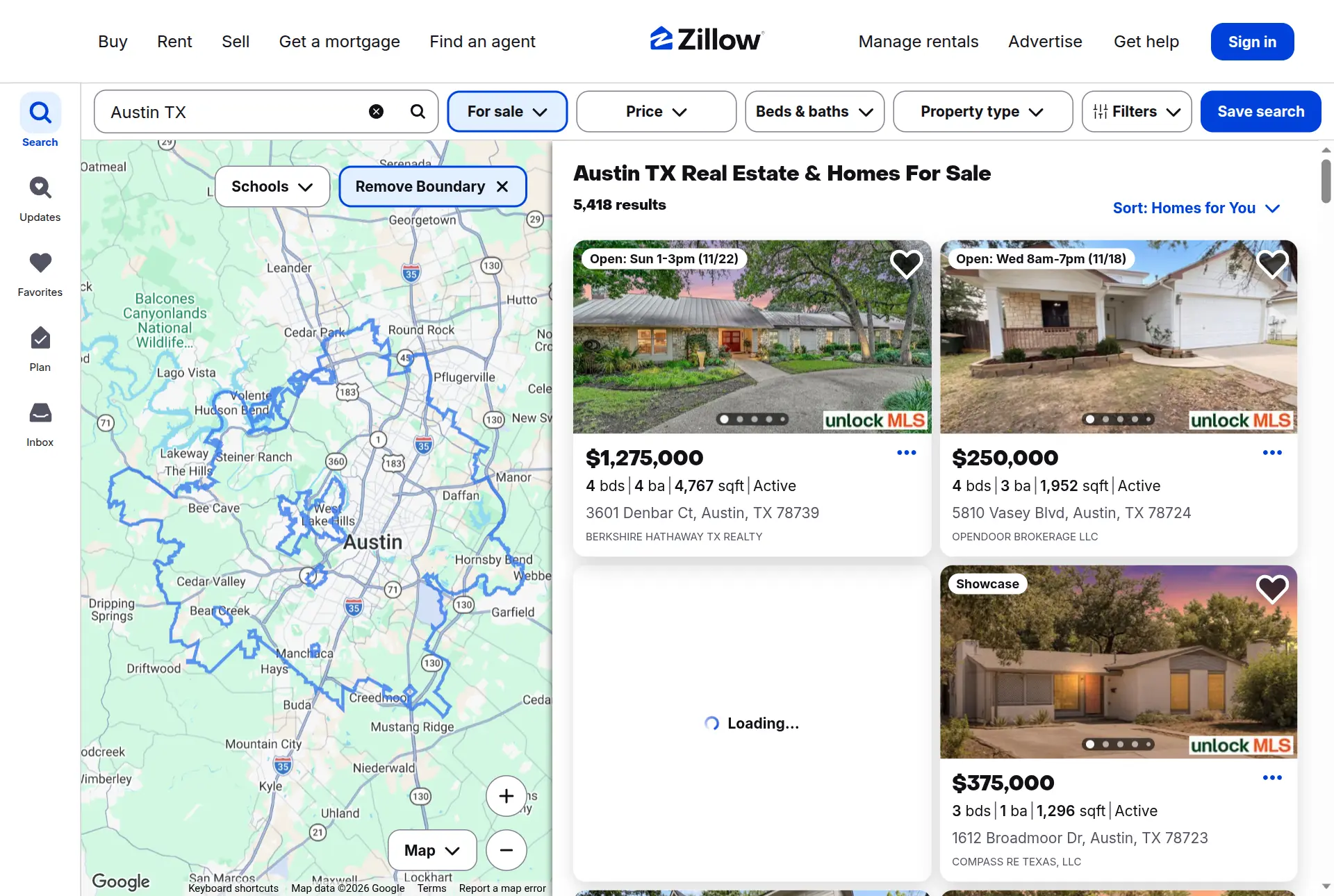
What it is used for
- Monitor a housing market
- The listings Zillow shows for a place: price, address, beds, baths, area, kind of home, status and days on Zillow.
- Find the price changes
price_changeanddays_on_zillowshow which listings were cut and which have waited. Run it weekly and read the difference.- Build a list of comparables
- Filter by beds, price and kind of home and collect what is for sale or recently sold around an address.
What you send
A place in the United States with filters, or the address of a Zillow results page. These are its 10 inputs, as its schema has them.
locationstring One of the two- A city and state, a ZIP code, a county, a neighbourhood with its city, or a state, named as Zillow names it.
urlstring One of the two- A results page's address copied from zillow.com instead; it is read with the filters it carries.
listing_typestring Optional- for_sale, for_rent or sold. for_sale unless you say otherwise.Default
for_sale home_typeslist of strings Optional- Any of house, condo, townhouse, multi_family, apartment, manufactured, land. Every kind when left out.
min_priceinteger Optional- The lowest price in US dollars; for rentals, the lowest monthly rent.
max_priceinteger Optional- The highest price in US dollars; for rentals, the highest monthly rent.
min_bedsinteger Optional- With location: at least this many bedrooms, 1 to 5.
min_bathsnumber Optional- 1, 1.5, 2, 3 or 4.
max_resultsinteger Optional- Return at most this many listings of the page; all of them when not given.
pageinteger Optional- The results page, from 1 to 20.Default
1
A request, ready to send
It starts a run with the input shown at the top of this page, waits up to 60 seconds for it, and reads its records. Put your key in the variable it reads.
# Start a run and wait up to 60 seconds for it to finish
curl -X POST "https://api.enrichednow.com/v1/scrapers/zillow.search/runs?wait=60" \
  -H "Authorization: Bearer $ENRICHEDNOW_API_KEY" \
  -H "Content-Type: application/json" \
  -d '{"input":{"location":"Austin, TX"}}'

# Read its records, with the id the first call answered
curl "https://api.enrichednow.com/v1/runs/$RUN_ID/records?limit=100" \
  -H "Authorization: Bearer $ENRICHEDNOW_API_KEY"
from enrichednow import EnrichedNow
client = EnrichedNow() # reads ENRICHEDNOW_API_KEY
# Start a run, wait for it to end, and get its records
result = client.scrape("zillow.search", {"location": "Austin, TX"})
print(result.run.id, result.run.status, result.run.record_count)
# Read its records: pages are fetched as you go
for record in result.records:
print(record)Install it with pip install enrichednow, then save as run.py and run python3 run.py
import EnrichedNow from "enrichednow";

const client = new EnrichedNow(); // reads ENRICHEDNOW_API_KEY

// Start a run, wait for it to end, and get its records
const { run, records } = await client.scrape("zillow.search", { location: "Austin, TX" });
console.log(run.id, run.status, run.record_count);

// Read its records: pages are fetched as you go
for await (const record of records) console.log(record);
Install it with npm install enrichednow, then save as run.mjs and run node run.mjs
package main

import (
	"context"
	"fmt"
	"log"
	"time"

	enrichednow "github.com/enrichednow/enrichednow-go"
)

func main() {
	client, err := enrichednow.NewClient() // reads ENRICHEDNOW_API_KEY
	if err != nil {
		log.Fatal(err)
	}
	ctx, cancel := context.WithTimeout(context.Background(), 10*time.Minute)
	defer cancel()

	// Start a run, wait for it to end, and get its records
	run, records, err := client.Scrape(ctx, "zillow.search", map[string]any{"location": "Austin, TX"})
	if err != nil {
		log.Fatal(err)
	}
	fmt.Println(run.ID, run.Status, run.RecordCount)

	// Read its records: pages are fetched as you go
	for records.Next() {
		fmt.Println(string(records.Current()))
	}
	if err := records.Err(); err != nil {
		log.Fatal(err)
	}
}
Install it with go get github.com/enrichednow/enrichednow-go@latest, then save as run.go and run go run run.go
import com.enrichednow.EnrichedNowClient;
import com.enrichednow.ScrapeResult;
import java.util.Map;

public class Run {
    public static void main(String[] args) {
        EnrichedNowClient client = EnrichedNowClient.fromEnv(); // reads ENRICHEDNOW_API_KEY

        // Start a run, wait for it to end, and get its records
        ScrapeResult result = client.scrape("zillow.search", Map.of("location", "Austin, TX"));
        System.out.println(result.run().id() + " " + result.run().status() + " " + result.run().recordCount());

        // Read its records: pages are fetched as you go
        for (Map<String, Object> record : result.records()) {
            System.out.println(record);
        }
    }
}
Add com.enrichednow:enrichednow-java:0.4.0 to your Maven or Gradle build, then save as Run.java
enrichednow run zillow.search --input-json '{"location":"Austin, TX"}'Install it with curl -fsSL https://raw.githubusercontent.com/enrichednow/enrichednow-cli/main/install.sh | sh
What comes back
The listings on a page of the results: Zillow's id, price, address, coordinates, beds, baths, area, kind of home, status, days on Zillow, main photo and the brokerage named. A record has 32 fields. One we could not read is null, never an empty string or a zero.
{
  "position": 1,
  "page": 1,
  "zpid": "339458430",
  "url": "https://www.zillow.com/homedetails/12703-Timberside-Dr-Austin-TX-78727/339458430_zpid/",
  "status": "for_sale",
  "status_text": "Active",
  "is_building": false,
  "building_name": null,
  "price": 498000,
  "address": "12703 Timberside Dr, Austin, TX 78727",
  "street": "12703 Timberside Dr",
  "city": "Austin",
  "state": "TX",
  "zipcode": "78727",
  "latitude": 30.426064,
  "longitude": -97.706955,
  "beds": 3,
  "baths": 2,
  "living_area": 1438,
  "lot_size": 6599.34,
  "lot_size_unit": "sqft",
  "home_type": "single_family",
  "days_on_zillow": 8,
  "zestimate": 490200,
  "rent_zestimate": 2345,
  "tax_assessed_value": 422241,
  "sold_date": null,
  "price_change": null,
  "broker_name": "Ready Real Estate",
  "photo": "https://photos.zillowstatic.com/fp/ac699e2f4316f2d775bef763eb55dc04-p_e.jpg",
  "units": [],
  "fetched_at": "2026-11-19T18:07:42.983450Z"
}
The scraper returned this record for the input above, reading a saved copy of the page, not the live site.
The fields of a record
positioninteger- The listing's place among the returned listings of this page, from 1.
pageinteger- The results page the listing was on.
zpidstring or null- Zillow's id of the home. Null for a rental building, which has units instead of one id.
urlstring- The listing's address on zillow.com.
statusstring- What the listing is: for_sale, for_rent, sold, pending or off_market.
status_textstring or null- The status line of the card, in Zillow's words, e.g. "Active", "House for sale", "Sold".
is_buildingboolean- True for a rental building listed as one card with several units (see units), false for a single home.
building_namestring or null- The building's name, for a rental building.
pricenumber or null- In US dollars: the asking price of a home for sale, the monthly rent of a rental (for a building, the lowest rent among its units), the sale price of a sold home. Null when the card shows none, as for sold homes where sale prices are not public.
addressstring or null- The address as the card writes it, in one line.
streetstring or null- The street line of the address, with the unit number when there is one.
citystring or null- The city of the address.
statestring or null- The two-letter state of the address.
zipcodestring or null- The ZIP code of the address.
latitudenumber or null- Latitude of the home, in decimal degrees.
longitudenumber or null- Longitude of the home, in decimal degrees.
bedsnumber or null- Bedrooms; 0 is a studio. Null for land and for a building (see units).
bathsnumber or null- Bathrooms; a half bath counts 0.5.
living_areanumber or null- The interior area in square feet.
lot_sizenumber or null- The size of the lot, in the unit lot_size_unit names.
lot_size_unitstring or null- The unit of lot_size: sqft or acres, as Zillow gives it.
home_typestring or null- The kind of home: single_family, condo, townhouse, multi_family, apartment, manufactured or lot. Null for a building.
days_on_zillowinteger or null- Days the listing has been on Zillow; for a sold home, days since the sale was recorded.
zestimatenumber or null- Zillow's own estimate of the home's value in US dollars, when the card carries one.
rent_zestimatenumber or null- Zillow's own estimate of the monthly rent in US dollars, when the card carries one.
tax_assessed_valuenumber or null- The value the home is assessed at for property tax, in US dollars, when the card carries it.
sold_datedate or null- The day the sale was recorded, for a sold home.
price_changenumber or null- The last change of the asking price in US dollars, negative for a cut; null when the card shows none.
broker_namestring or null- The brokerage the card names as the listing's, when it names one.
photostring or null- The card's main photo. Null when the card shows a map or a street view instead of a photo.
unitslist of objects- For a rental building: the kinds of unit the card lists, each with its lowest rent. Empty for a single home.Each holds
beds,price_from. fetched_atdatetime- When the results page was read, in UTC.
Units and limits
- Counted per request
- Billed per request: a run that returns data costs 1 unit, however many records it returns.
- A miss costs nothing
- A run that fails, that meets something not supported yet, or that you cancel costs nothing. You pay for runs that return data.
- What bounds a run
- A run may take up to 5 minutes. Its records are read in pages of up to 1,000 and are kept for 7 days.
What it does not do
- One run reads one page of results: up to 41 listings. Zillow shows at most 20 pages of a search, so a large area is better split by ZIP code or price range.
- A place Zillow does not recognise ends as failed, with the reason location_not_recognised, and costs nothing.
- Among rentals, a building with several units is one listing: it has no Zillow id, and its units are listed with their lowest rents.
- Sold homes carry no price in states where sale prices are not public.
The bounds its schema sets
listing_type- for_sale, for_rent, sold; for_sale unless you say otherwise
home_types- at most 7 items
min_price- 0 to 1,000,000,000
max_price- 1 to 1,000,000,000
min_beds- 1 to 5
max_results- 1 to 41
page- 1 to 20; 1 unless you say otherwise
Questions
What does Zillow search return?
The listings on a page of the results: Zillow's id, price, address, coordinates, beds, baths, area, kind of home, status, days on Zillow, main photo and the brokerage named. A record has 32 fields, among them position, page, zpid, url, status and status_text. A value that could not be read is null, never an empty string or a zero.
What do I send?
A place in the United States with filters, or the address of a Zillow results page. Of location and url, send one of the two. Optional: listing_type, home_types, min_price, max_price, min_beds, min_baths, max_results and page.
How is it counted?
Billed per request: a run that returns data costs 1 unit, however many records it returns. A run that fails, that meets something not supported yet, or that you cancel costs nothing. The first 1,000 units each month are free.
How much does one run return?
Its schema sets these bounds: listing_type for_sale, for_rent, sold (for_sale unless you say otherwise); home_types at most 7 items; min_price 0 to 1,000,000,000; max_price 1 to 1,000,000,000; min_beds 1 to 5; max_results 1 to 41; page 1 to 20 (1 unless you say otherwise). A run may take up to 5 minutes.
What does it not do?
One run reads one page of results: up to 41 listings. Zillow shows at most 20 pages of a search, so a large area is better split by ZIP code or price range. A place Zillow does not recognise ends as failed, with the reason location_not_recognised, and costs nothing. Among rentals, a building with several units is one listing: it has no Zillow id, and its units are listed with their lowest rents. Sold homes carry no price in states where sale prices are not public.
How long are the records kept, and in what format do they come?
Records are kept for 7 days after the run ended, and read in pages of up to 1,000. They come as JSON, as NDJSON with one record a line, or as CSV with a column for each field.
Can an AI assistant call it?
Yes. Through the EnrichedNow MCP server an assistant calls the tool run_scraper with the scraper_id zillow.search and the same input. It costs what the same API call costs.
Used in these playbooks
A playbook runs Zillow search as one of its steps and hands back the finished list. Its runs of this scraper cost what they cost here, and the playbook adds nothing.
Real estate
Property Comps
Recently sold and listed homes like yours in a US area, with sale price, price per square foot and the ZIP code average.
Real estate
Stale Listings
Homes for sale that have sat on Zillow for months or been cut in price, with list price, Zestimate and the listing agent.
Zillow
Zillow's public search results and home pages: homes for sale, rentals and recently sold homes in the United States.
Zillow property
zillow.propertyA home's Zillow id, its address on zillow.com, or its street address. The home's page: status, price, address, coordinates, beds, baths, areas, year built, description, photos, Zillow's estimates of value and rent, and the listing agent and brokerage shown on the listing.
- Industry
- Real estate
- Where
- United States
Run it on an input of your own.
Create an account, make a key, and send the request above with your own input. The first 1,000 units each month are free.