Scraper API
Y Combinator
ycombinator.companiesAvailable
Y Combinator company directory
The companies the directory lists for them: name, one-liner, long description, website, batch, status, stage, industries, tags, regions, location, team size, and whether the company is hiring.
Give it Words to search for, and any of the directory's filters: batch, industry, region, tag, status, hiring, team size.
1 unit a record, for runs that return data. Runs that fail cost nothing. How units work
- Counted
- 1 unit a record
- Inputs
- 13
- Record
- 26 fields
- A run takes
- up to 5 minutes
- Records kept
- 7 days
- Measured
- its success, on the status page
POST/v1/scrapers/ycombinator.companies/runs
sent, and answered
a record of the run26 fields
ok1 unit a record
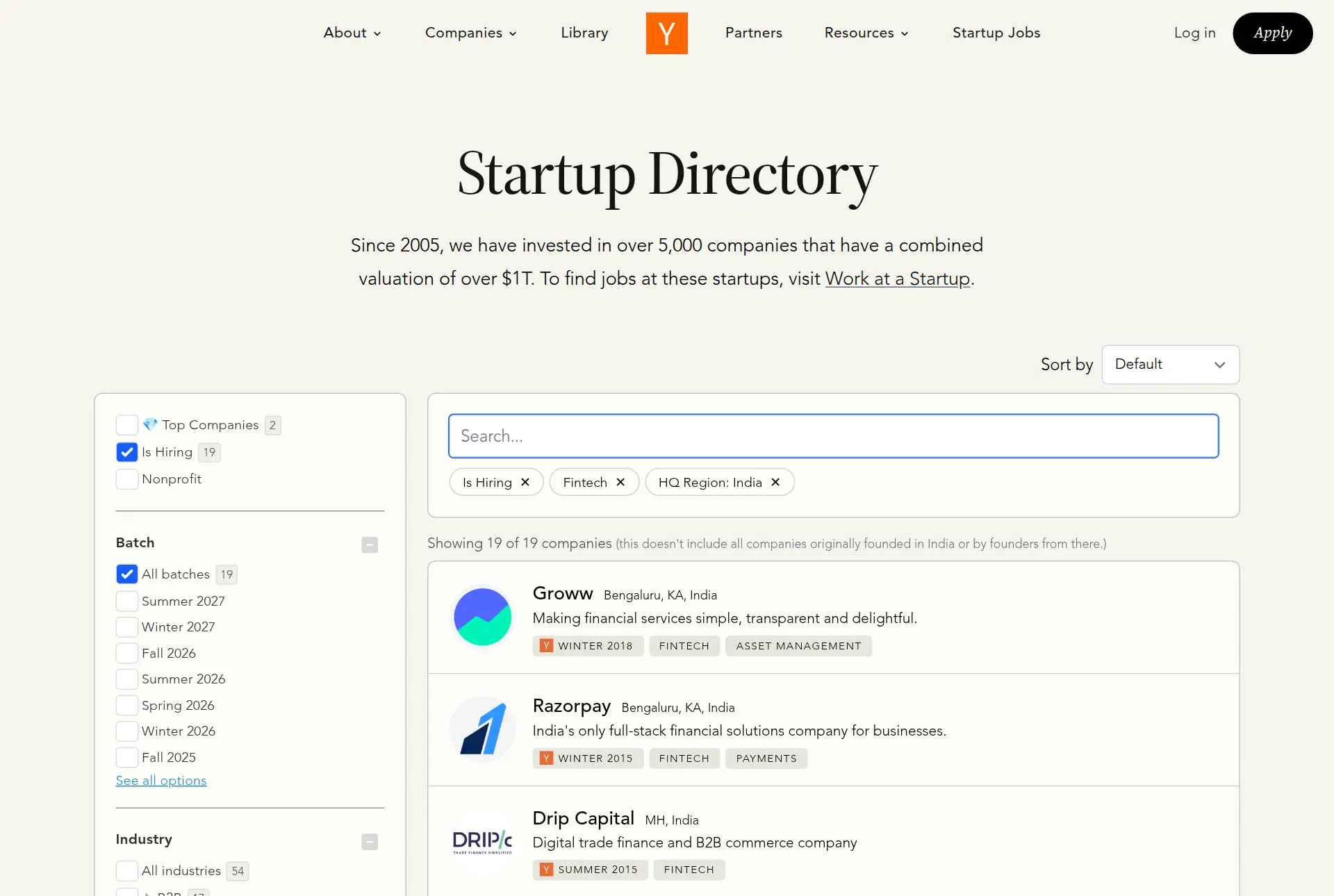
A record this scraper returned for this input. The first 9 of its 26 fields are set down here; the whole record is below.
What it is used for
- Build a list of startups
- Search Y Combinator's directory by industry, batch, region or tag and get each company with its one-liner, website, team size and status.
- Find who is hiring
- Filter by
is_hiringand team size to list the startups looking for people, with thedomainto reach each one at. - Study a batch
- Read a batch's companies and count them by industry, stage and status, to see what a cohort set out to build and how it has fared.
What you send
Words to search for, and any of the directory's filters: batch, industry, region, tag, status, hiring, team size. These are its 13 inputs, as its schema has them.
querystring Optional- Words to search for: a name, or what a company does. Leave it out to list by filters alone.
batchstring Optional- A batch by its short code or its name: W24, S09, F25, or Winter 2024.
industrystring Optional- An industry as the directory names it: Fintech, Healthcare, B2B, Consumer, Industrials.
regionstring Optional- A region as the directory names it: United States of America, Europe, India, Latin America, Remote.
tagstring Optional- A directory tag: AI, SaaS, Developer Tools, Marketplace.
statusstring Optional- Active, Acquired, Public or Inactive.
is_hiringboolean Optional- true for companies marked as hiring, false for the others.
top_companyboolean Optional- True: only companies on Y Combinator's list of top companies.
nonprofitboolean Optional- True: only nonprofits. False: none of them.
min_team_sizeinteger Optional- Only companies with at least this many people.
max_team_sizeinteger Optional- Only companies with at most this many people.
sortstring Optional- relevance, the directory's own order, or launch_date for the newest launches first.Default
relevance max_resultsinteger Optional- How many companies to return: 100 unless you say otherwise, 1,000 at most.Default
100
A request, ready to send
It starts a run with the input shown at the top of this page, waits up to 60 seconds for it, and reads its records. Put your key in the variable it reads.
# Start a run and wait up to 60 seconds for it to finish
curl -X POST "https://api.enrichednow.com/v1/scrapers/ycombinator.companies/runs?wait=60" \
  -H "Authorization: Bearer $ENRICHEDNOW_API_KEY" \
  -H "Content-Type: application/json" \
  -d '{"input":{"industry":"Fintech","region":"India","is_hiring":true,"max_results":3}}'

# Read its records, with the id the first call answered
curl "https://api.enrichednow.com/v1/runs/$RUN_ID/records?limit=100" \
  -H "Authorization: Bearer $ENRICHEDNOW_API_KEY"
from enrichednow import EnrichedNow
client = EnrichedNow() # reads ENRICHEDNOW_API_KEY
# Start a run, wait for it to end, and get its records
result = client.scrape("ycombinator.companies", {
"industry": "Fintech",
"region": "India",
"is_hiring": True,
"max_results": 3,
})
print(result.run.id, result.run.status, result.run.record_count)
# Read its records: pages are fetched as you go
for record in result.records:
print(record)Install it with pip install enrichednow, then save as run.py and run python3 run.py
import EnrichedNow from "enrichednow";

const client = new EnrichedNow(); // reads ENRICHEDNOW_API_KEY

// Start a run, wait for it to end, and get its records
const { run, records } = await client.scrape("ycombinator.companies", {
  industry: "Fintech",
  region: "India",
  is_hiring: true,
  max_results: 3,
});
console.log(run.id, run.status, run.record_count);

// Read its records: pages are fetched as you go
for await (const record of records) console.log(record);
Install it with npm install enrichednow, then save as run.mjs and run node run.mjs
package main

import (
	"context"
	"fmt"
	"log"
	"time"

	enrichednow "github.com/enrichednow/enrichednow-go"
)

func main() {
	client, err := enrichednow.NewClient() // reads ENRICHEDNOW_API_KEY
	if err != nil {
		log.Fatal(err)
	}
	ctx, cancel := context.WithTimeout(context.Background(), 10*time.Minute)
	defer cancel()

	// Start a run, wait for it to end, and get its records
	run, records, err := client.Scrape(ctx, "ycombinator.companies", map[string]any{"industry": "Fintech", "region": "India", "is_hiring": true, "max_results": 3})
	if err != nil {
		log.Fatal(err)
	}
	fmt.Println(run.ID, run.Status, run.RecordCount)

	// Read its records: pages are fetched as you go
	for records.Next() {
		fmt.Println(string(records.Current()))
	}
	if err := records.Err(); err != nil {
		log.Fatal(err)
	}
}
Install it with go get github.com/enrichednow/enrichednow-go@latest, then save as run.go and run go run run.go
import com.enrichednow.EnrichedNowClient;
import com.enrichednow.ScrapeResult;
import java.util.Map;

public class Run {
    public static void main(String[] args) {
        EnrichedNowClient client = EnrichedNowClient.fromEnv(); // reads ENRICHEDNOW_API_KEY

        // Start a run, wait for it to end, and get its records
        ScrapeResult result = client.scrape("ycombinator.companies", Map.of("industry", "Fintech", "region", "India", "is_hiring", true, "max_results", 3));
        System.out.println(result.run().id() + " " + result.run().status() + " " + result.run().recordCount());

        // Read its records: pages are fetched as you go
        for (Map<String, Object> record : result.records()) {
            System.out.println(record);
        }
    }
}
Add com.enrichednow:enrichednow-java:0.4.0 to your Maven or Gradle build, then save as Run.java
enrichednow run ycombinator.companies --input industry=Fintech --input region=India --input is_hiring=true --input max_results=3Install it with curl -fsSL https://raw.githubusercontent.com/enrichednow/enrichednow-cli/main/install.sh | sh
What comes back
The companies the directory lists for them: name, one-liner, long description, website, batch, status, stage, industries, tags, regions, location, team size, and whether the company is hiring. A record has 26 fields. One we could not read is null, never an empty string or a zero.
{
  "position": 1,
  "company_id": "1839",
  "name": "Groww",
  "slug": "groww",
  "url": "https://www.ycombinator.com/companies/groww",
  "former_names": [],
  "one_liner": "Making financial services simple, transparent and delightful.",
  "description": "Groww aims to empower people in India by making financial services simple, transparent and delightful. By leveraging technology, we build reliable and accessible financial services. \r\n\r\nGroww is India's largest stock broker (in terms of … [truncated]",
  "website": "https://groww.in",
  "domain": "groww.in",
  "batch": "Winter 2018",
  "status": "Public",
  "stage": "Growth",
  "industry": "Fintech",
  "subindustry": "Fintech -> Asset Management",
  "industries": [
    "Fintech",
    "Asset Management"
  ],
  "tags": [
    "India",
    "Investing"
  ],
  "regions": [
    "India",
    "South Asia"
  ],
  "locations": "Bengaluru, KA, India",
  "team_size": 1050,
  "is_hiring": true,
  "top_company": true,
  "nonprofit": false,
  "launched_at": "2017-11-09T04:03:09Z",
  "logo_url": "https://bookface-images.s3.amazonaws.com/small_logos/0ae62cb1672e8223d9b0ae2e5b7ecde4ae763c5e.png",
  "fetched_at": "2026-11-19T18:07:42.734639Z"
}
The scraper returned this record for the input above, reading a saved copy of the page, not the live site.
Values shortened for this page: description: 305 characters, the first 236 shown.
The fields of a record
positioninteger- The company's rank in the results of the search, from 1.
company_idstring or null- Y Combinator's own id of the company.
namestring- The company's name.
slugstring- The company's name in its directory address:
stripefor ycombinator.com/companies/stripe. urlstring- The company's page in the directory.
former_nameslist of strings- Names the company had before, as the directory lists them.
one_linerstring or null- The one-line description under the company's name.
descriptionstring or null- The company's long description, as written in the directory.
websitestring or null- The company's website, as the directory gives it.
domainstring or null- The host of that website without
www., e.g. stripe.com. batchstring or null- The Y Combinator batch the company was in, in full, e.g. "Summer 2009". Null where the directory says "Unspecified".
statusstring or null- Active, Acquired, Public or Inactive, as the directory states it.
stagestring or null- The stage the directory gives the company, e.g. Early or Growth.
industrystring or null- The company's main industry in the directory, e.g. Fintech.
subindustrystring or null- The industry with its branch, as the directory writes it, e.g. "B2B -> Infrastructure".
industrieslist of strings- Every industry the directory files the company under.
tagslist of strings- The directory's tags for the company, e.g. SaaS, Developer Tools.
regionslist of strings- The regions the directory files the company under, e.g. "United States of America", "Remote".
locationsstring or null- Where the company is, as one text, e.g. "San Francisco, CA, USA".
team_sizeinteger or null- The number of people the directory states for the company.
is_hiringboolean or null- True when the directory marks the company as hiring.
top_companyboolean or null- True when the company is on Y Combinator's list of top companies.
nonprofitboolean or null- True when the directory marks the company as a nonprofit.
launched_atdatetime or null- When the company's directory page was launched, in UTC.
logo_urlstring or null- The address of the company's logo image.
fetched_atdatetime- When the directory was read, in UTC.
Units and limits
- Counted per record
- Billed per record: a run that returns data costs 1 unit for each record it returns.
- A miss costs nothing
- A run that fails, that meets something not supported yet, or that you cancel costs nothing. You pay for runs that return data.
- What bounds a run
- A run may take up to 5 minutes. Its records are read in pages of up to 1,000 and are kept for 7 days.
What it does not do
- The directory answers at most 1,000 companies of one search. A larger set is read batch by batch, or industry by industry.
- A filter value the directory does not have matches nothing: the run ends ok with no records.
- Founders are not in a directory record. They are on the company's own page, which ycombinator.company reads.
The bounds its schema sets
status- Active, Acquired, Public, Inactive
min_team_size- 0 to 1,000,000
max_team_size- 0 to 1,000,000
sort- relevance, launch_date; relevance unless you say otherwise
max_results- 1 to 1,000; 100 unless you say otherwise
Questions
What does Y Combinator company directory return?
The companies the directory lists for them: name, one-liner, long description, website, batch, status, stage, industries, tags, regions, location, team size, and whether the company is hiring. A record has 26 fields, among them position, company_id, name, slug, url and former_names. A value that could not be read is null, never an empty string or a zero.
What do I send?
Words to search for, and any of the directory's filters: batch, industry, region, tag, status, hiring, team size. Optional: query, batch, industry, region, tag, status, is_hiring, top_company, nonprofit, min_team_size, max_team_size, sort and max_results.
How is it counted?
Billed per record: a run that returns data costs 1 unit for each record it returns. A run that fails, that meets something not supported yet, or that you cancel costs nothing. The first 1,000 units each month are free.
How much does one run return?
Its schema sets these bounds: status Active, Acquired, Public, Inactive; min_team_size 0 to 1,000,000; max_team_size 0 to 1,000,000; sort relevance, launch_date (relevance unless you say otherwise); max_results 1 to 1,000 (100 unless you say otherwise). A run may take up to 5 minutes.
What does it not do?
The directory answers at most 1,000 companies of one search. A larger set is read batch by batch, or industry by industry. A filter value the directory does not have matches nothing: the run ends ok with no records. Founders are not in a directory record. They are on the company's own page, which ycombinator.company reads.
How long are the records kept, and in what format do they come?
Records are kept for 7 days after the run ended, and read in pages of up to 1,000. They come as JSON, as NDJSON with one record a line, or as CSV with a column for each field.
Can an AI assistant call it?
Yes. Through the EnrichedNow MCP server an assistant calls the tool run_scraper with the scraper_id ycombinator.companies and the same input. It costs what the same API call costs.
Used in these playbooks
A playbook runs Y Combinator company directory as one of its steps and hands back the finished list. Its runs of this scraper cost what they cost here, and the playbook adds nothing.
Sales
Launch and Batch Lists
The startups of a Y Combinator batch, newest launches first, with their founders and a way to reach each one.
Sales
Lookalike Companies
Startups like the accounts you won, found where the Y Combinator directory files them, with the people to contact.
Finance
VC Deal Sourcing
Young startups gaining traction on GitHub, Hacker News and Y Combinator, one row each with its signals and website.
Y Combinator
Y Combinator's public startup directory and job board: companies by batch, industry and region, a company's page with its founders, and job postings with pay and equity ranges.
Y Combinator company
ycombinator.companyA company's name in its directory address, or that address. The company's directory page: batch, status, one-liner, description, website, founding year, team size, location, tags, social links, the founders listed with their titles and biographies, open jobs, news and launch posts.
Y Combinator jobs
ycombinator.jobsA role, a place, or one company. The job postings the board lists: title, employer, place, kind of employment, pay and equity ranges, experience, visa, skills, and the posting's address.
Y Combinator job posting
ycombinator.jobA posting's address on ycombinator.com. The posting in full: title, employer and its website, place, kind of employment, pay and equity ranges, experience, visa, skills, the description and the interview process.
- Industry
- Companies and B2B
- Where
- Worldwide
Run it on an input of your own.
Create an account, make a key, and send the request above with your own input. The first 1,000 units each month are free.