Scraper API
Walmart
walmart.sellerAvailable
Walmart seller
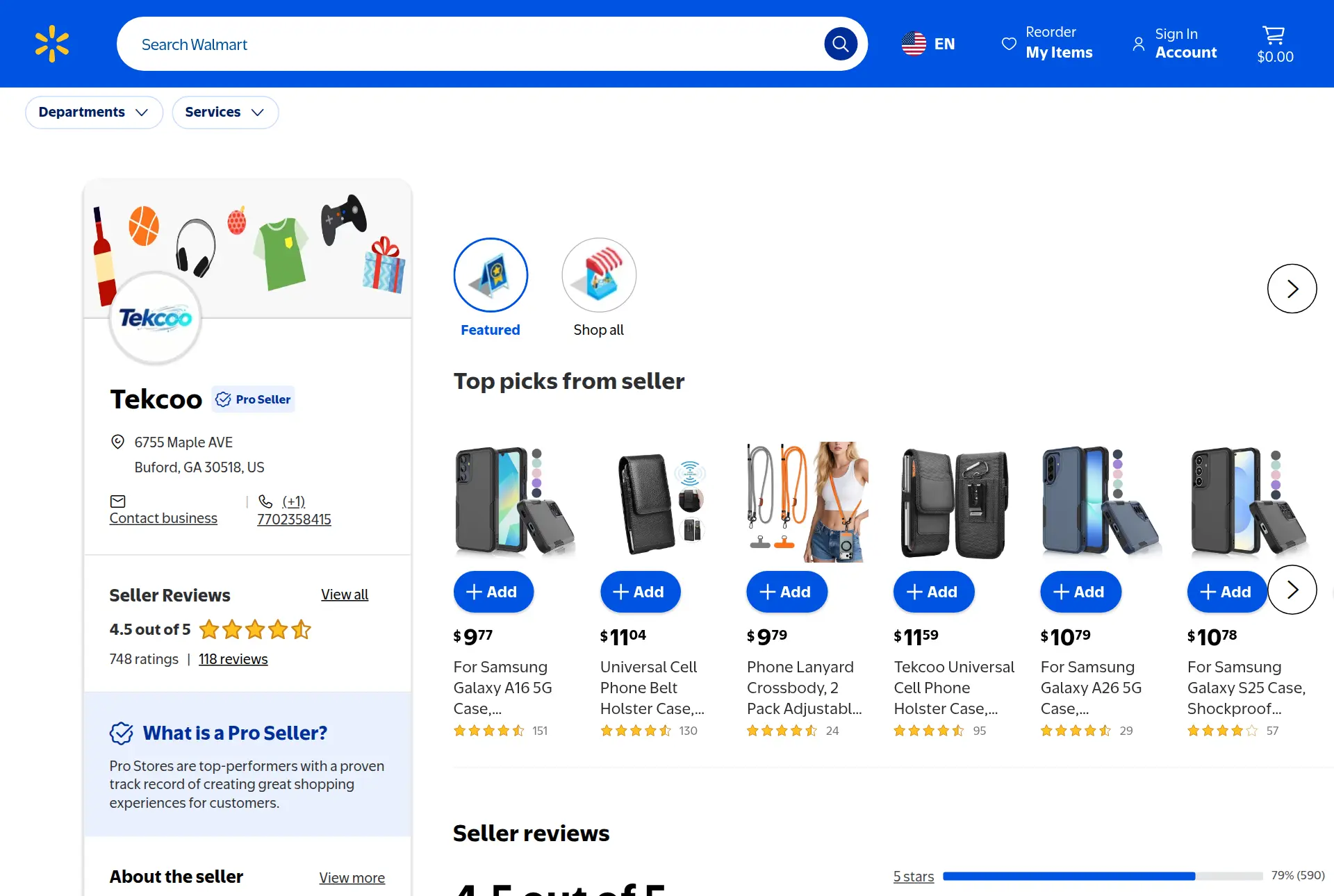
The seller as its storefront states it: the name it trades under and its legal name, the business address and telephone number Walmart publishes, what it writes about itself, its rating and how many ratings and reviews it has.
Give it a Marketplace seller's id on Walmart, or the address of its storefront.
1 unit a run, for runs that return data. Runs that fail cost nothing. How units work
- Counted
- 1 unit a run
- Inputs
- 1, 1 required
- Record
- 22 fields
- A run takes
- up to 5 minutes
- Records kept
- 7 days
- Measured
- its success, on the status page
POST/v1/scrapers/walmart.seller/runs
sent, and answered
a record of the run22 fields
ok1 unit a run
A record this scraper returned for this input. The first 9 of its 22 fields are set down here; the whole record is below.
What it is used for
- Vet a Marketplace seller
- Before you buy from or partner with a seller, read its
legal_name, business address,countryand how long itsrating_countsays it has been rated. - Map who sells in a category
- Collect the sellers behind a search's listings and group them by
countryandregionto see where the competition is based. - Track a seller's standing
- Read a storefront on a schedule and keep its
rating,rating_countandreview_count, to see a seller's reputation move.
What you send
A Marketplace seller's id on Walmart, or the address of its storefront. It is the one input.
sellerstring Required- The number in the storefront's address (walmart.com/seller/3316), or the address itself.
A request, ready to send
It starts a run with the input shown at the top of this page, waits up to 60 seconds for it, and reads its records. Put your key in the variable it reads.
# Start a run and wait up to 60 seconds for it to finish
curl -X POST "https://api.enrichednow.com/v1/scrapers/walmart.seller/runs?wait=60" \
  -H "Authorization: Bearer $ENRICHEDNOW_API_KEY" \
  -H "Content-Type: application/json" \
  -d '{"input":{"seller":"3316"}}'

# Read its records, with the id the first call answered
curl "https://api.enrichednow.com/v1/runs/$RUN_ID/records?limit=100" \
  -H "Authorization: Bearer $ENRICHEDNOW_API_KEY"
from enrichednow import EnrichedNow
client = EnrichedNow() # reads ENRICHEDNOW_API_KEY
# Start a run, wait for it to end, and get its records
result = client.scrape("walmart.seller", {"seller": "3316"})
print(result.run.id, result.run.status, result.run.record_count)
# Read its records: pages are fetched as you go
for record in result.records:
print(record)Install it with pip install enrichednow, then save as run.py and run python3 run.py
import EnrichedNow from "enrichednow";

const client = new EnrichedNow(); // reads ENRICHEDNOW_API_KEY

// Start a run, wait for it to end, and get its records
const { run, records } = await client.scrape("walmart.seller", { seller: "3316" });
console.log(run.id, run.status, run.record_count);

// Read its records: pages are fetched as you go
for await (const record of records) console.log(record);
Install it with npm install enrichednow, then save as run.mjs and run node run.mjs
package main

import (
	"context"
	"fmt"
	"log"
	"time"

	enrichednow "github.com/enrichednow/enrichednow-go"
)

func main() {
	client, err := enrichednow.NewClient() // reads ENRICHEDNOW_API_KEY
	if err != nil {
		log.Fatal(err)
	}
	ctx, cancel := context.WithTimeout(context.Background(), 10*time.Minute)
	defer cancel()

	// Start a run, wait for it to end, and get its records
	run, records, err := client.Scrape(ctx, "walmart.seller", map[string]any{"seller": "3316"})
	if err != nil {
		log.Fatal(err)
	}
	fmt.Println(run.ID, run.Status, run.RecordCount)

	// Read its records: pages are fetched as you go
	for records.Next() {
		fmt.Println(string(records.Current()))
	}
	if err := records.Err(); err != nil {
		log.Fatal(err)
	}
}
Install it with go get github.com/enrichednow/enrichednow-go@latest, then save as run.go and run go run run.go
import com.enrichednow.EnrichedNowClient;
import com.enrichednow.ScrapeResult;
import java.util.Map;

public class Run {
    public static void main(String[] args) {
        EnrichedNowClient client = EnrichedNowClient.fromEnv(); // reads ENRICHEDNOW_API_KEY

        // Start a run, wait for it to end, and get its records
        ScrapeResult result = client.scrape("walmart.seller", Map.of("seller", "3316"));
        System.out.println(result.run().id() + " " + result.run().status() + " " + result.run().recordCount());

        // Read its records: pages are fetched as you go
        for (Map<String, Object> record : result.records()) {
            System.out.println(record);
        }
    }
}
Add com.enrichednow:enrichednow-java:0.4.0 to your Maven or Gradle build, then save as Run.java
enrichednow run walmart.seller --input-json '{"seller":"3316"}'Install it with curl -fsSL https://raw.githubusercontent.com/enrichednow/enrichednow-cli/main/install.sh | sh
What comes back
The seller as its storefront states it: the name it trades under and its legal name, the business address and telephone number Walmart publishes, what it writes about itself, its rating and how many ratings and reviews it has. A record has 22 fields. One we could not read is null, never an empty string or a zero.
{
  "seller_id": "3316",
  "seller_key": "88DF07FC5D0A4864BBA8CAA191243241",
  "name": "Tekcoo",
  "legal_name": "Tekcoo",
  "url": "https://www.walmart.com/seller/3316",
  "about": "Tekcoo was created out of a vision that has been developing for over 5 years. It founders with collectively over 7 years of accessory experience dreamed of a place where customers could find the greatest selection and lowest priced … [truncated]",
  "phone": "7702358415",
  "address_line1": "6755 Maple AVE",
  "address_line2": "Ste 200",
  "city": "Buford",
  "region": "GA",
  "postal_code": "30518",
  "country": "US",
  "rating": 4.5,
  "rating_count": 748,
  "review_count": 118,
  "seller_type": "EXTERNAL",
  "status": "ACTIVE",
  "badge": true,
  "logo": "https://i5.walmartimages.com/asr/8dbda8fe-3f93-4008-9b60-41dd09691b90.802fa2f8981ee81ffa90c0a719df4ca0.jpeg",
  "banner": null,
  "fetched_at": "2026-11-19T18:07:41.818813Z"
}
The scraper returned this record for the input above, reading a saved copy of the page, not the live site.
Values shortened for this page: about: 800 characters, the first 231 shown.
The fields of a record
seller_idstring- Walmart's id of the seller: the number in its storefront's address.
seller_keystring or null- Walmart's other id of the seller, the one a product's
seller_idgives. namestring- The name the seller trades under on Walmart.
legal_namestring or null- The business's registered name, as Walmart publishes it; often the same as
name. urlstring- The seller's storefront on walmart.com.
aboutstring or null- What the seller writes about itself, as text.
phonestring or null- The business's telephone number as the storefront shows it; null where Walmart withholds the seller's contact details.
address_line1string or null- The first line of the business address; null where Walmart withholds the seller's address.
address_line2string or null- The second line of the business address, where there is one.
citystring or null- The city of the business address.
regionstring or null- The state or province of the business address, as Walmart writes it, e.g.
FL,GD. postal_codestring or null- The postal code of the business address.
countrystring or null- The country of the business, as a two-letter code, e.g.
US,CN. ratingnumber or null- The seller's average rating, 1 to 5; null for a seller nobody has rated.
rating_countinteger or null- How many ratings the seller has.
review_countinteger or null- How many of those ratings came with a written review.
seller_typestring or null- Walmart's code for the kind of seller, e.g.
EXTERNALfor a Marketplace seller. statusstring or null- Walmart's code for the seller's standing, e.g.
ACTIVE, orONBOARDING_ACTIVEfor one still being set up. badgeboolean- True when the storefront shows Walmart's Pro Seller badge, which Walmart gives its best-performing sellers.
logostring or null- The address of the seller's logo, where it has one.
bannerstring or null- The address of the storefront's banner, where it has one.
fetched_atdatetime- When the storefront was read, in UTC.
Units and limits
- Counted per request
- Billed per request: a run that returns data costs 1 unit, however many records it returns.
- A miss costs nothing
- A run that fails, that meets something not supported yet, or that you cancel costs nothing. You pay for runs that return data.
- What bounds a run
- A run may take up to 5 minutes. Its records are read in pages of up to 1,000 and are kept for 7 days.
What it does not do
- The storefront's products are not part of the record: read them with Walmart search or product.
- Where Walmart withholds a seller's address or telephone number, those fields are empty.
- A seller id Walmart has no storefront for ends not_found.
Questions
What does Walmart seller return?
The seller as its storefront states it: the name it trades under and its legal name, the business address and telephone number Walmart publishes, what it writes about itself, its rating and how many ratings and reviews it has. A record has 22 fields, among them seller_id, seller_key, name, legal_name, url and about. A value that could not be read is null, never an empty string or a zero.
What do I send?
A Marketplace seller's id on Walmart, or the address of its storefront. The input seller is required.
How is it counted?
Billed per request: a run that returns data costs 1 unit, however many records it returns. A run that fails, that meets something not supported yet, or that you cancel costs nothing. The first 1,000 units each month are free.
What does it not do?
The storefront's products are not part of the record: read them with Walmart search or product. Where Walmart withholds a seller's address or telephone number, those fields are empty. A seller id Walmart has no storefront for ends not_found.
How long are the records kept, and in what format do they come?
Records are kept for 7 days after the run ended, and read in pages of up to 1,000. They come as JSON, as NDJSON with one record a line, or as CSV with a column for each field.
Can an AI assistant call it?
Yes. Through the EnrichedNow MCP server an assistant calls the tool run_scraper with the scraper_id walmart.seller and the same input. It costs what the same API call costs.
Used in this playbook
A playbook runs Walmart seller as one of its steps and hands back the finished list. Its runs of this scraper cost what they cost here, and the playbook adds nothing.
E-commerce
Seller Identity
The legal business behind each marketplace seller of your products, with its address, website, domain record and register entry.
Walmart
Walmart's public search results, product pages, customer reviews and search suggestions.
Walmart search
walmart.searchA search query. The products on a page of Walmart's search results: prices, ratings and sellers, with advertisements marked.
Walmart product
walmart.productA Walmart product's address, or its item id. Its price, availability, seller, rating, specifications, images and variants.
Walmart product reviews
walmart.reviewsA Walmart product's address or item id, and which page of its reviews. A page of the product's customer reviews: stars, title, text, the day it was written, the Verified Purchase badge, helpful votes and pictures.
Walmart autocomplete
walmart.autocompleteThe first letters or words of a search. What Walmart's search box suggests for them: up to ten searches, and the category shortcuts it shows under them, each with its address and picture.
- Industry
- Shopping and retail
- Where
- United States
Run it on an input of your own.
Create an account, make a key, and send the request above with your own input. The first 1,000 units each month are free.