Scraper API
2GIS
twogis.searchAvailable
2GIS search
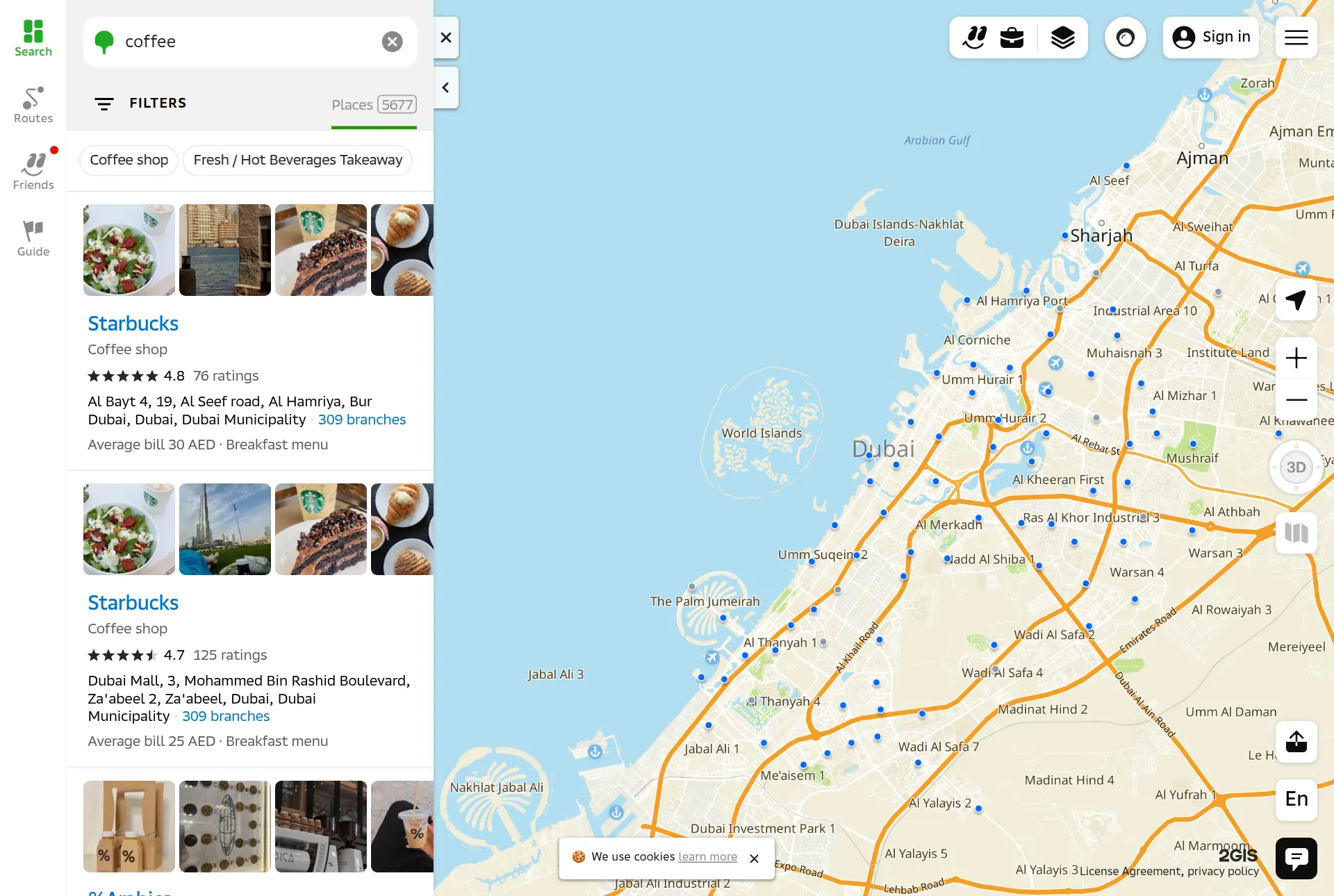
The places on a page of the results: name, address, district, coordinates, categories, rating and how many ratings it is of, attributes, opening hours, and the organisation's number of branches.
Give it a search and a city, as 2GIS names the city in its page addresses.
1 unit a run, for runs that return data. Runs that fail cost nothing. How units work
- Counted
- 1 unit a run
- Inputs
- 4, 2 required
- Record
- 33 fields
- A run takes
- up to 5 minutes
- Records kept
- 7 days
- Measured
- its success, on the status page
POST/v1/scrapers/twogis.search/runs
sent, and answered
a record of the run33 fields
ok1 unit a run
A record this scraper returned for this input. The first 9 of its 33 fields are set down here; the whole record is below.
What it is used for
- Build a lead list
- Search a kind of place in a city such as Moscow, Almaty or Dubai and pass each
place_idto the place scraper for its phones, websites and email. - Map a city's competition
- Plot a query's results by
latitudeandlongitudeand compareratingandreview_countacross districts to see where the strong places are. - Check where you rank
- Run the searches your customers make each week and follow where your own place stands among the results, beside the places shown as advertisers.
What you send
A search and a city, as 2GIS names the city in its page addresses. These are its 4 inputs, as its schema has them.
querystring Required- A kind of place, a name or an address, in any language 2GIS understands.
citystring Required- The city, as 2GIS names it in its page addresses: moscow, spb, novosibirsk, almaty, dubai.
pageinteger Optional- The results page, from 1. A page holds up to 12 places.Default
1 max_resultsinteger Optional- Return at most this many places of the page.
A request, ready to send
It starts a run with the input shown at the top of this page, waits up to 60 seconds for it, and reads its records. Put your key in the variable it reads.
# Start a run and wait up to 60 seconds for it to finish
curl -X POST "https://api.enrichednow.com/v1/scrapers/twogis.search/runs?wait=60" \
  -H "Authorization: Bearer $ENRICHEDNOW_API_KEY" \
  -H "Content-Type: application/json" \
  -d '{"input":{"query":"coffee","city":"dubai"}}'

# Read its records, with the id the first call answered
curl "https://api.enrichednow.com/v1/runs/$RUN_ID/records?limit=100" \
  -H "Authorization: Bearer $ENRICHEDNOW_API_KEY"
from enrichednow import EnrichedNow
client = EnrichedNow() # reads ENRICHEDNOW_API_KEY
# Start a run, wait for it to end, and get its records
result = client.scrape("twogis.search", {"query": "coffee", "city": "dubai"})
print(result.run.id, result.run.status, result.run.record_count)
# Read its records: pages are fetched as you go
for record in result.records:
print(record)Install it with pip install enrichednow, then save as run.py and run python3 run.py
import EnrichedNow from "enrichednow";

const client = new EnrichedNow(); // reads ENRICHEDNOW_API_KEY

// Start a run, wait for it to end, and get its records
const { run, records } = await client.scrape("twogis.search", { query: "coffee", city: "dubai" });
console.log(run.id, run.status, run.record_count);

// Read its records: pages are fetched as you go
for await (const record of records) console.log(record);
Install it with npm install enrichednow, then save as run.mjs and run node run.mjs
package main

import (
	"context"
	"fmt"
	"log"
	"time"

	enrichednow "github.com/enrichednow/enrichednow-go"
)

func main() {
	client, err := enrichednow.NewClient() // reads ENRICHEDNOW_API_KEY
	if err != nil {
		log.Fatal(err)
	}
	ctx, cancel := context.WithTimeout(context.Background(), 10*time.Minute)
	defer cancel()

	// Start a run, wait for it to end, and get its records
	run, records, err := client.Scrape(ctx, "twogis.search", map[string]any{"query": "coffee", "city": "dubai"})
	if err != nil {
		log.Fatal(err)
	}
	fmt.Println(run.ID, run.Status, run.RecordCount)

	// Read its records: pages are fetched as you go
	for records.Next() {
		fmt.Println(string(records.Current()))
	}
	if err := records.Err(); err != nil {
		log.Fatal(err)
	}
}
Install it with go get github.com/enrichednow/enrichednow-go@latest, then save as run.go and run go run run.go
import com.enrichednow.EnrichedNowClient;
import com.enrichednow.ScrapeResult;
import java.util.Map;

public class Run {
    public static void main(String[] args) {
        EnrichedNowClient client = EnrichedNowClient.fromEnv(); // reads ENRICHEDNOW_API_KEY

        // Start a run, wait for it to end, and get its records
        ScrapeResult result = client.scrape("twogis.search", Map.of("query", "coffee", "city", "dubai"));
        System.out.println(result.run().id() + " " + result.run().status() + " " + result.run().recordCount());

        // Read its records: pages are fetched as you go
        for (Map<String, Object> record : result.records()) {
            System.out.println(record);
        }
    }
}
Add com.enrichednow:enrichednow-java:0.4.0 to your Maven or Gradle build, then save as Run.java
enrichednow run twogis.search --input query=coffee --input city=dubaiInstall it with curl -fsSL https://raw.githubusercontent.com/enrichednow/enrichednow-cli/main/install.sh | sh
What comes back
The places on a page of the results: name, address, district, coordinates, categories, rating and how many ratings it is of, attributes, opening hours, and the organisation's number of branches. A record has 33 fields. One we could not read is null, never an empty string or a zero.
{
  "place_id": "70000001035714425",
  "type": "branch",
  "name": "Starbucks, coffee shop",
  "short_name": "Starbucks",
  "description": "coffee shop",
  "url": "https://2gis.ru/dubai/firm/70000001035714425",
  "address": "Al Bayt 4, 19, Al Seef road",
  "address_comment": "G Floor",
  "building_name": "Al Bayt 4",
  "postal_code": null,
  "district": "Al Hamriya",
  "city": "Dubai",
  "region": "Dubai Emirate",
  "country": "UAE",
  "latitude": 25.26464,
  "longitude": 55.303865,
  "categories": [
    "Coffee shop"
  ],
  "rating": 4.8,
  "rating_count": 76,
  "review_count": 22,
  "attributes": [
    "Average bill 30 AED",
    "Breakfast menu",
    "Outdoor sitting area"
  ],
  "hours": [
    {
      "day": "Mon",
      "opens": "08:00",
      "closes": "24:00"
    },
    {
      "day": "Tue",
      "opens": "08:00",
      "closes": "24:00"
    }
  ],
  "open_24_7": null,
  "utc_offset_minutes": 240,
  "organization_id": "70000001033047305",
  "branch_count": 309,
  "photo_count": 62,
  "image": "https://i6.photo.2gis.com/main/branch/99/70000001035714425/common",
  "promoted": false,
  "removed": false,
  "position": 1,
  "page": 1,
  "fetched_at": "2026-11-19T18:07:41.636733Z"
}
The scraper returned this record for the input above, reading a saved copy of the page, not the live site.
Values shortened for this page: attributes: 10 items, the first 3 shown; hours: 7 items, the first 2 shown.
The fields of a record
place_idstring- 2GIS's id of the place.
typestring- What the place is:
branchfor an organisation's branch, orbuilding,street,adm_div(a district or a town),station,attractionand the like. namestring- The name as the page writes it, e.g.
Orto, cafe. short_namestring or null- The name without what follows the comma, e.g.
Orto. descriptionstring or null- What the name is followed by, e.g.
cafe. urlstring- The place's page on 2GIS.
addressstring or null- The street address, e.g.
395, Jumeirah road. address_commentstring or null- What the page adds to the address, e.g. the floor or the office.
building_namestring or null- The name of the building the place is in, when the page gives one.
postal_codestring or null- The postal code.
districtstring or null- The district of the city.
citystring or null- The city or town.
regionstring or null- The region the city is in.
countrystring or null- The country, in the page's language.
latitudenumber or null- The latitude of the place's pin, in decimal degrees.
longitudenumber or null- The longitude of that pin.
categorieslist of strings- The categories 2GIS lists the place in, the main one first.
ratingnumber or null- The average rating, 1 to 5. Null for a place nobody has rated.
rating_countinteger or null- How many ratings the average is of.
review_countinteger or null- How many of those ratings come with a written review.
attributeslist of strings- What the page lists the place as offering or having, e.g.
Wi-Fi,Average bill 40 AED. hourslist of objects- The opening hours, a row per day and period. Empty when the page lists none.
open_24_7boolean or null- True when the page says the place is open around the clock.
utc_offset_minutesinteger or null- The place's time zone as minutes ahead of UTC.
organization_idstring or null- 2GIS's id of the organisation the branch belongs to.
branch_countinteger or null- How many branches that organisation has on 2GIS.
photo_countinteger or null- How many photos the page has of the place.
imagestring or null- The place's main photo.
promotedboolean or null- True when the place is shown as an advertiser.
removedboolean- True when 2GIS says the place was removed from its directory: it may have closed for good or for a while.
positioninteger- The place's position on the results page, from 1.
pageinteger- The results page it was on.
fetched_atdatetime- When the page was read, in UTC.
Units and limits
- Counted per request
- Billed per request: a run that returns data costs 1 unit, however many records it returns.
- A miss costs nothing
- A run that fails, that meets something not supported yet, or that you cancel costs nothing. You pay for runs that return data.
- What bounds a run
- A run may take up to 5 minutes. Its records are read in pages of up to 1,000 and are kept for 7 days.
What it does not do
- One run reads one page of results, up to 12 places.
- A place's card has no telephone number or website: twogis.place returns them.
- Names and addresses are in the language of the city's own 2GIS site: Russian for most cities, English for the Emirates.
- A search for an address returns buildings and streets beside businesses; the type field says which each record is.
The bounds its schema sets
page- 1 to 1,000; 1 unless you say otherwise
max_results- 1 to 12
Questions
What does 2GIS search return?
The places on a page of the results: name, address, district, coordinates, categories, rating and how many ratings it is of, attributes, opening hours, and the organisation's number of branches. A record has 33 fields, among them place_id, type, name, short_name, description and url. A value that could not be read is null, never an empty string or a zero.
What do I send?
A search and a city, as 2GIS names the city in its page addresses. The inputs query and city are required. Optional: page and max_results.
How is it counted?
Billed per request: a run that returns data costs 1 unit, however many records it returns. A run that fails, that meets something not supported yet, or that you cancel costs nothing. The first 1,000 units each month are free.
How much does one run return?
Its schema sets these bounds: page 1 to 1,000 (1 unless you say otherwise); max_results 1 to 12. A run may take up to 5 minutes.
What does it not do?
One run reads one page of results, up to 12 places. A place's card has no telephone number or website: twogis.place returns them. Names and addresses are in the language of the city's own 2GIS site: Russian for most cities, English for the Emirates. A search for an address returns buildings and streets beside businesses; the type field says which each record is.
How long are the records kept, and in what format do they come?
Records are kept for 7 days after the run ended, and read in pages of up to 1,000. They come as JSON, as NDJSON with one record a line, or as CSV with a column for each field.
Can an AI assistant call it?
Yes. Through the EnrichedNow MCP server an assistant calls the tool run_scraper with the scraper_id twogis.search and the same input. It costs what the same API call costs.
2GIS
2GIS's public search results and place pages: businesses and places in Russia, Kazakhstan, the Emirates and the other countries it maps.
2GIS place
twogis.placeA place's id on 2GIS, or the address of its page. What its page states: name, address, coordinates, categories, rating, attributes, opening hours, and its telephone numbers, websites, email addresses, messengers and social pages.
- Industry
- Travel, food and places
- Where
- 5 countries
Run it on an input of your own.
Create an account, make a key, and send the request above with your own input. The first 1,000 units each month are free.