Scraper API
TradingView
tradingview.symbolAvailable
TradingView symbol
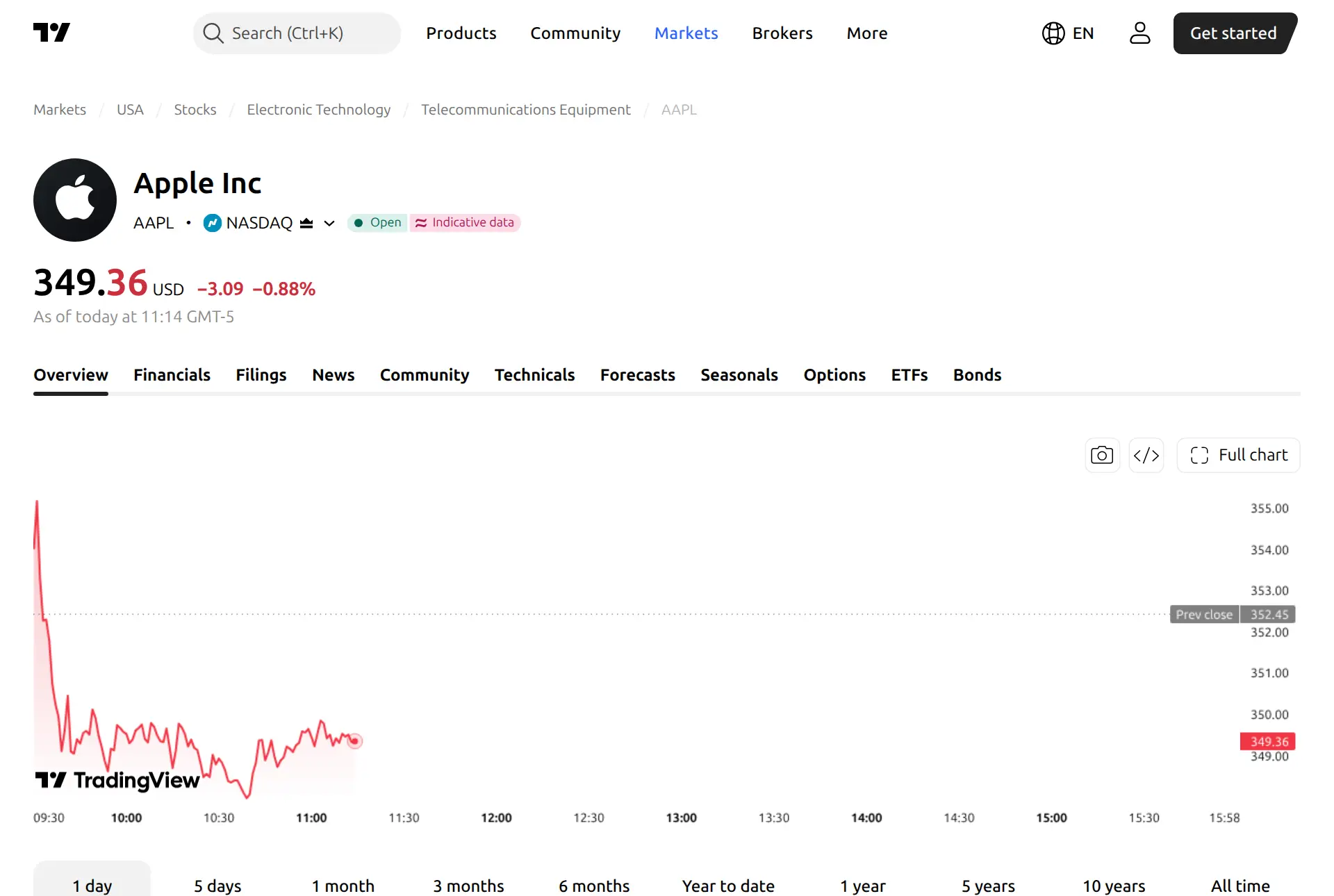
Its quote: price, change, the session's range and volume, 52-week and all-time range, performance over six periods, and for a company its market value, earnings, dividend yield, sector and next earnings date.
Give it an instrument's symbol on TradingView, such as NASDAQ:AAPL, or the address of its page.
1 unit a run, for runs that return data. Runs that fail cost nothing. How units work
- Counted
- 1 unit a run
- Inputs
- 1, 1 required
- Record
- 45 fields
- A run takes
- up to 5 minutes
- Records kept
- 7 days
- Measured
- its success, on the status page
POST/v1/scrapers/tradingview.symbol/runs
sent, and answered
a record of the run45 fields
ok1 unit a run
A record this scraper returned for this input. The first 9 of its 45 fields are set down here; the whole record is below.
What it is used for
- Quote an instrument on demand
- The price, change, the session's range and volume of a share, fund, index, currency pair, crypto pair or future, with
delay_secondssaying how fresh it is. - Track key figures over time
- Read a list of symbols on a schedule and keep
market_cap,pe_ratio,dividend_yield_percentandnext_earnings_atin your own table. - Compare performance
- Set
performanceover its six periods side by side for several instruments, each in its owncurrency.
What you send
An instrument's symbol on TradingView, such as NASDAQ:AAPL, or the address of its page. It is the one input.
symbolstring Required- The instrument: its exchange and ticker joined by a colon, e.g.
NASDAQ:AAPL,LSE:VOD,BINANCE:BTCUSDT,FX:EURUSD; or the address of its page on tradingview.com.tradingview.searchfinds the symbol for a name.
A request, ready to send
It starts a run with the input shown at the top of this page, waits up to 60 seconds for it, and reads its records. Put your key in the variable it reads.
# Start a run and wait up to 60 seconds for it to finish
curl -X POST "https://api.enrichednow.com/v1/scrapers/tradingview.symbol/runs?wait=60" \
  -H "Authorization: Bearer $ENRICHEDNOW_API_KEY" \
  -H "Content-Type: application/json" \
  -d '{"input":{"symbol":"NASDAQ:AAPL"}}'

# Read its records, with the id the first call answered
curl "https://api.enrichednow.com/v1/runs/$RUN_ID/records?limit=100" \
  -H "Authorization: Bearer $ENRICHEDNOW_API_KEY"
from enrichednow import EnrichedNow
client = EnrichedNow() # reads ENRICHEDNOW_API_KEY
# Start a run, wait for it to end, and get its records
result = client.scrape("tradingview.symbol", {"symbol": "NASDAQ:AAPL"})
print(result.run.id, result.run.status, result.run.record_count)
# Read its records: pages are fetched as you go
for record in result.records:
print(record)Install it with pip install enrichednow, then save as run.py and run python3 run.py
import EnrichedNow from "enrichednow";

const client = new EnrichedNow(); // reads ENRICHEDNOW_API_KEY

// Start a run, wait for it to end, and get its records
const { run, records } = await client.scrape("tradingview.symbol", { symbol: "NASDAQ:AAPL" });
console.log(run.id, run.status, run.record_count);

// Read its records: pages are fetched as you go
for await (const record of records) console.log(record);
Install it with npm install enrichednow, then save as run.mjs and run node run.mjs
package main

import (
	"context"
	"fmt"
	"log"
	"time"

	enrichednow "github.com/enrichednow/enrichednow-go"
)

func main() {
	client, err := enrichednow.NewClient() // reads ENRICHEDNOW_API_KEY
	if err != nil {
		log.Fatal(err)
	}
	ctx, cancel := context.WithTimeout(context.Background(), 10*time.Minute)
	defer cancel()

	// Start a run, wait for it to end, and get its records
	run, records, err := client.Scrape(ctx, "tradingview.symbol", map[string]any{"symbol": "NASDAQ:AAPL"})
	if err != nil {
		log.Fatal(err)
	}
	fmt.Println(run.ID, run.Status, run.RecordCount)

	// Read its records: pages are fetched as you go
	for records.Next() {
		fmt.Println(string(records.Current()))
	}
	if err := records.Err(); err != nil {
		log.Fatal(err)
	}
}
Install it with go get github.com/enrichednow/enrichednow-go@latest, then save as run.go and run go run run.go
import com.enrichednow.EnrichedNowClient;
import com.enrichednow.ScrapeResult;
import java.util.Map;

public class Run {
    public static void main(String[] args) {
        EnrichedNowClient client = EnrichedNowClient.fromEnv(); // reads ENRICHEDNOW_API_KEY

        // Start a run, wait for it to end, and get its records
        ScrapeResult result = client.scrape("tradingview.symbol", Map.of("symbol", "NASDAQ:AAPL"));
        System.out.println(result.run().id() + " " + result.run().status() + " " + result.run().recordCount());

        // Read its records: pages are fetched as you go
        for (Map<String, Object> record : result.records()) {
            System.out.println(record);
        }
    }
}
Add com.enrichednow:enrichednow-java:0.4.0 to your Maven or Gradle build, then save as Run.java
enrichednow run tradingview.symbol --input symbol=NASDAQ:AAPLInstall it with curl -fsSL https://raw.githubusercontent.com/enrichednow/enrichednow-cli/main/install.sh | sh
What comes back
Its quote: price, change, the session's range and volume, 52-week and all-time range, performance over six periods, and for a company its market value, earnings, dividend yield, sector and next earnings date. A record has 45 fields. One we could not read is null, never an empty string or a zero.
{
  "position": null,
  "symbol": "NASDAQ:AAPL",
  "ticker": "AAPL",
  "name": "Apple Inc.",
  "url": "https://www.tradingview.com/symbols/NASDAQ-AAPL/",
  "type": "stock",
  "type_details": [
    "common"
  ],
  "exchange": "NASDAQ",
  "currency": "USD",
  "country": "United States",
  "sector": "Electronic Technology",
  "industry": "Telecommunications Equipment",
  "price": 352.45,
  "open": 351.94,
  "high": 356.42,
  "low": 351.4706,
  "change": 0.5399999999999636,
  "change_percent": 0.15344832485577664,
  "volume": 34053460,
  "average_volume_10d": 42700089.5,
  "price_time": "2026-11-18T14:30:00Z",
  "update_mode": "delayed_streaming_900",
  "delay_seconds": 900,
  "market_cap": 5121867472538.601,
  "pe_ratio": 39.27238286255501,
  "eps": 9.0105,
  "dividend_yield_percent": 0.306896649711574,
  "beta": 0.6877092,
  "week_52_high": 360.83,
  "week_52_low": 243.42,
  "all_time_high": 360.83,
  "all_time_low": 0.049107,
  "performance": {
    "week": 0.8310804045258758,
    "month": 3.4260142322646945,
    "three_months": 11.023609645461564,
    "six_months": 15.134587743368607,
    "year_to_date": 29.455841031386015,
    "year": 30.54187192118226
  },
  "technical_rating": 0.4,
  "rsi": 56.55624251398507,
  "isin": "US0378331005",
  "employees": 167000,
  "revenue": 478834000000,
  "net_income": 132175000000,
  "shares_outstanding": 14532200000,
  "shares_float": 14514819488.8,
  "next_earnings_at": "2027-02-04T12:00:00Z",
  "fundamentals_currency": "USD",
  "logo": "https://s3-symbol-logo.tradingview.com/apple.svg",
  "fetched_at": "2026-11-19T18:07:41.539489Z"
}
The scraper returned this record for the input above, reading a saved copy of the page, not the live site.
The fields of a record
positioninteger or null- The row's place in the screener's order, from 1. Null for a single symbol.
symbolstring- TradingView's symbol, exchange and ticker joined by a colon, e.g.
NASDAQ:AAPL.tradingview.symboltakes it. tickerstring- The ticker on its exchange, e.g.
AAPL. namestring or null- The instrument's name, e.g.
Apple Inc.orBitcoin / TetherUS. urlstring- The instrument's page on tradingview.com.
typestring or null- TradingView's kind of instrument:
stock,fund,index,forex,spot(a crypto pair),futures,bond,economic,dr. type_detailslist of strings- TradingView's finer marks of the kind, e.g.
common,etf,crypto,continuous. exchangestring or null- The exchange or source the quote is from, e.g.
NASDAQ,LSE,BINANCE. currencystring or null- The currency the price is quoted in, e.g.
USD. London shares are quoted in pence (GBX). countrystring or null- The country the issuer is registered in, by name. Null for currencies, crypto and futures.
sectorstring or null- The sector TradingView files a company under.
industrystring or null- The industry within the sector.
pricenumber or null- The last price (the close of the current or last session), in
currency. opennumber or null- The opening price of that session.
highnumber or null- The highest price of that session.
lownumber or null- The lowest price of that session.
changenumber or null- The change from the previous close, in
currency. change_percentnumber or null- The same change, in percent of the previous close.
volumenumber or null- The volume traded in that session: shares, contracts, or units of the base currency for a crypto pair.
average_volume_10dnumber or null- The average daily volume over the last ten sessions.
price_timedatetime or null- The start of the session the price belongs to, in UTC.
update_modestring or null- How fresh TradingView's price is:
streaming(not delayed),delayed_streaming_900(delayed by that many seconds) orendofday. delay_secondsinteger or null- The delay of the price in seconds, when it is delayed; 0 for a price that is not delayed; null when TradingView does not say.
market_capnumber or null- The company's market capitalisation, in
fundamentals_currency. pe_rationumber or null- The price to earnings ratio over the trailing twelve months. Null for a company with a loss.
epsnumber or null- Basic earnings per share over the trailing twelve months, in
fundamentals_currency. dividend_yield_percentnumber or null- The dividend yield, in percent of the price.
betanumber or null- The one-year beta against the market.
week_52_highnumber or null- The highest price of the last 52 weeks.
week_52_lownumber or null- The lowest price of the last 52 weeks.
all_time_highnumber or null- The highest price in TradingView's history of the instrument.
all_time_lownumber or null- The lowest price in that history.
performanceobject- The price change over six periods, in percent.Holds
week,month,three_months,six_months,year_to_date,year. technical_ratingnumber or null- TradingView's summary of its technical indicators, from -1 (strong sell) through 0 (neutral) to 1 (strong buy).
rsinumber or null- The 14-day relative strength index, 0 to 100.
isinstring or null- The security's ISIN.
employeesinteger or null- The company's number of employees.
revenuenumber or null- The company's revenue of its last fiscal year, in
fundamentals_currency. net_incomenumber or null- The company's net income of its last fiscal year, in
fundamentals_currency. shares_outstandingnumber or null- The number of shares outstanding.
shares_floatnumber or null- The number of shares free to trade.
next_earnings_atdatetime or null- When the company next reports earnings, in UTC.
fundamentals_currencystring or null- The currency of
market_cap,eps,revenueandnet_income, e.g.USD. logostring or null- The address of the instrument's logo, an SVG image.
fetched_atdatetime- When TradingView was asked, in UTC.
Units and limits
- Counted per request
- Billed per request: a run that returns data costs 1 unit, however many records it returns.
- A miss costs nothing
- A run that fails, that meets something not supported yet, or that you cancel costs nothing. You pay for runs that return data.
- What bounds a run
- A run may take up to 5 minutes. Its records are read in pages of up to 1,000 and are kept for 7 days.
What it does not do
- One run reads one instrument, once. It is a quote, not a stream and not a chart: no price history is returned.
- Prices are TradingView's own and some are delayed; each record says by how many seconds.
- Ideas, news and analysts' forecasts on the instrument's page are not read.
Questions
What does TradingView symbol return?
Its quote: price, change, the session's range and volume, 52-week and all-time range, performance over six periods, and for a company its market value, earnings, dividend yield, sector and next earnings date. A record has 45 fields, among them position, symbol, ticker, name, url and type. A value that could not be read is null, never an empty string or a zero.
What do I send?
An instrument's symbol on TradingView, such as NASDAQ:AAPL, or the address of its page. The input symbol is required.
How is it counted?
Billed per request: a run that returns data costs 1 unit, however many records it returns. A run that fails, that meets something not supported yet, or that you cancel costs nothing. The first 1,000 units each month are free.
What does it not do?
One run reads one instrument, once. It is a quote, not a stream and not a chart: no price history is returned. Prices are TradingView's own and some are delayed; each record says by how many seconds. Ideas, news and analysts' forecasts on the instrument's page are not read.
How long are the records kept, and in what format do they come?
Records are kept for 7 days after the run ended, and read in pages of up to 1,000. They come as JSON, as NDJSON with one record a line, or as CSV with a column for each field.
Can an AI assistant call it?
Yes. Through the EnrichedNow MCP server an assistant calls the tool run_scraper with the scraper_id tradingview.symbol and the same input. It costs what the same API call costs.
TradingView
Quotes and key figures from TradingView for shares, funds, indices, currencies, crypto and futures, as a visitor who is not signed in sees them.
TradingView symbol search
tradingview.searchA name, a ticker or an ISIN, and optionally a kind of instrument, an exchange and a page. The instruments TradingView's search lists for it, 50 a page: symbol, name, kind, exchange, country, currency, ISIN and CUSIP, and for a future its contracts.
TradingView screener
tradingview.screenerA market, the figure to order by, and how many instruments to return. That many instruments of the market in that order, each with the same quote and key figures as tradingview.symbol, and its place in the order.
- Industry
- Markets and funding
- Where
- Worldwide
- For
- Investors
- Data
- Market data
Run it on an input of your own.
Create an account, make a key, and send the request above with your own input. The first 1,000 units each month are free.