Scraper API
SEC EDGAR
sec.filingsAvailable
SEC filings
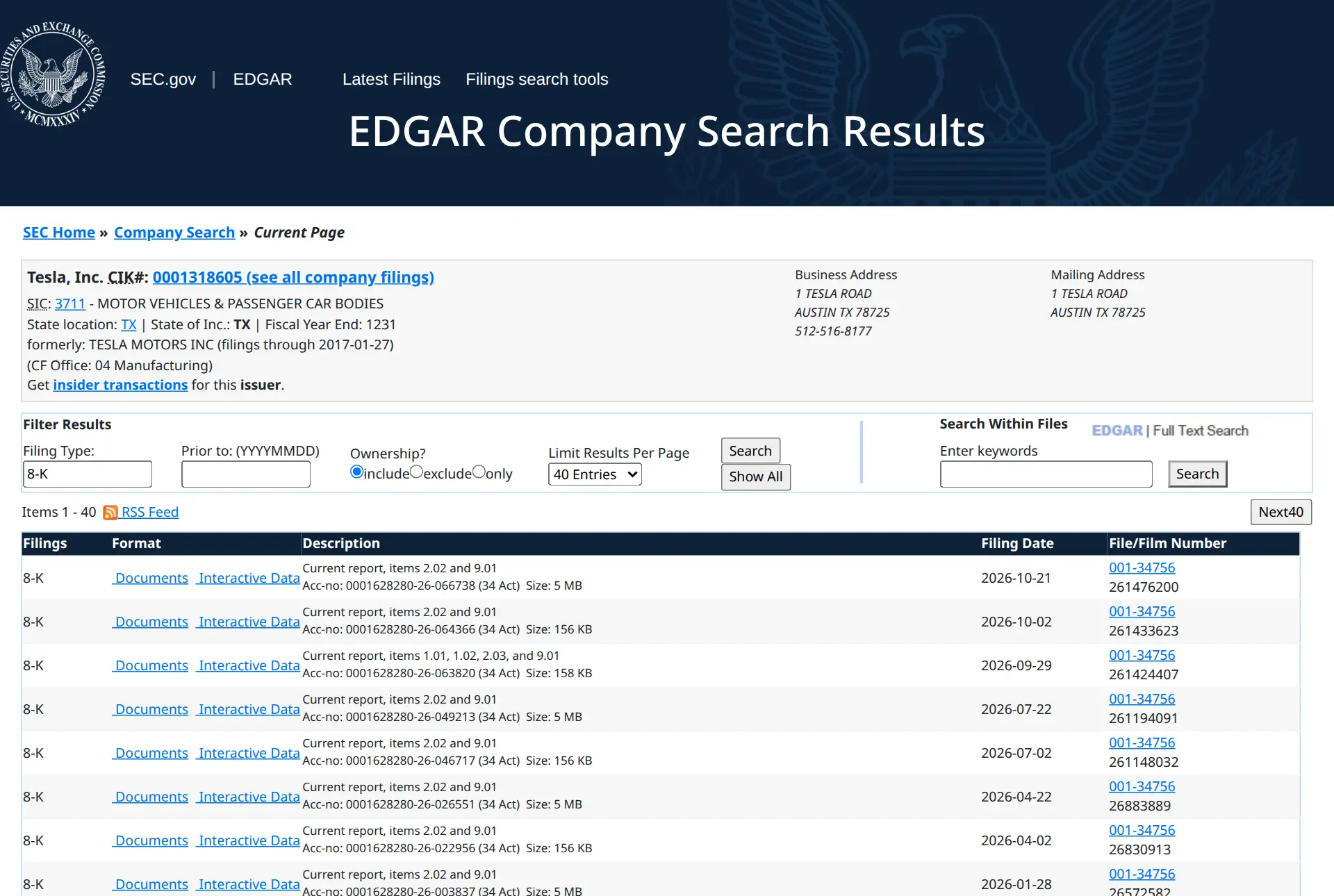
The filer's recent filings from EDGAR, newest first: form type, filing and report dates, when it was accepted, the items of an 8-K, and the addresses of the main document and of the filing's index.
Give it a company's ticker or its CIK, and optionally form types, a range of filing days and how many filings you want.
1 unit a run, for runs that return data. Runs that fail cost nothing. How units work
- Counted
- 1 unit a run
- Inputs
- 5, 1 required
- Record
- 19 fields
- A run takes
- up to 5 minutes
- Records kept
- 7 days
- Measured
- its success, on the status page
POST/v1/scrapers/sec.filings/runs
sent, and answered
a record of the run19 fields
ok1 unit a run
A record this scraper returned for this input. The first 9 of its 19 fields are set down here; the whole record is below.
What it is used for
- Watch a company's filings
- Read a company's filings on a schedule and pass on each new 8-K, 10-Q or 10-K as it is filed, with the link to its document.
- Follow material events
- The
itemsof an 8-K say what it reports: results, an executive leaving, an agreement signed. Filter by them to see only what you follow. - Feed a research pipeline
- Collect the addresses of the filings you need, by form and dates, and fetch each document from its
urlto read it in full.
What you send
A company's ticker or its CIK, and optionally form types, a range of filing days and how many filings you want. These are its 5 inputs, as its schema has them.
companystring Required- The company's ticker (
AAPL,BRK-B) or its CIK, EDGAR's number of the filer (320193). A fund or a person who files is named by CIK. formslist of strings Optional- Only filings of these form types, as EDGAR names them:
10-K,10-Q,8-K,4,DEF 14A,S-1, ... An amendment is its own type (10-K/A). Empty (default): every form. filed_fromstring Optional- Only filings made on or after this day, as
YYYY-MM-DD. filed_tostring Optional- Only filings made on or before this day, as
YYYY-MM-DD. max_resultsinteger Optional- How many filings to return at most, newest first (default 20, up to 200).Default
20
A request, ready to send
It starts a run with the input shown at the top of this page, waits up to 60 seconds for it, and reads its records. Put your key in the variable it reads.
# Start a run and wait up to 60 seconds for it to finish
curl -X POST "https://api.enrichednow.com/v1/scrapers/sec.filings/runs?wait=60" \
  -H "Authorization: Bearer $ENRICHEDNOW_API_KEY" \
  -H "Content-Type: application/json" \
  -d '{"input":{"company":"TSLA","forms":["8-K"],"max_results":3}}'

# Read its records, with the id the first call answered
curl "https://api.enrichednow.com/v1/runs/$RUN_ID/records?limit=100" \
  -H "Authorization: Bearer $ENRICHEDNOW_API_KEY"
from enrichednow import EnrichedNow
client = EnrichedNow() # reads ENRICHEDNOW_API_KEY
# Start a run, wait for it to end, and get its records
result = client.scrape("sec.filings", {
"company": "TSLA",
"forms": ["8-K"],
"max_results": 3,
})
print(result.run.id, result.run.status, result.run.record_count)
# Read its records: pages are fetched as you go
for record in result.records:
print(record)Install it with pip install enrichednow, then save as run.py and run python3 run.py
import EnrichedNow from "enrichednow";

const client = new EnrichedNow(); // reads ENRICHEDNOW_API_KEY

// Start a run, wait for it to end, and get its records
const { run, records } = await client.scrape("sec.filings", {
  company: "TSLA",
  forms: ["8-K"],
  max_results: 3,
});
console.log(run.id, run.status, run.record_count);

// Read its records: pages are fetched as you go
for await (const record of records) console.log(record);
Install it with npm install enrichednow, then save as run.mjs and run node run.mjs
package main

import (
	"context"
	"fmt"
	"log"
	"time"

	enrichednow "github.com/enrichednow/enrichednow-go"
)

func main() {
	client, err := enrichednow.NewClient() // reads ENRICHEDNOW_API_KEY
	if err != nil {
		log.Fatal(err)
	}
	ctx, cancel := context.WithTimeout(context.Background(), 10*time.Minute)
	defer cancel()

	// Start a run, wait for it to end, and get its records
	run, records, err := client.Scrape(ctx, "sec.filings", map[string]any{"company": "TSLA", "forms": []any{"8-K"}, "max_results": 3})
	if err != nil {
		log.Fatal(err)
	}
	fmt.Println(run.ID, run.Status, run.RecordCount)

	// Read its records: pages are fetched as you go
	for records.Next() {
		fmt.Println(string(records.Current()))
	}
	if err := records.Err(); err != nil {
		log.Fatal(err)
	}
}
Install it with go get github.com/enrichednow/enrichednow-go@latest, then save as run.go and run go run run.go
import com.enrichednow.EnrichedNowClient;
import com.enrichednow.ScrapeResult;
import java.util.List;
import java.util.Map;

public class Run {
    public static void main(String[] args) {
        EnrichedNowClient client = EnrichedNowClient.fromEnv(); // reads ENRICHEDNOW_API_KEY

        // Start a run, wait for it to end, and get its records
        ScrapeResult result = client.scrape("sec.filings", Map.of("company", "TSLA", "forms", List.of("8-K"), "max_results", 3));
        System.out.println(result.run().id() + " " + result.run().status() + " " + result.run().recordCount());

        // Read its records: pages are fetched as you go
        for (Map<String, Object> record : result.records()) {
            System.out.println(record);
        }
    }
}
Add com.enrichednow:enrichednow-java:0.4.0 to your Maven or Gradle build, then save as Run.java
enrichednow run sec.filings --input-json '{"company":"TSLA","forms":["8-K"],"max_results":3}'Install it with curl -fsSL https://raw.githubusercontent.com/enrichednow/enrichednow-cli/main/install.sh | sh
What comes back
The filer's recent filings from EDGAR, newest first: form type, filing and report dates, when it was accepted, the items of an 8-K, and the addresses of the main document and of the filing's index. A record has 19 fields. One we could not read is null, never an empty string or a zero.
{
  "accession_number": "0001628280-26-066738",
  "form": "8-K",
  "filing_date": "2026-10-21",
  "report_date": "2026-10-21",
  "accepted_at": "2026-10-21T20:41:42Z",
  "description": "8-K",
  "items": [
    "2.02",
    "9.01"
  ],
  "primary_document": "tsla-20261021.htm",
  "url": "https://www.sec.gov/Archives/edgar/data/1318605/000162828026066738/tsla-20261021.htm",
  "index_url": "https://www.sec.gov/Archives/edgar/data/1318605/000162828026066738/0001628280-26-066738-index.htm",
  "size_bytes": 5568283,
  "has_xbrl": true,
  "has_inline_xbrl": true,
  "file_number": "001-34756",
  "company_name": "Tesla, Inc.",
  "cik": "1318605",
  "ticker": "TSLA",
  "industry": "Motor Vehicles & Passenger Car Bodies",
  "fetched_at": "2026-11-19T18:07:41.230271Z"
}
The scraper returned this record for the input above, reading a saved copy of the page, not the live site.
The fields of a record
accession_numberstring- EDGAR's id of the filing, e.g.
0000320193-26-000123. formstring- The form type as EDGAR names it:
10-K,10-Q,8-K,4,DEF 14A, ...; an amendment ends in/A. filing_datestring- The day the filing was made, as
YYYY-MM-DD. report_datestring or null- The day or the end of the period the filing reports on, as
YYYY-MM-DD; null where the form has none. accepted_atdatetime or null- When EDGAR accepted the filing, in UTC.
descriptionstring or null- EDGAR's short description of the main document; often the form type again.
itemslist of strings- For an 8-K, the numbers of the items it reports, e.g.
2.02(results of operations) and9.01(exhibits); empty for other forms. primary_documentstring or null- The file name of the filing's main document.
urlstring or null- The address of the main document on sec.gov; null when EDGAR names none.
index_urlstring- The address of the filing's index page on sec.gov, which lists every document and exhibit of it.
size_bytesinteger or null- The size of the whole filing, in bytes.
has_xbrlboolean or null- True when the filing carries financial data in XBRL.
has_inline_xbrlboolean or null- True when that data is tagged inside the main document itself (inline XBRL).
file_numberstring or null- The SEC file number the filing was made under, e.g.
001-36743. company_namestring- The filer's name as EDGAR has it.
cikstring- The filer's CIK, EDGAR's number of it, without leading zeros.
tickerstring or null- The filer's ticker; the first one for a company with several classes of shares, null for a filer without one.
industrystring or null- The filer's industry, in the words of its SIC code, e.g.
Electronic Computers. fetched_atdatetime- When EDGAR answered, in UTC.
Units and limits
- Counted per request
- Billed per request: a run that returns data costs 1 unit, however many records it returns.
- A miss costs nothing
- A run that fails, that meets something not supported yet, or that you cancel costs nothing. You pay for runs that return data.
- What bounds a run
- A run may take up to 5 minutes. Its records are read in pages of up to 1,000 and are kept for 7 days.
What it does not do
- It reads the list EDGAR publishes for a filer: its most recent filings, about the last thousand. Older ones are not reached.
- A record is a filing's entry in that list, with the address of its main document. The text of the filing is not returned.
- Up to 200 filings a run. There is no search across companies or inside the text of filings.
The bounds its schema sets
forms- at most 20 items
max_results- 1 to 200; 20 unless you say otherwise
Questions
What does SEC filings return?
The filer's recent filings from EDGAR, newest first: form type, filing and report dates, when it was accepted, the items of an 8-K, and the addresses of the main document and of the filing's index. A record has 19 fields, among them accession_number, form, filing_date, report_date, accepted_at and description. A value that could not be read is null, never an empty string or a zero.
What do I send?
A company's ticker or its CIK, and optionally form types, a range of filing days and how many filings you want. The input company is required. Optional: forms, filed_from, filed_to and max_results.
How is it counted?
Billed per request: a run that returns data costs 1 unit, however many records it returns. A run that fails, that meets something not supported yet, or that you cancel costs nothing. The first 1,000 units each month are free.
How much does one run return?
Its schema sets these bounds: forms at most 20 items; max_results 1 to 200 (20 unless you say otherwise). A run may take up to 5 minutes.
What does it not do?
It reads the list EDGAR publishes for a filer: its most recent filings, about the last thousand. Older ones are not reached. A record is a filing's entry in that list, with the address of its main document. The text of the filing is not returned. Up to 200 filings a run. There is no search across companies or inside the text of filings.
How long are the records kept, and in what format do they come?
Records are kept for 7 days after the run ended, and read in pages of up to 1,000. They come as JSON, as NDJSON with one record a line, or as CSV with a column for each field.
Can an AI assistant call it?
Yes. Through the EnrichedNow MCP server an assistant calls the tool run_scraper with the scraper_id sec.filings and the same input. It costs what the same API call costs.
Used in this playbook
A playbook runs SEC filings as one of its steps and hands back the finished list. Its runs of this scraper cost what they cost here, and the playbook adds nothing.
Finance
SEC Filing Monitor
New SEC filings of the companies you follow, insider trades, 8-Ks and activist stakes first, each linked to the filing.
SEC EDGAR
Company filings with the U.S. Securities and Exchange Commission, as its EDGAR system publishes them.
- Industry
- Markets and funding
- Where
- United States
- For
- Investors
- Data
- Market data
Run it on an input of your own.
Create an account, make a key, and send the request above with your own input. The first 1,000 units each month are free.