Scraper API
Sainsbury'ssainsburys.productAvailable
Sainsbury’s product
The product: name, brand, price, the price before a Nectar offer, unit price, offers, rating, barcodes, description, the shelves it sits on and every picture.
Give it a product's id at Sainsbury's, or the address of its page.
1 unit a run, for runs that return data. Runs that fail cost nothing. How units work
- Counted
- 1 unit a run
- Inputs
- 1, 1 required
- Record
- 25 fields
- A run takes
- up to 5 minutes
- Records kept
- 7 days
- Measured
- its success, on the status page
POST/v1/scrapers/sainsburys.product/runs
sent, and answered
a record of the run25 fields
ok1 unit a run
A record this scraper returned for this input. The first 9 of its 25 fields are set down here; the whole record is below.
What it is used for
- Complete a product record
- Brand, description, shelves, barcodes and every picture of a product, keyed by Sainsbury's id or its
barcodes. - Follow one product's price
- Read a product on a schedule and keep its
priceandprice_before_offer, with the offer that set it. - See what shoppers think
ratingandreview_countsay how a product is rated, to compare it with its rivals on the same shelf.
What you send
A product's id at Sainsbury's, or the address of its page. It is the one input.
productstring Required- The product's id (
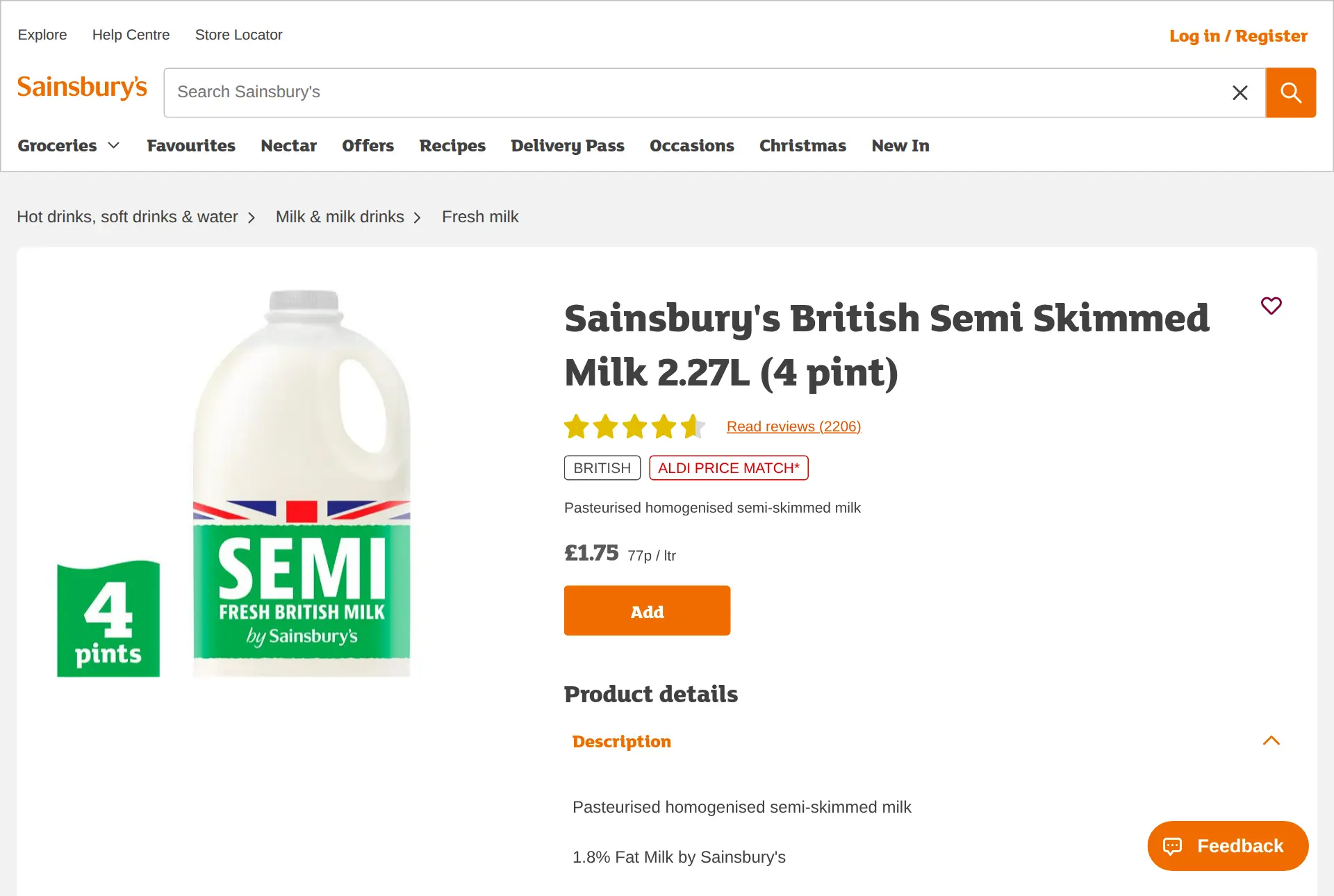
357937), or its address on sainsburys.co.uk (https://www.sainsburys.co.uk/gol-ui/product/sainsburys-british-semi-skimmed-milk-2-27l-4-pint).
A request, ready to send
It starts a run with the input shown at the top of this page, waits up to 60 seconds for it, and reads its records. Put your key in the variable it reads.
# Start a run and wait up to 60 seconds for it to finish
curl -X POST "https://api.enrichednow.com/v1/scrapers/sainsburys.product/runs?wait=60" \
  -H "Authorization: Bearer $ENRICHEDNOW_API_KEY" \
  -H "Content-Type: application/json" \
  -d '{"input":{"product":"357937"}}'

# Read its records, with the id the first call answered
curl "https://api.enrichednow.com/v1/runs/$RUN_ID/records?limit=100" \
  -H "Authorization: Bearer $ENRICHEDNOW_API_KEY"
from enrichednow import EnrichedNow
client = EnrichedNow() # reads ENRICHEDNOW_API_KEY
# Start a run, wait for it to end, and get its records
result = client.scrape("sainsburys.product", {"product": "357937"})
print(result.run.id, result.run.status, result.run.record_count)
# Read its records: pages are fetched as you go
for record in result.records:
print(record)Install it with pip install enrichednow, then save as run.py and run python3 run.py
import EnrichedNow from "enrichednow";

const client = new EnrichedNow(); // reads ENRICHEDNOW_API_KEY

// Start a run, wait for it to end, and get its records
const { run, records } = await client.scrape("sainsburys.product", { product: "357937" });
console.log(run.id, run.status, run.record_count);

// Read its records: pages are fetched as you go
for await (const record of records) console.log(record);
Install it with npm install enrichednow, then save as run.mjs and run node run.mjs
package main

import (
	"context"
	"fmt"
	"log"
	"time"

	enrichednow "github.com/enrichednow/enrichednow-go"
)

func main() {
	client, err := enrichednow.NewClient() // reads ENRICHEDNOW_API_KEY
	if err != nil {
		log.Fatal(err)
	}
	ctx, cancel := context.WithTimeout(context.Background(), 10*time.Minute)
	defer cancel()

	// Start a run, wait for it to end, and get its records
	run, records, err := client.Scrape(ctx, "sainsburys.product", map[string]any{"product": "357937"})
	if err != nil {
		log.Fatal(err)
	}
	fmt.Println(run.ID, run.Status, run.RecordCount)

	// Read its records: pages are fetched as you go
	for records.Next() {
		fmt.Println(string(records.Current()))
	}
	if err := records.Err(); err != nil {
		log.Fatal(err)
	}
}
Install it with go get github.com/enrichednow/enrichednow-go@latest, then save as run.go and run go run run.go
import com.enrichednow.EnrichedNowClient;
import com.enrichednow.ScrapeResult;
import java.util.Map;

public class Run {
    public static void main(String[] args) {
        EnrichedNowClient client = EnrichedNowClient.fromEnv(); // reads ENRICHEDNOW_API_KEY

        // Start a run, wait for it to end, and get its records
        ScrapeResult result = client.scrape("sainsburys.product", Map.of("product", "357937"));
        System.out.println(result.run().id() + " " + result.run().status() + " " + result.run().recordCount());

        // Read its records: pages are fetched as you go
        for (Map<String, Object> record : result.records()) {
            System.out.println(record);
        }
    }
}
Add com.enrichednow:enrichednow-java:0.4.0 to your Maven or Gradle build, then save as Run.java
enrichednow run sainsburys.product --input-json '{"product":"357937"}'Install it with curl -fsSL https://raw.githubusercontent.com/enrichednow/enrichednow-cli/main/install.sh | sh
What comes back
The product: name, brand, price, the price before a Nectar offer, unit price, offers, rating, barcodes, description, the shelves it sits on and every picture. A record has 25 fields. One we could not read is null, never an empty string or a zero.
{
  "product_id": "357937",
  "url": "https://www.sainsburys.co.uk/gol-ui/product/sainsburys-british-semi-skimmed-milk-2-27l-4-pint",
  "name": "Sainsbury's British Semi Skimmed Milk 2.27L (4 pint)",
  "price": 1.75,
  "price_before_offer": null,
  "currency": "GBP",
  "sold_by": null,
  "weights": [],
  "unit_price": 0.77,
  "unit": "ltr",
  "unit_amount": 1,
  "available": true,
  "offers": [],
  "rating": 4.607,
  "review_count": 2206,
  "barcodes": [
    "0000000357937",
    "0000050181117"
  ],
  "categories": [
    "Fresh milk",
    "Pancake Day",
    "About Nectar"
  ],
  "labels": [
    "BRITISH",
    "ALDI PRICE MATCH*"
  ],
  "image": "https://assets.sainsburys-groceries.co.uk/gol/357937/image.jpg",
  "fetched_at": "2026-11-19T18:23:57.385799Z",
  "brand": "Sainsbury's",
  "description": "Pasteurised homogenised semi-skimmed milk",
  "department": "Milk & milk drinks",
  "breadcrumbs": [
    "Hot drinks, soft drinks & water",
    "Milk & milk drinks",
    "Fresh milk"
  ],
  "images": [
    "https://assets.sainsburys-groceries.co.uk/gol/357937/1/2365x2365.jpg"
  ]
}
The scraper returned this record for the input above, reading a saved copy of the page, not the live site.
Values shortened for this page: categories: 13 items, the first 3 shown.
The fields of a record
product_idstring- Sainsbury's id of the product (
357937).sainsburys.producttakes it. urlstring or null- The product's page on sainsburys.co.uk.
namestring- The product's name as the shop writes it, with its size.
pricenumber or null- The price the shop shows first, in pounds. Where an offer for Nectar members sets the price of one item, this is that price, and
price_before_offeris the price without it. Null for an item priced by its band of weight (seeweights). price_before_offernumber or null- The price without the offer that sets
price, in pounds; null when no such offer applies. currencystring- The currency of the prices: always
GBP. sold_bystring or nullkgfor a product priced by weight (loose fruit and vegetables); null for one sold by the item.weightslist of objects- For an item whose weight varies (a joint, a pack of chicken fillets), the bands of weight it comes in and the price of each;
priceis then null. Empty for any other product. unit_pricenumber or null- The price per
unit_amountunit, in pounds, as the shop compares products. unitstring or null- The unit of
unit_priceas the shop writes it:kg,ltr,ea(each),100g... unit_amountnumber or null- How many
unitthe unit price is for, usually 1. availableboolean or null- Whether the shop offers the product for delivery now.
offerslist of objects- The offers on the product now.Each holds
text,nectar,starts_at,ends_at. ratingnumber or null- The average customer rating, out of 5.
review_countinteger or null- How many customer reviews the rating is from.
barcodeslist of strings- The product's barcodes (EAN-13), as the shop lists them.
categorieslist of strings- The shop's categories the product is placed in.
labelslist of strings- The labels on the product's tile:
BRITISH,ALDI PRICE MATCH*... imagestring or null- The address of the product's main picture.
fetched_atdatetime- When the shop answered, in UTC.
brandstring or null- The brand, as the shop names it.
descriptionstring or null- The product's description from its page.
departmentstring or null- The aisle the product is in, e.g.
Milk & milk drinks. breadcrumbslist of strings- The path of shelves to the product, from the widest.
imageslist of strings- Every picture of the product, at the largest size the shop offers.
Units and limits
- Counted per request
- Billed per request: a run that returns data costs 1 unit, however many records it returns.
- A miss costs nothing
- A run that fails, that meets something not supported yet, or that you cancel costs nothing. You pay for runs that return data.
- What bounds a run
- A run may take up to 5 minutes. Its records are read in pages of up to 1,000 and are kept for 7 days.
What it does not do
- One run reads one product. A product the shop no longer sells ends as failed, with the reason not_found.
- Ingredients and nutrition are not returned: the shop's product service does not hold them.
- An item whose weight varies is priced by its bands of weight, in weights, and has no single price.
Questions
What does Sainsbury’s product return?
The product: name, brand, price, the price before a Nectar offer, unit price, offers, rating, barcodes, description, the shelves it sits on and every picture. A record has 25 fields, among them product_id, url, name, price, price_before_offer and currency. A value that could not be read is null, never an empty string or a zero.
What do I send?
A product's id at Sainsbury's, or the address of its page. The input product is required.
How is it counted?
Billed per request: a run that returns data costs 1 unit, however many records it returns. A run that fails, that meets something not supported yet, or that you cancel costs nothing. The first 1,000 units each month are free.
What does it not do?
One run reads one product. A product the shop no longer sells ends as failed, with the reason not_found. Ingredients and nutrition are not returned: the shop's product service does not hold them. An item whose weight varies is priced by its bands of weight, in weights, and has no single price.
How long are the records kept, and in what format do they come?
Records are kept for 7 days after the run ended, and read in pages of up to 1,000. They come as JSON, as NDJSON with one record a line, or as CSV with a column for each field.
Can an AI assistant call it?
Yes. Through the EnrichedNow MCP server an assistant calls the tool run_scraper with the scraper_id sainsburys.product and the same input. It costs what the same API call costs.
Sainsbury's
Sainsbury's online grocery shop in the United Kingdom: its search results and a product's page, with prices, Nectar offers, unit prices and ratings.
Sainsbury’s search
sainsburys.searchWords to search Sainsbury's groceries for, and optionally a page, a page size and an order. A page of the shop's results: each product's id, name, price, the price before a Nectar offer, unit price, offers, rating, barcodes and picture.
- Industry
- Shopping and retail
- Where
- United Kingdom
- For
- E-commerce
Run it on an input of your own.
Create an account, make a key, and send the request above with your own input. The first 1,000 units each month are free.