Scraper API
Property24
property24.listingAvailable
Property24 listing
The listing: price, address, suburb, town and province, type, listing date, rooms, parking, floor and plot size, rates and levies, description, every line of its overview, photos and the agency.
Give it a listing's address on property24.com.
1 unit a run, for runs that return data. Runs that fail cost nothing. How units work
- Counted
- 1 unit a run
- Inputs
- 1, 1 required
- Record
- 29 fields
- A run takes
- up to 5 minutes
- Records kept
- 7 days
- Measured
- its success, on the status page
POST/v1/scrapers/property24.listing/runs
sent, and answered
a record of the run29 fields
ok1 unit a run
A record this scraper returned for this input. The first 9 of its 29 fields are set down here; the whole record is below.
What it is used for
- Compare homes in full
- Read the floor and plot size, rates and levies, rooms and features of the homes you follow, side by side.
- Price a home
- Collect the listings near a home with their sizes and asking prices to set a fair figure.
- Feed a property site
- Keep the
description, photos andoverviewof listings you are allowed to show, with their agency.
What you send
A listing's address on property24.com. It is the one input.
urlstring Required- The listing's address on property24.com, as a search result gives it.
A request, ready to send
It starts a run with the input shown at the top of this page, waits up to 60 seconds for it, and reads its records. Put your key in the variable it reads.
# Start a run and wait up to 60 seconds for it to finish
curl -X POST "https://api.enrichednow.com/v1/scrapers/property24.listing/runs?wait=60" \
  -H "Authorization: Bearer $ENRICHEDNOW_API_KEY" \
  -H "Content-Type: application/json" \
  -d '{"input":{"url":"https://www.property24.com/for-sale/claremont/cape-town/western-cape/11741/117835243"}}'

# Read its records, with the id the first call answered
curl "https://api.enrichednow.com/v1/runs/$RUN_ID/records?limit=100" \
  -H "Authorization: Bearer $ENRICHEDNOW_API_KEY"
from enrichednow import EnrichedNow
client = EnrichedNow() # reads ENRICHEDNOW_API_KEY
# Start a run, wait for it to end, and get its records
result = client.scrape("property24.listing", {
"url": "https://www.property24.com/for-sale/claremont/cape-town/western-cape/11741/117835243",
})
print(result.run.id, result.run.status, result.run.record_count)
# Read its records: pages are fetched as you go
for record in result.records:
print(record)Install it with pip install enrichednow, then save as run.py and run python3 run.py
import EnrichedNow from "enrichednow";

const client = new EnrichedNow(); // reads ENRICHEDNOW_API_KEY

// Start a run, wait for it to end, and get its records
const { run, records } = await client.scrape("property24.listing", {
  url: "https://www.property24.com/for-sale/claremont/cape-town/western-cape/11741/117835243",
});
console.log(run.id, run.status, run.record_count);

// Read its records: pages are fetched as you go
for await (const record of records) console.log(record);
Install it with npm install enrichednow, then save as run.mjs and run node run.mjs
package main

import (
	"context"
	"fmt"
	"log"
	"time"

	enrichednow "github.com/enrichednow/enrichednow-go"
)

func main() {
	client, err := enrichednow.NewClient() // reads ENRICHEDNOW_API_KEY
	if err != nil {
		log.Fatal(err)
	}
	ctx, cancel := context.WithTimeout(context.Background(), 10*time.Minute)
	defer cancel()

	// Start a run, wait for it to end, and get its records
	run, records, err := client.Scrape(ctx, "property24.listing", map[string]any{"url": "https://www.property24.com/for-sale/claremont/cape-town/western-cape/11741/117835243"})
	if err != nil {
		log.Fatal(err)
	}
	fmt.Println(run.ID, run.Status, run.RecordCount)

	// Read its records: pages are fetched as you go
	for records.Next() {
		fmt.Println(string(records.Current()))
	}
	if err := records.Err(); err != nil {
		log.Fatal(err)
	}
}
Install it with go get github.com/enrichednow/enrichednow-go@latest, then save as run.go and run go run run.go
import com.enrichednow.EnrichedNowClient;
import com.enrichednow.ScrapeResult;
import java.util.Map;

public class Run {
    public static void main(String[] args) {
        EnrichedNowClient client = EnrichedNowClient.fromEnv(); // reads ENRICHEDNOW_API_KEY

        // Start a run, wait for it to end, and get its records
        ScrapeResult result = client.scrape("property24.listing", Map.of("url", "https://www.property24.com/for-sale/claremont/cape-town/western-cape/11741/117835243"));
        System.out.println(result.run().id() + " " + result.run().status() + " " + result.run().recordCount());

        // Read its records: pages are fetched as you go
        for (Map<String, Object> record : result.records()) {
            System.out.println(record);
        }
    }
}
Add com.enrichednow:enrichednow-java:0.4.0 to your Maven or Gradle build, then save as Run.java
enrichednow run property24.listing --input url=https://www.property24.com/for-sale/claremont/cape-town/western-cape/11741/117835243Install it with curl -fsSL https://raw.githubusercontent.com/enrichednow/enrichednow-cli/main/install.sh | sh
What comes back
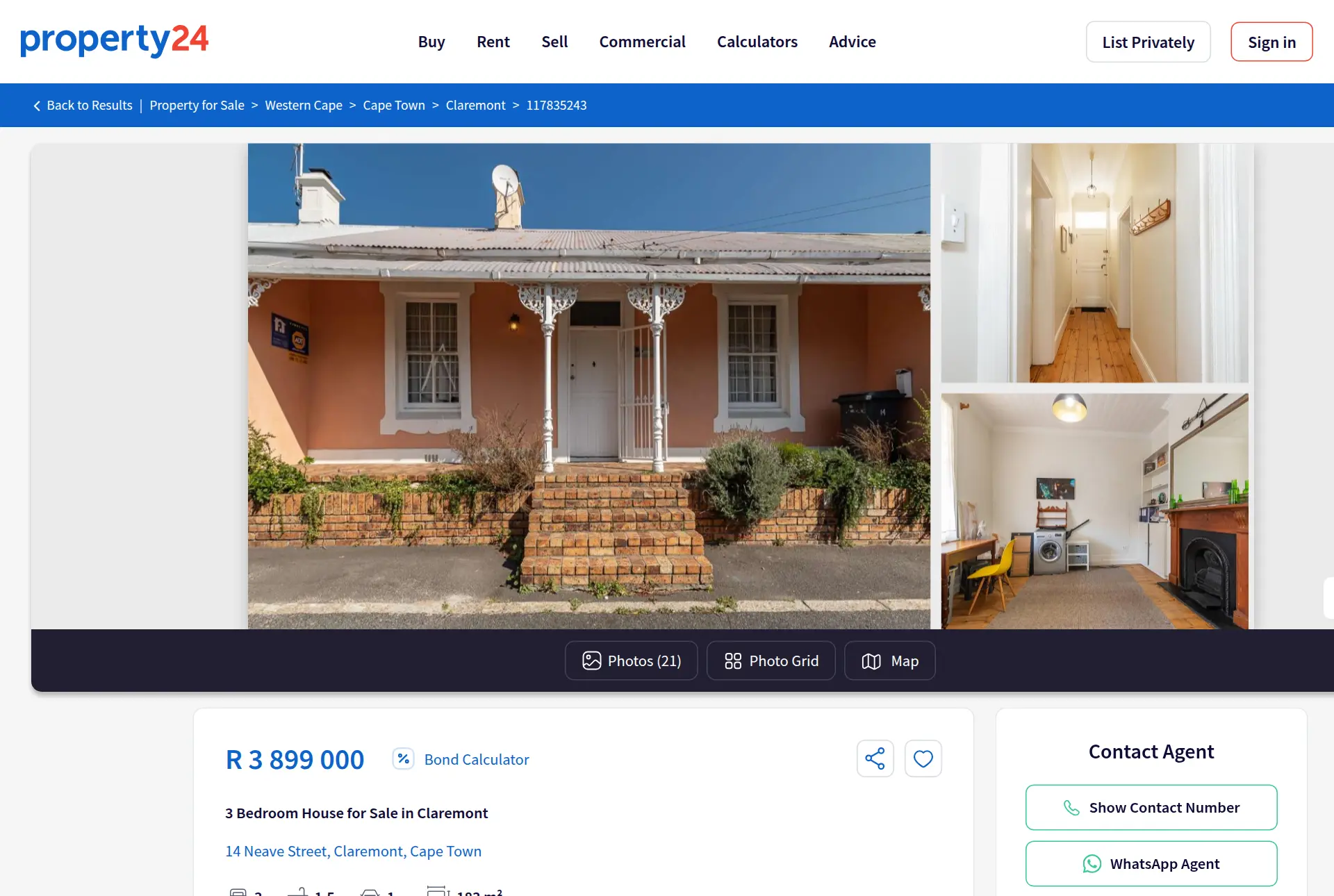
The listing: price, address, suburb, town and province, type, listing date, rooms, parking, floor and plot size, rates and levies, description, every line of its overview, photos and the agency. A record has 29 fields. One we could not read is null, never an empty string or a zero.
{
  "listing_id": "117835243",
  "url": "https://www.property24.com/for-sale/claremont/cape-town/western-cape/11741/117835243",
  "title": "3 Bedroom House for Sale in Claremont",
  "offer": "sale",
  "price": 3899000,
  "price_text": "R 3 899 000",
  "currency": "ZAR",
  "address": "14 Neave Street, Claremont, Cape Town",
  "suburb": "Claremont",
  "city": "Cape Town",
  "province": "Western Cape",
  "property_type": "House",
  "listed_on": "2026-11-19",
  "available_from": null,
  "bedrooms": 3,
  "bathrooms": 1.5,
  "parking": 1,
  "garages": null,
  "floor_size_m2": 99,
  "erf_size_m2": 183,
  "rates_and_taxes": 1820,
  "levies": null,
  "description": "Exclusive Sole Mandate\n\nThis charming Victorian style home is set in a lovely street lined with beautiful Victorian houses, creating a wonderful sense of character and history.\n\nAs you enter, you are welcomed by warm wooden floors, high … [truncated]",
  "overview": {
    "Listing Number": "117835243",
    "Type of Property": "House",
    "Listing Date": "19 November 2026",
    "Erf Size": "183 m²",
    "Floor Size": "99 m²",
    "Rates and Taxes": "R 1 820",
    "Bedrooms": "3; Fireplace in main bedroom, burglar bars",
    "Bathrooms": "1.5; Guest Loo",
    "Reception Rooms": "2",
    "Lounge": "1",
    "Dining Room": "1",
    "Parking": "1 open parking",
    "Garden": "Yes",
    "Security": "Burglar bars"
  },
  "images": [
    "https://images.prop24.com/390599584",
    "https://images.prop24.com/390599585",
    "https://images.prop24.com/390599586"
  ],
  "photo_count": 21,
  "agency": "Real Realty",
  "agency_url": "https://www.property24.com/for-sale/agency/real-realty/13041",
  "fetched_at": "2026-11-19T21:13:52.953700Z"
}
The scraper returned this record for the input above, reading a saved copy of the page, not the live site.
Values shortened for this page: description: 2,371 characters, the first 236 shown; images: 21 items, the first 3 shown.
The fields of a record
listing_idstring- Property24's number of the listing.
urlstring- The listing's page on property24.com.
titlestring- The listing's heading, e.g.
4 Bedroom House for Sale in Atholl. offerstringsaleorrent.priceinteger or null- The asking price, or the monthly rent, in rand. Null for a price on application.
price_textstring or null- The price as the page writes it.
currencystring- Always
ZAR. addressstring or null- The address the page gives, most often the suburb and town (
Atholl, Sandton); the street only where the advertiser shows it. suburbstring or null- The suburb, the last of the page's trail of places.
citystring or null- The town or city, the second of the trail.
provincestring or null- The province.
property_typestring or null- The type of property, e.g.
House,Apartment / Flat. listed_ondate or null- The listing date the page states.
available_fromdate or null- For a rental, the day it can be moved into (Occupation Date), when stated.
bedroomsnumber or null- The number of bedrooms.
bathroomsnumber or null- The number of bathrooms.
parkinginteger or null- The number of parking spaces the page states; null where it only describes them (
Secure Parking). garagesinteger or null- The number of garages.
floor_size_m2number or null- The floor size in square metres.
erf_size_m2number or null- The size of the plot (erf) in square metres.
rates_and_taxesinteger or null- The monthly rates and taxes in rand, when stated.
leviesinteger or null- The monthly levy in rand, when stated.
descriptionstring or null- The advertiser's text.
overviewobject- Every line of the page's overview, rooms and features, as label and value, e.g.
Pets Allowed:Yes,Bathrooms:4.5; Jacuzzi Bath, Guest Toilet, En suite. imageslist of strings- The listing's photos the page links, in its order.
photo_countinteger or null- How many photos the listing has.
agencystring or null- The estate agency that advertises it; null for a private seller.
agency_urlstring or null- The agency's page on property24.com.
fetched_atdatetime- When Property24 answered, in UTC.
Units and limits
- Counted per request
- Billed per request: a run that returns data costs 1 unit, however many records it returns.
- A miss costs nothing
- A run that fails, that meets something not supported yet, or that you cancel costs nothing. You pay for runs that return data.
- What bounds a run
- A run may take up to 5 minutes. Its records are read in pages of up to 1,000 and are kept for 7 days.
What it does not do
- The agents' names and numbers are not returned; the record names the agency.
- The street is given only where the advertiser shows it; otherwise the address is the suburb and the town.
- A listing that was withdrawn ends as failed with the reason not_found, and costs nothing.
Questions
What does Property24 listing return?
The listing: price, address, suburb, town and province, type, listing date, rooms, parking, floor and plot size, rates and levies, description, every line of its overview, photos and the agency. A record has 29 fields, among them listing_id, url, title, offer, price and price_text. A value that could not be read is null, never an empty string or a zero.
What do I send?
A listing's address on property24.com. The input url is required.
How is it counted?
Billed per request: a run that returns data costs 1 unit, however many records it returns. A run that fails, that meets something not supported yet, or that you cancel costs nothing. The first 1,000 units each month are free.
What does it not do?
The agents' names and numbers are not returned; the record names the agency. The street is given only where the advertiser shows it; otherwise the address is the suburb and the town. A listing that was withdrawn ends as failed with the reason not_found, and costs nothing.
How long are the records kept, and in what format do they come?
Records are kept for 7 days after the run ended, and read in pages of up to 1,000. They come as JSON, as NDJSON with one record a line, or as CSV with a column for each field.
Can an AI assistant call it?
Yes. Through the EnrichedNow MCP server an assistant calls the tool run_scraper with the scraper_id property24.listing and the same input. It costs what the same API call costs.
Property24
Property24, South Africa's largest property portal: an area's homes for sale or to rent, and one listing with its overview, rates and levies, photos and agency.
Property24 search
property24.searchThe address of an area's results on property24.com, and optionally an order and a page. The listings on that page: price in rand, title, type, suburb, bedrooms, bathrooms, parking, floor or plot size, the agency, badges and the main photo.
- Industry
- Real estate
- Where
- South Africa
- Data
- Prices
Run it on an input of your own.
Create an account, make a key, and send the request above with your own input. The first 1,000 units each month are free.