Scraper API
Priceline
priceline.hotels_searchAvailable
Priceline hotel search
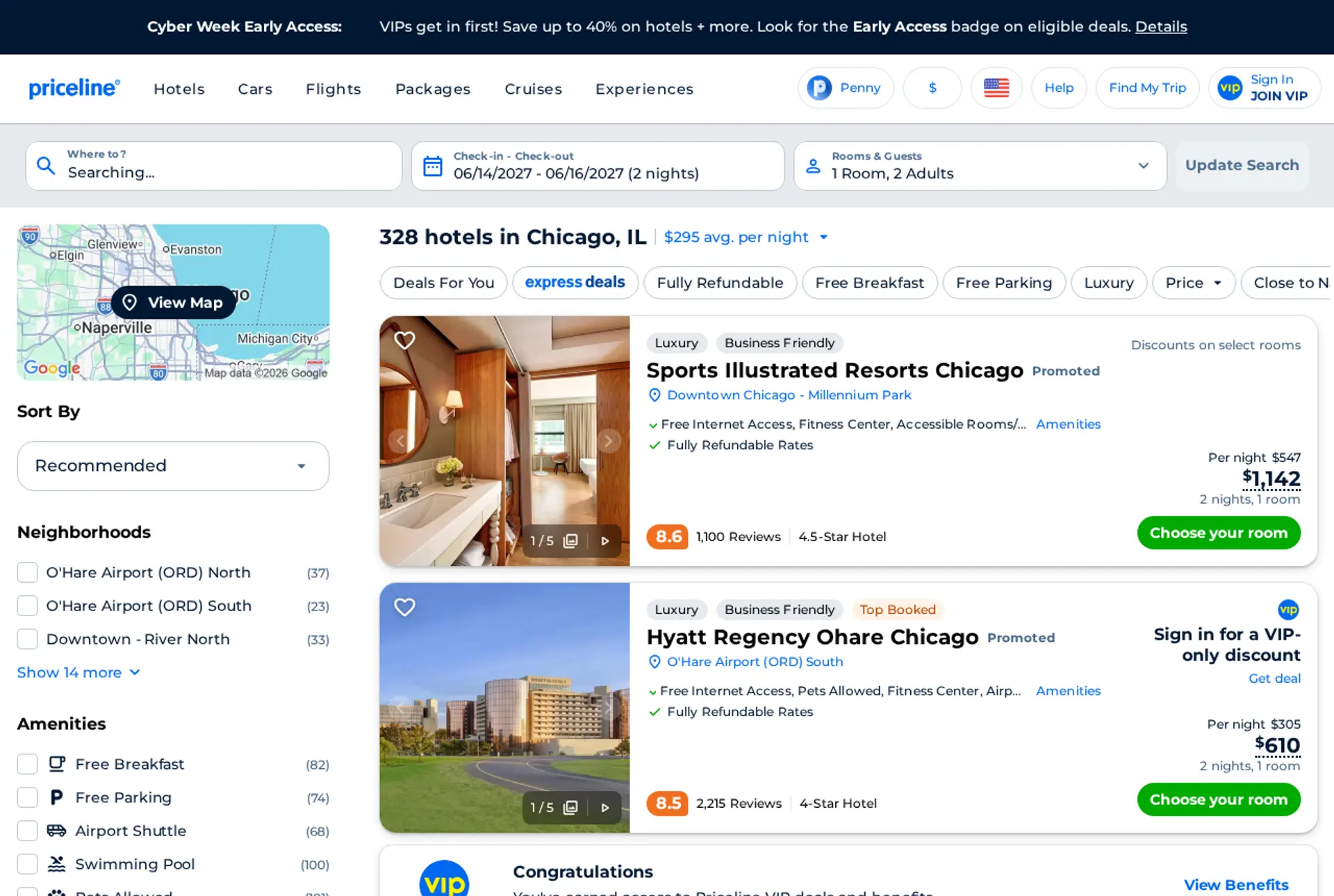
The hotels on the first page of Priceline's results for the stay: name, class, brand, address, coordinates, the guests' scores and review count, amenities, the price a night, the total with taxes, and whether it is an Express Deal.
Give it a destination, and optionally the dates of a stay, the rooms and the adults.
1 unit a run, for runs that return data. Runs that fail cost nothing. How units work
- Counted
- 1 unit a run
- Inputs
- 5, 1 required
- Record
- 34 fields
- A run takes
- up to 5 minutes
- Records kept
- 7 days
- Measured
- its success, on the status page
POST/v1/scrapers/priceline.hotels_search/runs
sent, and answered
a record of the run34 fields
ok1 unit a run
A record this scraper returned for this input. The first 9 of its 34 fields are set down here; the whole record is below.
What it is used for
- Compare hotel prices
- Read the price a night and the total with taxes of the hotels in a town for the same dates, side by side with other sites.
- Watch a town's prices
- Search the same town and dates on a schedule and follow how the prices of its hotels move as the stay comes closer.
- Find what is on offer
- Count the hotels, Express Deals and brands Priceline lists for a town, with their class and the guests' scores.
What you send
A destination, and optionally the dates of a stay, the rooms and the adults. These are its 5 inputs, as its schema has them.
destinationstring Required- Where to stay, as typed into Priceline's search box: a town, a landmark or an airport, whose town is searched. Or Priceline's id of a town.
check_instring Both or neither- The day of arrival, as YYYY-MM-DD. Without dates: one night, 14 days from today.
check_outstring Both or neither- The day of departure, as YYYY-MM-DD: after check_in, and at most 30 nights later.
roomsinteger Optional- The number of rooms. 1 unless you say otherwise.Default
1 adultsinteger Optional- The number of adults in all the rooms together. 2 unless you say otherwise.Default
2
A request, ready to send
It starts a run with the input shown at the top of this page, waits up to 60 seconds for it, and reads its records. Put your key in the variable it reads.
# Start a run and wait up to 60 seconds for it to finish
curl -X POST "https://api.enrichednow.com/v1/scrapers/priceline.hotels_search/runs?wait=60" \
  -H "Authorization: Bearer $ENRICHEDNOW_API_KEY" \
  -H "Content-Type: application/json" \
  -d '{"input":{"destination":"Chicago","check_in":"2027-06-14","check_out":"2027-06-16"}}'

# Read its records, with the id the first call answered
curl "https://api.enrichednow.com/v1/runs/$RUN_ID/records?limit=100" \
  -H "Authorization: Bearer $ENRICHEDNOW_API_KEY"
from enrichednow import EnrichedNow
client = EnrichedNow() # reads ENRICHEDNOW_API_KEY
# Start a run, wait for it to end, and get its records
result = client.scrape("priceline.hotels_search", {
"destination": "Chicago",
"check_in": "2027-06-14",
"check_out": "2027-06-16",
})
print(result.run.id, result.run.status, result.run.record_count)
# Read its records: pages are fetched as you go
for record in result.records:
print(record)Install it with pip install enrichednow, then save as run.py and run python3 run.py
import EnrichedNow from "enrichednow";

const client = new EnrichedNow(); // reads ENRICHEDNOW_API_KEY

// Start a run, wait for it to end, and get its records
const { run, records } = await client.scrape("priceline.hotels_search", {
  destination: "Chicago",
  check_in: "2027-06-14",
  check_out: "2027-06-16",
});
console.log(run.id, run.status, run.record_count);

// Read its records: pages are fetched as you go
for await (const record of records) console.log(record);
Install it with npm install enrichednow, then save as run.mjs and run node run.mjs
package main

import (
	"context"
	"fmt"
	"log"
	"time"

	enrichednow "github.com/enrichednow/enrichednow-go"
)

func main() {
	client, err := enrichednow.NewClient() // reads ENRICHEDNOW_API_KEY
	if err != nil {
		log.Fatal(err)
	}
	ctx, cancel := context.WithTimeout(context.Background(), 10*time.Minute)
	defer cancel()

	// Start a run, wait for it to end, and get its records
	run, records, err := client.Scrape(ctx, "priceline.hotels_search", map[string]any{"destination": "Chicago", "check_in": "2027-06-14", "check_out": "2027-06-16"})
	if err != nil {
		log.Fatal(err)
	}
	fmt.Println(run.ID, run.Status, run.RecordCount)

	// Read its records: pages are fetched as you go
	for records.Next() {
		fmt.Println(string(records.Current()))
	}
	if err := records.Err(); err != nil {
		log.Fatal(err)
	}
}
Install it with go get github.com/enrichednow/enrichednow-go@latest, then save as run.go and run go run run.go
import com.enrichednow.EnrichedNowClient;
import com.enrichednow.ScrapeResult;
import java.util.Map;

public class Run {
    public static void main(String[] args) {
        EnrichedNowClient client = EnrichedNowClient.fromEnv(); // reads ENRICHEDNOW_API_KEY

        // Start a run, wait for it to end, and get its records
        ScrapeResult result = client.scrape("priceline.hotels_search", Map.of("destination", "Chicago", "check_in", "2027-06-14", "check_out", "2027-06-16"));
        System.out.println(result.run().id() + " " + result.run().status() + " " + result.run().recordCount());

        // Read its records: pages are fetched as you go
        for (Map<String, Object> record : result.records()) {
            System.out.println(record);
        }
    }
}
Add com.enrichednow:enrichednow-java:0.4.0 to your Maven or Gradle build, then save as Run.java
enrichednow run priceline.hotels_search --input destination=Chicago --input check_in=2027-06-14 --input check_out=2027-06-16Install it with curl -fsSL https://raw.githubusercontent.com/enrichednow/enrichednow-cli/main/install.sh | sh
What comes back
The hotels on the first page of Priceline's results for the stay: name, class, brand, address, coordinates, the guests' scores and review count, amenities, the price a night, the total with taxes, and whether it is an Express Deal. A record has 34 fields. One we could not read is null, never an empty string or a zero.
{
  "position": 1,
  "hotel_id": "266386204",
  "name": "Riu Plaza Chicago",
  "express_deal": false,
  "url": "https://www.priceline.com/relax/at/266386204/from/20270614/to/20270616/rooms/1",
  "sponsored": true,
  "star_rating": 4,
  "brand": "Riu Hotels and Resorts",
  "brand_owner": "RIU Hotels",
  "address": "150 E Ontario St, Streeterville",
  "neighborhood": "Magnificent Mile -Gold Coast",
  "city": "Chicago",
  "state_code": "IL",
  "country_code": "US",
  "latitude": 41.8936778,
  "longitude": -87.62323522,
  "review_score": 9.1,
  "review_scores": [
    {
      "label": "Location",
      "score": 9.7
    },
    {
      "label": "Cleanliness",
      "score": 9.4
    },
    {
      "label": "Staff",
      "score": 9.3
    }
  ],
  "review_count": 4457,
  "amenities": [
    "Free Internet Access",
    "Fitness Center",
    "Accessible Rooms/Facilities"
  ],
  "badges": [
    "Family Friendly",
    "Luxury"
  ],
  "images": [
    "https://assets.pclncdn.com/bstatic/xdata/images/hotel/582510393.jpg?k=39878d4ce42f9e7b0bf703384b6a8a7c5511952c076e416872554ee6987beb22&o=&a=2325679",
    "https://assets.pclncdn.com/bstatic/xdata/images/hotel/589595217.jpg?k=55b03963ba57315d5ccf156a68891816b5a7b8e36091d71d49ddaf51d122b172&o=&a=2325679",
    "https://assets.pclncdn.com/bstatic/xdata/images/hotel/596614855.jpg?k=cddcdd233fd5c9a79a992c33b5850617cb2168a83eb6ab44da97cb4598b3ac8c&o=&a=2325679"
  ],
  "price_per_night": 387.37,
  "price_per_night_before_discount": 430,
  "stay_price": 822.74,
  "taxes": 155.52,
  "total_price": 978.26,
  "currency": "USD",
  "cancellation": "Fully Refundable Rates",
  "pay_later": null,
  "check_in": "2027-06-14",
  "check_out": "2027-06-16",
  "total_results": 326,
  "fetched_at": "2026-11-19T21:13:52.943759Z"
}
The scraper returned this record for the input above, reading a saved copy of the page, not the live site.
Values shortened for this page: review_scores: 4 items, the first 3 shown; amenities: 4 items, the first 3 shown; images: 5 items, the first 3 shown.
The fields of a record
positioninteger- The hotel's place on the page, from 1, in Priceline's own order.
hotel_idstring or null- Priceline's id of the hotel. Null for an Express Deal, whose hotel Priceline names only after booking.
namestring- The hotel's name; for an Express Deal, the description Priceline gives instead, e.g.
A 4-Star Hotel in the Magnificent Mile Area. express_dealboolean- True for an Express Deal: a discounted hotel whose name and address Priceline reveals only after booking.
urlstring or null- The hotel's page on priceline.com for the same stay. Null for an Express Deal.
sponsoredboolean- True when Priceline marks the hotel as promoted (a paid placement).
star_ratingnumber or null- The hotel's class in stars, e.g.
3.5. brandstring or null- The hotel's brand, e.g.
Curio Collection, when it belongs to one. brand_ownerstring or null- The company that owns the brand, e.g.
Hilton Worldwide. addressstring or null- The street address. Null for an Express Deal.
neighborhoodstring or null- The neighbourhood Priceline places the hotel in.
citystring or null- The town the hotel is in, as Priceline names it (it can be a town near the one searched).
state_codestring or null- The state or province code, in the countries that have one, e.g.
IL. country_codestring or null- The country, as Priceline's two-letter code: mostly the ISO one (
US,FR), with a few of its own (UKfor the United Kingdom,JAfor Japan). latitudenumber or null- The latitude in decimal degrees. Null for an Express Deal.
longitudenumber or null- The longitude in decimal degrees.
review_scorenumber or null- The guests' overall score, out of 10.
review_scoreslist of objects- Every score Priceline shows for the hotel, the overall one among them.Each holds
label,score. review_countinteger or null- How many guest reviews the score is from. Where Priceline writes a round figure with a plus (
600+ Reviews), the figure. amenitieslist of strings- The amenities the card lists, e.g.
Free Internet Access,Free Parking. badgeslist of strings- The labels Priceline puts on the hotel, e.g.
Family Friendly,Top Booked. imageslist of strings- The first photos of the hotel, as the results show them.
price_per_nightnumber or null- The lowest price a night for the stay, before taxes and fees, in
currency, as the results page is first sent. The page asks again once it has loaded, and the figure it then shows can differ by a few dollars. Null when the hotel has no room for the stay. price_per_night_before_discountnumber or null- The price a night before a reduction, when the results page states one.
stay_pricenumber or null- The price of the whole stay before taxes, for all the rooms: the large figure on the card.
taxesnumber or null- The taxes on the stay:
total_pricelessstay_price. total_pricenumber or null- The total for the stay with taxes and fees, as the card's
Totalline states it. currencystring or null- The currency of the prices, e.g.
USD. cancellationstring or null- What the card says of cancelling, e.g.
Fully Refundable Rates; null when it says nothing. pay_laterboolean or null- True when the card offers to pay later, at the hotel or before the stay.
check_indate- The day of arrival the prices are for.
check_outdate- The day of departure the prices are for.
total_resultsinteger or null- How many hotels Priceline says it has for the stay, the same on every record.
fetched_atdatetime- When Priceline answered, in UTC.
Units and limits
- Counted per request
- Billed per request: a run that returns data costs 1 unit, however many records it returns.
- A miss costs nothing
- A run that fails, that meets something not supported yet, or that you cancel costs nothing. You pay for runs that return data.
- What bounds a run
- A run may take up to 5 minutes. Its records are read in pages of up to 1,000 and are kept for 7 days.
What it does not do
- One run reads the first page of results: 30 hotels, in Priceline's own order. Another order or a further page cannot be asked for.
- Prices are in US dollars, as Priceline shows them to a visitor in the United States. The results page asks for prices again once it has loaded, so what it shows can differ by a few dollars.
- An Express Deal is a hotel Priceline names only after booking: its record has a description instead of a name, and no id, address or link.
- A destination Priceline suggests nothing for ends as failed with the reason location_not_found, and costs nothing.
The bounds its schema sets
rooms- 1 to 8; 1 unless you say otherwise
adults- 1 to 16; 2 unless you say otherwise
Questions
What does Priceline hotel search return?
The hotels on the first page of Priceline's results for the stay: name, class, brand, address, coordinates, the guests' scores and review count, amenities, the price a night, the total with taxes, and whether it is an Express Deal. A record has 34 fields, among them position, hotel_id, name, express_deal, url and sponsored. A value that could not be read is null, never an empty string or a zero.
What do I send?
A destination, and optionally the dates of a stay, the rooms and the adults. The input destination is required. Of check_in and check_out, send both or neither. Optional: rooms and adults.
How is it counted?
Billed per request: a run that returns data costs 1 unit, however many records it returns. A run that fails, that meets something not supported yet, or that you cancel costs nothing. The first 1,000 units each month are free.
How much does one run return?
Its schema sets these bounds: rooms 1 to 8 (1 unless you say otherwise); adults 1 to 16 (2 unless you say otherwise). A run may take up to 5 minutes.
What does it not do?
One run reads the first page of results: 30 hotels, in Priceline's own order. Another order or a further page cannot be asked for. Prices are in US dollars, as Priceline shows them to a visitor in the United States. The results page asks for prices again once it has loaded, so what it shows can differ by a few dollars. An Express Deal is a hotel Priceline names only after booking: its record has a description instead of a name, and no id, address or link. A destination Priceline suggests nothing for ends as failed with the reason location_not_found, and costs nothing.
How long are the records kept, and in what format do they come?
Records are kept for 7 days after the run ended, and read in pages of up to 1,000. They come as JSON, as NDJSON with one record a line, or as CSV with a column for each field.
Can an AI assistant call it?
Yes. Through the EnrichedNow MCP server an assistant calls the tool run_scraper with the scraper_id priceline.hotels_search and the same input. It costs what the same API call costs.
Priceline
Hotels on Priceline for a destination and a stay: class, brand, address, guests' scores, amenities, Express Deals, and the price a night and the total with taxes.
- Industry
- Travel, food and places
- Where
- United States
Run it on an input of your own.
Create an account, make a key, and send the request above with your own input. The first 1,000 units each month are free.