Scraper API
Naver
naver.booksAvailable
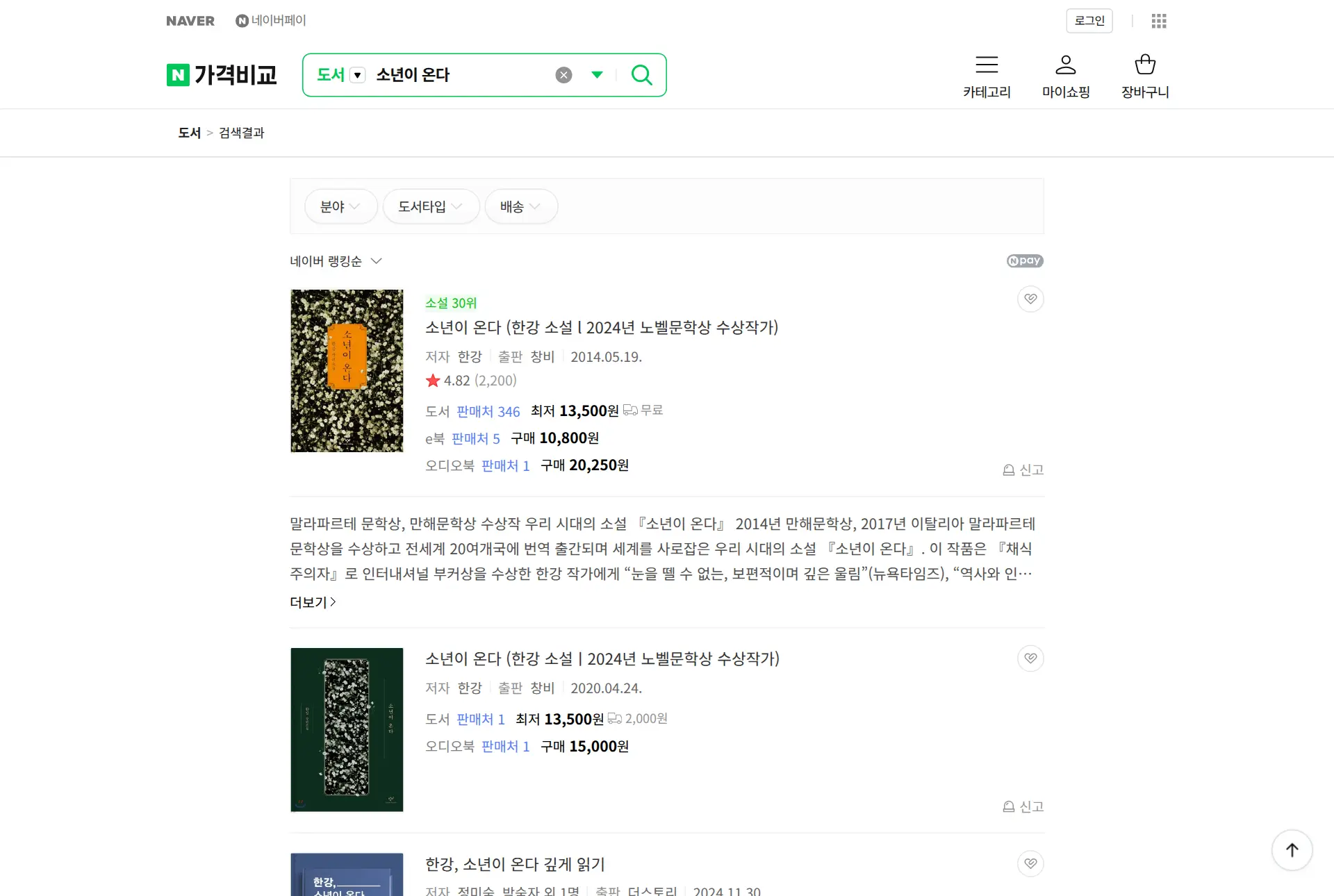
Naver book search
A page of 40 books: title, subtitle, authors, publisher, publication date, description, the lowest price and how many shops sell it, e-book and audiobook prices, reviews, rating, bestseller rank and prizes.
Give it a title, an author, a publisher or an ISBN, and a page number.
1 unit a run, for runs that return data. Runs that fail cost nothing. How units work
- Counted
- 1 unit a run
- Inputs
- 2, 1 required
- Record
- 23 fields
- A run takes
- up to 5 minutes
- Records kept
- 7 days
- Measured
- its success, on the status page
POST/v1/scrapers/naver.books/runs
sent, and answered
a record of the run23 fields
ok1 unit a run
A record this scraper returned for this input. The first 9 of its 23 fields are set down here; the whole record is below.
What it is used for
- Price a book in Korea
- Read a book's lowest price, how many shops sell it, and its e-book and audiobook prices.
- Follow a title's editions
- Search a title and get each edition and translation with its publisher, publication date and its page on Naver.
- Gauge readers' response
- Each book carries its review count, rating and bestseller rank as Naver shows them.
What you send
A title, an author, a publisher or an ISBN, and a page number. These are its 2 inputs, as its schema has them.
querystring Required- A title, an author, a publisher or an ISBN, e.g.
소년이 온다. pageinteger Optional- The results page, from 1; 40 books a page, in Naver's order, at most 25 pages.Default
1
A request, ready to send
It starts a run with the input shown at the top of this page, waits up to 60 seconds for it, and reads its records. Put your key in the variable it reads.
# Start a run and wait up to 60 seconds for it to finish
curl -X POST "https://api.enrichednow.com/v1/scrapers/naver.books/runs?wait=60" \
  -H "Authorization: Bearer $ENRICHEDNOW_API_KEY" \
  -H "Content-Type: application/json" \
  -d '{"input":{"query":"소년이 온다"}}'

# Read its records, with the id the first call answered
curl "https://api.enrichednow.com/v1/runs/$RUN_ID/records?limit=100" \
  -H "Authorization: Bearer $ENRICHEDNOW_API_KEY"
from enrichednow import EnrichedNow
client = EnrichedNow() # reads ENRICHEDNOW_API_KEY
# Start a run, wait for it to end, and get its records
result = client.scrape("naver.books", {"query": "소년이 온다"})
print(result.run.id, result.run.status, result.run.record_count)
# Read its records: pages are fetched as you go
for record in result.records:
print(record)Install it with pip install enrichednow, then save as run.py and run python3 run.py
import EnrichedNow from "enrichednow";

const client = new EnrichedNow(); // reads ENRICHEDNOW_API_KEY

// Start a run, wait for it to end, and get its records
const { run, records } = await client.scrape("naver.books", { query: "소년이 온다" });
console.log(run.id, run.status, run.record_count);

// Read its records: pages are fetched as you go
for await (const record of records) console.log(record);
Install it with npm install enrichednow, then save as run.mjs and run node run.mjs
package main

import (
	"context"
	"fmt"
	"log"
	"time"

	enrichednow "github.com/enrichednow/enrichednow-go"
)

func main() {
	client, err := enrichednow.NewClient() // reads ENRICHEDNOW_API_KEY
	if err != nil {
		log.Fatal(err)
	}
	ctx, cancel := context.WithTimeout(context.Background(), 10*time.Minute)
	defer cancel()

	// Start a run, wait for it to end, and get its records
	run, records, err := client.Scrape(ctx, "naver.books", map[string]any{"query": "소년이 온다"})
	if err != nil {
		log.Fatal(err)
	}
	fmt.Println(run.ID, run.Status, run.RecordCount)

	// Read its records: pages are fetched as you go
	for records.Next() {
		fmt.Println(string(records.Current()))
	}
	if err := records.Err(); err != nil {
		log.Fatal(err)
	}
}
Install it with go get github.com/enrichednow/enrichednow-go@latest, then save as run.go and run go run run.go
import com.enrichednow.EnrichedNowClient;
import com.enrichednow.ScrapeResult;
import java.util.Map;

public class Run {
    public static void main(String[] args) {
        EnrichedNowClient client = EnrichedNowClient.fromEnv(); // reads ENRICHEDNOW_API_KEY

        // Start a run, wait for it to end, and get its records
        ScrapeResult result = client.scrape("naver.books", Map.of("query", "\uc18c\ub144\uc774 \uc628\ub2e4"));
        System.out.println(result.run().id() + " " + result.run().status() + " " + result.run().recordCount());

        // Read its records: pages are fetched as you go
        for (Map<String, Object> record : result.records()) {
            System.out.println(record);
        }
    }
}
Add com.enrichednow:enrichednow-java:0.4.0 to your Maven or Gradle build, then save as Run.java
enrichednow run naver.books --input 'query=소년이 온다'Install it with curl -fsSL https://raw.githubusercontent.com/enrichednow/enrichednow-cli/main/install.sh | sh
What comes back
A page of 40 books: title, subtitle, authors, publisher, publication date, description, the lowest price and how many shops sell it, e-book and audiobook prices, reviews, rating, bestseller rank and prizes. A record has 23 fields. One we could not read is null, never an empty string or a zero.
{
  "position": 6,
  "page": 1,
  "book_id": "88618958943",
  "kind": "listing",
  "title": "소년이 온다 / 한강",
  "subtitle": null,
  "authors": [
    "한강"
  ],
  "illustrators": [],
  "publisher": "창비",
  "published_on": "2024-05-10",
  "description": "말라파르테 문학상, 만해문학상 수상작 \n우리 시대의 소설 『소년이 온다』\n\n2014년 만해문학상, 2017년 이탈리아 말라파르테 문학상을 수상하고 전세계 20여개국에 번역 출간되며 세계를 사로잡은 우리 시대의 소설 『소년이 온다』.\n이 작품은 『채식주의자』로 인터내셔널 부커상을 수상한 한강 작가에게 “눈을 뗄 수 없는, 보편적이며 깊은 울림”(뉴욕타임즈), “역사와 인간의 본질을 다룬 충격적이고 도발적인 소설”(가디언), … [truncated]",
  "price": 13500,
  "ebook_price": null,
  "audiobook_price": null,
  "shop_count": null,
  "shop": "영풍문고",
  "review_count": 128,
  "rating": 4.89,
  "bestseller_rank": "소설 30위",
  "awards": [],
  "thumbnail": "https://shopping-phinf.pstatic.net/main_8861895/88618958943.jpg",
  "url": "https://smartstore.naver.com/main/products/11074448621",
  "fetched_at": "2026-11-19T20:42:15.309306Z"
}
The scraper returned this record for the input above, reading a saved copy of the page, not the live site.
Values shortened for this page: description: 625 characters, the first 237 shown.
The fields of a record
positioninteger- The book's place in the results, from 1, counted across pages.
pageinteger- The results page the book is on.
book_idstring- Naver's id of the entry, e.g.
32491401626. kindstringbook: Naver's own entry for one edition of a book, priced from the shops that sell it.listing: one shop's own listing of a book.titlestring- The title as Naver lists it.
subtitlestring or null- The line Naver shows under the title, where it has one.
authorslist of strings- The authors, in Naver's order.
illustratorslist of strings- The illustrators, where Naver names any.
publisherstring or null- The publisher.
published_ondate or null- The day of publication. Null where Naver gives none or only a month.
descriptionstring or null- The description of the book Naver shows, as plain text with its line breaks.
priceinteger or null- The price in Korean won: for a
book, the lowest among the shops that sell it; for alisting, the shop's. Null where no shop sells it. ebook_priceinteger or null- The lowest price of the e-book, in won, where one is sold.
audiobook_priceinteger or null- The lowest price of the audiobook, in won, where one is sold.
shop_countinteger or null- For a
book: how many shops Naver lists as selling it. Null for alisting. shopstring or null- For a
listing: the shop's name, e.g.영풍문고. Null for abook, and for a private individual's shop. review_countinteger or null- How many reviews Naver counts for it.
ratingnumber or null- The average rating of those reviews, out of 5. Null without reviews.
bestseller_rankstring or null- Its place on a bestseller list as Naver prints it, e.g.
소설 30위(30th in fiction). awardslist of strings- The prizes Naver lists for it, e.g.
인터내셔널 부커상. thumbnailstring or null- The address of the cover picture.
urlstring- For a
book, its page on Naver (search.shopping.naver.com/book/catalog/<id>); for alisting, the shop's page of it. fetched_atdatetime- When the results were read, in UTC.
Units and limits
- Counted per request
- Billed per request: a run that returns data costs 1 unit, however many records it returns.
- A miss costs nothing
- A run that fails, that meets something not supported yet, or that you cancel costs nothing. You pay for runs that return data.
- What bounds a run
- A run may take up to 5 minutes. Its records are read in pages of up to 1,000 and are kept for 7 days.
What it does not do
- Books are in Naver's own order; there is no other sort.
- Up to 25 pages of a search.
- Books Naver marks for adults are left out.
The bounds its schema sets
page- 1 to 25; 1 unless you say otherwise
Questions
What does Naver book search return?
A page of 40 books: title, subtitle, authors, publisher, publication date, description, the lowest price and how many shops sell it, e-book and audiobook prices, reviews, rating, bestseller rank and prizes. A record has 23 fields, among them position, page, book_id, kind, title and subtitle. A value that could not be read is null, never an empty string or a zero.
What do I send?
A title, an author, a publisher or an ISBN, and a page number. The input query is required. Optional: page.
How is it counted?
Billed per request: a run that returns data costs 1 unit, however many records it returns. A run that fails, that meets something not supported yet, or that you cancel costs nothing. The first 1,000 units each month are free.
How much does one run return?
Its schema sets these bounds: page 1 to 25 (1 unless you say otherwise). A run may take up to 5 minutes.
What does it not do?
Books are in Naver's own order; there is no other sort. Up to 25 pages of a search. Books Naver marks for adults are left out.
How long are the records kept, and in what format do they come?
Records are kept for 7 days after the run ended, and read in pages of up to 1,000. They come as JSON, as NDJSON with one record a line, or as CSV with a column for each field.
Can an AI assistant call it?
Yes. Through the EnrichedNow MCP server an assistant calls the tool run_scraper with the scraper_id naver.books and the same input. It costs what the same API call costs.
Naver
Naver's main search, news, image and book searches, and the visitor reviews of places on Naver Map, as a visitor who is not signed in sees them.
Naver news search
naver.newsSearch words, in Korean or any other language, an order and a page number. A page of articles: headline, paper, summary, when it was published, the page of the printed edition, its copy on Naver News, and the other papers' articles on the same story.
Naver image search
naver.imagesSearch words and a page number. A page of images: the image at full size and as a thumbnail, its width and height, the page it is on with that page's title and date, and what kind of site it is.
Naver search
naver.searchSearch words, in Korean or any other language, and a page number. A page of Naver's main results: the web pages, blog posts and cafe posts it ranks, each with title, address, snippet, site or blog name and date, and on the first page the Power Link advertisements with the advertiser, its site and its extra links.
Naver Map place reviews
naver.place_reviewsA place's id on Naver Map or the address of its page, and how many reviews to return. The place's visitor reviews, newest first: the text, the day of the visit, which visit it was, how it was verified, the keywords picked, photos, what was booked and the place's reply, with the place's name, kind and address.
- Industry
- Search and the open web
- Where
- South Korea
Run it on an input of your own.
Create an account, make a key, and send the request above with your own input. The first 1,000 units each month are free.