Scraper API
Nasdaq
nasdaq.quoteAvailable
Nasdaq quote
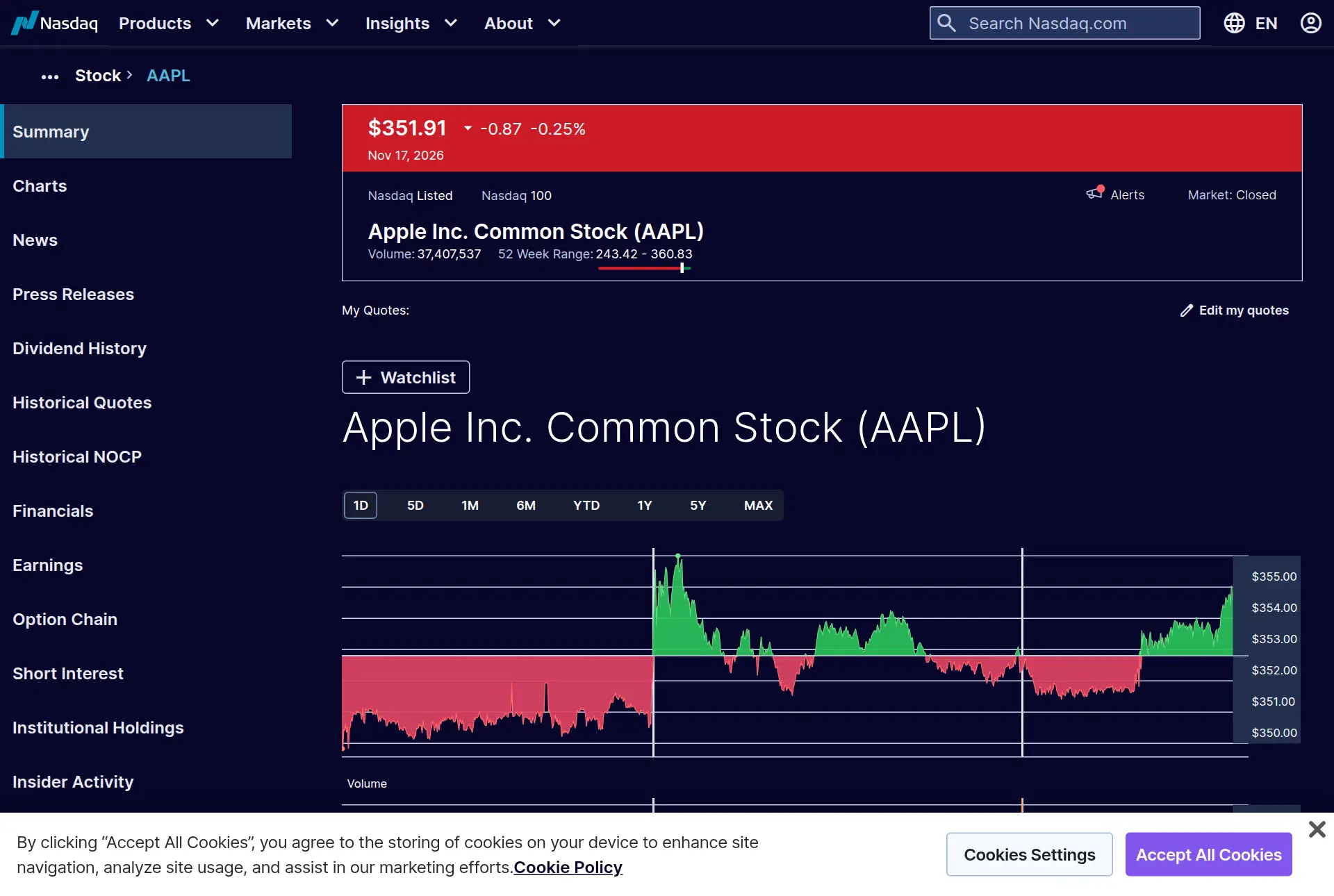
The quote as nasdaq.com shows it: last price and change, bid and ask, volume, day and 52-week range, market capitalisation, sector and industry, dividend, and every row of the page's key data.
Give it a ticker symbol, and optionally whether it is a stock, a fund or an index.
1 unit a run, for runs that return data. Runs that fail cost nothing. How units work
- Counted
- 1 unit a run
- Inputs
- 2, 1 required
- Record
- 36 fields
- A run takes
- up to 5 minutes
- Records kept
- 7 days
- Measured
- its success, on the status page
POST/v1/scrapers/nasdaq.quote/runs
sent, and answered
a record of the run36 fields
ok1 unit a run
A record this scraper returned for this input. The first 9 of its 36 fields are set down here; the whole record is below.
What it is used for
- Price a watchlist
- Last price, change, bid and ask, volume and the day's range for a stock, a fund or an index, with when the last trade was made.
- Compare companies
- Market cap, sector, industry, the 52-week range and the analysts' one-year target in one record, with the rows of the page's key data table.
- Track dividends
annualized_dividendanddividend_yieldsay what a share pays, with the last ex-dividend date and the day that dividend was paid.
What you send
A ticker symbol, and optionally whether it is a stock, a fund or an index. These are its 2 inputs, as its schema has them.
symbolstring Required- The ticker symbol, e.g.
AAPL,BRK.B,QQQ, or an index's symbol such asCOMP. asset_classstring Optional- The kind of security:
stocks,etforindex. When not given, the symbol is looked up as a stock, then as a fund, then as an index.
A request, ready to send
It starts a run with the input shown at the top of this page, waits up to 60 seconds for it, and reads its records. Put your key in the variable it reads.
# Start a run and wait up to 60 seconds for it to finish
curl -X POST "https://api.enrichednow.com/v1/scrapers/nasdaq.quote/runs?wait=60" \
  -H "Authorization: Bearer $ENRICHEDNOW_API_KEY" \
  -H "Content-Type: application/json" \
  -d '{"input":{"symbol":"AAPL"}}'

# Read its records, with the id the first call answered
curl "https://api.enrichednow.com/v1/runs/$RUN_ID/records?limit=100" \
  -H "Authorization: Bearer $ENRICHEDNOW_API_KEY"
from enrichednow import EnrichedNow
client = EnrichedNow() # reads ENRICHEDNOW_API_KEY
# Start a run, wait for it to end, and get its records
result = client.scrape("nasdaq.quote", {"symbol": "AAPL"})
print(result.run.id, result.run.status, result.run.record_count)
# Read its records: pages are fetched as you go
for record in result.records:
print(record)Install it with pip install enrichednow, then save as run.py and run python3 run.py
import EnrichedNow from "enrichednow";

const client = new EnrichedNow(); // reads ENRICHEDNOW_API_KEY

// Start a run, wait for it to end, and get its records
const { run, records } = await client.scrape("nasdaq.quote", { symbol: "AAPL" });
console.log(run.id, run.status, run.record_count);

// Read its records: pages are fetched as you go
for await (const record of records) console.log(record);
Install it with npm install enrichednow, then save as run.mjs and run node run.mjs
package main

import (
	"context"
	"fmt"
	"log"
	"time"

	enrichednow "github.com/enrichednow/enrichednow-go"
)

func main() {
	client, err := enrichednow.NewClient() // reads ENRICHEDNOW_API_KEY
	if err != nil {
		log.Fatal(err)
	}
	ctx, cancel := context.WithTimeout(context.Background(), 10*time.Minute)
	defer cancel()

	// Start a run, wait for it to end, and get its records
	run, records, err := client.Scrape(ctx, "nasdaq.quote", map[string]any{"symbol": "AAPL"})
	if err != nil {
		log.Fatal(err)
	}
	fmt.Println(run.ID, run.Status, run.RecordCount)

	// Read its records: pages are fetched as you go
	for records.Next() {
		fmt.Println(string(records.Current()))
	}
	if err := records.Err(); err != nil {
		log.Fatal(err)
	}
}
Install it with go get github.com/enrichednow/enrichednow-go@latest, then save as run.go and run go run run.go
import com.enrichednow.EnrichedNowClient;
import com.enrichednow.ScrapeResult;
import java.util.Map;

public class Run {
    public static void main(String[] args) {
        EnrichedNowClient client = EnrichedNowClient.fromEnv(); // reads ENRICHEDNOW_API_KEY

        // Start a run, wait for it to end, and get its records
        ScrapeResult result = client.scrape("nasdaq.quote", Map.of("symbol", "AAPL"));
        System.out.println(result.run().id() + " " + result.run().status() + " " + result.run().recordCount());

        // Read its records: pages are fetched as you go
        for (Map<String, Object> record : result.records()) {
            System.out.println(record);
        }
    }
}
Add com.enrichednow:enrichednow-java:0.4.0 to your Maven or Gradle build, then save as Run.java
enrichednow run nasdaq.quote --input symbol=AAPLInstall it with curl -fsSL https://raw.githubusercontent.com/enrichednow/enrichednow-cli/main/install.sh | sh
What comes back
The quote as nasdaq.com shows it: last price and change, bid and ask, volume, day and 52-week range, market capitalisation, sector and industry, dividend, and every row of the page's key data. A record has 36 fields. One we could not read is null, never an empty string or a zero.
{
  "symbol": "AAPL",
  "name": "Apple Inc. Common Stock",
  "asset_class": "stocks",
  "url": "https://www.nasdaq.com/market-activity/stocks/aapl",
  "exchange": "NASDAQ-GS",
  "stock_type": "Common Stock",
  "is_nasdaq_listed": true,
  "is_nasdaq_100": true,
  "market_status": "After-Hours",
  "last_price": 351.7,
  "net_change": -0.75,
  "percent_change": -0.21,
  "last_trade_time": "Nov 18, 2026 5:42 PM ET",
  "is_real_time": true,
  "close_price": 352.45,
  "close_time": "Closed at Nov 18, 2026 4:00 PM ET",
  "bid_price": 351.6,
  "ask_price": 351.94,
  "bid_size": 12,
  "ask_size": 25,
  "volume": 34054316,
  "previous_close": 351.91,
  "day_low": 351.4706,
  "day_high": 356.42,
  "week_52_low": 243.42,
  "week_52_high": 360.83,
  "market_cap": 5121867545900,
  "sector": "Technology",
  "industry": "Computer Manufacturing",
  "one_year_target": 360,
  "annualized_dividend": 1.08,
  "ex_dividend_date": "Nov 12, 2026",
  "dividend_pay_date": "Nov 16, 2026",
  "dividend_yield": 0.31,
  "key_figures": [
    {
      "label": "Exchange",
      "value": "NASDAQ-GS"
    },
    {
      "label": "Sector",
      "value": "Technology"
    },
    {
      "label": "Industry",
      "value": "Computer Manufacturing"
    }
  ],
  "fetched_at": "2026-11-19T18:07:41.001056Z"
}
The scraper returned this record for the input above, reading a saved copy of the page, not the live site.
Values shortened for this page: key_figures: 13 items, the first 3 shown.
The fields of a record
symbolstring- The ticker symbol, e.g.
AAPL. namestring or null- The security's name, e.g.
Apple Inc. Common Stock. asset_classstring- What kind of security it is, in Nasdaq's word:
stocks,etforindex. urlstring- The symbol's page on nasdaq.com.
exchangestring or null- Where it is listed, as Nasdaq writes it, e.g.
NASDAQ-GS,NYSE. stock_typestring or null- The kind of share, e.g.
Common Stock. Null for an index or a fund. is_nasdaq_listedboolean or null- True when the security is listed on Nasdaq.
is_nasdaq_100boolean or null- True when it is a member of the Nasdaq-100.
market_statusstring or null- The session at the time of reading, as Nasdaq names it:
Open,Closed,Pre-Market,After-Hours. last_pricenumber or null- The last sale price in US dollars; for an index, its value.
net_changenumber or null- The change Nasdaq shows beside the last price, negative for a fall: during regular hours from the previous close, before and after them from the last regular close (
close_price). percent_changenumber or null- That change in percent, e.g.
-0.24. last_trade_timestring or null- When the last price was made, as Nasdaq prints it, e.g.
Nov 18, 2026 5:39 PM ET. is_real_timeboolean or null- True when Nasdaq marks the price as live; false when it is delayed or a closing price.
close_pricenumber or null- The price at the last regular close, given beside the last price outside regular hours. Null during regular hours.
close_timestring or null- The time of that close as Nasdaq prints it, e.g.
Closed at Nov 18, 2026 4:00 PM ET. bid_pricenumber or null- The best bid in US dollars.
ask_pricenumber or null- The best ask in US dollars.
bid_sizeinteger or null- The size of the best bid, as Nasdaq states it.
ask_sizeinteger or null- The size of the best ask, as Nasdaq states it.
volumeinteger or null- Shares traded in the session, rounded to a whole share.
previous_closenumber or null- The previous session's closing price.
day_lownumber or null- The session's lowest price.
day_highnumber or null- The session's highest price.
week_52_lownumber or null- The lowest price of the last 52 weeks.
week_52_highnumber or null- The highest price of the last 52 weeks.
market_capinteger or null- The market capitalisation in US dollars.
sectorstring or null- The company's sector, e.g.
Technology. industrystring or null- The company's industry, e.g.
Computer Manufacturing. one_year_targetnumber or null- The analysts' one-year price target Nasdaq shows.
annualized_dividendnumber or null- The dividend of a year in US dollars a share. Null when none is paid.
ex_dividend_datestring or null- The last ex-dividend date as Nasdaq prints it, e.g.
Nov 12, 2026. dividend_pay_datestring or null- The last dividend's payment date as Nasdaq prints it.
dividend_yieldnumber or null- The current dividend yield in percent.
key_figureslist of objects- Every row of the page's key data table, as printed and in its order: the figures above and those that only some kinds of security have (a fund's expense ratio, its assets).Each holds
label,value. fetched_atdatetime- When the quote was read, in UTC.
Units and limits
- Counted per request
- Billed per request: a run that returns data costs 1 unit, however many records it returns.
- A miss costs nothing
- A run that fails, that meets something not supported yet, or that you cancel costs nothing. You pay for runs that return data.
- What bounds a run
- A run may take up to 5 minutes. Its records are read in pages of up to 1,000 and are kept for 7 days.
What it does not do
- One run reads one symbol. Price history, news and filings are not returned.
- Stocks, funds and indexes that nasdaq.com has a quote page for; prices are in US dollars.
- A symbol Nasdaq does not have ends as failed, with the reason not_found, and costs nothing.
The bounds its schema sets
asset_class- stocks, etf, index
Questions
What does Nasdaq quote return?
The quote as nasdaq.com shows it: last price and change, bid and ask, volume, day and 52-week range, market capitalisation, sector and industry, dividend, and every row of the page's key data. A record has 36 fields, among them symbol, name, asset_class, url, exchange and stock_type. A value that could not be read is null, never an empty string or a zero.
What do I send?
A ticker symbol, and optionally whether it is a stock, a fund or an index. The input symbol is required. Optional: asset_class.
How is it counted?
Billed per request: a run that returns data costs 1 unit, however many records it returns. A run that fails, that meets something not supported yet, or that you cancel costs nothing. The first 1,000 units each month are free.
How much does one run return?
Its schema sets these bounds: asset_class stocks, etf, index. A run may take up to 5 minutes.
What does it not do?
One run reads one symbol. Price history, news and filings are not returned. Stocks, funds and indexes that nasdaq.com has a quote page for; prices are in US dollars. A symbol Nasdaq does not have ends as failed, with the reason not_found, and costs nothing.
How long are the records kept, and in what format do they come?
Records are kept for 7 days after the run ended, and read in pages of up to 1,000. They come as JSON, as NDJSON with one record a line, or as CSV with a column for each field.
Can an AI assistant call it?
Yes. Through the EnrichedNow MCP server an assistant calls the tool run_scraper with the scraper_id nasdaq.quote and the same input. It costs what the same API call costs.
Nasdaq
Quotes and the stock screener of nasdaq.com, as its own public pages show them.
Nasdaq stock screener
nasdaq.screenerOptionally an exchange, a sector and a size class, and a page number. A page of the stocks that match, largest market capitalisation first: symbol, name, last price, change, market capitalisation, and the day the prices are from.
- Industry
- Markets and funding
- Where
- United States
- For
- Investors
- Data
- Market data
Run it on an input of your own.
Create an account, make a key, and send the request above with your own input. The first 1,000 units each month are free.