Scraper API
LinkedIn Ad Library
linkedin_ads.adAvailable
LinkedIn Ad Library ad
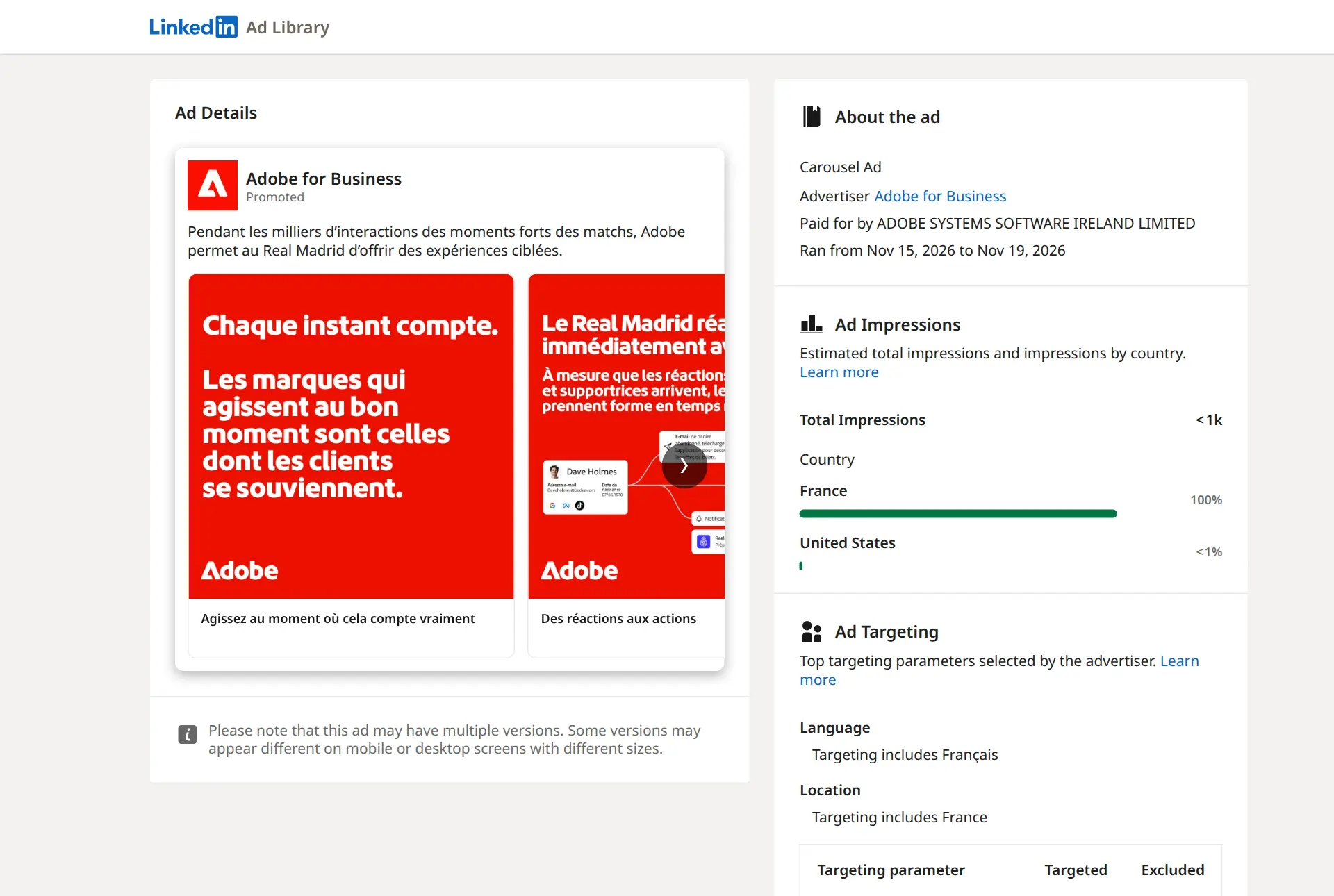
That ad: the advertiser, who paid, the whole text, headline, link, buttons, images, video, document pages and carousel slides, and for an ad shown in the European Union the dates, impressions by country and targeting.
Give it an ad's id, or its address in the LinkedIn Ad Library.
1 unit a run, for runs that return data. Runs that fail cost nothing. How units work
- Counted
- 1 unit a run
- Inputs
- 1, 1 required
- Record
- 24 fields
- A run takes
- up to 5 minutes
- Records kept
- 7 days
- Measured
- its success, on the status page
POST/v1/scrapers/linkedin_ads.ad/runs
sent, and answered
a record of the run24 fields
ok1 unit a run
A record this scraper returned for this input. The first 9 of its 24 fields are set down here; the whole record is below.
What it is used for
- Read an ad in full
- Read one ad's whole
text, itsheadline,buttons,link_urland media, with who paid for it inpaid_for_by. - See where an ad was shown
- For an ad shown in the European Union, read
ran_from,ran_to, itsimpressionsrange andimpressions_by_country. - Learn how an ad was targeted
- Read
targetingto see the language and location an advertiser chose and which audience, company or job criteria it used.
What you send
An ad's id, or its address in the LinkedIn Ad Library. It is the one input.
adstring Required- The ad's id, or its address: https://www.linkedin.com/ad-library/detail/…
A request, ready to send
It starts a run with the input shown at the top of this page, waits up to 60 seconds for it, and reads its records. Put your key in the variable it reads.
# Start a run and wait up to 60 seconds for it to finish
curl -X POST "https://api.enrichednow.com/v1/scrapers/linkedin_ads.ad/runs?wait=60" \
  -H "Authorization: Bearer $ENRICHEDNOW_API_KEY" \
  -H "Content-Type: application/json" \
  -d '{"input":{"ad":"1643762774"}}'

# Read its records, with the id the first call answered
curl "https://api.enrichednow.com/v1/runs/$RUN_ID/records?limit=100" \
  -H "Authorization: Bearer $ENRICHEDNOW_API_KEY"
from enrichednow import EnrichedNow
client = EnrichedNow() # reads ENRICHEDNOW_API_KEY
# Start a run, wait for it to end, and get its records
result = client.scrape("linkedin_ads.ad", {"ad": "1643762774"})
print(result.run.id, result.run.status, result.run.record_count)
# Read its records: pages are fetched as you go
for record in result.records:
print(record)Install it with pip install enrichednow, then save as run.py and run python3 run.py
import EnrichedNow from "enrichednow";

const client = new EnrichedNow(); // reads ENRICHEDNOW_API_KEY

// Start a run, wait for it to end, and get its records
const { run, records } = await client.scrape("linkedin_ads.ad", { ad: "1643762774" });
console.log(run.id, run.status, run.record_count);

// Read its records: pages are fetched as you go
for await (const record of records) console.log(record);
Install it with npm install enrichednow, then save as run.mjs and run node run.mjs
package main

import (
	"context"
	"fmt"
	"log"
	"time"

	enrichednow "github.com/enrichednow/enrichednow-go"
)

func main() {
	client, err := enrichednow.NewClient() // reads ENRICHEDNOW_API_KEY
	if err != nil {
		log.Fatal(err)
	}
	ctx, cancel := context.WithTimeout(context.Background(), 10*time.Minute)
	defer cancel()

	// Start a run, wait for it to end, and get its records
	run, records, err := client.Scrape(ctx, "linkedin_ads.ad", map[string]any{"ad": "1643762774"})
	if err != nil {
		log.Fatal(err)
	}
	fmt.Println(run.ID, run.Status, run.RecordCount)

	// Read its records: pages are fetched as you go
	for records.Next() {
		fmt.Println(string(records.Current()))
	}
	if err := records.Err(); err != nil {
		log.Fatal(err)
	}
}
Install it with go get github.com/enrichednow/enrichednow-go@latest, then save as run.go and run go run run.go
import com.enrichednow.EnrichedNowClient;
import com.enrichednow.ScrapeResult;
import java.util.Map;

public class Run {
    public static void main(String[] args) {
        EnrichedNowClient client = EnrichedNowClient.fromEnv(); // reads ENRICHEDNOW_API_KEY

        // Start a run, wait for it to end, and get its records
        ScrapeResult result = client.scrape("linkedin_ads.ad", Map.of("ad", "1643762774"));
        System.out.println(result.run().id() + " " + result.run().status() + " " + result.run().recordCount());

        // Read its records: pages are fetched as you go
        for (Map<String, Object> record : result.records()) {
            System.out.println(record);
        }
    }
}
Add com.enrichednow:enrichednow-java:0.4.0 to your Maven or Gradle build, then save as Run.java
enrichednow run linkedin_ads.ad --input-json '{"ad":"1643762774"}'Install it with curl -fsSL https://raw.githubusercontent.com/enrichednow/enrichednow-cli/main/install.sh | sh
What comes back
That ad: the advertiser, who paid, the whole text, headline, link, buttons, images, video, document pages and carousel slides, and for an ad shown in the European Union the dates, impressions by country and targeting. A record has 24 fields. One we could not read is null, never an empty string or a zero.
{
  "ad_id": "1643762774",
  "url": "https://www.linkedin.com/ad-library/detail/1643762774",
  "advertiser_name": "Adobe for Business",
  "advertiser_url": "https://www.linkedin.com/company/3509272",
  "advertiser_logo": "https://media.licdn.com/dms/image/v2/C560BAQH7EdXSnwaEaA/company-logo_100_100/company-logo_100_100/0/1630616475439/adobe_experience_cloud_logo?e=1796860800&v=beta&t=0wtsSuVr_vAm6bFEMR_Vf7vq0tsPPrN15IJBLlcFri8",
  "paid_for_by": "ADOBE SYSTEMS SOFTWARE IRELAND LIMITED",
  "format": "Carousel Ad",
  "creative_type": "SPONSORED_UPDATE_CAROUSEL",
  "text": "Pendant les milliers d’interactions des moments forts des matchs, Adobe permet au Real Madrid d’offrir des expériences ciblées.",
  "headline": null,
  "link_url": null,
  "buttons": [],
  "images": [],
  "video": null,
  "video_preview_image": null,
  "document_pages": [],
  "slides": [
    {
      "title": "Agissez au moment où cela compte vraiment",
      "image": "https://media.licdn.com/dms/image/v2/D4E10AQHyyEF_qZ7_tg/image-shrink_1080_1080/B4EaEhSA1_J0Ao-/0/1791559732877?e=1795651200&v=beta&t=fY_U2-GBpkwLREwH2_GBYLxV50mldQiIf9eX9whE-GU",
      "link_url": "https://business.adobe.com/fr/customer-success-stories/real-madrid.html?sdid=L3XTTG36&mv=social&mv2=paidsoc"
    },
    {
      "title": "Des réactions aux actions",
      "image": "https://media.licdn.com/dms/image/v2/D4E10AQFRAyHVx7fUHQ/image-shrink_1280/B4EaHah_toIgAI-/0/1794667707458?e=1795651200&v=beta&t=lPuDU6WsshWcJmvrP-MmdWSicF7ZQXjdzyJbIysaHd0",
      "link_url": "https://business.adobe.com/fr/customer-success-stories/real-madrid.html?sdid=L7NVTBC5&mv=social&mv2=paidsoc"
    }
  ],
  "event_time": null,
  "ran_from": "2026-11-15",
  "ran_to": "2026-11-18",
  "impressions": "<1k",
  "impressions_by_country": [
    {
      "country": "France",
      "share": "100%"
    }
  ],
  "targeting": [
    {
      "parameter": "Language",
      "value": "Targeting includes Français",
      "targeted": null,
      "excluded": null
    },
    {
      "parameter": "Location",
      "value": "Targeting includes France",
      "targeted": null,
      "excluded": null
    }
  ],
  "fetched_at": "2026-11-19T18:07:40.924244Z"
}
The scraper returned this record for the input above, reading a saved copy of the page, not the live site.
Values shortened for this page: slides: 6 items, the first 2 shown; targeting: 8 items, the first 2 shown.
The fields of a record
ad_idstring- LinkedIn's id of the ad: the number in its address in the library.
urlstring- The ad's page in the Ad Library.
advertiser_namestring or null- The organisation that runs the ad.
advertiser_urlstring or null- The advertiser's page on LinkedIn.
advertiser_logostring or null- The advertiser's logo.
paid_for_bystring or null- Who paid for the ad, as the library states it.
formatstring or null- The kind of ad, as the library names it, e.g.
Single Image Ad,Video Ad,Carousel Ad,Document Ad,Message Ad. creative_typestring or null- LinkedIn's own code for the kind of ad, e.g.
SPONSORED_STATUS_UPDATE. textstring or null- The ad's whole text. A message ad shows its placeholders, e.g.
%FIRSTNAME%. headlinestring or null- The headline under the image or video.
link_urlstring or null- Where the ad leads, when the page links it.
buttonslist of strings- The labels of the ad's buttons, e.g.
Learn more. imageslist of strings- The ad's images.
videostring or null- The ad's video file, in the best quality the page offers.
video_preview_imagestring or null- The still shown before the video plays.
document_pageslist of strings- The preview pages of a document ad, as images.
slideslist of objects- The slides of a carousel ad, in order, each with where it leads.Each holds
title,image,link_url. event_timestring or null- When an event ad's event takes place, as the library writes it.
ran_fromdate or null- The first day the ad ran. The library states it for ads shown in the European Union.
ran_todate or null- The last day the ad ran, as far as the library states it.
impressionsstring or null- The ad's total impressions, as the range the library shows, e.g.
5k-10kor<1k. Stated for ads shown in the European Union. impressions_by_countrylist of objects- The share of the impressions by country, where the library states it.
targetinglist of objects- The targeting the advertiser chose, where the library states it: language and location in words, and for each other parameter whether people were included or excluded by it.
fetched_atdatetime- When the page was read, in UTC.
Units and limits
- Counted per request
- Billed per request: a run that returns data costs 1 unit, however many records it returns.
- A miss costs nothing
- A run that fails, that meets something not supported yet, or that you cancel costs nothing. You pay for runs that return data.
- What bounds a run
- A run may take up to 5 minutes. Its records are read in pages of up to 1,000 and are kept for 7 days.
What it does not do
- Dates, impressions and targeting are stated only for ads shown in the European Union.
- An id the library has no ad for ends as failed, with the reason not_found, and costs nothing.
Questions
What does LinkedIn Ad Library ad return?
That ad: the advertiser, who paid, the whole text, headline, link, buttons, images, video, document pages and carousel slides, and for an ad shown in the European Union the dates, impressions by country and targeting. A record has 24 fields, among them ad_id, url, advertiser_name, advertiser_url, advertiser_logo and paid_for_by. A value that could not be read is null, never an empty string or a zero.
What do I send?
An ad's id, or its address in the LinkedIn Ad Library. The input ad is required.
How is it counted?
Billed per request: a run that returns data costs 1 unit, however many records it returns. A run that fails, that meets something not supported yet, or that you cancel costs nothing. The first 1,000 units each month are free.
What does it not do?
Dates, impressions and targeting are stated only for ads shown in the European Union. An id the library has no ad for ends as failed, with the reason not_found, and costs nothing.
How long are the records kept, and in what format do they come?
Records are kept for 7 days after the run ended, and read in pages of up to 1,000. They come as JSON, as NDJSON with one record a line, or as CSV with a column for each field.
Can an AI assistant call it?
Yes. Through the EnrichedNow MCP server an assistant calls the tool run_scraper with the scraper_id linkedin_ads.ad and the same input. It costs what the same API call costs.
Used in this playbook
A playbook runs LinkedIn Ad Library ad as one of its steps and hands back the finished list. Its runs of this scraper cost what they cost here, and the playbook adds nothing.
Marketing
Ad Creative Research
A competitor's ads on Meta, Google Ads and LinkedIn, with copy, landing page and how long each has run, longest first.
LinkedIn Ad Library
The ads in the LinkedIn Ad Library, the public register of advertising on LinkedIn.
LinkedIn Ad Library search
linkedin_ads.searchAn advertiser's name, words to search the ads for, or who paid for them, with countries and dates. The ads the library lists, newest first: the advertiser, the kind of ad, its text, headline, images, document pages and carousel slides.
LinkedIn Ad Library on the line-up
- Industry
- Companies and B2B
- Where
- Worldwide
Run it on an input of your own.
Create an account, make a key, and send the request above with your own input. The first 1,000 units each month are free.