Scraper API
Instagram
instagram.reelsAvailable
Instagram reels of an account
The reels on its reels tab, in order: each reel's address with its play, like and comment counts.
Give it an Instagram account's handle, or its profile address.
1 unit a record, for runs that return data. Runs that fail cost nothing. How units work
- Counted
- 1 unit a record
- Inputs
- 1, 1 required
- Record
- 14 fields
- A run takes
- up to 5 minutes
- Records kept
- 7 days
- Measured
- its success, on the status page
POST/v1/scrapers/instagram.reels/runs
sent, and answered
a record of the run14 fields
ok1 unit a record
A record this scraper returned for this input. The first 9 of its 14 fields are set down here; the whole record is below.
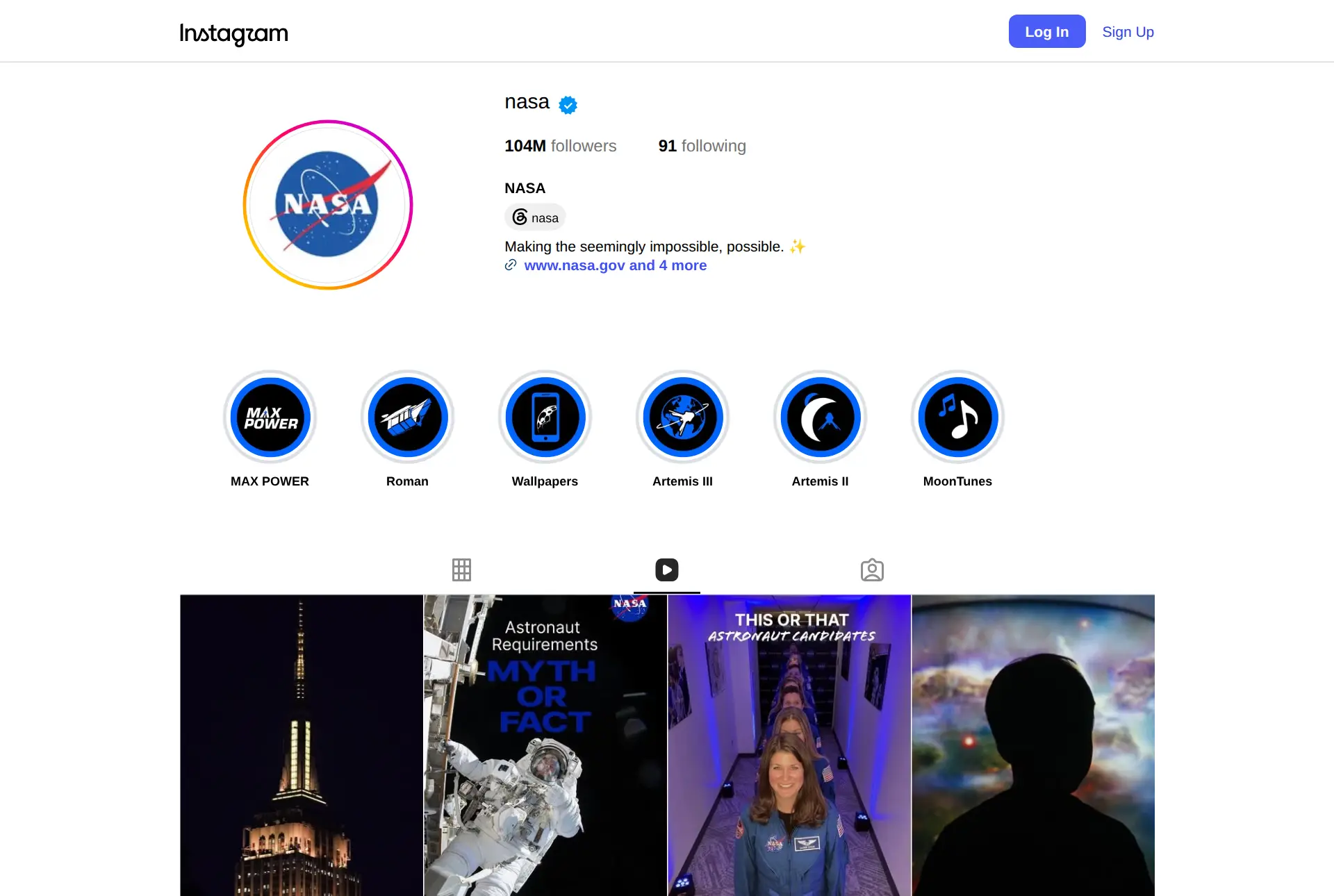
What it is used for
- See which reels travel
- An account's latest reels with
play_count,like_countandcomment_count, to see which ones reached the most people. - Benchmark accounts
- Read the reels tabs of several brands on a schedule and compare their plays per reel.
- Find the collaborations
by_this_accountmarks the reels another account posted with this one, so partnerships stand out.
What you send
An Instagram account's handle, or its profile address. It is the one input.
usernamestring Required- The account's handle, e.g. nasa or @nasa, or its profile address (https://www.instagram.com/nasa/).
A request, ready to send
It starts a run with the input shown at the top of this page, waits up to 60 seconds for it, and reads its records. Put your key in the variable it reads.
# Start a run and wait up to 60 seconds for it to finish
curl -X POST "https://api.enrichednow.com/v1/scrapers/instagram.reels/runs?wait=60" \
  -H "Authorization: Bearer $ENRICHEDNOW_API_KEY" \
  -H "Content-Type: application/json" \
  -d '{"input":{"username":"nasa"}}'

# Read its records, with the id the first call answered
curl "https://api.enrichednow.com/v1/runs/$RUN_ID/records?limit=100" \
  -H "Authorization: Bearer $ENRICHEDNOW_API_KEY"
from enrichednow import EnrichedNow
client = EnrichedNow() # reads ENRICHEDNOW_API_KEY
# Start a run, wait for it to end, and get its records
result = client.scrape("instagram.reels", {"username": "nasa"})
print(result.run.id, result.run.status, result.run.record_count)
# Read its records: pages are fetched as you go
for record in result.records:
print(record)Install it with pip install enrichednow, then save as run.py and run python3 run.py
import EnrichedNow from "enrichednow";

const client = new EnrichedNow(); // reads ENRICHEDNOW_API_KEY

// Start a run, wait for it to end, and get its records
const { run, records } = await client.scrape("instagram.reels", { username: "nasa" });
console.log(run.id, run.status, run.record_count);

// Read its records: pages are fetched as you go
for await (const record of records) console.log(record);
Install it with npm install enrichednow, then save as run.mjs and run node run.mjs
package main

import (
	"context"
	"fmt"
	"log"
	"time"

	enrichednow "github.com/enrichednow/enrichednow-go"
)

func main() {
	client, err := enrichednow.NewClient() // reads ENRICHEDNOW_API_KEY
	if err != nil {
		log.Fatal(err)
	}
	ctx, cancel := context.WithTimeout(context.Background(), 10*time.Minute)
	defer cancel()

	// Start a run, wait for it to end, and get its records
	run, records, err := client.Scrape(ctx, "instagram.reels", map[string]any{"username": "nasa"})
	if err != nil {
		log.Fatal(err)
	}
	fmt.Println(run.ID, run.Status, run.RecordCount)

	// Read its records: pages are fetched as you go
	for records.Next() {
		fmt.Println(string(records.Current()))
	}
	if err := records.Err(); err != nil {
		log.Fatal(err)
	}
}
Install it with go get github.com/enrichednow/enrichednow-go@latest, then save as run.go and run go run run.go
import com.enrichednow.EnrichedNowClient;
import com.enrichednow.ScrapeResult;
import java.util.Map;

public class Run {
    public static void main(String[] args) {
        EnrichedNowClient client = EnrichedNowClient.fromEnv(); // reads ENRICHEDNOW_API_KEY

        // Start a run, wait for it to end, and get its records
        ScrapeResult result = client.scrape("instagram.reels", Map.of("username", "nasa"));
        System.out.println(result.run().id() + " " + result.run().status() + " " + result.run().recordCount());

        // Read its records: pages are fetched as you go
        for (Map<String, Object> record : result.records()) {
            System.out.println(record);
        }
    }
}
Add com.enrichednow:enrichednow-java:0.4.0 to your Maven or Gradle build, then save as Run.java
enrichednow run instagram.reels --input username=nasaInstall it with curl -fsSL https://raw.githubusercontent.com/enrichednow/enrichednow-cli/main/install.sh | sh
What comes back
The reels on its reels tab, in order: each reel's address with its play, like and comment counts. A record has 14 fields. One we could not read is null, never an empty string or a zero.
{
  "shortcode": "Df3Rp0bKNdr",
  "url": "https://www.instagram.com/reel/Df3Rp0bKNdr/",
  "id": "4032769631913039723",
  "position": 1,
  "play_count": 1865340,
  "like_count": 27740,
  "comment_count": 204,
  "counts_hidden": false,
  "thumbnail_url": "https://scontent-phl2-1.cdninstagram.com/v/t51.82787-15/909639997_18654645670011588_7039336257252665058_n.jpg?stp=dst-jpg_e35_s640x640_tt6&_nc_cat=1&ccb=7-5&_nc_sid=18de74&efg=eyJlZmdfdGFnIjoiQ0xJUFMuYmVzdF9pbWFnZV91cmxnZW4uQzMifQ%3D%3D&_nc_ohc=ZZhH_qQSFYkQ7kNvwHwQEXy&_nc_oc=AdqG6cHMgtKc21UfbV0RyWji2LN3ALnsOB1hV-xumYZkRmh6tPGQFra7wHLhbpSNa1w&_nc_zt=23&_nc_ht=scontent-phl2-1.cdninstagram.com&_nc_gid=Pqto5J5XfTfcO9flqfskWw&_nc_ss=79689&_nc_ct=RQosPBUKFQQAAAA&oh=00_AQRCBtRo7TD6tZwQ6tLWYORAlWSh9F1qczoB2kYE7HejWA&oe=6B041276",
  "username": "nasa",
  "owner_id": "53387587",
  "by_this_account": false,
  "pinned": false,
  "fetched_at": "2026-11-19T18:30:51.227845Z"
}
The scraper returned this record for the input above, reading a saved copy of the page, not the live site.
The fields of a record
shortcodestring- The reel's short code: the part of its address after /reel/.
urlstring- The reel's address.
idstring or null- Instagram's numeric id of the reel.
positioninteger- Its place in the tab, from 1.
play_countinteger or null- Number of plays; null when the account hides its counts.
like_countinteger or null- Number of likes; null when the account hides its counts.
comment_countinteger or null- Number of comments.
counts_hiddenboolean- True when the account hides the reel's like and play counts.
thumbnail_urlstring or null- The reel's still image, as the tab shows it.
usernamestring- The handle whose reels tab was read.
owner_idstring or null- Instagram's numeric id of the account that posted the reel.
by_this_accountboolean- False for a collaboration another account posted, which the tab also lists.
pinnedboolean- True when the reel is pinned to the top of the tab.
fetched_atdatetime- When the page was read, in UTC.
Units and limits
- Counted per record
- Billed per record: a run that returns data costs 1 unit for each record it returns.
- A miss costs nothing
- A run that fails, that meets something not supported yet, or that you cancel costs nothing. You pay for runs that return data.
- What bounds a run
- A run may take up to 5 minutes. Its records are read in pages of up to 1,000 and are kept for 7 days.
What it does not do
- The first twelve reels of the tab.
- A reel's caption and time come from instagram.post.
- Collaborations another account posted are listed too, and marked.
Questions
What does Instagram reels of an account return?
The reels on its reels tab, in order: each reel's address with its play, like and comment counts. A record has 14 fields, among them shortcode, url, id, position, play_count and like_count. A value that could not be read is null, never an empty string or a zero.
What do I send?
An Instagram account's handle, or its profile address. The input username is required.
How is it counted?
Billed per record: a run that returns data costs 1 unit for each record it returns. A run that fails, that meets something not supported yet, or that you cancel costs nothing. The first 1,000 units each month are free.
What does it not do?
The first twelve reels of the tab. A reel's caption and time come from instagram.post. Collaborations another account posted are listed too, and marked.
How long are the records kept, and in what format do they come?
Records are kept for 7 days after the run ended, and read in pages of up to 1,000. They come as JSON, as NDJSON with one record a line, or as CSV with a column for each field.
Can an AI assistant call it?
Yes. Through the EnrichedNow MCP server an assistant calls the tool run_scraper with the scraper_id instagram.reels and the same input. It costs what the same API call costs.
Public Instagram accounts and their posts, as a visitor who is not signed in sees them.
Instagram profile
instagram.profileAn Instagram account's handle, or its profile address. Its names, bio, links, verified badge, follower, following and post counts, and its most recent posts.
Instagram post
instagram.postAn Instagram post's or reel's address, or its short code. Its caption, hashtags, like and comment counts, publication time, owner, and its photos and videos.
- Industry
- Social and video
- Where
- Worldwide
Run it on an input of your own.
Create an account, make a key, and send the request above with your own input. The first 1,000 units each month are free.