Scraper API
Google Trends
google.trendsAvailable
Google Trends
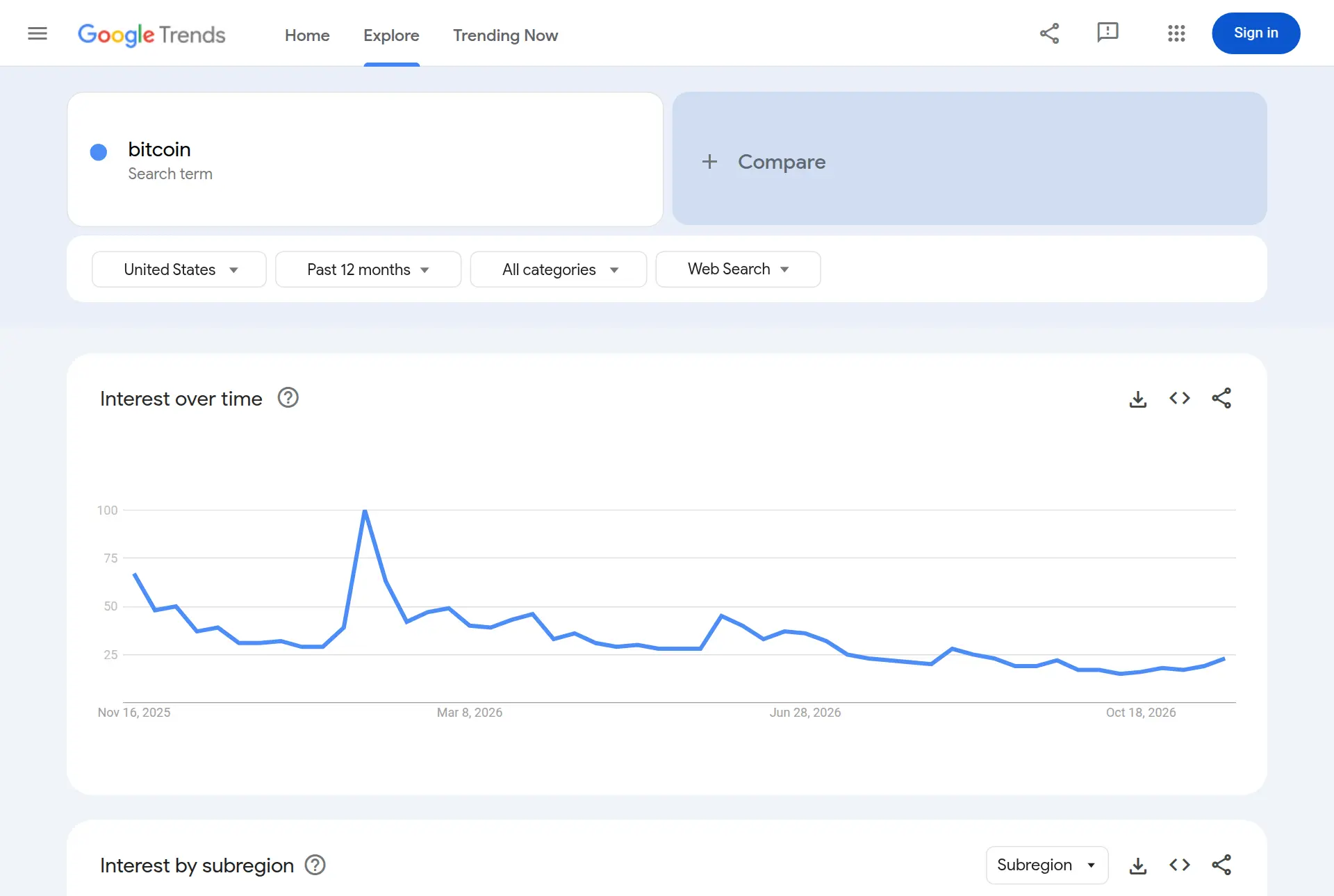
For each term, its search interest over the period as Google Trends publishes it: one value from 0 to 100 per interval, and the term's top and rising related queries.
Give it One to five search terms, a place and a period.
1 unit a run, for runs that return data. Runs that fail cost nothing. How units work
- Counted
- 1 unit a run
- Inputs
- 6, 1 required
- Record
- 12 fields
- A run takes
- up to 5 minutes
- Records kept
- 7 days
- Measured
- its success, on the status page
POST/v1/scrapers/google.trends/runs
sent, and answered
a record of the run12 fields
ok1 unit a run
A record this scraper returned for this input. The first 9 of its 12 fields are set down here; the whole record is below.
What it is used for
- Measure interest over time
- Google Trends' interest in a keyword for a country and period, as a series, with its average over the period.
- Find what is rising
related_queries_risinglists the searches that are growing around a keyword. Read it for the subjects to write about next.- Compare keywords
- Send up to five keywords and read their interest on one scale, to choose between names, products or subjects.
What you send
One to five search terms, a place and a period. These are its 6 inputs, as its schema has them.
keywordslist of strings Required- One to five search terms. Terms sent together are compared on one scale.
geostring Optional- A country as a two-letter code such as US, or a region of one such as US-CA. Worldwide when left out.
time_rangestring Optional- The period, as Google Trends writes it: now 1-H, now 4-H, now 1-d, now 7-d, today 1-m, today 3-m, today 12-m, today 5-y, all, or two dates such as 2025-01-01 2025-06-30.Default
today 12-m search_typestring Optional- Which searches are counted: web, images, news, youtube or shopping. web unless you say otherwise.Default
web related_queriesboolean Optional- false leaves the related queries out.Default
true languagestring Optional- The language of the labels, as a code such as en-US or de. en-US unless you say otherwise.Default
en-US
A request, ready to send
It starts a run with the input shown at the top of this page, waits up to 60 seconds for it, and reads its records. Put your key in the variable it reads.
# Start a run and wait up to 60 seconds for it to finish
curl -X POST "https://api.enrichednow.com/v1/scrapers/google.trends/runs?wait=60" \
  -H "Authorization: Bearer $ENRICHEDNOW_API_KEY" \
  -H "Content-Type: application/json" \
  -d '{"input":{"keywords":["bitcoin"],"geo":"US","time_range":"today 12-m"}}'

# Read its records, with the id the first call answered
curl "https://api.enrichednow.com/v1/runs/$RUN_ID/records?limit=100" \
  -H "Authorization: Bearer $ENRICHEDNOW_API_KEY"
from enrichednow import EnrichedNow
client = EnrichedNow() # reads ENRICHEDNOW_API_KEY
# Start a run, wait for it to end, and get its records
result = client.scrape("google.trends", {
"keywords": ["bitcoin"],
"geo": "US",
"time_range": "today 12-m",
})
print(result.run.id, result.run.status, result.run.record_count)
# Read its records: pages are fetched as you go
for record in result.records:
print(record)Install it with pip install enrichednow, then save as run.py and run python3 run.py
import EnrichedNow from "enrichednow";

const client = new EnrichedNow(); // reads ENRICHEDNOW_API_KEY

// Start a run, wait for it to end, and get its records
const { run, records } = await client.scrape("google.trends", {
  keywords: ["bitcoin"],
  geo: "US",
  time_range: "today 12-m",
});
console.log(run.id, run.status, run.record_count);

// Read its records: pages are fetched as you go
for await (const record of records) console.log(record);
Install it with npm install enrichednow, then save as run.mjs and run node run.mjs
package main

import (
	"context"
	"fmt"
	"log"
	"time"

	enrichednow "github.com/enrichednow/enrichednow-go"
)

func main() {
	client, err := enrichednow.NewClient() // reads ENRICHEDNOW_API_KEY
	if err != nil {
		log.Fatal(err)
	}
	ctx, cancel := context.WithTimeout(context.Background(), 10*time.Minute)
	defer cancel()

	// Start a run, wait for it to end, and get its records
	run, records, err := client.Scrape(ctx, "google.trends", map[string]any{"keywords": []any{"bitcoin"}, "geo": "US", "time_range": "today 12-m"})
	if err != nil {
		log.Fatal(err)
	}
	fmt.Println(run.ID, run.Status, run.RecordCount)

	// Read its records: pages are fetched as you go
	for records.Next() {
		fmt.Println(string(records.Current()))
	}
	if err := records.Err(); err != nil {
		log.Fatal(err)
	}
}
Install it with go get github.com/enrichednow/enrichednow-go@latest, then save as run.go and run go run run.go
import com.enrichednow.EnrichedNowClient;
import com.enrichednow.ScrapeResult;
import java.util.List;
import java.util.Map;

public class Run {
    public static void main(String[] args) {
        EnrichedNowClient client = EnrichedNowClient.fromEnv(); // reads ENRICHEDNOW_API_KEY

        // Start a run, wait for it to end, and get its records
        ScrapeResult result = client.scrape("google.trends", Map.of("keywords", List.of("bitcoin"), "geo", "US", "time_range", "today 12-m"));
        System.out.println(result.run().id() + " " + result.run().status() + " " + result.run().recordCount());

        // Read its records: pages are fetched as you go
        for (Map<String, Object> record : result.records()) {
            System.out.println(record);
        }
    }
}
Add com.enrichednow:enrichednow-java:0.4.0 to your Maven or Gradle build, then save as Run.java
enrichednow run google.trends --input-json '{"keywords":["bitcoin"],"geo":"US","time_range":"today 12-m"}'Install it with curl -fsSL https://raw.githubusercontent.com/enrichednow/enrichednow-cli/main/install.sh | sh
What comes back
For each term, its search interest over the period as Google Trends publishes it: one value from 0 to 100 per interval, and the term's top and rising related queries. A record has 12 fields. One we could not read is null, never an empty string or a zero.
{
  "keyword": "bitcoin",
  "geo": "US",
  "time_range": "today 12-m",
  "search_type": "web",
  "compared_with": [],
  "resolution": "week",
  "average": null,
  "interest_over_time": [
    {
      "time": "2025-11-16T00:00:00Z",
      "label": "Nov 16 – 22, 2025",
      "value": 66,
      "partial": false
    },
    {
      "time": "2025-11-23T00:00:00Z",
      "label": "Nov 23 – 29, 2025",
      "value": 47,
      "partial": false
    }
  ],
  "related_queries_top": [
    {
      "query": "bitcoin price",
      "value": 100,
      "label": "100",
      "url": "https://trends.google.com/trends/explore?q=bitcoin+price&date=today+12-m&geo=US"
    },
    {
      "query": "bitcoin stock",
      "value": 19,
      "label": "19",
      "url": "https://trends.google.com/trends/explore?q=bitcoin+stock&date=today+12-m&geo=US"
    }
  ],
  "related_queries_rising": [
    {
      "query": "spcx stock",
      "value": 18400,
      "label": "Breakout",
      "url": "https://trends.google.com/trends/explore?q=spcx+stock&date=today+12-m&geo=US"
    },
    {
      "query": "how to buy bitcoin safely",
      "value": 8100,
      "label": "Breakout",
      "url": "https://trends.google.com/trends/explore?q=how+to+buy+bitcoin+safely&date=today+12-m&geo=US"
    }
  ],
  "url": "https://trends.google.com/trends/explore?q=bitcoin&date=today%2012-m&geo=US",
  "fetched_at": "2026-11-19T18:07:40.737440Z"
}
The scraper returned this record for the input above, reading a saved copy of the page, not the live site.
Values shortened for this page: interest_over_time: 53 items, the first 2 shown; related_queries_top: 25 items, the first 2 shown; related_queries_rising: 25 items, the first 2 shown.
The fields of a record
keywordstring- The search term, as asked.
geostring or null- The place asked for (
US,US-CA); null for worldwide. time_rangestring- The period asked for, as Trends writes it.
search_typestring- Which searches were counted:
web,images,news,youtubeorshopping. compared_withlist of strings- The other keywords of the same run. All of them share one scale: 100 is the highest point of any.
resolutionstring or null- The length of one interval of the timeline:
hour,day,week,month, …, as Trends chose it for the period. averageinteger or null- The keyword's average over the period on the shared scale. Trends gives it only when several keywords are compared.
interest_over_timelist of objects- The timeline, oldest interval first. Empty when Trends has too little data for the keyword.
related_queries_toplist of objects or null- The most common queries of people who searched for the keyword, most common first. Null when they were not asked for or could not be read; an empty list when Trends has none.Each holds
query,value,label,url. related_queries_risinglist of objects or null- The related queries that grew most over the previous period, the largest growth first. Null and empty as for the top queries.Each holds
query,value,label,url. urlstring- The comparison's page on Google Trends.
fetched_atdatetime- When the data was read, in UTC.
Units and limits
- Counted per request
- Billed per request: a run that returns data costs 1 unit, however many records it returns.
- A miss costs nothing
- A run that fails, that meets something not supported yet, or that you cancel costs nothing. You pay for runs that return data.
- What bounds a run
- A run may take up to 5 minutes. Its records are read in pages of up to 1,000 and are kept for 7 days.
What it does not do
- The values are the index Google Trends publishes, not search counts: 100 is the highest point of the comparison, and every other value is relative to it.
- The length of an interval is chosen by Google Trends for the period: minutes for the last hours, days for a month, weeks for a year, months for longer.
- A term with too little search volume comes back with an empty timeline.
- Related queries are sometimes not given for a term. The run then ends as partial, with the timeline and without them.
- Interest by region and related topics are not returned.
The bounds its schema sets
keywords- at most 5 items
search_type- web, images, news, youtube, shopping; web unless you say otherwise
Questions
What does Google Trends return?
For each term, its search interest over the period as Google Trends publishes it: one value from 0 to 100 per interval, and the term's top and rising related queries. A record has 12 fields, among them keyword, geo, time_range, search_type, compared_with and resolution. A value that could not be read is null, never an empty string or a zero.
What do I send?
One to five search terms, a place and a period. The input keywords is required. Optional: geo, time_range, search_type, related_queries and language.
How is it counted?
Billed per request: a run that returns data costs 1 unit, however many records it returns. A run that fails, that meets something not supported yet, or that you cancel costs nothing. The first 1,000 units each month are free.
How much does one run return?
Its schema sets these bounds: keywords at most 5 items; search_type web, images, news, youtube, shopping (web unless you say otherwise). A run may take up to 5 minutes.
What does it not do?
The values are the index Google Trends publishes, not search counts: 100 is the highest point of the comparison, and every other value is relative to it. The length of an interval is chosen by Google Trends for the period: minutes for the last hours, days for a month, weeks for a year, months for longer. A term with too little search volume comes back with an empty timeline. Related queries are sometimes not given for a term. The run then ends as partial, with the timeline and without them. Interest by region and related topics are not returned.
How long are the records kept, and in what format do they come?
Records are kept for 7 days after the run ended, and read in pages of up to 1,000. They come as JSON, as NDJSON with one record a line, or as CSV with a column for each field.
Can an AI assistant call it?
Yes. Through the EnrichedNow MCP server an assistant calls the tool run_scraper with the scraper_id google.trends and the same input. It costs what the same API call costs.
Google Trends
Search interest over time and related queries, as Google Trends publishes them.
- Industry
- Search and the open web
- Where
- Worldwide
Run it on an input of your own.
Create an account, make a key, and send the request above with your own input. The first 1,000 units each month are free.