Scraper API
Google Hotels
google.hotelsAvailable
Google Hotels
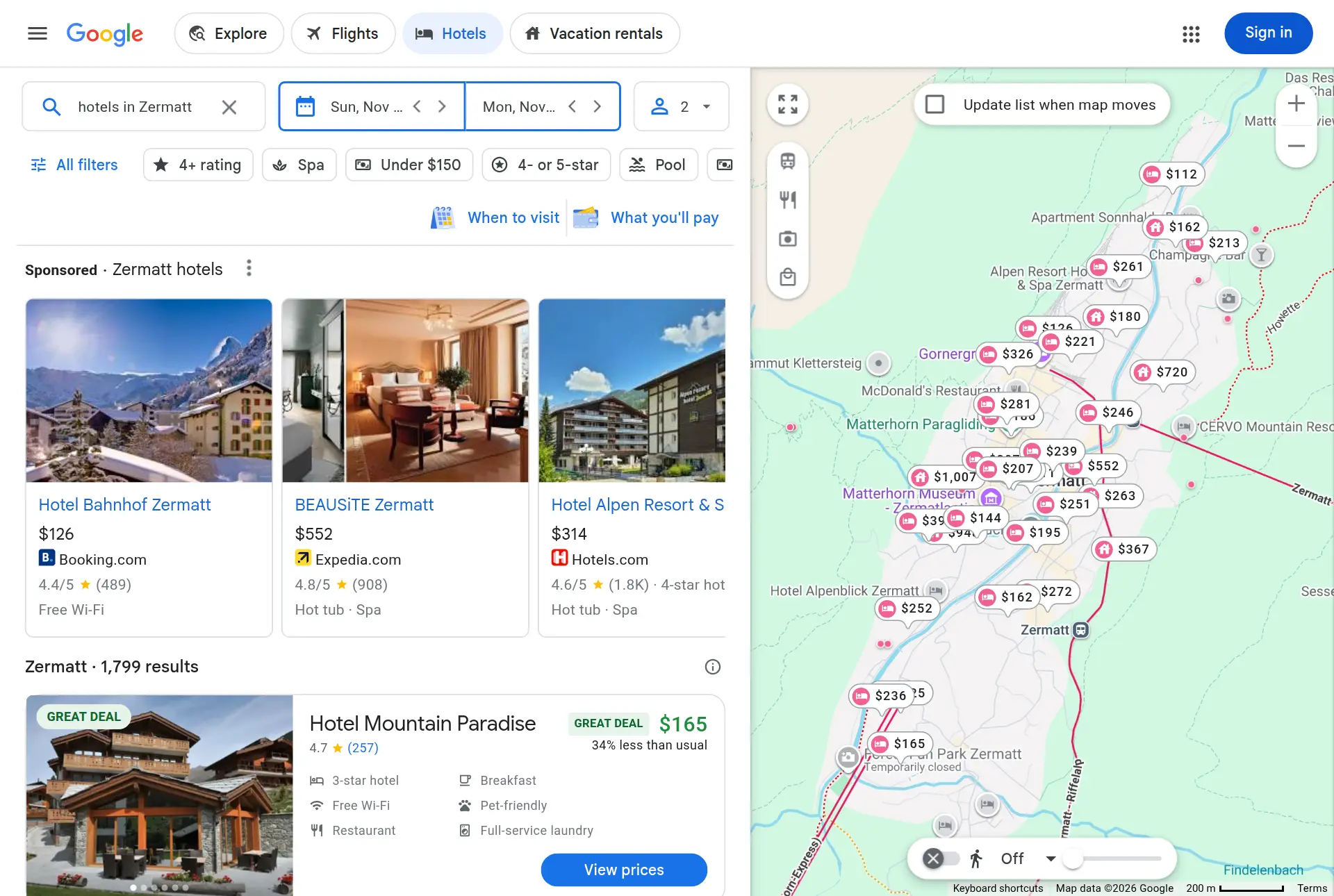
The hotels Google Hotels lists for the place, in its order: name, price a night and for the stay, the deal it marks, rating and number of reviews with the share of each star, what reviews mention, the location's score, class, amenities and photos.
Give it a place to stay in, and optionally the nights and the currency.
1 unit a run, for runs that return data. Runs that fail cost nothing. How units work
- Counted
- 1 unit a run
- Inputs
- 4, 1 required
- Record
- 24 fields
- A run takes
- up to 5 minutes
- Records kept
- 7 days
- Measured
- its success, on the status page
POST/v1/scrapers/google.hotels/runs
sent, and answered
a record of the run24 fields
ok1 unit a run
A record this scraper returned for this input. The first 9 of its 24 fields are set down here; the whole record is below.
What it is used for
- Watch hotel prices
- Search a city for the same nights on a schedule and follow
priceandtotal_priceof each hotel. - Benchmark a hotel
- Hold a hotel's
rating,reviews_count,hotel_classand price against the others Google Hotels lists nearby. - Find the deals
dealanddeal_textsay which hotels Google Hotels marks as priced below their usual.
What you send
A place to stay in, and optionally the nights and the currency. These are its 4 inputs, as its schema has them.
locationstring Required- Where to stay: a city, an area or a landmark, such as Paris or Shibuya, Tokyo.
check_instring Both or neither- The day of arrival, written 2026-12-10. With check_out, or neither.
check_outstring Both or neither- The day of departure, after check_in. A stay is 30 nights at most.
currencystring Optional- The currency of the prices, as a three-letter code such as USD or EUR. USD unless you say otherwise.Default
USD
A request, ready to send
It starts a run with the input shown at the top of this page, waits up to 60 seconds for it, and reads its records. Put your key in the variable it reads.
# Start a run and wait up to 60 seconds for it to finish
curl -X POST "https://api.enrichednow.com/v1/scrapers/google.hotels/runs?wait=60" \
  -H "Authorization: Bearer $ENRICHEDNOW_API_KEY" \
  -H "Content-Type: application/json" \
  -d '{"input":{"location":"Zermatt"}}'

# Read its records, with the id the first call answered
curl "https://api.enrichednow.com/v1/runs/$RUN_ID/records?limit=100" \
  -H "Authorization: Bearer $ENRICHEDNOW_API_KEY"
from enrichednow import EnrichedNow
client = EnrichedNow() # reads ENRICHEDNOW_API_KEY
# Start a run, wait for it to end, and get its records
result = client.scrape("google.hotels", {"location": "Zermatt"})
print(result.run.id, result.run.status, result.run.record_count)
# Read its records: pages are fetched as you go
for record in result.records:
print(record)Install it with pip install enrichednow, then save as run.py and run python3 run.py
import EnrichedNow from "enrichednow";

const client = new EnrichedNow(); // reads ENRICHEDNOW_API_KEY

// Start a run, wait for it to end, and get its records
const { run, records } = await client.scrape("google.hotels", { location: "Zermatt" });
console.log(run.id, run.status, run.record_count);

// Read its records: pages are fetched as you go
for await (const record of records) console.log(record);
Install it with npm install enrichednow, then save as run.mjs and run node run.mjs
package main

import (
	"context"
	"fmt"
	"log"
	"time"

	enrichednow "github.com/enrichednow/enrichednow-go"
)

func main() {
	client, err := enrichednow.NewClient() // reads ENRICHEDNOW_API_KEY
	if err != nil {
		log.Fatal(err)
	}
	ctx, cancel := context.WithTimeout(context.Background(), 10*time.Minute)
	defer cancel()

	// Start a run, wait for it to end, and get its records
	run, records, err := client.Scrape(ctx, "google.hotels", map[string]any{"location": "Zermatt"})
	if err != nil {
		log.Fatal(err)
	}
	fmt.Println(run.ID, run.Status, run.RecordCount)

	// Read its records: pages are fetched as you go
	for records.Next() {
		fmt.Println(string(records.Current()))
	}
	if err := records.Err(); err != nil {
		log.Fatal(err)
	}
}
Install it with go get github.com/enrichednow/enrichednow-go@latest, then save as run.go and run go run run.go
import com.enrichednow.EnrichedNowClient;
import com.enrichednow.ScrapeResult;
import java.util.Map;

public class Run {
    public static void main(String[] args) {
        EnrichedNowClient client = EnrichedNowClient.fromEnv(); // reads ENRICHEDNOW_API_KEY

        // Start a run, wait for it to end, and get its records
        ScrapeResult result = client.scrape("google.hotels", Map.of("location", "Zermatt"));
        System.out.println(result.run().id() + " " + result.run().status() + " " + result.run().recordCount());

        // Read its records: pages are fetched as you go
        for (Map<String, Object> record : result.records()) {
            System.out.println(record);
        }
    }
}
Add com.enrichednow:enrichednow-java:0.4.0 to your Maven or Gradle build, then save as Run.java
enrichednow run google.hotels --input location=ZermattInstall it with curl -fsSL https://raw.githubusercontent.com/enrichednow/enrichednow-cli/main/install.sh | sh
What comes back
The hotels Google Hotels lists for the place, in its order: name, price a night and for the stay, the deal it marks, rating and number of reviews with the share of each star, what reviews mention, the location's score, class, amenities and photos. A record has 24 fields. One we could not read is null, never an empty string or a zero.
{
  "position": 5,
  "name": "Hotel Restaurant Weisshorn",
  "hotel_id": "ChkIr_O89rmhofWCARoML2cvMTF4ZmtyNGZ2EAE",
  "url": "https://www.google.com/travel/hotels/entity/ChkIr_O89rmhofWCARoML2cvMTF4ZmtyNGZ2EAE",
  "price": 144,
  "currency": "USD",
  "price_text": "$144",
  "nightly_text": "$144 nightly",
  "total_price": 159,
  "nights": 1,
  "deal": "GREAT PRICE",
  "deal_text": "with free breakfast",
  "rating": 4.4,
  "reviews_count": 488,
  "rating_shares": {
    "1": 2,
    "2": 2,
    "3": 7,
    "4": 23,
    "5": 66
  },
  "mentions": [
    "Service",
    "Dining",
    "Breakfast"
  ],
  "location_label": "Excellent location",
  "location_score": 4.8,
  "hotel_class": null,
  "category": null,
  "amenities": [],
  "eco_certified": false,
  "photos": [
    "https://lh3.googleusercontent.com/grass-cs/AABkmLcNHjn3jY-dokcndlqdu9uaeJ6C2kzHDsdTmRwbt-JkIGYoprdQBtoo5X7MmP-pePuQVTWFZUAp5OJPjNuHQy2IW6ZENBHXiq7VHBaYBQ3dYiXNjPnwun606Suymgy38pwCL2FI=s287-w287-h192-n-k-no-v1",
    "https://lh3.googleusercontent.com/grass-cs/AABkmLcoVaF8bTDxNHvHnoXRNaxHMRbRzsUAqqBwEispRkYXBVKfnuYaTVmPSNzOdcO_3MiPH2F08r2PmHDaMlu4hG4URqM_ryyt43CXwMqiuS2ZBvef_YmI5ns_5lwG7cqyTEQK4q78TA=s287-w287-h192-n-k-no-v1",
    "https://lh3.googleusercontent.com/grass-cs/AABkmLchXyjWMItsHsPyKziuxgl36IGDIltqBtdDY6YtRV5aSAwo0ni31BfcMjNUZn7PuSgA7St8X1wNTPJCtn7kWS5Ql7swx9iQr1g_Uwj4D2VTp5vZBVgZIaiKJjjKNnOaq6skgRdR=s287-w287-h192-n-k-no-v1"
  ],
  "fetched_at": "2026-11-19T17:28:12.202405Z"
}
The scraper returned this record for the input above, reading a saved copy of the page, not the live site.
Values shortened for this page: photos: 6 items, the first 3 shown.
The fields of a record
positioninteger- The hotel's place in the list, from 1. Sponsored cards are not counted.
namestring- The hotel's name, as the card shows it.
hotel_idstring or null- Google Hotels' own id of the hotel, from the address of its page.
urlstring or null- The hotel's page on Google Hotels.
pricenumber or null- The lowest price a night the card shows, in
currency. Null when the card shows no price. currencystring- The currency of the prices, as asked, e.g.
USD. price_textstring or null- That price as the card prints it, e.g.
$157. nightly_textstring or null- The nightly price as the card words it, e.g.
$157 nightly. total_pricenumber or null- The total for the stay with taxes and fees, in
currency, where the card states it. nightsinteger or null- The number of nights the total is for, as the card states it.
dealstring or null- The deal Google Hotels marks on the card, e.g.
GREAT DEAL. deal_textstring or null- What it says of that deal, as the card words it: how far below the usual price, or for what class.
ratingnumber or null- The average rating, out of 5.
reviews_countinteger or null- The number of reviews the rating is from.
rating_sharesobject- The share of reviews of each star, in per cent, keyed
5to1. mentionslist of strings- What reviews often mention, as the card lists it, e.g.
Location,Breakfast. location_labelstring or null- How Google Hotels rates the location, e.g.
Excellent location. location_scorenumber or null- The location's score, out of 5, where the card shows it.
hotel_classinteger or null- The hotel's stars, 1 to 5, where the card states its class.
categorystring or null- The kind of place as the card words it, e.g.
4-star tourist hotel,Guest house. amenitieslist of strings- The amenities the card lists, as it words them, e.g.
Free Wi-Fi,Breakfast ($). eco_certifiedboolean- True when the card marks the hotel eco-certified.
photoslist of strings- The addresses of the photos the card shows.
fetched_atdatetime- When the list was read, in UTC.
Units and limits
- Counted per request
- Billed per request: a run that returns data costs 1 unit, however many records it returns.
- A miss costs nothing
- A run that fails, that meets something not supported yet, or that you cancel costs nothing. You pay for runs that return data.
- What bounds a run
- A run may take up to 5 minutes. Its records are read in pages of up to 1,000 and are kept for 7 days.
What it does not do
- One page of results a run: about twenty hotels.
- Without dates the prices are for one night from today. The prices are for two adults, as Google Hotels shows them before the guests are changed.
- Google Hotels answers any place with hotels: a name it does not know is matched to the nearest place it does.
Questions
What does Google Hotels return?
The hotels Google Hotels lists for the place, in its order: name, price a night and for the stay, the deal it marks, rating and number of reviews with the share of each star, what reviews mention, the location's score, class, amenities and photos. A record has 24 fields, among them position, name, hotel_id, url, price and currency. A value that could not be read is null, never an empty string or a zero.
What do I send?
A place to stay in, and optionally the nights and the currency. The input location is required. Of check_in and check_out, send both or neither. Optional: currency.
How is it counted?
Billed per request: a run that returns data costs 1 unit, however many records it returns. A run that fails, that meets something not supported yet, or that you cancel costs nothing. The first 1,000 units each month are free.
What does it not do?
One page of results a run: about twenty hotels. Without dates the prices are for one night from today. The prices are for two adults, as Google Hotels shows them before the guests are changed. Google Hotels answers any place with hotels: a name it does not know is matched to the nearest place it does.
How long are the records kept, and in what format do they come?
Records are kept for 7 days after the run ended, and read in pages of up to 1,000. They come as JSON, as NDJSON with one record a line, or as CSV with a column for each field.
Can an AI assistant call it?
Yes. Through the EnrichedNow MCP server an assistant calls the tool run_scraper with the scraper_id google.hotels and the same input. It costs what the same API call costs.
Used in this playbook
A playbook runs Google Hotels as one of its steps and hands back the finished list. Its runs of this scraper cost what they cost here, and the playbook adds nothing.
Other
Hotel Rate Shop
What your competing hotels charge a night for the same stays, from Google Hotels, Booking.com and MakeMyTrip, with each change.
Google Hotels
Hotels for a place on Google Hotels, with prices for the nights, ratings, class and amenities.
- Industry
- Travel, food and places
- Where
- Worldwide
Run it on an input of your own.
Create an account, make a key, and send the request above with your own input. The first 1,000 units each month are free.