Scraper API
Google Flights
google.flightsAvailable
Google Flights
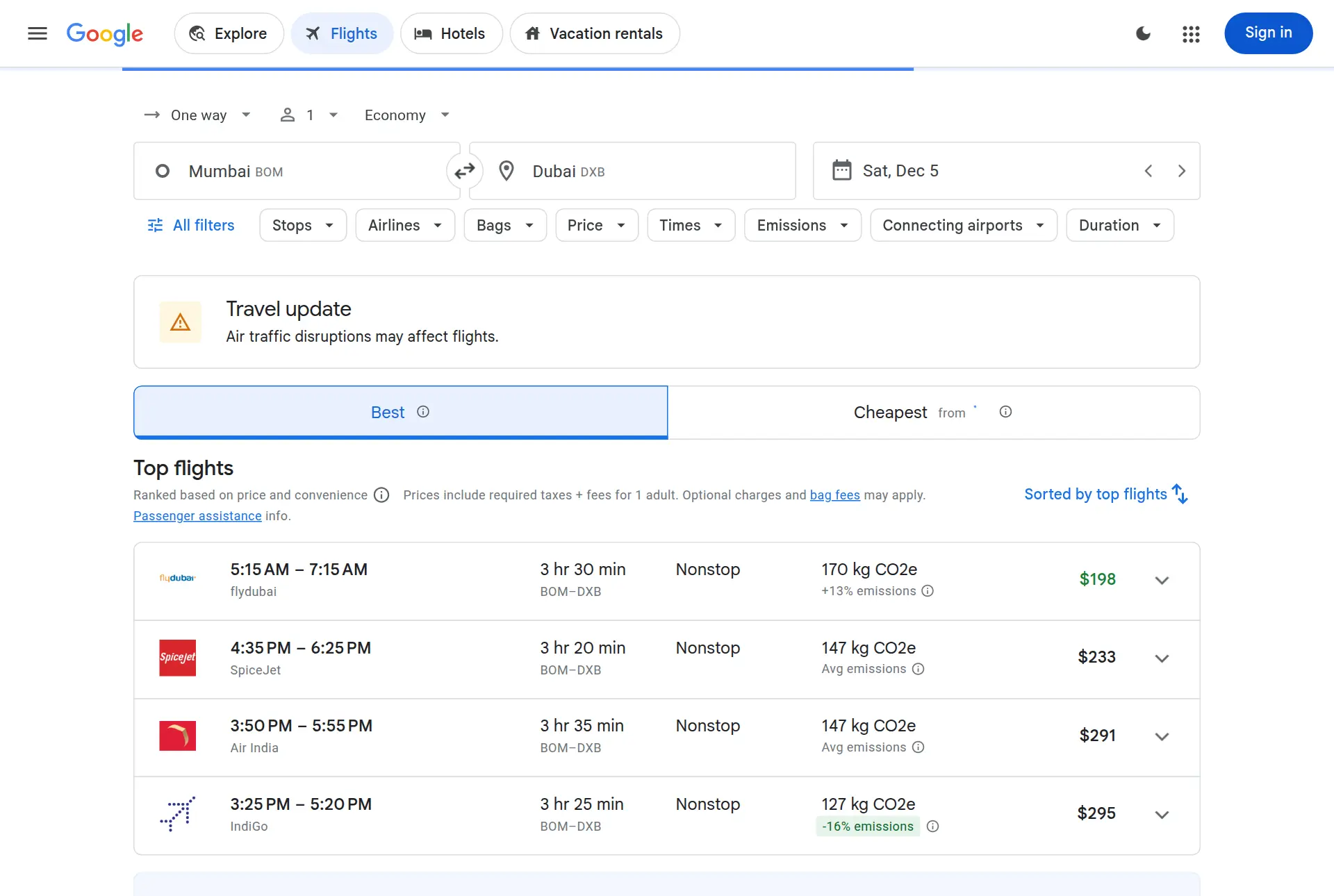
The flights Google Flights lists for the trip, in its order: price, airlines, departure and arrival times and days, duration, stops and each layover, the flight numbers of each leg, estimated emissions, and what the card says of bags and fares.
Give it Where from, where to and the day of a one-way flight, and optionally the number of adults, the cabin and the currency.
1 unit a run, for runs that return data. Runs that fail cost nothing. How units work
- Counted
- 1 unit a run
- Inputs
- 6, 3 required
- Record
- 23 fields
- A run takes
- up to 5 minutes
- Records kept
- 7 days
- Measured
- its success, on the status page
POST/v1/scrapers/google.flights/runs
sent, and answered
a record of the run23 fields
ok1 unit a run
A record this scraper returned for this input. The first 9 of its 23 fields are set down here; the whole record is below.
What it is used for
- Track fares between two airports
- Search the same trip and day on a schedule and read
priceof each flight, to see when a fare drops. - Compare airlines between two cities
- Read who flies between them, at what times, with how many
stopsand for how long, from one search. - Report on emissions
co2_gramsagainstco2_typical_gramssays how a flight's estimated emissions compare with the usual between the same two airports.
What you send
Where from, where to and the day of a one-way flight, and optionally the number of adults, the cabin and the currency. These are its 6 inputs, as its schema has them.
originstring Required- Where the flight leaves from: an airport's code such as JFK, or a city such as New York.
destinationstring Required- Where it goes: an airport's code such as LHR, or a city such as London.
datestring Required- The day of the flight, written 2026-12-15.
adultsinteger Optional- How many adults travel, 1 to 9. The prices are for all of them. 1 unless you say otherwise.Default
1 cabinstring Optional- economy, business or first. economy unless you say otherwise.Default
economy currencystring Optional- The currency of the prices, as a three-letter code such as USD, EUR or INR. USD unless you say otherwise.Default
USD
A request, ready to send
It starts a run with the input shown at the top of this page, waits up to 60 seconds for it, and reads its records. Put your key in the variable it reads.
# Start a run and wait up to 60 seconds for it to finish
curl -X POST "https://api.enrichednow.com/v1/scrapers/google.flights/runs?wait=60" \
  -H "Authorization: Bearer $ENRICHEDNOW_API_KEY" \
  -H "Content-Type: application/json" \
  -d '{"input":{"origin":"BOM","destination":"DXB","date":"2026-12-05"}}'

# Read its records, with the id the first call answered
curl "https://api.enrichednow.com/v1/runs/$RUN_ID/records?limit=100" \
  -H "Authorization: Bearer $ENRICHEDNOW_API_KEY"
from enrichednow import EnrichedNow
client = EnrichedNow() # reads ENRICHEDNOW_API_KEY
# Start a run, wait for it to end, and get its records
result = client.scrape("google.flights", {
"origin": "BOM",
"destination": "DXB",
"date": "2026-12-05",
})
print(result.run.id, result.run.status, result.run.record_count)
# Read its records: pages are fetched as you go
for record in result.records:
print(record)Install it with pip install enrichednow, then save as run.py and run python3 run.py
import EnrichedNow from "enrichednow";

const client = new EnrichedNow(); // reads ENRICHEDNOW_API_KEY

// Start a run, wait for it to end, and get its records
const { run, records } = await client.scrape("google.flights", {
  origin: "BOM",
  destination: "DXB",
  date: "2026-12-05",
});
console.log(run.id, run.status, run.record_count);

// Read its records: pages are fetched as you go
for await (const record of records) console.log(record);
Install it with npm install enrichednow, then save as run.mjs and run node run.mjs
package main

import (
	"context"
	"fmt"
	"log"
	"time"

	enrichednow "github.com/enrichednow/enrichednow-go"
)

func main() {
	client, err := enrichednow.NewClient() // reads ENRICHEDNOW_API_KEY
	if err != nil {
		log.Fatal(err)
	}
	ctx, cancel := context.WithTimeout(context.Background(), 10*time.Minute)
	defer cancel()

	// Start a run, wait for it to end, and get its records
	run, records, err := client.Scrape(ctx, "google.flights", map[string]any{"origin": "BOM", "destination": "DXB", "date": "2026-12-05"})
	if err != nil {
		log.Fatal(err)
	}
	fmt.Println(run.ID, run.Status, run.RecordCount)

	// Read its records: pages are fetched as you go
	for records.Next() {
		fmt.Println(string(records.Current()))
	}
	if err := records.Err(); err != nil {
		log.Fatal(err)
	}
}
Install it with go get github.com/enrichednow/enrichednow-go@latest, then save as run.go and run go run run.go
import com.enrichednow.EnrichedNowClient;
import com.enrichednow.ScrapeResult;
import java.util.Map;

public class Run {
    public static void main(String[] args) {
        EnrichedNowClient client = EnrichedNowClient.fromEnv(); // reads ENRICHEDNOW_API_KEY

        // Start a run, wait for it to end, and get its records
        ScrapeResult result = client.scrape("google.flights", Map.of("origin", "BOM", "destination", "DXB", "date", "2026-12-05"));
        System.out.println(result.run().id() + " " + result.run().status() + " " + result.run().recordCount());

        // Read its records: pages are fetched as you go
        for (Map<String, Object> record : result.records()) {
            System.out.println(record);
        }
    }
}
Add com.enrichednow:enrichednow-java:0.4.0 to your Maven or Gradle build, then save as Run.java
enrichednow run google.flights --input origin=BOM --input destination=DXB --input date=2026-12-05Install it with curl -fsSL https://raw.githubusercontent.com/enrichednow/enrichednow-cli/main/install.sh | sh
What comes back
The flights Google Flights lists for the trip, in its order: price, airlines, departure and arrival times and days, duration, stops and each layover, the flight numbers of each leg, estimated emissions, and what the card says of bags and fares. A record has 23 fields. One we could not read is null, never an empty string or a zero.
{
  "position": 1,
  "section": "top",
  "price": 198,
  "currency": "USD",
  "price_text": "$198",
  "airlines": [
    "flydubai"
  ],
  "operated_by": null,
  "stops": 0,
  "origin": "BOM",
  "origin_name": "Chhatrapati Shivaji Maharaj International Airport Mumbai",
  "destination": "DXB",
  "destination_name": "Dubai International Airport",
  "departure_date": "2026-12-05",
  "departure_time": "5:15 AM",
  "arrival_date": "2026-12-05",
  "arrival_time": "7:15 AM",
  "duration_minutes": 210,
  "layovers": [],
  "legs": [
    {
      "origin": "BOM",
      "destination": "DXB",
      "carrier": "FZ",
      "flight_number": "FZ 446",
      "date": "2026-12-05"
    }
  ],
  "co2_grams": 170000,
  "co2_typical_grams": 151000,
  "notes": [],
  "fetched_at": "2026-11-19T17:28:12.192424Z"
}
The scraper returned this record for the input above, reading a saved copy of the page, not the live site.
The fields of a record
positioninteger- The flight's place in the list, from 1: the top flights first, then the others.
sectionstringtopfor a flight of the list's "Top flights",otherfor one of its "Other flights".pricenumber or null- The lowest price the card shows, for all the passengers asked for, in
currency. Null when the card shows none. currencystring- The currency of the price, as asked, e.g.
USD. price_textstring or null- The price as the card prints it, e.g.
$349. airlineslist of strings- The airlines the card names for the flight, in its order, e.g.
American. operated_bystring or null- Who flies it when another airline does, as the card words it, e.g.
Republic Airways as American Eagle. stopsinteger- The number of stops: 0 for a nonstop flight.
originstring or null- The airport it leaves from, by its code, e.g.
JFK. origin_namestring- The airport it leaves from, by its name, e.g.
John F. Kennedy International Airport. destinationstring or null- The airport it lands at, by its code, e.g.
LHR. destination_namestring- The airport it lands at, by its name, e.g.
Heathrow Airport. departure_datestring- The day it leaves,
YYYY-MM-DD, in the airport's own time. departure_timestring- The time it leaves, as the card prints it in the airport's own time, e.g.
5:29 PM. arrival_datestring- The day it lands,
YYYY-MM-DD, in the airport's own time. arrival_timestring- The time it lands, as the card prints it in the airport's own time, e.g.
9:20 AM. duration_minutesinteger or null- The whole journey's length, in minutes, stops included.
layoverslist of objects- Each stop, in order: where, and for how long.Each holds
airport,airport_name,city,duration_minutes,overnight. legslist of objects- Each flight of the journey with its number, where the card's emissions link names them.Each holds
origin,destination,carrier,flight_number,date. co2_gramsinteger or null- The flight's estimated emissions for the passengers asked for, in grams of CO2e, as the card states them.
co2_typical_gramsinteger or null- The typical emissions of a flight between the same two airports, in grams of CO2e, to compare with
co2_grams. noteslist of strings- What else the card says of the fare, e.g.
1 carry-on bag included,This price does not include overhead bin access,First Class. fetched_atdatetime- When the list was read, in UTC.
Units and limits
- Counted per request
- Billed per request: a run that returns data costs 1 unit, however many records it returns.
- A miss costs nothing
- A run that fails, that meets something not supported yet, or that you cancel costs nothing. You pay for runs that return data.
- What bounds a run
- A run may take up to 5 minutes. Its records are read in pages of up to 1,000 and are kept for 7 days.
What it does not do
- One way only: for a return, run the other way as a second search. A round trip's prices are not returned.
- Premium economy cannot be asked for.
- The list Google Flights shows first, sorted by its own ranking; the cheapest-first list and the fares of each airline's site are not returned.
- Places Google Flights does not take as a trip end as failed, with the reason not_found, and cost nothing.
The bounds its schema sets
adults- 1 to 9; 1 unless you say otherwise
cabin- economy, business, first; economy unless you say otherwise
Questions
What does Google Flights return?
The flights Google Flights lists for the trip, in its order: price, airlines, departure and arrival times and days, duration, stops and each layover, the flight numbers of each leg, estimated emissions, and what the card says of bags and fares. A record has 23 fields, among them position, section, price, currency, price_text and airlines. A value that could not be read is null, never an empty string or a zero.
What do I send?
Where from, where to and the day of a one-way flight, and optionally the number of adults, the cabin and the currency. The inputs origin, destination and date are required. Optional: adults, cabin and currency.
How is it counted?
Billed per request: a run that returns data costs 1 unit, however many records it returns. A run that fails, that meets something not supported yet, or that you cancel costs nothing. The first 1,000 units each month are free.
How much does one run return?
Its schema sets these bounds: adults 1 to 9 (1 unless you say otherwise); cabin economy, business, first (economy unless you say otherwise). A run may take up to 5 minutes.
What does it not do?
One way only: for a return, run the other way as a second search. A round trip's prices are not returned. Premium economy cannot be asked for. The list Google Flights shows first, sorted by its own ranking; the cheapest-first list and the fares of each airline's site are not returned. Places Google Flights does not take as a trip end as failed, with the reason not_found, and cost nothing.
How long are the records kept, and in what format do they come?
Records are kept for 7 days after the run ended, and read in pages of up to 1,000. They come as JSON, as NDJSON with one record a line, or as CSV with a column for each field.
Can an AI assistant call it?
Yes. Through the EnrichedNow MCP server an assistant calls the tool run_scraper with the scraper_id google.flights and the same input. It costs what the same API call costs.
Google Flights
Flights for a one-way trip on Google Flights: prices, airlines, times, stops and flight numbers.
- Industry
- Travel, food and places
- Where
- Worldwide
- Data
- Prices
Run it on an input of your own.
Create an account, make a key, and send the request above with your own input. The first 1,000 units each month are free.