Scraper API
Google Finance
google.finance_quoteAvailable
Google Finance quote
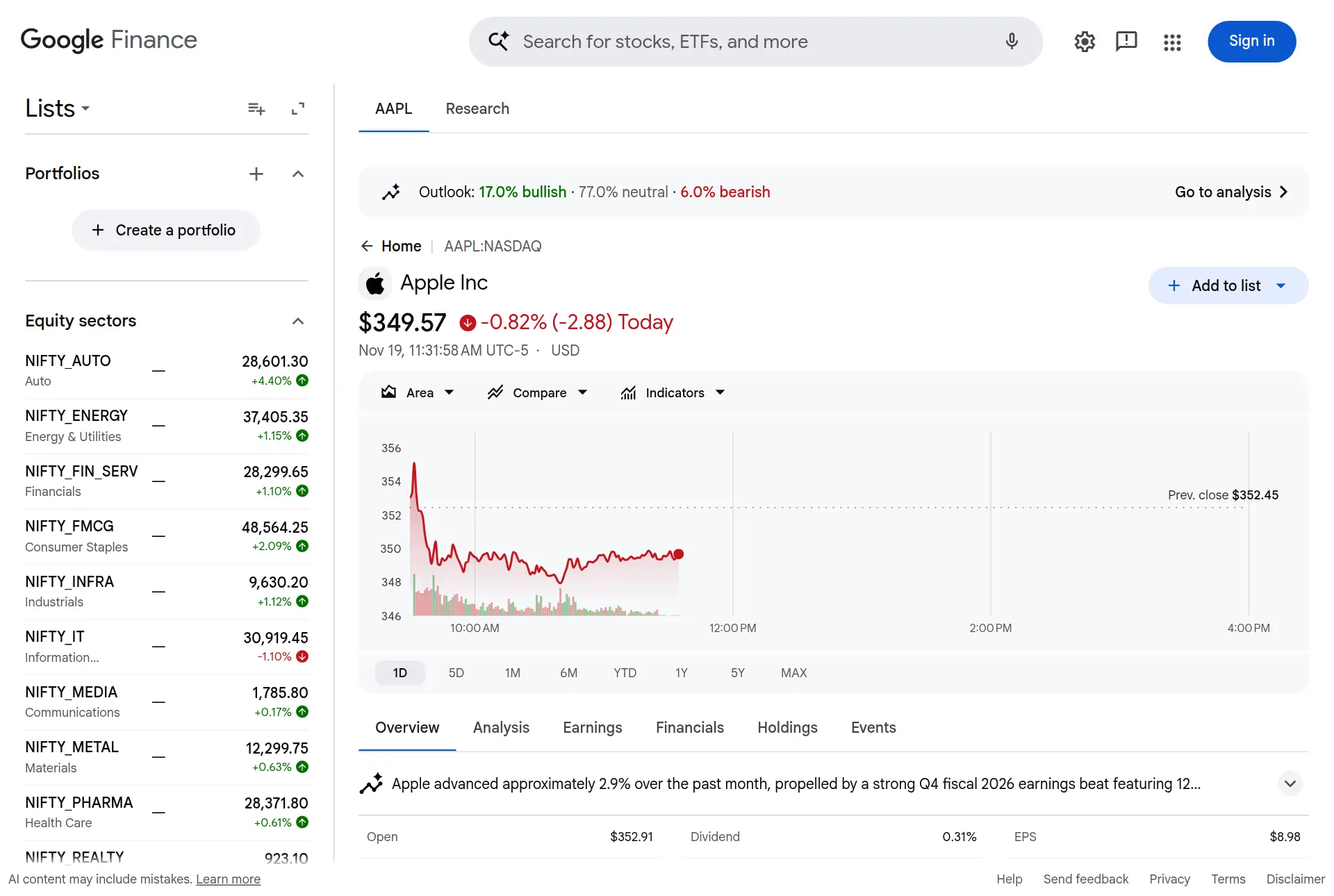
The quote page of a stock, an index, a fund, a currency pair or a cryptocurrency: price, the day's change, previous close, the time of the price, the after-hours price where shown, the day's open, high and low, volume, market value, every key figure the page lists, and the company's facts and description.
Give it a symbol as Google Finance writes it: a ticker and its exchange, such as AAPL:NASDAQ, or a pair, such as EUR-USD or BTC-USD.
1 unit a run, for runs that return data. Runs that fail cost nothing. How units work
- Counted
- 1 unit a run
- Inputs
- 1, 1 required
- Record
- 27 fields
- A run takes
- up to 5 minutes
- Records kept
- 7 days
- Measured
- its success, on the status page
POST/v1/scrapers/google.finance_quote/runs
sent, and answered
a record of the run27 fields
ok1 unit a run
A record this scraper returned for this input. The first 9 of its 27 fields are set down here; the whole record is below.
What it is used for
- Track a price
- Read
price,changeandchange_percenton a schedule for the stocks, indexes, pairs and coins you follow, withquoted_atfor the moment of each price. - Enrich a list of companies
- Add the sector, market value, CEO, headquarters and description to the tickers you hold, from
statsandabout. - Watch after-hours moves
after_hours_priceandafter_hours_changeshow where a stock trades once the session has closed.
What you send
A symbol as Google Finance writes it: a ticker and its exchange, such as AAPL:NASDAQ, or a pair, such as EUR-USD or BTC-USD. It is the one input.
symbolstring Required- The ticker and its exchange, joined by a colon (AAPL:NASDAQ, VOD:LON, 7203:TYO, .DJI:INDEXDJX), or two currency codes joined by a dash (EUR-USD, BTC-USD).
A request, ready to send
It starts a run with the input shown at the top of this page, waits up to 60 seconds for it, and reads its records. Put your key in the variable it reads.
# Start a run and wait up to 60 seconds for it to finish
curl -X POST "https://api.enrichednow.com/v1/scrapers/google.finance_quote/runs?wait=60" \
  -H "Authorization: Bearer $ENRICHEDNOW_API_KEY" \
  -H "Content-Type: application/json" \
  -d '{"input":{"symbol":"AAPL:NASDAQ"}}'

# Read its records, with the id the first call answered
curl "https://api.enrichednow.com/v1/runs/$RUN_ID/records?limit=100" \
  -H "Authorization: Bearer $ENRICHEDNOW_API_KEY"
from enrichednow import EnrichedNow
client = EnrichedNow() # reads ENRICHEDNOW_API_KEY
# Start a run, wait for it to end, and get its records
result = client.scrape("google.finance_quote", {"symbol": "AAPL:NASDAQ"})
print(result.run.id, result.run.status, result.run.record_count)
# Read its records: pages are fetched as you go
for record in result.records:
print(record)Install it with pip install enrichednow, then save as run.py and run python3 run.py
import EnrichedNow from "enrichednow";

const client = new EnrichedNow(); // reads ENRICHEDNOW_API_KEY

// Start a run, wait for it to end, and get its records
const { run, records } = await client.scrape("google.finance_quote", { symbol: "AAPL:NASDAQ" });
console.log(run.id, run.status, run.record_count);

// Read its records: pages are fetched as you go
for await (const record of records) console.log(record);
Install it with npm install enrichednow, then save as run.mjs and run node run.mjs
package main

import (
	"context"
	"fmt"
	"log"
	"time"

	enrichednow "github.com/enrichednow/enrichednow-go"
)

func main() {
	client, err := enrichednow.NewClient() // reads ENRICHEDNOW_API_KEY
	if err != nil {
		log.Fatal(err)
	}
	ctx, cancel := context.WithTimeout(context.Background(), 10*time.Minute)
	defer cancel()

	// Start a run, wait for it to end, and get its records
	run, records, err := client.Scrape(ctx, "google.finance_quote", map[string]any{"symbol": "AAPL:NASDAQ"})
	if err != nil {
		log.Fatal(err)
	}
	fmt.Println(run.ID, run.Status, run.RecordCount)

	// Read its records: pages are fetched as you go
	for records.Next() {
		fmt.Println(string(records.Current()))
	}
	if err := records.Err(); err != nil {
		log.Fatal(err)
	}
}
Install it with go get github.com/enrichednow/enrichednow-go@latest, then save as run.go and run go run run.go
import com.enrichednow.EnrichedNowClient;
import com.enrichednow.ScrapeResult;
import java.util.Map;

public class Run {
    public static void main(String[] args) {
        EnrichedNowClient client = EnrichedNowClient.fromEnv(); // reads ENRICHEDNOW_API_KEY

        // Start a run, wait for it to end, and get its records
        ScrapeResult result = client.scrape("google.finance_quote", Map.of("symbol", "AAPL:NASDAQ"));
        System.out.println(result.run().id() + " " + result.run().status() + " " + result.run().recordCount());

        // Read its records: pages are fetched as you go
        for (Map<String, Object> record : result.records()) {
            System.out.println(record);
        }
    }
}
Add com.enrichednow:enrichednow-java:0.4.0 to your Maven or Gradle build, then save as Run.java
enrichednow run google.finance_quote --input symbol=AAPL:NASDAQInstall it with curl -fsSL https://raw.githubusercontent.com/enrichednow/enrichednow-cli/main/install.sh | sh
What comes back
The quote page of a stock, an index, a fund, a currency pair or a cryptocurrency: price, the day's change, previous close, the time of the price, the after-hours price where shown, the day's open, high and low, volume, market value, every key figure the page lists, and the company's facts and description. A record has 27 fields. One we could not read is null, never an empty string or a zero.
{
  "symbol": "AAPL:NASDAQ",
  "url": "https://www.google.com/finance/quote/AAPL:NASDAQ",
  "ticker": "AAPL",
  "exchange": "NASDAQ",
  "name": "Apple Inc",
  "kind": "stock",
  "currency": "USD",
  "price": 352.45,
  "change": 0.54000854,
  "change_percent": 0.15345076,
  "previous_close": 351.91,
  "quoted_at": "2026-11-18T22:35:56Z",
  "timezone": "America/New_York",
  "country_code": "US",
  "after_hours_price": 351.79,
  "after_hours_change": -0.66000366,
  "after_hours_change_percent": -0.18726164,
  "open": 351.94,
  "high": 356.42,
  "low": 351.4706,
  "volume": 33399649,
  "market_cap": 5121867018394.775,
  "sector": "Information Technology",
  "stats": {
    "Open": "$351.94",
    "High": "$356.42",
    "Low": "$351.47",
    "Mkt. cap": "5.12T",
    "Avg. vol.": "45.13M",
    "Volume": "33.40M",
    "Dividend": "0.31%",
    "Quarterly dividend": "$0.27",
    "Ex-dividend date": "Nov 12, 2026",
    "P/E ratio": "39.25",
    "52-wk high": "$360.83",
    "52-wk low": "$243.42",
    "EPS": "$8.98",
    "Beta": "1.07",
    "Shares outstanding": "14.53B",
    "No. of employees": "167K"
  },
  "about": {
    "CEO": "John Ternus",
    "Employees": "167K",
    "Founded": "Apr 1, 1976",
    "Headquarters": "Cupertino, California, United States",
    "Sector": "Information Technology",
    "Industry": "Computers, Peripherals, and Software"
  },
  "description": "Apple Inc. is an American multinational technology company headquartered in Cupertino, California, in Silicon Valley, and known for consumer electronics, software and online services. Founded in 1976 as Apple Computer Company by Steve Jobs, … [truncated]",
  "fetched_at": "2026-11-19T18:07:40.354460Z"
}
The scraper returned this record for the input above, reading a saved copy of the page, not the live site.
Values shortened for this page: description: 1,074 characters, the first 240 shown.
The fields of a record
symbolstring- The symbol as Google Finance writes it:
AAPL:NASDAQ,.DJI:INDEXDJX,EUR-USD. urlstring- The page on Google Finance.
tickerstring or null- The ticker without its exchange, e.g.
AAPL. Null for a currency or crypto pair. exchangestring or null- The exchange's code on Google Finance, e.g.
NASDAQ,LON,TYO. Null for a pair. namestring or null- The name the page gives: the company, the index, the fund or the pair, e.g.
Apple Inc,EUR / USD. kindstring or null- What the symbol is, where the page's data says so: a stock, an index, a fund, a future, a currency pair or a cryptocurrency.
currencystring or null- The currency the price is in, as the page states it, e.g.
USD,JPY, orGBXfor pence on the London exchange. For a pair, the second currency. Null for an index. pricenumber- The latest price the page shows.
changenumber or null- The change against the previous close, in the price's own unit.
change_percentnumber or null- That change in per cent, e.g.
-1.89for a fall of 1.89 per cent. previous_closenumber or null- The previous trading day's closing price.
quoted_atdatetime or null- The time of the price, in UTC.
timezonestring or null- The exchange's time zone, e.g.
America/New_York. Null for a pair. country_codestring or null- The country of the listing, as two letters, e.g.
US. Null for an index or a pair. after_hours_pricenumber or null- The price outside trading hours, when the page shows one.
after_hours_changenumber or null- The change of the after-hours price against the close.
after_hours_change_percentnumber or null- That change in per cent.
opennumber or null- The day's opening price. Null for a pair.
highnumber or null- The day's highest price. Null for a pair.
lownumber or null- The day's lowest price. Null for a pair.
volumeinteger or null- The number of shares traded in the day. Null where the page gives none.
market_capnumber or null- The market value, in the currency the page states it in (the listing's own; for a fund, its assets). Null where the page gives none.
sectorstring or null- The sector Google Finance files a company under, e.g.
Information Technology. statsobject- The key figures the page lists, label to value as printed, e.g.
{"Mkt. cap": "5.12T", "P/E ratio": "39.25", "52-wk high": "$360.83"}. Empty for a pair. aboutobject- The facts under "About", label to value as printed, e.g.
{"CEO": "…", "Founded": "Apr 1, 1976", "Headquarters": "Cupertino, California, United States"}. Empty where the page has no such section. descriptionstring or null- The profile text the page shows for a company, an index or a fund.
fetched_atdatetime- When the page was read, in UTC.
Units and limits
- Counted per request
- Billed per request: a run that returns data costs 1 unit, however many records it returns.
- A miss costs nothing
- A run that fails, that meets something not supported yet, or that you cancel costs nothing. You pay for runs that return data.
- What bounds a run
- A run may take up to 5 minutes. Its records are read in pages of up to 1,000 and are kept for 7 days.
What it does not do
- One run reads one symbol. Charts, news and financial statements are not returned.
- A ticker without its exchange is refused: the same letters are different securities on different exchanges.
- The key figures and the company's facts are returned as the English page prints them, under its own labels.
- A symbol Google Finance has no page for ends as failed, with the reason not_found, and costs nothing.
Questions
What does Google Finance quote return?
The quote page of a stock, an index, a fund, a currency pair or a cryptocurrency: price, the day's change, previous close, the time of the price, the after-hours price where shown, the day's open, high and low, volume, market value, every key figure the page lists, and the company's facts and description. A record has 27 fields, among them symbol, url, ticker, exchange, name and kind. A value that could not be read is null, never an empty string or a zero.
What do I send?
A symbol as Google Finance writes it: a ticker and its exchange, such as AAPL:NASDAQ, or a pair, such as EUR-USD or BTC-USD. The input symbol is required.
How is it counted?
Billed per request: a run that returns data costs 1 unit, however many records it returns. A run that fails, that meets something not supported yet, or that you cancel costs nothing. The first 1,000 units each month are free.
What does it not do?
One run reads one symbol. Charts, news and financial statements are not returned. A ticker without its exchange is refused: the same letters are different securities on different exchanges. The key figures and the company's facts are returned as the English page prints them, under its own labels. A symbol Google Finance has no page for ends as failed, with the reason not_found, and costs nothing.
How long are the records kept, and in what format do they come?
Records are kept for 7 days after the run ended, and read in pages of up to 1,000. They come as JSON, as NDJSON with one record a line, or as CSV with a column for each field.
Can an AI assistant call it?
Yes. Through the EnrichedNow MCP server an assistant calls the tool run_scraper with the scraper_id google.finance_quote and the same input. It costs what the same API call costs.
Google Finance
Quote pages of Google Finance: stocks, indexes, funds, currency pairs and cryptocurrencies, as a visitor who is not signed in sees them.
- Industry
- Markets and funding
- Where
- Worldwide
- For
- Investors
- Data
- Market data
Run it on an input of your own.
Create an account, make a key, and send the request above with your own input. The first 1,000 units each month are free.