Scraper API
GetYourGuide
getyourguide.activityAvailable
GetYourGuide activity
The activity: name, description, rating and number of reviews, the lowest price, country, city and attraction, itinerary, pictures and a few reviews.
Give it the address of an activity on getyourguide.com.
1 unit a run, for runs that return data. Runs that fail cost nothing. How units work
- Counted
- 1 unit a run
- Inputs
- 1, 1 required
- Record
- 16 fields
- A run takes
- up to 5 minutes
- Records kept
- 7 days
- Measured
- its success, on the status page
POST/v1/scrapers/getyourguide.activity/runs
sent, and answered
a record of the run16 fields
ok1 unit a run
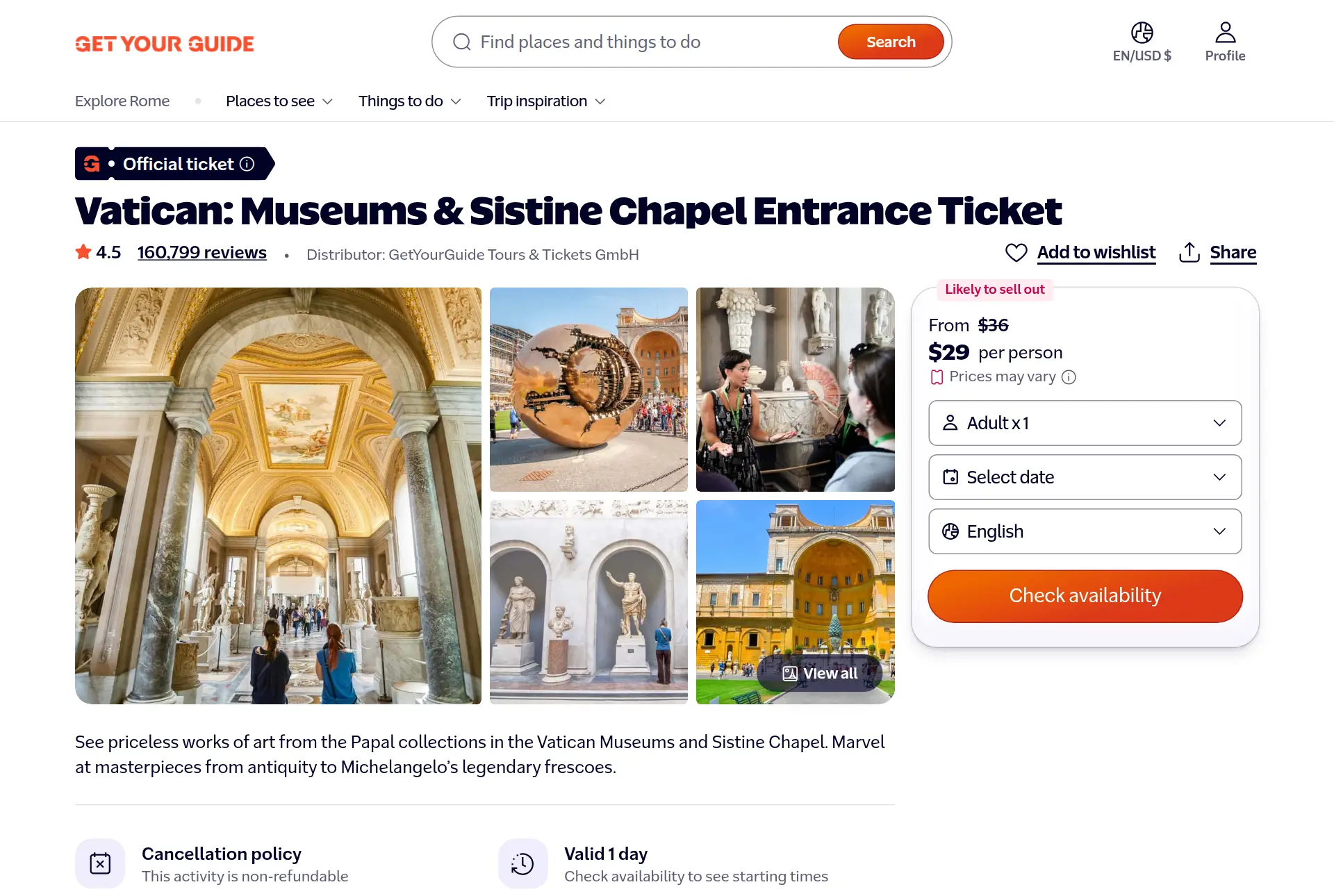
A record this scraper returned for this input. The first 9 of its 16 fields are set down here; the whole record is below.
What it is used for
- Read a tour or ticket
- Give an activity's address and get its name, description, rating, number of reviews and lowest price.
- Watch prices of activities
- Read the activities you list each day and keep
price_fromandcurrencyas GetYourGuide shows them. - Map what a city offers
- Group the activities you read by
cityandattraction, with theiritinerary, to see what is sold where.
What you send
The address of an activity on getyourguide.com. It is the one input.
urlstring Required- The address of an activity on getyourguide.com, e.g.
https://www.getyourguide.com/rome-l33/skip-the-line-vatican-museums-sistine-chapel-ticket-t62214/.
A request, ready to send
It starts a run with the input shown at the top of this page, waits up to 60 seconds for it, and reads its records. Put your key in the variable it reads.
# Start a run and wait up to 60 seconds for it to finish
curl -X POST "https://api.enrichednow.com/v1/scrapers/getyourguide.activity/runs?wait=60" \
  -H "Authorization: Bearer $ENRICHEDNOW_API_KEY" \
  -H "Content-Type: application/json" \
  -d '{"input":{"url":"https://www.getyourguide.com/rome-l33/skip-the-line-vatican-museums-sistine-chapel-ticket-t62214/"}}'

# Read its records, with the id the first call answered
curl "https://api.enrichednow.com/v1/runs/$RUN_ID/records?limit=100" \
  -H "Authorization: Bearer $ENRICHEDNOW_API_KEY"
from enrichednow import EnrichedNow
client = EnrichedNow() # reads ENRICHEDNOW_API_KEY
# Start a run, wait for it to end, and get its records
result = client.scrape("getyourguide.activity", {
"url": "https://www.getyourguide.com/rome-l33/skip-the-line-vatican-museums-sistine-chapel-ticket-t62214/",
})
print(result.run.id, result.run.status, result.run.record_count)
# Read its records: pages are fetched as you go
for record in result.records:
print(record)Install it with pip install enrichednow, then save as run.py and run python3 run.py
import EnrichedNow from "enrichednow";

const client = new EnrichedNow(); // reads ENRICHEDNOW_API_KEY

// Start a run, wait for it to end, and get its records
const { run, records } = await client.scrape("getyourguide.activity", {
  url: "https://www.getyourguide.com/rome-l33/skip-the-line-vatican-museums-sistine-chapel-ticket-t62214/",
});
console.log(run.id, run.status, run.record_count);

// Read its records: pages are fetched as you go
for await (const record of records) console.log(record);
Install it with npm install enrichednow, then save as run.mjs and run node run.mjs
package main

import (
	"context"
	"fmt"
	"log"
	"time"

	enrichednow "github.com/enrichednow/enrichednow-go"
)

func main() {
	client, err := enrichednow.NewClient() // reads ENRICHEDNOW_API_KEY
	if err != nil {
		log.Fatal(err)
	}
	ctx, cancel := context.WithTimeout(context.Background(), 10*time.Minute)
	defer cancel()

	// Start a run, wait for it to end, and get its records
	run, records, err := client.Scrape(ctx, "getyourguide.activity", map[string]any{"url": "https://www.getyourguide.com/rome-l33/skip-the-line-vatican-museums-sistine-chapel-ticket-t62214/"})
	if err != nil {
		log.Fatal(err)
	}
	fmt.Println(run.ID, run.Status, run.RecordCount)

	// Read its records: pages are fetched as you go
	for records.Next() {
		fmt.Println(string(records.Current()))
	}
	if err := records.Err(); err != nil {
		log.Fatal(err)
	}
}
Install it with go get github.com/enrichednow/enrichednow-go@latest, then save as run.go and run go run run.go
import com.enrichednow.EnrichedNowClient;
import com.enrichednow.ScrapeResult;
import java.util.Map;

public class Run {
    public static void main(String[] args) {
        EnrichedNowClient client = EnrichedNowClient.fromEnv(); // reads ENRICHEDNOW_API_KEY

        // Start a run, wait for it to end, and get its records
        ScrapeResult result = client.scrape("getyourguide.activity", Map.of("url", "https://www.getyourguide.com/rome-l33/skip-the-line-vatican-museums-sistine-chapel-ticket-t62214/"));
        System.out.println(result.run().id() + " " + result.run().status() + " " + result.run().recordCount());

        // Read its records: pages are fetched as you go
        for (Map<String, Object> record : result.records()) {
            System.out.println(record);
        }
    }
}
Add com.enrichednow:enrichednow-java:0.4.0 to your Maven or Gradle build, then save as Run.java
enrichednow run getyourguide.activity --input url=https://www.getyourguide.com/rome-l33/skip-the-line-vatican-museums-sistine-chapel-ticket-t62214/Install it with curl -fsSL https://raw.githubusercontent.com/enrichednow/enrichednow-cli/main/install.sh | sh
What comes back
The activity: name, description, rating and number of reviews, the lowest price, country, city and attraction, itinerary, pictures and a few reviews. A record has 16 fields. One we could not read is null, never an empty string or a zero.
{
  "activity_id": 62214,
  "url": "https://www.getyourguide.com/rome-l33/skip-the-line-vatican-museums-sistine-chapel-ticket-t62214/",
  "name": "Vatican: Museums & Sistine Chapel Entrance Ticket",
  "description": "See priceless works of art from the Papal collections in the Vatican Museums and Sistine Chapel. Marvel at masterpieces from antiquity to Michelangelo’s legendary frescoes.",
  "rating": 4.48,
  "review_count": 160799,
  "price_from": 28.54,
  "currency": "USD",
  "country": "Italy",
  "region": "Lazio",
  "city": "Rome",
  "attraction": "Vatican Museums",
  "itinerary": [],
  "images": [
    "https://cdn.getyourguide.com/img/tour/5f16d60b18470.jpeg/53.jpg",
    "https://cdn.getyourguide.com/img/tour/5f16d60b18470.jpeg/132.jpg",
    "https://cdn.getyourguide.com/img/tour/5f16d60b18470.jpeg/68.jpg"
  ],
  "reviews": [
    {
      "rating": 5,
      "text": "An audio guide doesn't seem to make sense here. Either go and explore on your own, or just hire a guide, but then you'll need to set aside a whole day, because you'll be moving more slowly. Still, it's definitely a place worth visiting.",
      "written_on": "2026-11-19"
    },
    {
      "rating": 5,
      "text": "You have to wait in line anyway. But it moves fairly quickly. I found it quite disorganized, though. Pay attention to which line you're in before joining the first one you see. There are 3 different lines for those with admission tickets. … [truncated]",
      "written_on": "2026-11-19"
    }
  ],
  "fetched_at": "2026-11-19T18:38:42.128451Z"
}
The scraper returned this record for the input above, reading a saved copy of the page, not the live site.
Values shortened for this page: reviews: 10 items, the first 2 shown; reviews[1].text: 415 characters, the first 238 shown.
The fields of a record
activity_idinteger- GetYourGuide's number of the activity (the
t…in its address). urlstring- The activity's page, as GetYourGuide names it.
namestring- The activity's name.
descriptionstring or null- Its short description.
ratingnumber or null- The travellers' average rating, out of 5, to two decimals.
review_countinteger or null- How many reviews it has.
price_fromnumber or null- The lowest price the page's document states, in
currency: a price a person, or a group where the activity is sold by the group; the page prints it rounded. currencystring or null- The currency of the price, e.g.
USD. countrystring or null- The country, as the page's breadcrumb names it.
regionstring or null- The region, as the breadcrumb names it.
citystring or null- The city, from the breadcrumb's
Things to do in …. attractionstring or null- The attraction or area the breadcrumb ends with, e.g.
Vatican Museums. itinerarylist of strings- The stops of the itinerary, in order, when the page gives one.
imageslist of strings- The pictures the page's document names.
reviewslist of objects- The reviews the page shows (a few), without their authors.Each holds
rating,text,written_on. fetched_atdatetime- When the page was read, in UTC.
Units and limits
- Counted per request
- Billed per request: a run that returns data costs 1 unit, however many records it returns.
- A miss costs nothing
- A run that fails, that meets something not supported yet, or that you cancel costs nothing. You pay for runs that return data.
- What bounds a run
- A run may take up to 5 minutes. Its records are read in pages of up to 1,000 and are kept for 7 days.
What it does not do
- One run reads one activity; there is no search.
- Availability, dates and options are not read.
- Reviews come without their authors; only those the page shows.
Questions
What does GetYourGuide activity return?
The activity: name, description, rating and number of reviews, the lowest price, country, city and attraction, itinerary, pictures and a few reviews. A record has 16 fields, among them activity_id, url, name, description, rating and review_count. A value that could not be read is null, never an empty string or a zero.
What do I send?
The address of an activity on getyourguide.com. The input url is required.
How is it counted?
Billed per request: a run that returns data costs 1 unit, however many records it returns. A run that fails, that meets something not supported yet, or that you cancel costs nothing. The first 1,000 units each month are free.
What does it not do?
One run reads one activity; there is no search. Availability, dates and options are not read. Reviews come without their authors; only those the page shows.
How long are the records kept, and in what format do they come?
Records are kept for 7 days after the run ended, and read in pages of up to 1,000. They come as JSON, as NDJSON with one record a line, or as CSV with a column for each field.
Can an AI assistant call it?
Yes. Through the EnrichedNow MCP server an assistant calls the tool run_scraper with the scraper_id getyourguide.activity and the same input. It costs what the same API call costs.
GetYourGuide
Tours, tickets and things to do on getyourguide.com: an activity's rating, lowest price, place and itinerary.
- Industry
- Travel, food and places
- Where
- Worldwide
Run it on an input of your own.
Create an account, make a key, and send the request above with your own input. The first 1,000 units each month are free.