Scraper API
Craigslist
craigslist.listingAvailable
Craigslist posting
Its title, price, text, the facts listed beside its map (condition, size, rent period, pay), photos, address and map pin, category, and when it was posted and last changed.
Give it the address of a posting's page, as craigslist.search returns it.
1 unit a run, for runs that return data. Runs that fail cost nothing. How units work
- Counted
- 1 unit a run
- Inputs
- 1, 1 required
- Record
- 28 fields
- A run takes
- up to 5 minutes
- Records kept
- 7 days
- Measured
- its success, on the status page
POST/v1/scrapers/craigslist.listing/runs
sent, and answered
a record of the run28 fields
ok1 unit a run
A record this scraper returned for this input. The first 9 of its 28 fields are set down here; the whole record is below.
What it is used for
- Read a posting in full
- The text, price, photos and the facts beside the map, such as condition, size, rent period or pay, in one record.
- Place it on a map
- The street address where one is given, the place under the map and the
latitudeandlongitudeof its pin. - Know how fresh it is
posted_atandupdated_atsay when a posting went up and was last changed; a posting that is gone ends as not found.
What you send
The address of a posting's page, as craigslist.search returns it. It is the one input.
urlstring Required- The address of the posting's page on craigslist.org.
A request, ready to send
It starts a run with the input shown at the top of this page, waits up to 60 seconds for it, and reads its records. Put your key in the variable it reads.
# Start a run and wait up to 60 seconds for it to finish
curl -X POST "https://api.enrichednow.com/v1/scrapers/craigslist.listing/runs?wait=60" \
  -H "Authorization: Bearer $ENRICHEDNOW_API_KEY" \
  -H "Content-Type: application/json" \
  -d '{"input":{"url":"https://www.craigslist.org/view/d/carol-stream-local-truck-driver-cdl/cRuaoWodm15NLnZureb7WG"}}'

# Read its records, with the id the first call answered
curl "https://api.enrichednow.com/v1/runs/$RUN_ID/records?limit=100" \
  -H "Authorization: Bearer $ENRICHEDNOW_API_KEY"
from enrichednow import EnrichedNow
client = EnrichedNow() # reads ENRICHEDNOW_API_KEY
# Start a run, wait for it to end, and get its records
result = client.scrape("craigslist.listing", {
"url": "https://www.craigslist.org/view/d/carol-stream-local-truck-driver-cdl/cRuaoWodm15NLnZureb7WG",
})
print(result.run.id, result.run.status, result.run.record_count)
# Read its records: pages are fetched as you go
for record in result.records:
print(record)Install it with pip install enrichednow, then save as run.py and run python3 run.py
import EnrichedNow from "enrichednow";

const client = new EnrichedNow(); // reads ENRICHEDNOW_API_KEY

// Start a run, wait for it to end, and get its records
const { run, records } = await client.scrape("craigslist.listing", {
  url: "https://www.craigslist.org/view/d/carol-stream-local-truck-driver-cdl/cRuaoWodm15NLnZureb7WG",
});
console.log(run.id, run.status, run.record_count);

// Read its records: pages are fetched as you go
for await (const record of records) console.log(record);
Install it with npm install enrichednow, then save as run.mjs and run node run.mjs
package main

import (
	"context"
	"fmt"
	"log"
	"time"

	enrichednow "github.com/enrichednow/enrichednow-go"
)

func main() {
	client, err := enrichednow.NewClient() // reads ENRICHEDNOW_API_KEY
	if err != nil {
		log.Fatal(err)
	}
	ctx, cancel := context.WithTimeout(context.Background(), 10*time.Minute)
	defer cancel()

	// Start a run, wait for it to end, and get its records
	run, records, err := client.Scrape(ctx, "craigslist.listing", map[string]any{"url": "https://www.craigslist.org/view/d/carol-stream-local-truck-driver-cdl/cRuaoWodm15NLnZureb7WG"})
	if err != nil {
		log.Fatal(err)
	}
	fmt.Println(run.ID, run.Status, run.RecordCount)

	// Read its records: pages are fetched as you go
	for records.Next() {
		fmt.Println(string(records.Current()))
	}
	if err := records.Err(); err != nil {
		log.Fatal(err)
	}
}
Install it with go get github.com/enrichednow/enrichednow-go@latest, then save as run.go and run go run run.go
import com.enrichednow.EnrichedNowClient;
import com.enrichednow.ScrapeResult;
import java.util.Map;

public class Run {
    public static void main(String[] args) {
        EnrichedNowClient client = EnrichedNowClient.fromEnv(); // reads ENRICHEDNOW_API_KEY

        // Start a run, wait for it to end, and get its records
        ScrapeResult result = client.scrape("craigslist.listing", Map.of("url", "https://www.craigslist.org/view/d/carol-stream-local-truck-driver-cdl/cRuaoWodm15NLnZureb7WG"));
        System.out.println(result.run().id() + " " + result.run().status() + " " + result.run().recordCount());

        // Read its records: pages are fetched as you go
        for (Map<String, Object> record : result.records()) {
            System.out.println(record);
        }
    }
}
Add com.enrichednow:enrichednow-java:0.4.0 to your Maven or Gradle build, then save as Run.java
enrichednow run craigslist.listing --input url=https://www.craigslist.org/view/d/carol-stream-local-truck-driver-cdl/cRuaoWodm15NLnZureb7WGInstall it with curl -fsSL https://raw.githubusercontent.com/enrichednow/enrichednow-cli/main/install.sh | sh
What comes back
Its title, price, text, the facts listed beside its map (condition, size, rent period, pay), photos, address and map pin, category, and when it was posted and last changed. A record has 28 fields. One we could not read is null, never an empty string or a zero.
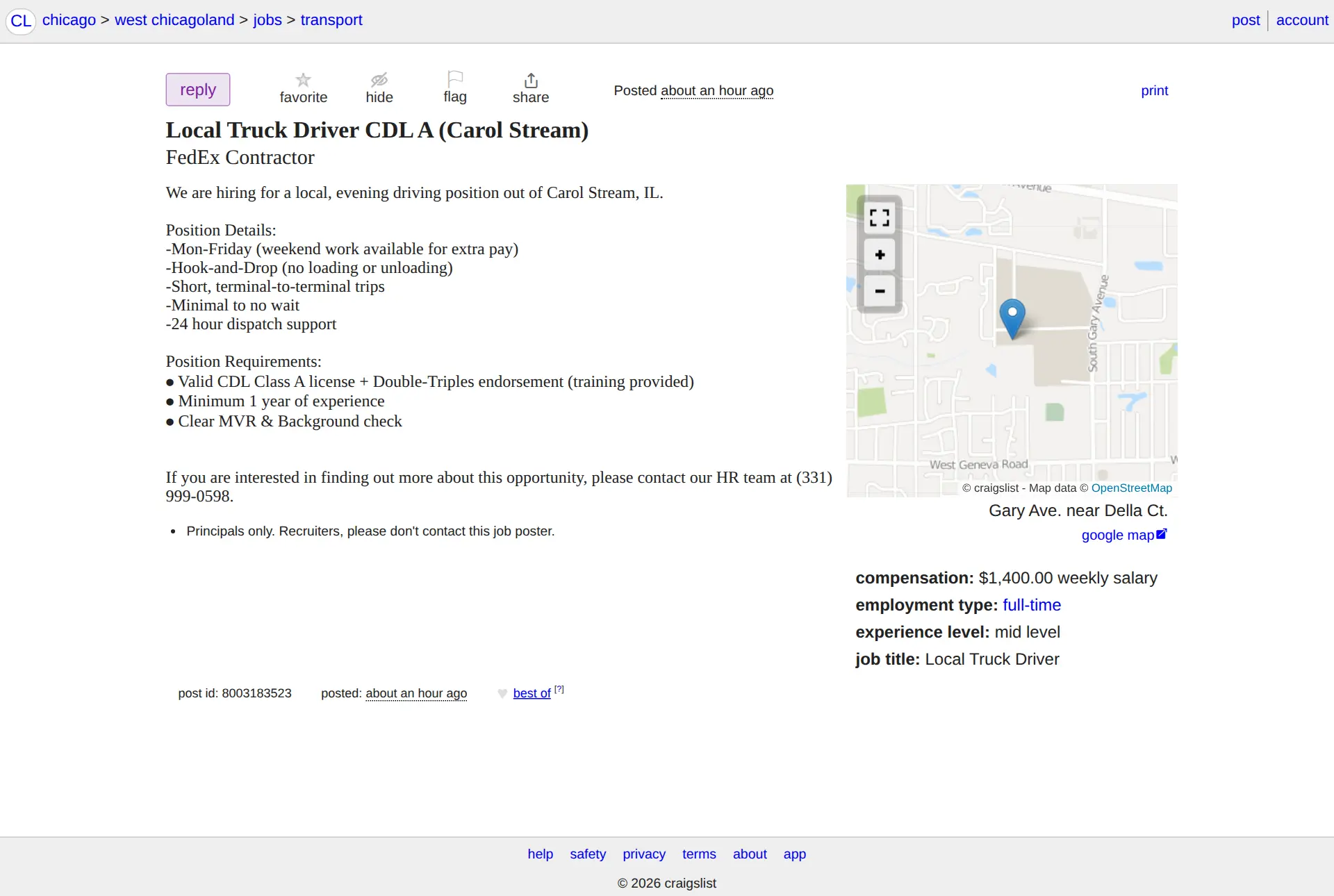
{
  "posting_id": "8003183523",
  "url": "https://www.craigslist.org/view/d/carol-stream-local-truck-driver-cdl/cRuaoWodm15NLnZureb7WG",
  "title": "Local Truck Driver CDL A",
  "price": null,
  "price_text": null,
  "currency": null,
  "location": "Carol Stream",
  "company": "FedEx Contractor",
  "description": "We are hiring for a local, evening driving position out of Carol Stream, IL.\nPosition Details:\n-Mon-Friday (weekend work available for extra pay)\n-Hook-and-Drop (no loading or unloading)\n-Short, terminal-to-terminal trips\n-Minimal to no … [truncated]",
  "attributes": [
    {
      "label": "compensation",
      "value": "$1,400.00 weekly salary"
    },
    {
      "label": "employment type",
      "value": "full-time"
    },
    {
      "label": "experience level",
      "value": "mid level"
    }
  ],
  "images": [],
  "street_address": null,
  "map_address": "Gary Ave. near Della Ct.",
  "locality": null,
  "region": null,
  "postal_code": null,
  "country": null,
  "latitude": 41.895232,
  "longitude": -88.128247,
  "bedrooms": null,
  "bathrooms": null,
  "area": "chicago",
  "subarea": "west chicagoland",
  "section": "jobs",
  "category": "transport",
  "posted_at": "2026-11-19T10:03:55-06:00",
  "updated_at": null,
  "fetched_at": "2026-11-19T18:07:39.700624Z"
}
The scraper returned this record for the input above, reading a saved copy of the page, not the live site.
Values shortened for this page: description: 541 characters, the first 236 shown; attributes: 4 items, the first 3 shown.
The fields of a record
posting_idstring or null- Craigslist's number for the posting, as its page prints it (
post id). urlstring- The address of the posting's page on craigslist.org.
titlestring- The posting's title.
pricenumber or null- The asking price, rent or pay as a number. Null when the page states none.
price_textstring or null- The price as the page prints it, with its currency sign, e.g.
$150,£200. currencystring or null- The ISO 4217 code of the price, e.g.
USD,GBP, where the page states it or its sign names one (£,€); null for a bare$, which several countries use. locationstring or null- The place the poster wrote beside the title, e.g.
Carol Stream. companystring or null- For a job: the employer's name as the posting gives it.
descriptionstring or null- The posting's text, as plain text with its line breaks.
attributeslist of objects- The facts the page lists beside the map: condition, size, rent period, compensation, employment type and the like.Each holds
label,value. imageslist of strings- The addresses of the posting's photos.
street_addressstring or null- The street address, where the poster gave one.
map_addressstring or null- The place written under the map, e.g.
243 23rd St near Bissell. localitystring or null- The town or neighbourhood.
regionstring or null- The state, province or region.
postal_codestring or null- The postal code, where stated.
countrystring or null- The two-letter country code, e.g.
US,GB. latitudenumber or null- The latitude of the posting's map pin, as rounded by Craigslist.
longitudenumber or null- The longitude of the posting's map pin, as rounded by Craigslist.
bedroomsinteger or null- For housing: the number of bedrooms, where stated.
bathroomsnumber or null- For housing: the number of bathrooms, where stated.
areastring or null- The Craigslist site the posting is on, e.g.
new york. subareastring or null- The part of that site, e.g.
queens, where it has parts. sectionstring or null- The part of Craigslist:
for sale,housing,jobs,services,gigs,community. categorystring or null- The posting's category, e.g.
bicycles - by owner. posted_atdatetime or null- When the posting was first put up, with the posting's own time zone offset.
updated_atdatetime or null- When the poster last changed it, where the page says so.
fetched_atdatetime- When the page was read, in UTC.
Units and limits
- Counted per request
- Billed per request: a run that returns data costs 1 unit, however many records it returns.
- A miss costs nothing
- A run that fails, that meets something not supported yet, or that you cancel costs nothing. You pay for runs that return data.
- What bounds a run
- A run may take up to 5 minutes. Its records are read in pages of up to 1,000 and are kept for 7 days.
What it does not do
- The poster's contact details are behind Craigslist's reply button and are not returned.
- A posting that was deleted or has expired ends as failed, with the reason not_found, and costs nothing.
Questions
What does Craigslist posting return?
Its title, price, text, the facts listed beside its map (condition, size, rent period, pay), photos, address and map pin, category, and when it was posted and last changed. A record has 28 fields, among them posting_id, url, title, price, price_text and currency. A value that could not be read is null, never an empty string or a zero.
What do I send?
The address of a posting's page, as craigslist.search returns it. The input url is required.
How is it counted?
Billed per request: a run that returns data costs 1 unit, however many records it returns. A run that fails, that meets something not supported yet, or that you cancel costs nothing. The first 1,000 units each month are free.
What does it not do?
The poster's contact details are behind Craigslist's reply button and are not returned. A posting that was deleted or has expired ends as failed, with the reason not_found, and costs nothing.
How long are the records kept, and in what format do they come?
Records are kept for 7 days after the run ended, and read in pages of up to 1,000. They come as JSON, as NDJSON with one record a line, or as CSV with a column for each field.
Can an AI assistant call it?
Yes. Through the EnrichedNow MCP server an assistant calls the tool run_scraper with the scraper_id craigslist.listing and the same input. It costs what the same API call costs.
Craigslist
Postings on Craigslist's sites in cities around the world, as anyone sees them: a search of a category, and one posting's page.
Craigslist search
craigslist.searchA Craigslist site by its name (sfbay, newyork, london), a category by its three-letter code, and optionally words to search for. The postings its results page lists: title, address, price, the place, the map pin, the photos, and for housing the bedrooms and bathrooms.
- Industry
- Shopping and retail
- Where
- United StatesCanada
- For
- E-commerce
Run it on an input of your own.
Create an account, make a key, and send the request above with your own input. The first 1,000 units each month are free.