Scraper API
Copart
copart.searchAvailable
Copart search
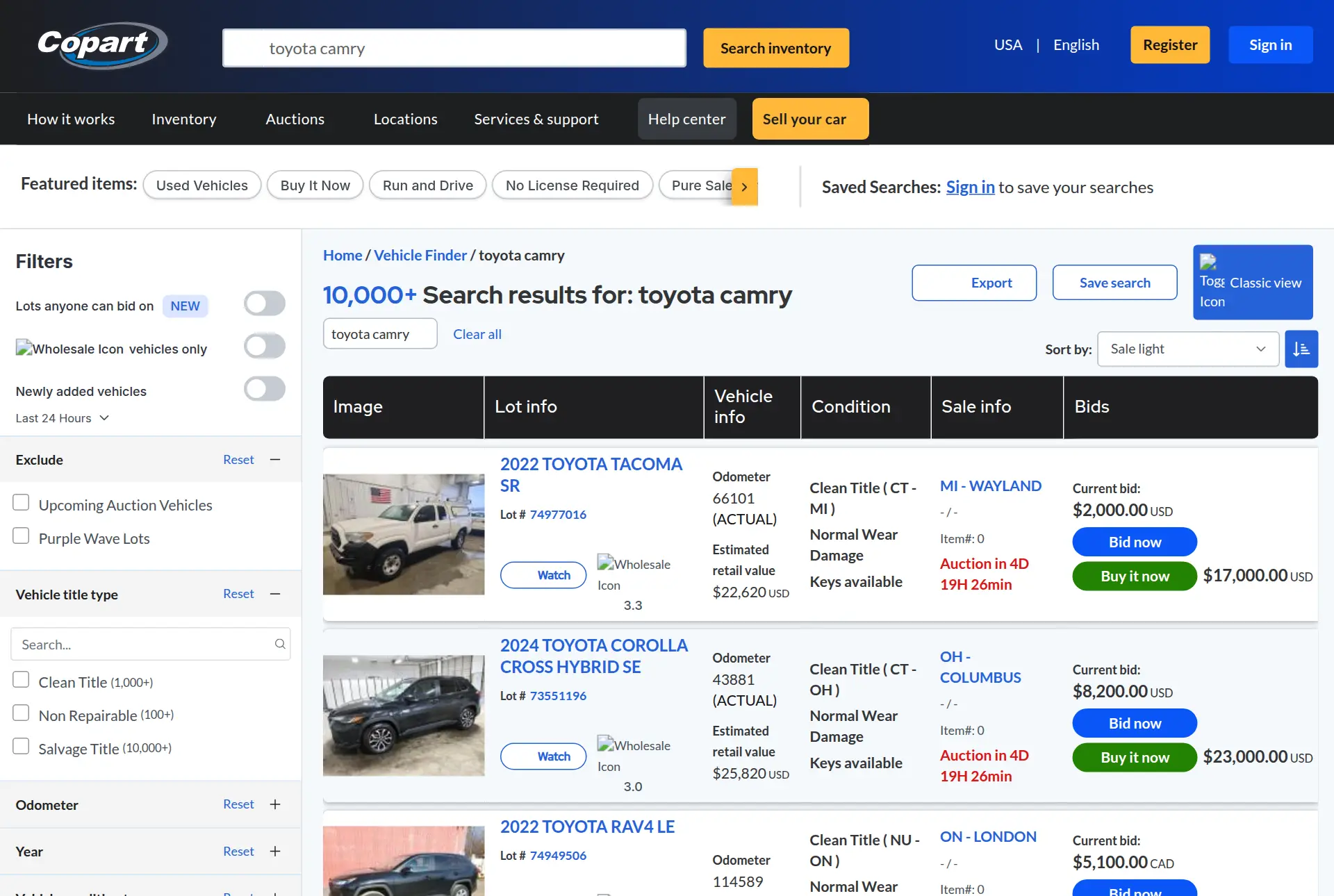
The lots: title, year, make, model, VIN as Copart shows it, odometer, damage, title group, sale status, current bid, buy-it-now price, estimated retail value, auction date, yard, and the vehicle's engine, drive, fuel and colour.
Give it Words as typed in Copart's search box, or a make, a model and model years; a page, and 20, 50 or 100 lots a page.
1 unit a run, for runs that return data. Runs that fail cost nothing. How units work
- Counted
- 1 unit a run
- Inputs
- 7
- Record
- 44 fields
- A run takes
- up to 5 minutes
- Records kept
- 7 days
- Measured
- its success, on the status page
POST/v1/scrapers/copart.search/runs
sent, and answered
a record of the run44 fields
ok1 unit a run
A record this scraper returned for this input. The first 9 of its 44 fields are set down here; the whole record is below.
What it is used for
- Find vehicles to bid on
- Search a make, a model and years and keep the lots whose
primary_damage,title_groupandodometersuit you. - Price salvage stock
- Set
current_bidbesideestimated_retail_valuefor many lots of one model, by damage and title group. - Watch what comes up
- Run the same search every day and note the new
lot_numbers and theirauction_date.
What you send
Words as typed in Copart's search box, or a make, a model and model years; a page, and 20, 50 or 100 lots a page. These are its 7 inputs, as its schema has them.
querystring Optional- Words, e.g. toyota camry, or a VIN. Copart matches any of the words and lists the closest first.
makestring Optional- Only lots of this make.
modelstring Optional- Only lots of this model of the make, as Copart names it.
year_frominteger Optional- Only lots of this model year or later.
year_tointeger Optional- Only lots of this model year or earlier.
pageinteger Optional- The page of results, from 1.Default
1 per_pageinteger Optional- Lots a page: 20, 50 or 100.Default
20
A request, ready to send
It starts a run with the input shown at the top of this page, waits up to 60 seconds for it, and reads its records. Put your key in the variable it reads.
# Start a run and wait up to 60 seconds for it to finish
curl -X POST "https://api.enrichednow.com/v1/scrapers/copart.search/runs?wait=60" \
  -H "Authorization: Bearer $ENRICHEDNOW_API_KEY" \
  -H "Content-Type: application/json" \
  -d '{"input":{"make":"Honda","model":"Civic","year_from":2019,"year_to":2020}}'

# Read its records, with the id the first call answered
curl "https://api.enrichednow.com/v1/runs/$RUN_ID/records?limit=100" \
  -H "Authorization: Bearer $ENRICHEDNOW_API_KEY"
from enrichednow import EnrichedNow
client = EnrichedNow() # reads ENRICHEDNOW_API_KEY
# Start a run, wait for it to end, and get its records
result = client.scrape("copart.search", {
"make": "Honda",
"model": "Civic",
"year_from": 2019,
"year_to": 2020,
})
print(result.run.id, result.run.status, result.run.record_count)
# Read its records: pages are fetched as you go
for record in result.records:
print(record)Install it with pip install enrichednow, then save as run.py and run python3 run.py
import EnrichedNow from "enrichednow";

const client = new EnrichedNow(); // reads ENRICHEDNOW_API_KEY

// Start a run, wait for it to end, and get its records
const { run, records } = await client.scrape("copart.search", {
  make: "Honda",
  model: "Civic",
  year_from: 2019,
  year_to: 2020,
});
console.log(run.id, run.status, run.record_count);

// Read its records: pages are fetched as you go
for await (const record of records) console.log(record);
Install it with npm install enrichednow, then save as run.mjs and run node run.mjs
package main

import (
	"context"
	"fmt"
	"log"
	"time"

	enrichednow "github.com/enrichednow/enrichednow-go"
)

func main() {
	client, err := enrichednow.NewClient() // reads ENRICHEDNOW_API_KEY
	if err != nil {
		log.Fatal(err)
	}
	ctx, cancel := context.WithTimeout(context.Background(), 10*time.Minute)
	defer cancel()

	// Start a run, wait for it to end, and get its records
	run, records, err := client.Scrape(ctx, "copart.search", map[string]any{"make": "Honda", "model": "Civic", "year_from": 2019, "year_to": 2020})
	if err != nil {
		log.Fatal(err)
	}
	fmt.Println(run.ID, run.Status, run.RecordCount)

	// Read its records: pages are fetched as you go
	for records.Next() {
		fmt.Println(string(records.Current()))
	}
	if err := records.Err(); err != nil {
		log.Fatal(err)
	}
}
Install it with go get github.com/enrichednow/enrichednow-go@latest, then save as run.go and run go run run.go
import com.enrichednow.EnrichedNowClient;
import com.enrichednow.ScrapeResult;
import java.util.Map;

public class Run {
    public static void main(String[] args) {
        EnrichedNowClient client = EnrichedNowClient.fromEnv(); // reads ENRICHEDNOW_API_KEY

        // Start a run, wait for it to end, and get its records
        ScrapeResult result = client.scrape("copart.search", Map.of("make", "Honda", "model", "Civic", "year_from", 2019, "year_to", 2020));
        System.out.println(result.run().id() + " " + result.run().status() + " " + result.run().recordCount());

        // Read its records: pages are fetched as you go
        for (Map<String, Object> record : result.records()) {
            System.out.println(record);
        }
    }
}
Add com.enrichednow:enrichednow-java:0.4.0 to your Maven or Gradle build, then save as Run.java
enrichednow run copart.search --input make=Honda --input model=Civic --input year_from=2019 --input year_to=2020Install it with curl -fsSL https://raw.githubusercontent.com/enrichednow/enrichednow-cli/main/install.sh | sh
What comes back
The lots: title, year, make, model, VIN as Copart shows it, odometer, damage, title group, sale status, current bid, buy-it-now price, estimated retail value, auction date, yard, and the vehicle's engine, drive, fuel and colour. A record has 44 fields. One we could not read is null, never an empty string or a zero.
{
  "lot_number": "69460776",
  "url": "https://www.copart.com/lot/69460776/salvage-2020-honda-civic-sport-il-chicago-north",
  "title": "2020 HONDA CIVIC SPORT",
  "year": 2020,
  "make": "HONDA",
  "model": "CIVIC",
  "trim": "SPORT",
  "vehicle_type": "AUTOMOBILE",
  "vin": "SHHFK7H4XLU******",
  "odometer": 86941,
  "odometer_status": "ACTUAL",
  "primary_damage": "ROLLOVER",
  "secondary_damage": null,
  "highlights": "ENHANCED VEHICLES",
  "title_type": "SALVAGE CERTIFICATE",
  "title_group": "SALVAGE TITLE",
  "title_state": "IL",
  "sale_status": "Pure Sale",
  "current_bid": 500,
  "buy_it_now_price": null,
  "estimated_retail_value": 17085,
  "currency": "USD",
  "auction_date": "2026-11-19T18:00:00Z",
  "sold": false,
  "yard": "IL - CHICAGO NORTH",
  "city": "ELGIN",
  "state": "IL",
  "postal_code": "60120-7419",
  "country": "USA",
  "latitude": 42.01272,
  "longitude": -88.23522,
  "lane": "F",
  "item_number": 6176,
  "body_style": "HATCHBACK",
  "color": "WHITE",
  "engine": "1.5L 4",
  "cylinders": "4",
  "transmission": "ECVT AUTOMATIC",
  "drive": "FRONT WHEEL DRIVE",
  "fuel": "GAS",
  "has_keys": true,
  "image": "https://cs.copart.com/v1/AUTH_svc.pdoc00001/lpp/1026/874445f84f59482caae43dbeb1e2b5d2_thb.jpg",
  "position": 1,
  "fetched_at": "2026-11-19T21:56:19.707221Z"
}
The scraper returned this record for the input above, reading a saved copy of the page, not the live site.
The fields of a record
lot_numberstring- Copart's lot number, as in the lot's address.
urlstring- The address of the lot's page on copart.com.
titlestring- The lot's title, as Copart writes it, e.g.
2023 TOYOTA COROLLA LE. yearinteger or null- The model year.
makestring or null- The make, as Copart writes it, e.g.
TOYOTA. modelstring or null- The model, e.g.
COROLLA. trimstring or null- The trim or series, e.g.
LE. vehicle_typestring or null- The kind of vehicle, as Copart files it, e.g.
AUTOMOBILE,MOTORCYCLE. vinstring or null- The vehicle identification number as Copart shows it to a visitor, its last characters hidden (
5YFB4MDE2PP******). odometernumber or null- The odometer reading Copart lists (miles on Copart's US site).
odometer_statusstring or null- What Copart says of that reading, e.g.
ACTUAL,NOT ACTUAL,EXEMPT. primary_damagestring or null- The main damage, as Copart lists it, e.g.
FRONT END. secondary_damagestring or null- The second damage, where Copart lists one.
highlightsstring or null- Copart's mark for the lot's condition, e.g.
RUNS AND DRIVES,ENHANCED VEHICLES. title_typestring or null- The ownership document, as Copart names it, e.g.
CERTIFICATE OF TITLE. title_groupstring or null- The group that document falls in, e.g.
CLEAN TITLE,SALVAGE TITLE. title_statestring or null- The state or province that issued it, as a two-letter code.
sale_statusstring or null- How the lot is sold, as Copart prints it, e.g.
Pure Sale(no reserve),Minimum Bid,On Approval. current_bidnumber or null- The current bid, in
currency. buy_it_now_pricenumber or null- The price at which the lot can be bought now, where Copart offers that.
estimated_retail_valuenumber or null- Copart's estimate of the vehicle's retail value, where it gives one.
currencystring or null- The ISO 4217 code of the bids' currency, e.g.
USD. auction_datedatetime or null- When the lot's auction starts, in UTC. Null for a lot not yet given a sale date.
soldboolean or null- Whether the lot has been sold.
yardstring or null- The Copart yard that holds the vehicle, e.g.
CT - HARTFORD SPRINGFIELD. citystring or null- The town of that yard.
statestring or null- The state or province of that yard, as a two-letter code.
postal_codestring or null- The postal code of that yard, e.g.
06026-9765. countrystring or null- The yard's country, as Copart writes it, e.g.
USA,CAN. latitudenumber or null- The latitude of that yard.
longitudenumber or null- The longitude of that yard.
lanestring or null- The lane of the auction the lot is in.
item_numberinteger or null- The lot's item number in that lane.
body_stylestring or null- The body style, e.g.
SEDAN,4DR SPOR. colorstring or null- The colour.
enginestring or null- The engine, as listed, e.g.
2.0L 4. cylindersstring or null- The number of cylinders, as listed.
transmissionstring or null- The transmission, e.g.
AUTOMATIC. drivestring or null- The drive, e.g.
FRONT WHEEL DRIVE. fuelstring or null- The fuel, e.g.
GAS,ELECTRIC. has_keysboolean or null- Whether the vehicle comes with keys.
imagestring or null- The lot's first picture, small.
positioninteger- The lot's place in the results, from 1, counting on across pages.
fetched_atdatetime- When the results were read, in UTC.
Units and limits
- Counted per request
- Billed per request: a run that returns data costs 1 unit, however many records it returns.
- A miss costs nothing
- A run that fails, that meets something not supported yet, or that you cancel costs nothing. You pay for runs that return data.
- What bounds a run
- A run may take up to 5 minutes. Its records are read in pages of up to 1,000 and are kept for 7 days.
What it does not do
- One run reads one page of results.
- Copart files some models under more than one name (F150 and F-150); model matches the name exactly.
- The seller is not returned.
The bounds its schema sets
year_from- 1,900 to 2,100
year_to- 1,900 to 2,100
page- 1 to 500; 1 unless you say otherwise
Questions
What does Copart search return?
The lots: title, year, make, model, VIN as Copart shows it, odometer, damage, title group, sale status, current bid, buy-it-now price, estimated retail value, auction date, yard, and the vehicle's engine, drive, fuel and colour. A record has 44 fields, among them lot_number, url, title, year, make and model. A value that could not be read is null, never an empty string or a zero.
What do I send?
Words as typed in Copart's search box, or a make, a model and model years; a page, and 20, 50 or 100 lots a page. Optional: query, make, model, year_from, year_to, page and per_page.
How is it counted?
Billed per request: a run that returns data costs 1 unit, however many records it returns. A run that fails, that meets something not supported yet, or that you cancel costs nothing. The first 1,000 units each month are free.
How much does one run return?
Its schema sets these bounds: year_from 1,900 to 2,100; year_to 1,900 to 2,100; page 1 to 500 (1 unless you say otherwise). A run may take up to 5 minutes.
What does it not do?
One run reads one page of results. Copart files some models under more than one name (F150 and F-150); model matches the name exactly. The seller is not returned.
How long are the records kept, and in what format do they come?
Records are kept for 7 days after the run ended, and read in pages of up to 1,000. They come as JSON, as NDJSON with one record a line, or as CSV with a column for each field.
Can an AI assistant call it?
Yes. Through the EnrichedNow MCP server an assistant calls the tool run_scraper with the scraper_id copart.search and the same input. It costs what the same API call costs.
Used in this playbook
A playbook runs Copart search as one of its steps and hands back the finished list. Its runs of this scraper cost what they cost here, and the playbook adds nothing.
Other
Used-Car Arbitrage
Copart lots selling well below what the same make, model and year fetch at retail near you, ranked by the spread, with bid moves.
Copart
Vehicle auctions on copart.com: the lots for a search, with damage, title, odometer and current bid, and one lot with its pictures.
Copart lot
copart.lotA Copart lot number, or the lot's address. The lot's title, year, make, model, VIN as Copart shows it, odometer, damage, title group, sale status, current bid, buy-it-now price, estimated retail value, auction date, yard, particulars and its pictures.
- Industry
- Shopping and retail
- Where
- United StatesCanada
- For
- E-commerce
Run it on an input of your own.
Create an account, make a key, and send the request above with your own input. The first 1,000 units each month are free.