Scraper API
Autotraderautotrader.carAvailable
Autotrader car
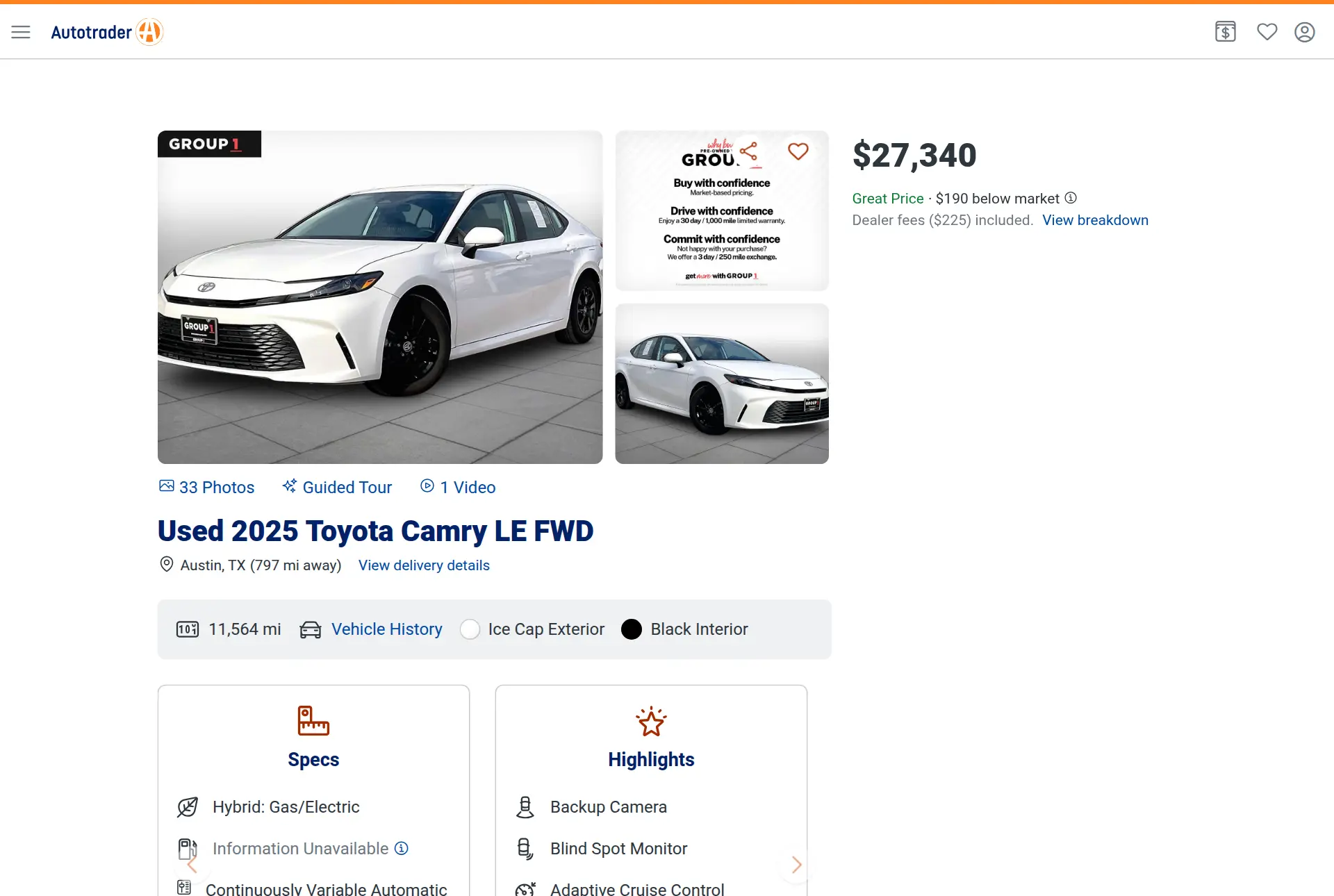
That car: price, deal rating and Kelley Blue Book's fair price range, specification, every photo, features by group, the history summary, open recalls, description, and the dealer with rating and location.
Give it a listing's id on Autotrader, or the address of the car's page.
1 unit a run, for runs that return data. Runs that fail cost nothing. How units work
- Counted
- 1 unit a run
- Inputs
- 1, 1 required
- Record
- 44 fields
- A run takes
- up to 5 minutes
- Records kept
- 7 days
- Measured
- its success, on the status page
POST/v1/scrapers/autotrader.car/runs
sent, and answered
a record of the run44 fields
ok1 unit a run
A record this scraper returned for this input. The first 9 of its 44 fields are set down here; the whole record is below.
What it is used for
- Read a car's listing in full
- Price, specification, every photo, features by group, the history summary and the dealer's description in one record.
- Compare a price with Kelley Blue Book
- Set the asking
pricebesidekbb_fair_price_lowandkbb_fair_price_high, and read Autotrader'sdeal_ratingfor the car. - Check a car before you call
historysays what the free history summary states,open_recallshow many recalls are open,dealer_ratinghow the dealer is reviewed.
What you send
A listing's id on Autotrader, or the address of the car's page. It is the one input.
listingstring Required- The listing's id, e.g.
796203422, or the address of the car's page (https://www.autotrader.com/cars-for-sale/vehicle/796203422).
A request, ready to send
It starts a run with the input shown at the top of this page, waits up to 60 seconds for it, and reads its records. Put your key in the variable it reads.
# Start a run and wait up to 60 seconds for it to finish
curl -X POST "https://api.enrichednow.com/v1/scrapers/autotrader.car/runs?wait=60" \
  -H "Authorization: Bearer $ENRICHEDNOW_API_KEY" \
  -H "Content-Type: application/json" \
  -d '{"input":{"listing":"796203422"}}'

# Read its records, with the id the first call answered
curl "https://api.enrichednow.com/v1/runs/$RUN_ID/records?limit=100" \
  -H "Authorization: Bearer $ENRICHEDNOW_API_KEY"
from enrichednow import EnrichedNow
client = EnrichedNow() # reads ENRICHEDNOW_API_KEY
# Start a run, wait for it to end, and get its records
result = client.scrape("autotrader.car", {"listing": "796203422"})
print(result.run.id, result.run.status, result.run.record_count)
# Read its records: pages are fetched as you go
for record in result.records:
print(record)Install it with pip install enrichednow, then save as run.py and run python3 run.py
import EnrichedNow from "enrichednow";

const client = new EnrichedNow(); // reads ENRICHEDNOW_API_KEY

// Start a run, wait for it to end, and get its records
const { run, records } = await client.scrape("autotrader.car", { listing: "796203422" });
console.log(run.id, run.status, run.record_count);

// Read its records: pages are fetched as you go
for await (const record of records) console.log(record);
Install it with npm install enrichednow, then save as run.mjs and run node run.mjs
package main

import (
	"context"
	"fmt"
	"log"
	"time"

	enrichednow "github.com/enrichednow/enrichednow-go"
)

func main() {
	client, err := enrichednow.NewClient() // reads ENRICHEDNOW_API_KEY
	if err != nil {
		log.Fatal(err)
	}
	ctx, cancel := context.WithTimeout(context.Background(), 10*time.Minute)
	defer cancel()

	// Start a run, wait for it to end, and get its records
	run, records, err := client.Scrape(ctx, "autotrader.car", map[string]any{"listing": "796203422"})
	if err != nil {
		log.Fatal(err)
	}
	fmt.Println(run.ID, run.Status, run.RecordCount)

	// Read its records: pages are fetched as you go
	for records.Next() {
		fmt.Println(string(records.Current()))
	}
	if err := records.Err(); err != nil {
		log.Fatal(err)
	}
}
Install it with go get github.com/enrichednow/enrichednow-go@latest, then save as run.go and run go run run.go
import com.enrichednow.EnrichedNowClient;
import com.enrichednow.ScrapeResult;
import java.util.Map;

public class Run {
    public static void main(String[] args) {
        EnrichedNowClient client = EnrichedNowClient.fromEnv(); // reads ENRICHEDNOW_API_KEY

        // Start a run, wait for it to end, and get its records
        ScrapeResult result = client.scrape("autotrader.car", Map.of("listing", "796203422"));
        System.out.println(result.run().id() + " " + result.run().status() + " " + result.run().recordCount());

        // Read its records: pages are fetched as you go
        for (Map<String, Object> record : result.records()) {
            System.out.println(record);
        }
    }
}
Add com.enrichednow:enrichednow-java:0.4.0 to your Maven or Gradle build, then save as Run.java
enrichednow run autotrader.car --input-json '{"listing":"796203422"}'Install it with curl -fsSL https://raw.githubusercontent.com/enrichednow/enrichednow-cli/main/install.sh | sh
What comes back
That car: price, deal rating and Kelley Blue Book's fair price range, specification, every photo, features by group, the history summary, open recalls, description, and the dealer with rating and location. A record has 44 fields. One we could not read is null, never an empty string or a zero.
{
  "listing_id": 796203422,
  "url": "https://www.autotrader.com/cars-for-sale/vehicle/796203422",
  "title": "Used 2025 Toyota Camry LE",
  "condition": "used",
  "vin": "4T1DAACK3SU595175",
  "year": 2025,
  "make": "Toyota",
  "model": "Camry",
  "trim": "LE",
  "body_style": "SEDAN",
  "price": 27115,
  "currency": "USD",
  "mileage": 11564,
  "exterior_color": "Ice Cap",
  "interior_color": "Black",
  "drivetrain": "2 wheel drive - front",
  "engine": "Hybrid",
  "transmission": "Continuously Variable Automatic",
  "fuel_type": "Hybrid Gas/Electric",
  "fuel_economy": null,
  "image": "https://images.autotrader.com/hn/c/625b3b3a8f124e9d884248258c647a04.jpg",
  "images": [
    "https://images.autotrader.com/hn/c/625b3b3a8f124e9d884248258c647a04.jpg",
    "https://images.autotrader.com/hn/c/6c4972637b0a4368b1c2ab34a68158b6.jpg",
    "https://images.autotrader.com/hn/c/e930a40cd7444d5b9cec7e47622f24ac.jpg"
  ],
  "stock_number": "SU595175",
  "days_on_site": 5,
  "deal_rating": "Great",
  "kbb_fair_price": 27530,
  "kbb_fair_price_low": 25930,
  "kbb_fair_price_high": 29130,
  "dealer_fees": 225,
  "description": "Excellent Condition, LOW MILES - 11,563! FUEL EFFICIENT EPA estimate 50 MPG Hwy/53 MPG City! Ice Cap exterior and BLACK interior, LE trim. Onboard Communications System, iPod/MP3 Input, Satellite Radio, Back-Up Camera, Aluminum Wheels, … [truncated]",
  "features": [
    {
      "name": "exterior",
      "features": [
        "Aluminum Wheels",
        "Automatic Headlights",
        "Heated Mirrors"
      ]
    },
    {
      "name": "interior",
      "features": [
        "AC",
        "Adjustable Steering Wheel",
        "Bucket Seats"
      ]
    },
    {
      "name": "mechanical",
      "features": [
        "4 Cylinder Engine",
        "4-Wheel Disc Brakes",
        "CVT Transmission"
      ]
    }
  ],
  "history": [
    "NO_SALVAGE_TITLE",
    "NO_FRAME_DAMAGE",
    "NO_FLOOD_WATER_DAMAGE"
  ],
  "open_recalls": 1,
  "dealer_name": "Group 1 Toyota North Austin",
  "dealer_phone": "7378430244",
  "dealer_street": "8400 Research Boulevard",
  "dealer_city": "Austin",
  "dealer_state": "TX",
  "dealer_postal_code": "78758",
  "dealer_rating": 4.4,
  "dealer_review_count": 11074,
  "dealer_latitude": 30.357748,
  "dealer_longitude": -97.71718,
  "fetched_at": "2026-11-19T18:07:38.985102Z"
}
The scraper returned this record for the input above, reading a saved copy of the page, not the live site.
Values shortened for this page: images: 33 items, the first 3 shown; description: 1,074 characters, the first 235 shown; features: 6 items, the first 3 shown; features[0].features: 7 items, the first 3 shown; features[1].features: 16 items, the first 3 shown; features[2].features: 6 items, the first 3 shown; history: 5 items, the first 3 shown.
The fields of a record
listing_idinteger- Autotrader's id of the listing, the number in the car's address.
urlstring- The car's page on autotrader.com.
titlestring- The listing's title, e.g.
Used 2025 Toyota Camry LE. conditionstring or nullused,certified(certified pre-owned) ornew, as the listing states it.vinstring or null- The vehicle identification number.
yearinteger or null- The model year.
makestring or null- The make, e.g.
Toyota. modelstring or null- The model, e.g.
Camry. trimstring or null- The trim, e.g.
LE. Null on a search result. body_stylestring or null- The body style Autotrader files the car under, e.g.
SEDAN,SUVCROSS. Null on a search result. pricenumber or null- The asking price, in US dollars, before the dealer's fees that the car's page adds to it (
dealer_fees). Null when the dealer asks to be contacted for it. currencystring or null- The currency of the price,
USD. mileageinteger or null- The odometer reading, in miles.
exterior_colorstring or null- The exterior colour as the listing names it, e.g.
Ice CaporWhite. interior_colorstring or null- The interior colour, e.g.
Black. drivetrainstring or null- The drive, e.g.
2 Wheel Drive - Front,4 wheel drive. enginestring or null- The engine as the listing describes it, e.g.
Hybrid,6-Cylinder Turbo. transmissionstring or null- The transmission, e.g.
Continuously Variable Automatic. fuel_typestring or null- The fuel, e.g.
Gasoline,Hybrid Gas/Electric,Electric. fuel_economystring or null- The fuel economy as printed, e.g.
48 City / 47 Highway. Null when not stated. imagestring or null- The listing's first photo.
imageslist of strings- Every photo of the listing, in order. Empty on a search result, which carries only the first.
stock_numberstring or null- The dealer's stock number for the car. Null on a search result.
days_on_siteinteger or null- How many days the listing has been on Autotrader. Null on a search result.
deal_ratingstring or null- Autotrader's rating of the price against the market, e.g.
Great,Good,Fair. Null on a search result and where none is shown. kbb_fair_pricenumber or null- Kelley Blue Book's fair purchase price for the car as the page shows it, in US dollars. Null on a search result.
kbb_fair_price_lownumber or null- The low end of Kelley Blue Book's fair price range, in US dollars.
kbb_fair_price_highnumber or null- The high end of Kelley Blue Book's fair price range, in US dollars.
dealer_feesnumber or null- The dealer's fees the page adds to the price (a documentation fee and the like), in US dollars. Null on a search result.
descriptionstring or null- The seller's description of the car. Null on a search result.
featureslist of objects- The car's features, by group, as its page lists them. Empty on a search result.Each holds
name,features. historylist of strings- What the free history summary on the page states, as Autotrader codes it, e.g.
NO_ACCIDENTS_REPORTED,NO_SALVAGE_TITLE,ONE_OWNER. Empty on a search result. open_recallsinteger or null- How many open safety recalls the page reports for the car. Null on a search result.
dealer_namestring or null- The selling dealer's name.
dealer_phonestring or null- The dealer's phone number as the listing gives it, digits only. Autotrader shows tracked numbers, so the same dealer's number can differ between a search result and the car's page.
dealer_streetstring or null- The dealer's street address.
dealer_citystring or null- The dealer's city.
dealer_statestring or null- The dealer's state, as a two-letter code.
dealer_postal_codestring or null- The dealer's ZIP code.
dealer_ratingnumber or null- The dealer's average review rating out of 5. Null on a search result.
dealer_review_countinteger or null- How many reviews the dealer's rating is from. Null on a search result.
dealer_latitudenumber or null- The dealer's latitude. Null on a search result.
dealer_longitudenumber or null- The dealer's longitude. Null on a search result.
fetched_atdatetime- When the listing was read, in UTC.
Units and limits
- Counted per request
- Billed per request: a run that returns data costs 1 unit, however many records it returns.
- A miss costs nothing
- A run that fails, that meets something not supported yet, or that you cancel costs nothing. You pay for runs that return data.
- What bounds a run
- A run may take up to 5 minutes. Its records are read in pages of up to 1,000 and are kept for 7 days.
What it does not do
- One run reads one car.
- A car that has been sold or taken down ends as not found.
- The dealer's phone is the number Autotrader shows, which can differ from page to page.
Questions
What does Autotrader car return?
That car: price, deal rating and Kelley Blue Book's fair price range, specification, every photo, features by group, the history summary, open recalls, description, and the dealer with rating and location. A record has 44 fields, among them listing_id, url, title, condition, vin and year. A value that could not be read is null, never an empty string or a zero.
What do I send?
A listing's id on Autotrader, or the address of the car's page. The input listing is required.
How is it counted?
Billed per request: a run that returns data costs 1 unit, however many records it returns. A run that fails, that meets something not supported yet, or that you cancel costs nothing. The first 1,000 units each month are free.
What does it not do?
One run reads one car. A car that has been sold or taken down ends as not found. The dealer's phone is the number Autotrader shows, which can differ from page to page.
How long are the records kept, and in what format do they come?
Records are kept for 7 days after the run ended, and read in pages of up to 1,000. They come as JSON, as NDJSON with one record a line, or as CSV with a column for each field.
Can an AI assistant call it?
Yes. Through the EnrichedNow MCP server an assistant calls the tool run_scraper with the scraper_id autotrader.car and the same input. It costs what the same API call costs.
Autotrader
Cars for sale on Autotrader, the US marketplace: searches near a ZIP code and single cars with their dealer.
Autotrader search
autotrader.searchA US ZIP code and a radius, a make and model as autotrader.com writes them, new, used or certified, price and year bounds, an order and a page. The cars that match: title, condition, VIN, year, make, model, price, mileage, colours, drive, engine, transmission, fuel, photo, and the dealer with its address and phone.
- Industry
- Shopping and retail
- Where
- United States
- For
- E-commerce
Run it on an input of your own.
Create an account, make a key, and send the request above with your own input. The first 1,000 units each month are free.