Scraper API
arXiv
arxiv.searchAvailable
arXiv search
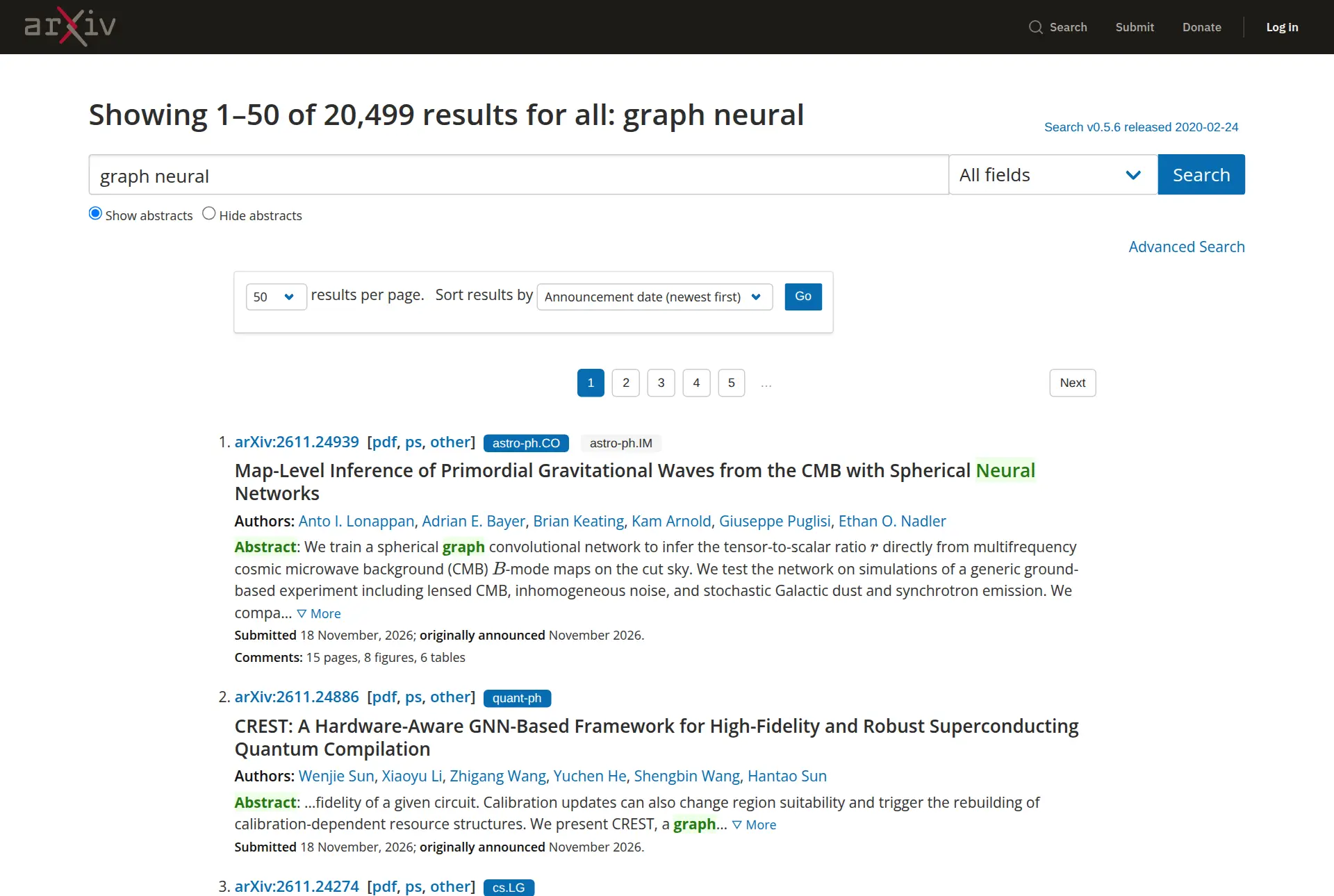
The papers arXiv lists for it, a page at a time: identifier, title, abstract, authors, categories, the dates it was submitted and last revised, DOI, journal reference and the address of the PDF.
Give it Words to search arXiv for, or a search in arXiv's own syntax, and optionally a category.
1 unit a run, for runs that return data. Runs that fail cost nothing. How units work
- Counted
- 1 unit a run
- Inputs
- 5
- Record
- 15 fields
- A run takes
- up to 5 minutes
- Records kept
- 7 days
- Measured
- its success, on the status page
POST/v1/scrapers/arxiv.search/runs
sent, and answered
a record of the run15 fields
ok1 unit a run
A record this scraper returned for this input. The first 9 of its 15 fields are set down here; the whole record is below.
What it is used for
- Follow a field's new papers
- Search a subject within a category, sorted by submission, and read each new paper's title, abstract and authors.
- Build a reading list
- Collect the papers on a subject with their abstracts and PDF addresses, ready to be read or summarised.
- Feed a research assistant
- Give a language model the abstracts a search returns, with their identifiers, so its answer can cite them.
What you send
Words to search arXiv for, or a search in arXiv's own syntax, and optionally a category. These are its 5 inputs, as its schema has them.
querystring Optional- Plain words must all match; put a phrase in double quotes. arXiv's own syntax is sent as written: ti: for the title, au: for an author, abs: for the abstract, joined by AND, OR or ANDNOT.
categorystring Optional- An arXiv category to search within, such as cs.CL, hep-th or math.AG.
sortstring Optional- relevance, submitted (newest first) or updated (latest revision first). relevance unless you say otherwise.Default
relevance max_resultsinteger Optional- Papers a page: 1 to 100, 20 unless you say otherwise.Default
20 pageinteger Optional- The page of results, from 1.Default
1
A request, ready to send
It starts a run with the input shown at the top of this page, waits up to 60 seconds for it, and reads its records. Put your key in the variable it reads.
# Start a run and wait up to 60 seconds for it to finish
curl -X POST "https://api.enrichednow.com/v1/scrapers/arxiv.search/runs?wait=60" \
  -H "Authorization: Bearer $ENRICHEDNOW_API_KEY" \
  -H "Content-Type: application/json" \
  -d '{"input":{"query":"graph neural","category":"cs.LG","sort":"submitted","max_results":3}}'

# Read its records, with the id the first call answered
curl "https://api.enrichednow.com/v1/runs/$RUN_ID/records?limit=100" \
  -H "Authorization: Bearer $ENRICHEDNOW_API_KEY"
from enrichednow import EnrichedNow
client = EnrichedNow() # reads ENRICHEDNOW_API_KEY
# Start a run, wait for it to end, and get its records
result = client.scrape("arxiv.search", {
"query": "graph neural",
"category": "cs.LG",
"sort": "submitted",
"max_results": 3,
})
print(result.run.id, result.run.status, result.run.record_count)
# Read its records: pages are fetched as you go
for record in result.records:
print(record)Install it with pip install enrichednow, then save as run.py and run python3 run.py
import EnrichedNow from "enrichednow";

const client = new EnrichedNow(); // reads ENRICHEDNOW_API_KEY

// Start a run, wait for it to end, and get its records
const { run, records } = await client.scrape("arxiv.search", {
  query: "graph neural",
  category: "cs.LG",
  sort: "submitted",
  max_results: 3,
});
console.log(run.id, run.status, run.record_count);

// Read its records: pages are fetched as you go
for await (const record of records) console.log(record);
Install it with npm install enrichednow, then save as run.mjs and run node run.mjs
package main

import (
	"context"
	"fmt"
	"log"
	"time"

	enrichednow "github.com/enrichednow/enrichednow-go"
)

func main() {
	client, err := enrichednow.NewClient() // reads ENRICHEDNOW_API_KEY
	if err != nil {
		log.Fatal(err)
	}
	ctx, cancel := context.WithTimeout(context.Background(), 10*time.Minute)
	defer cancel()

	// Start a run, wait for it to end, and get its records
	run, records, err := client.Scrape(ctx, "arxiv.search", map[string]any{"query": "graph neural", "category": "cs.LG", "sort": "submitted", "max_results": 3})
	if err != nil {
		log.Fatal(err)
	}
	fmt.Println(run.ID, run.Status, run.RecordCount)

	// Read its records: pages are fetched as you go
	for records.Next() {
		fmt.Println(string(records.Current()))
	}
	if err := records.Err(); err != nil {
		log.Fatal(err)
	}
}
Install it with go get github.com/enrichednow/enrichednow-go@latest, then save as run.go and run go run run.go
import com.enrichednow.EnrichedNowClient;
import com.enrichednow.ScrapeResult;
import java.util.Map;

public class Run {
    public static void main(String[] args) {
        EnrichedNowClient client = EnrichedNowClient.fromEnv(); // reads ENRICHEDNOW_API_KEY

        // Start a run, wait for it to end, and get its records
        ScrapeResult result = client.scrape("arxiv.search", Map.of("query", "graph neural", "category", "cs.LG", "sort", "submitted", "max_results", 3));
        System.out.println(result.run().id() + " " + result.run().status() + " " + result.run().recordCount());

        // Read its records: pages are fetched as you go
        for (Map<String, Object> record : result.records()) {
            System.out.println(record);
        }
    }
}
Add com.enrichednow:enrichednow-java:0.4.0 to your Maven or Gradle build, then save as Run.java
enrichednow run arxiv.search --input 'query=graph neural' --input category=cs.LG --input sort=submitted --input max_results=3Install it with curl -fsSL https://raw.githubusercontent.com/enrichednow/enrichednow-cli/main/install.sh | sh
What comes back
The papers arXiv lists for it, a page at a time: identifier, title, abstract, authors, categories, the dates it was submitted and last revised, DOI, journal reference and the address of the PDF. A record has 15 fields. One we could not read is null, never an empty string or a zero.
{
  "arxiv_id": "2611.22828",
  "version": 1,
  "url": "https://arxiv.org/abs/2611.22828v1",
  "pdf_url": "https://arxiv.org/pdf/2611.22828v1",
  "title": "TabDAG: Structured Evolutionary Search for Tabular Feature Engineering",
  "abstract": "Feature engineering can improve tabular prediction, but useful transformations are compositional, data-dependent, and subject to leakage constraints. We present TabDAG, a framework that combines evolutionary search with a graph … [truncated]",
  "authors": [
    {
      "name": "Anastasia Volkova",
      "affiliations": [
        "FusionBrain Lab"
      ]
    },
    {
      "name": "Andrey Kuznetsov",
      "affiliations": [
        "FusionBrain Lab"
      ]
    },
    {
      "name": "Ivan Oseledets",
      "affiliations": [
        "AXXX"
      ]
    }
  ],
  "primary_category": "cs.NE",
  "categories": [
    "cs.NE",
    "cs.LG"
  ],
  "published_at": "2026-11-17T14:14:09Z",
  "updated_at": "2026-11-17T14:14:09Z",
  "doi": null,
  "journal_ref": null,
  "comment": "Preprint under review",
  "fetched_at": "2026-11-19T18:07:38.458278Z"
}
The scraper returned this record for the input above, reading a saved copy of the page, not the live site.
Values shortened for this page: abstract: 1,651 characters, the first 227 shown; authors: 4 items, the first 3 shown.
The fields of a record
arxiv_idstring- The paper's arXiv identifier without its version, e.g.
1706.03762, orhep-th/9901001for a paper from before April 2007. versioninteger or null- The version this record describes, from 1. A search returns each paper's latest version.
urlstring- The paper's abstract page on arxiv.org, for this version.
pdf_urlstring or null- The address of the paper's PDF on arxiv.org, for this version.
titlestring- The paper's title, on one line.
abstractstring or null- The abstract as the authors submitted it, on one line; it may contain LaTeX.
authorslist of objects- The authors, in the paper's order.Each holds
name,affiliations. primary_categorystring or null- The arXiv category the paper is filed under first, e.g.
cs.CL,hep-ex. categorieslist of strings- Every category the paper is listed in, the primary one first; older papers also carry subject classes such as
68T05. published_atdatetime or null- When the first version was submitted, in UTC.
updated_atdatetime or null- When this version was submitted, in UTC. Equal to
published_atfor a first version. doistring or null- The DOI of the published version, when the authors gave one, e.g.
10.1016/j.physletb.2012.08.020. journal_refstring or null- The journal reference the authors gave, as written, e.g.
Phys.Lett. B716 (2012) 1-29. commentstring or null- The authors' comment on the submission, as written: often the page and figure counts, or where it was presented.
fetched_atdatetime- When arXiv was asked, in UTC.
Units and limits
- Counted per request
- Billed per request: a run that returns data costs 1 unit, however many records it returns.
- A miss costs nothing
- A run that fails, that meets something not supported yet, or that you cancel costs nothing. You pay for runs that return data.
- What bounds a run
- A run may take up to 5 minutes. Its records are read in pages of up to 1,000 and are kept for 7 days.
What it does not do
- One run reads one page of results. arXiv serves the first 10,000 results of a search, so page x max_results stops there.
- The record is arXiv's listing of a paper. The full text is not read: pdf_url is where the PDF is.
- A search nothing matches ends as ok with no records. One arXiv refuses as written ends as failed, with the reason invalid_query, and costs nothing.
The bounds its schema sets
sort- relevance, submitted, updated; relevance unless you say otherwise
max_results- 1 to 100; 20 unless you say otherwise
page- at least 1; 1 unless you say otherwise
Questions
What does arXiv search return?
The papers arXiv lists for it, a page at a time: identifier, title, abstract, authors, categories, the dates it was submitted and last revised, DOI, journal reference and the address of the PDF. A record has 15 fields, among them arxiv_id, version, url, pdf_url, title and abstract. A value that could not be read is null, never an empty string or a zero.
What do I send?
Words to search arXiv for, or a search in arXiv's own syntax, and optionally a category. Optional: query, category, sort, max_results and page.
How is it counted?
Billed per request: a run that returns data costs 1 unit, however many records it returns. A run that fails, that meets something not supported yet, or that you cancel costs nothing. The first 1,000 units each month are free.
How much does one run return?
Its schema sets these bounds: sort relevance, submitted, updated (relevance unless you say otherwise); max_results 1 to 100 (20 unless you say otherwise); page at least 1 (1 unless you say otherwise). A run may take up to 5 minutes.
What does it not do?
One run reads one page of results. arXiv serves the first 10,000 results of a search, so page x max_results stops there. The record is arXiv's listing of a paper. The full text is not read: pdf_url is where the PDF is. A search nothing matches ends as ok with no records. One arXiv refuses as written ends as failed, with the reason invalid_query, and costs nothing.
How long are the records kept, and in what format do they come?
Records are kept for 7 days after the run ended, and read in pages of up to 1,000. They come as JSON, as NDJSON with one record a line, or as CSV with a column for each field.
Can an AI assistant call it?
Yes. Through the EnrichedNow MCP server an assistant calls the tool run_scraper with the scraper_id arxiv.search and the same input. It costs what the same API call costs.
Used in this playbook
A playbook runs arXiv search as one of its steps and hands back the finished list. Its runs of this scraper cost what they cost here, and the playbook adds nothing.
Research
Literature Sweep
New papers on your subject from PubMed, arXiv and Crossref, each paper once, with its abstract, DOI and free full text.
arXiv
Papers on arXiv, the open archive of preprints: a search, and one paper by its identifier.
arXiv paper
arxiv.paperA paper's arXiv identifier, or the address of its page on arxiv.org. The paper as arXiv lists it: title, abstract, authors, categories, the dates it was submitted and last revised, DOI, journal reference, the authors' comment and the address of the PDF.
- Industry
- Code and research
- Where
- Worldwide
Run it on an input of your own.
Create an account, make a key, and send the request above with your own input. The first 1,000 units each month are free.