Scraper API
a2z event directoriesa2z.exhibitorsAvailable
a2z show exhibitors
Every exhibitor of the show: name, booths, whether its listing is upgraded or has products, press releases and show specials, and its page on the show's site.
Give it the address of a trade show's page on a2zinc.net.
1 unit a run, for runs that return data. Runs that fail cost nothing. How units work
- Counted
- 1 unit a run
- Inputs
- 2, 1 required
- Record
- 14 fields
- A run takes
- up to 5 minutes
- Records kept
- 7 days
- Measured
- its success, on the status page
POST/v1/scrapers/a2z.exhibitors/runs
sent, and answered
a record of the run14 fields
ok1 unit a run
A record this scraper returned for this input. The first 9 of its 14 fields are set down here; the whole record is below.
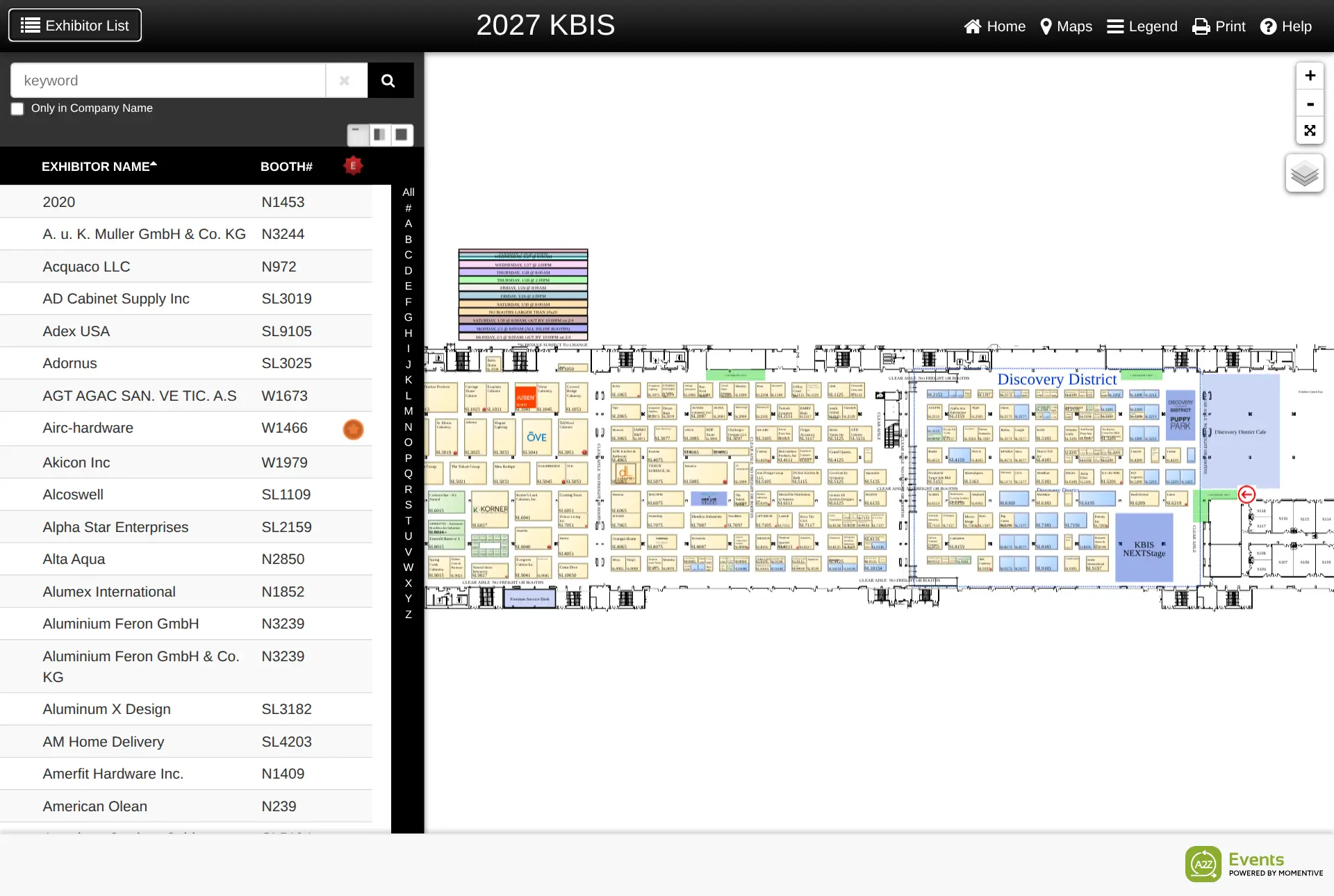
What it is used for
- Build a show's prospect list
- Read every exhibitor of a trade show with its
booths, to plan visits or outreach before the doors open. - Compare editions
- Read this year's and last year's lists and see which companies are new, which came back and which left.
- Find the big spenders
- Keep the exhibitors with an
enhancedlisting or severalbooths: the companies investing most in the show.
What you send
The address of a trade show's page on a2zinc.net. These are its 2 inputs, as its schema has them.
event_urlstring Required- Any page of the show under its Public folder on a2zinc.net: its floor plan, its exhibitor list or an exhibitor's page.
max_resultsinteger Optional- At most this many exhibitors, from the top of the list, as the show sorts it.Default
5000
A request, ready to send
It starts a run with the input shown at the top of this page, waits up to 60 seconds for it, and reads its records. Put your key in the variable it reads.
# Start a run and wait up to 60 seconds for it to finish
curl -X POST "https://api.enrichednow.com/v1/scrapers/a2z.exhibitors/runs?wait=60" \
  -H "Authorization: Bearer $ENRICHEDNOW_API_KEY" \
  -H "Content-Type: application/json" \
  -d '{"input":{"event_url":"https://kbis.a2zinc.net/kbis2027/Public/EventMap.aspx?shMode=E"}}'

# Read its records, with the id the first call answered
curl "https://api.enrichednow.com/v1/runs/$RUN_ID/records?limit=100" \
  -H "Authorization: Bearer $ENRICHEDNOW_API_KEY"
from enrichednow import EnrichedNow
client = EnrichedNow() # reads ENRICHEDNOW_API_KEY
# Start a run, wait for it to end, and get its records
result = client.scrape("a2z.exhibitors", {
"event_url": "https://kbis.a2zinc.net/kbis2027/Public/EventMap.aspx?shMode=E",
})
print(result.run.id, result.run.status, result.run.record_count)
# Read its records: pages are fetched as you go
for record in result.records:
print(record)Install it with pip install enrichednow, then save as run.py and run python3 run.py
import EnrichedNow from "enrichednow";

const client = new EnrichedNow(); // reads ENRICHEDNOW_API_KEY

// Start a run, wait for it to end, and get its records
const { run, records } = await client.scrape("a2z.exhibitors", {
  event_url: "https://kbis.a2zinc.net/kbis2027/Public/EventMap.aspx?shMode=E",
});
console.log(run.id, run.status, run.record_count);

// Read its records: pages are fetched as you go
for await (const record of records) console.log(record);
Install it with npm install enrichednow, then save as run.mjs and run node run.mjs
package main

import (
	"context"
	"fmt"
	"log"
	"time"

	enrichednow "github.com/enrichednow/enrichednow-go"
)

func main() {
	client, err := enrichednow.NewClient() // reads ENRICHEDNOW_API_KEY
	if err != nil {
		log.Fatal(err)
	}
	ctx, cancel := context.WithTimeout(context.Background(), 10*time.Minute)
	defer cancel()

	// Start a run, wait for it to end, and get its records
	run, records, err := client.Scrape(ctx, "a2z.exhibitors", map[string]any{"event_url": "https://kbis.a2zinc.net/kbis2027/Public/EventMap.aspx?shMode=E"})
	if err != nil {
		log.Fatal(err)
	}
	fmt.Println(run.ID, run.Status, run.RecordCount)

	// Read its records: pages are fetched as you go
	for records.Next() {
		fmt.Println(string(records.Current()))
	}
	if err := records.Err(); err != nil {
		log.Fatal(err)
	}
}
Install it with go get github.com/enrichednow/enrichednow-go@latest, then save as run.go and run go run run.go
import com.enrichednow.EnrichedNowClient;
import com.enrichednow.ScrapeResult;
import java.util.Map;

public class Run {
    public static void main(String[] args) {
        EnrichedNowClient client = EnrichedNowClient.fromEnv(); // reads ENRICHEDNOW_API_KEY

        // Start a run, wait for it to end, and get its records
        ScrapeResult result = client.scrape("a2z.exhibitors", Map.of("event_url", "https://kbis.a2zinc.net/kbis2027/Public/EventMap.aspx?shMode=E"));
        System.out.println(result.run().id() + " " + result.run().status() + " " + result.run().recordCount());

        // Read its records: pages are fetched as you go
        for (Map<String, Object> record : result.records()) {
            System.out.println(record);
        }
    }
}
Add com.enrichednow:enrichednow-java:0.4.0 to your Maven or Gradle build, then save as Run.java
enrichednow run a2z.exhibitors --input 'event_url=https://kbis.a2zinc.net/kbis2027/Public/EventMap.aspx?shMode=E'Install it with curl -fsSL https://raw.githubusercontent.com/enrichednow/enrichednow-cli/main/install.sh | sh
What comes back
Every exhibitor of the show: name, booths, whether its listing is upgraded or has products, press releases and show specials, and its page on the show's site. A record has 14 fields. One we could not read is null, never an empty string or a zero.
{
  "position": 1,
  "name": "2020",
  "booths": [
    "N1453"
  ],
  "booth_id": "2186905",
  "company_id": "886025",
  "url": "https://kbis.a2zinc.net/kbis2027/Public/eBooth.aspx?BoothID=2186905",
  "enhanced": false,
  "has_products": false,
  "has_press_releases": false,
  "has_show_specials": false,
  "event": "2027 KBIS",
  "event_url": "https://kbis.a2zinc.net/kbis2027/Public/EventMap.aspx?shMode=E",
  "total_results": 25,
  "fetched_at": "2026-11-24T18:50:57.552307Z"
}
The scraper returned this record for the input above, reading a saved copy of the page, not the live site.
The fields of a record
positioninteger- The row's place in the list, from 1, as the show sorts it (by name).
namestring- The exhibitor, as the show lists it.
boothslist of strings- The booth labels, e.g.
['1935'],['2676', '2682'],['RC1315']. booth_idstring- a2z's id of the booth row; the exhibitor's page is read with it.
company_idstring or null- a2z's id of the company at this show; the same company on two rows has one id.
urlstring- The exhibitor's page on a2z.
a2z.exhibitortakes it. enhancedboolean- True when the show marks the exhibitor's listing as enhanced (a paid upgrade, drawn in bold).
has_productsboolean- True when the exhibitor lists products on its page.
has_press_releasesboolean- True when the exhibitor has press releases on its page.
has_show_specialsboolean- True when the exhibitor offers show specials.
eventstring or null- The show, as its pages name it, e.g.
AIMExpo 2026. event_urlstring- The show's exhibitor list that was read.
total_resultsinteger- How many rows the show's list has, the same on every record.
fetched_atdatetime- When a2z answered, in UTC.
Units and limits
- Counted per request
- Billed per request: a run that returns data costs 1 unit, however many records it returns.
- A miss costs nothing
- A run that fails, that meets something not supported yet, or that you cancel costs nothing. You pay for runs that return data.
- What bounds a run
- A run may take up to 5 minutes. Its records are read in pages of up to 1,000 and are kept for 7 days.
What it does not do
- Companies only: no person named on a show's pages is returned.
- A show whose list is not out yet returns no records; one that does not exist ends as failed with the reason not_found, and costs nothing.
The bounds its schema sets
max_results- 1 to 5,000; 5,000 unless you say otherwise
Questions
What does a2z show exhibitors return?
Every exhibitor of the show: name, booths, whether its listing is upgraded or has products, press releases and show specials, and its page on the show's site. A record has 14 fields, among them position, name, booths, booth_id, company_id and url. A value that could not be read is null, never an empty string or a zero.
What do I send?
The address of a trade show's page on a2zinc.net. The input event_url is required. Optional: max_results.
How is it counted?
Billed per request: a run that returns data costs 1 unit, however many records it returns. A run that fails, that meets something not supported yet, or that you cancel costs nothing. The first 1,000 units each month are free.
How much does one run return?
Its schema sets these bounds: max_results 1 to 5,000 (5000 unless you say otherwise). A run may take up to 5 minutes.
What does it not do?
Companies only: no person named on a show's pages is returned. A show whose list is not out yet returns no records; one that does not exist ends as failed with the reason not_found, and costs nothing.
How long are the records kept, and in what format do they come?
Records are kept for 7 days after the run ended, and read in pages of up to 1,000. They come as JSON, as NDJSON with one record a line, or as CSV with a column for each field.
Can an AI assistant call it?
Yes. Through the EnrichedNow MCP server an assistant calls the tool run_scraper with the scraper_id a2z.exhibitors and the same input. It costs what the same API call costs.
Used in this playbook
A playbook runs a2z show exhibitors as one of its steps and hands back the finished list. Its runs of this scraper cost what they cost here, and the playbook adds nothing.
Events
Exhibitor Prospects
The companies exhibiting at the trade shows you name, with booth, website, location, categories and contact address.
a2z event directories
The exhibitors of trade shows whose floor plans are on a2z (a2zinc.net): every company with its booths, and one exhibitor's page with its country, website, description, categories and products. Companies only.
a2z exhibitor
a2z.exhibitorThe address of an exhibitor's page on a show's a2z site. The exhibitor: town, state and country, website, booths, description, the show's categories it chose, products, brands, press releases and social profiles.
a2z event directories on the line-up
- Industry
- Companies and B2B
- Where
- Worldwide
Run it on an input of your own.
Create an account, make a key, and send the request above with your own input. The first 1,000 units each month are free.